A Community discussion forum for Halo Custom Edition, Halo 2 Vista, Portal and Halo Machinima
|
 Home
Home Search
 Register
 Login
Login Member List
 Recent Posts
| Viewing User Profile for: TLS_FlyingDog | |||||||||||||||||||||
| About | Contact | ||||||||||||||||||||
|
Send Private Message |
||||||||||||||||||||
| Post Statistics | |||||||||||||||||||||
|
TLS_FlyingDog has contributed to 66 posts out of 465278 total posts
(.01%) in 5,803 days (.01 posts per day).
20 Most recent posts:
Halo CE Technical / Map Design »
Device Control Apr 26, 2009 06:37 PM
(Total replies: 0)
I have looked in the forums and could not find what i was needing. This is what is going on. First the script works only when it wants to: (script startup effects (sleep_until (= (device_group_get emitter) 1) 15) (effect_new "effects\explosions\large explosion" flag1) (object_destroy beam-1) ) The first time i did this script it worked just fine. I restarted the level and it would no longer work. I went back and fourth so many times until it all of a sudden worked but then again stoped. it got to the point i was frustrated and kept hitting "E" and the script fired. Again i restarted the level and it would not work. So again i kept hitting the "E" button and it worked. This is for a SP map. What am i missing in the script so it will work the one time i hit the "E" button. it seems to me that it is not syncing or something. Any ideas on how i can fix this. What happens is this. You hit the switch and it will cause an explosion and the beam emitter will stop. Thanks
Halo CE Technical / Map Design »
need help on activating a script. Apr 20, 2009 01:36 PM
(Total replies: 2)
Stennett you are right. I do apologize. You do need a device_control. Now how do I create a string for it and attach it. The hologram would be part of the map or scenery. You would need a trigger to activate it. I'm guessing it would be a trigger volume that is active on command and not when you enter the trigger volume. I have gone through the script bible and can't seem to find anything that would say on click or on command. something of that sort. I'm sure i'm making it harder than it really is. Any help would be great. Edited by TLS_FlyingDog on Apr 20, 2009 at 01:36 PM Edited by TLS_FlyingDog on Apr 20, 2009 at 10:36 PM Edited by TLS_FlyingDog on Apr 20, 2009 at 10:37 PM
Halo CE Technical / Map Design »
need help on activating a script. Apr 20, 2009 08:14 AM
(Total replies: 2)
I am in need some more help with a script. I’m starting to understand the scripts a little more and I want to thank everyone right off the bat, this is a great community. I don’t have the script with me since I’m at work today bit this is what I have. I was able to and it is working: I created a trigger volume lets say “A” that spawns an explosion effect at flag “flagA” and removes “BeamEmmiterA”. The script works as it should but how do I change it so that when I walk up to it Halo tells me to hit “E” to activate. Do I need to use something else besides a trigger volume? Thank you FlyingDog
Halo CE Technical / Map Design »
Needing some help on a nav script Apr 19, 2009 03:06 PM
(Total replies: 6)
Thank you, You are a great help
Halo CE Technical / Map Design »
Needing some help on a nav script Apr 19, 2009 02:21 PM
(Total replies: 6)
Thank you gamma927 that worked great. Nav Point poped up as soon as the level started. what i did was change it to come up on a trigger and it worked but i'm ubable to deactivate it now. here is what i have. nav1 is the trigger to activate the nav point at flag test test is the nav point flag name denav1 is the trigger to deactive the nav point flag at flag test (script startup basicsript (sleep_until (volume_test_objects nav1 (players))15) (activate_team_nav_point_flag "default" "player" test 0.6) (sleep_until (volume_test_objects denav1 (players))15) (deactivate_team_nav_point_flag "default" "player" test 0.6) ) here is the debug: 04.19.09 13:15:30 [nav line 5] this is not a valid cutscene_flag name: player" test 0.6) 04.19.09 13:15:30 recompiling scripts after scenarios were merged. 04.19.09 13:15:30 [nav line 1] this left parenthesis is unmatched.: (script startup basicsript or is there an easier way? any help would be great. Thank you FlyingDog Edited by TLS_FlyingDog on Apr 19, 2009 at 02:24 PM
Halo CE Technical / Map Design »
Needing some help on a nav script Apr 19, 2009 12:58 AM
(Total replies: 6)
Would someone please help me understand how the nav script works and how to write one. I am just starting to learn scripting so please bare with me. How would you attache it to an AI or game flag. also i have added trigger volumes on my map and it seems you need to hit them in order. is this normal? Thanks FlyingDog
Halo CE General Discussion »
Erosion Anannouncement Sep 8, 2008 08:53 AM
(Total replies: 165)
Nice Work, Very nice looking map there. The only thing i would say is don't make the cliff edge so hard and make it slope down a bit but that is just what i think. Looks good no matter what.
Halo CE General Discussion »
Map Preview/Suggestions May 19, 2008 10:47 AM
(Total replies: 38)
The map is looking good but i don't see easy ways to get around on foot, and if you are going on foot you do not have much cover. I would suggest making the bridge and side path a little wider so you can add cover for people on foot. Maybe a mid base. I do think you can smooth it out a bit more as well. Nice job and keep going with it.
Halo 2 Vista Map Design / Technical »
Needing some help with ideas May 8, 2008 03:05 PM
(Total replies: 2)
I have done a few Halo CE maps and recently started playing H2V. I have been tossing ideas around for some time now and I seem to be coming up dry. So I’m asking the community to see what types of maps people are looking for. Since the H2K is locked up I wont have to worry much about custom weapons and such so everything would be stock. What I am looking for are new fresh ideas and not to remake current Halo, H2 or H3 maps. I would give you credit for the idea of the map. Thanks Everyone. Edited by TLS_FlyingDog on May 8, 2008 at 03:17 PM
Halo 2 Vista Map Design / Technical »
Needing Help with Vista and H2 Mar 29, 2008 12:05 AM
(Total replies: 2)
I will double check that. thanks.
Halo 2 Vista Map Design / Technical »
Needing Help with Vista and H2 Mar 28, 2008 01:19 PM
(Total replies: 2)
Files and Folders wont show up in vista after i complie a bitmap or .ass file. I did make sure to set the folder options to see all hidden files and also went to regedit and changed the see superhidden files from 0 to 1 and they still wont show up in explore. I feel as if i'm loosing my mind here. any help would be great.
Halo 2 Vista Map Design / Technical »
Help with some Sapien and Compiling Errors Feb 25, 2008 02:46 PM
(Total replies: 21)
Open edges no but they say you can cross objects but it is not recommended. Also did you add materials before you tried to compile the map? If so did you name them correctly?
Halo CE General Discussion »
HW_chillscape.zip[MP] Feb 20, 2008 09:13 AM
(Total replies: 26)
The hardest part of making a map is the idea. When you do have an idea you want be ready to make changes to it. Plan, plan, plan and plan some more. How I start is by making a base and then building the map around it. Some will start with the level. Find what works for you and if you are having trouble ask for some help and input but be ready for some comments that you might not like. It is part of the game and you wont be able to make everyone happy, remember that. Learn how to create bases and not use scenery. If you have questions or need some help shoot me an e-mail chloe440@sbcglobal.net. I am not on xfire much so that is the best way to get ahold of me. Many times if you put effort into a level some people would be willing to make a base for you BUT you have to put effort into yourself. What you are doing is not easy and it takes time but keep at it. Dhark is right, make parts of the map and slowly connect it all. Watch you polly count and watch the size as well. Medium maps seem to work best. Good Luck and don't forget, ask for help.
Halo CE General Discussion »
HW_chillscape.zip[MP] Feb 20, 2008 12:16 AM
(Total replies: 26)
all maps are "boxes" meaning they are a sealed world. It does not mean it should look like a box. Take your time and put your own style into it. Don't rush a map to just get it out there. Take the time to learn the tools and to think of what would work well in a map. It will not come out the exact way you will want it to but you can come close.
Halo 2 Vista Map Design / Technical »
Help With Modeling Feb 18, 2008 04:05 PM
(Total replies: 3)
It does not have to be an actual box. Just a closed space.
Halo CE Technical / Map Design »
problem creating portals in my map - help pls? Feb 1, 2008 09:27 AM
(Total replies: 7)
You can use both. First layout a plane with a grid pattern it does not matter if your map is a square or not. Extrude the edges up and delete any middle faces so they look like tubes. Make sure the edges go past the floor and ceiling of your map and then add the texture to it. Exact portals are used to close off rooms. You can use both on any type of map. Even an outdoor map is still closed on all sides when you make the model. I hope this helps. 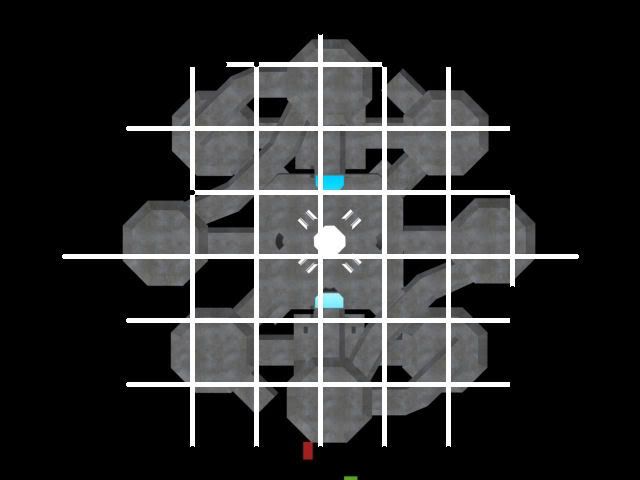
Halo CE Technical / Map Design »
Any help would be apreciated Feb 1, 2008 09:04 AM
(Total replies: 10)
the best way to do it is to make the base and attach it to the map and not use it as scenery.
Halo CE Technical / Map Design »
New scenery issue Jan 10, 2008 02:06 PM
(Total replies: 7)
Here is a tut that will show you how to make a shader. It is in the first part of the tut. http://hce.halomaps.org/index.cfm?fid=1714
Halo CE Technical / Map Design »
New scenery issue Jan 9, 2008 09:54 PM
(Total replies: 7)
You will need to make a bitmaps folder to put the tif file in. next use tool to convert it into a .bitmap file. What you can do is take an existing shader and just map the new bitmap you made to it and save it as a new file. first thing is make the tif file. save it as such data\scenery\yourscenery\bitmaps next run tool. tool bitmaps scenery\yourscenery\bitmaps and it will compile it. now when you do this it will create a new folder in tags\scenery\yourscenry\bitmaps and in there will be your texture as a .bitmap with Guerilla open an existing shader. lets use tags\levels\test\icefields\shaders\icefields_base_roof.shader_environment go down to diffuse properties base map and click on the three dots. now find the new bitmap you just made and click open. you can change the micro detail map also if you want and just below that is the bump map properties. now save the new shader as tags\scenery\yourscenry\shaders\your bitmap. make sure the shader and the bitmap have the same name. test.bitmap and test.shader_environment in max the texture would be named test as well as the tif file. or what ever you called it. That should be all of it. then when you make your model there should not be any problems.
Halo CE Technical / Map Design »
New scenery issue Jan 9, 2008 04:03 PM
(Total replies: 7)
Make sure that you name the material in GMAX or 3DS the same as the tiff file you are using to texture the model. I would use an existing texture from one of the map folders in your data folder. Just make sure the names are the same. It is not as easy as just making or downloading a texture file and making it work. if you did that you will need to make a shader for it and that is a whole other item. Not hard but something that will need to be done. |
|||||||||||||||||||||