A Community discussion forum for Halo Custom Edition, Halo 2 Vista, Portal and Halo Machinima
|
 Home
Home Search
 Register
 Login
Login Member List
 Recent Posts
| »Forums Index »Halo Custom Edition (Bungie/Gearbox) »Halo CE General Discussion »[blender]GBXmodel exporter | 
|
| Page 1 of 2 | Go to page: · [1] · 2 · Next |
| Author | Topic: [blender]GBXmodel exporter (44 messages, Page 1 of 2) | ||||
| Moderators: Dennis | |||||
 cyboryxmen Joined: Nov 7, 2010 
--CG artist-- New mission. Refuse this Mission! |
Posted: Feb 21, 2013 09:26 AM
Msg. 1 of 44
I was going to wait till I am able to get the script to export bones and stuff but the problem with that is I have to learn how to rig models first which I had never came to do in my entire blender experience. Besides, I still need to work on a script to export animations after that. Otherwise, exporting the bones would be a waste if we need to export them back into 3Dsmax to do the animations. I need you guys to help me test this script for bugs and stuff as to not scare the newcomers(people from blender artists) off. I'm assuming that only a few of you actually use blender so just export your old models instead of creating new ones if you want. I don't think this script is compatible with the 2.5x series since I am using a few of python's new codes so just use the latest ones.
Newer versions of blender have support for N-gons and this script does too but keep in mind that at the end of the export, all polygons that are to be exported will be converted to Tris(It's not a good idea to use N-gons to begin with anyway). Also, your models will not be directly altered on export. If there are unapplied modifiers, don't worry. This script automatically prepares your model for export and will even efficiently unwraps the model for you if you are too lazy to. The script will only take into account the objects within the current scene. This was made deliberately as to give the user the convenience of exporting multiple models within the same .blend file. Also, the script will take into account the current scale you are using so do not worry about re-scaling your objects for export. Recommended blender settings: some useful blender default settings(Everything here is optional except for the scene properties part. Halo does use the metric system ya know.) Switch from blender render to cycles render(I'm surprised that people still haven't converted to it yet) Go to window>toggle system console. This will help you in finding and fixing errors. Go to the 3Dview and open the properties panel(N key): Go to display and give the grid 1024 lines(that's the maximum)...or you could just disable it all together. Either way. Go to view and under clip, set End to 10km(That's bigger than the length of Extinction!) Using this addon is as simple as 1, 2 ,3! 1) 2) 3) and...you're good to go! Download here Now if you excuse me, I'm going to learn how to make my own shaders in Halo(wow, I'm having actual halo problems! Usually, I would just get stuck at the export part). -Zekilk Note to self(see what happens if export model has 2 UVW unwraps) It may not be able to export bones but you can go ahead and export a vehicle if that vehicle has absolutely no animations at all. This script does export markers though. Also, I was going to edit the code to make it more accurate and see if the scale fit's with halo's but I didn't so good luck with that Updated script will be done once I learn another language(it's for extra credit) Edited by cyboryxmen on Jun 6, 2013 at 07:54 AM |
||||


|
|||||
|
killzone64 Joined: Jun 9, 2010 
sometimes i miss the chaos occasionally |
Posted: Feb 21, 2013 09:54 AM
Msg. 2 of 44
all i can say now is, yesssssssss.
i can now get things done 20 times faster. though did you say gbx exporter?, or is it .jms exporter |
||||
|
|
|||||
|
cyboryxmen Joined: Nov 7, 2010
--CG artist-- New mission. Refuse this Mission! |
Posted: Feb 21, 2013 10:02 AM
Msg. 3 of 44
GBXmodel exporter(jms. files). scenery, vehicles, levels and everything else. Now excuse me, I'm going to need to update my forum posts. All 4 of them...yup...
-Zekilk Edited by cyboryxmen on Feb 21, 2013 at 10:35 AM |
||||
|
|
|||||
|
clonecam117 Joined: Dec 11, 2012 
Now a professional VFX/particle effect artist. |
Posted: Feb 21, 2013 10:28 AM
Msg. 4 of 44
you,sir, are a hero.
|
||||
|
|
|||||
|
ZOBI3KING Joined: Dec 25, 2012 
Look at me, I'm the captain now. |
Posted: Feb 21, 2013 05:28 PM
Msg. 5 of 44
This means I wont have to export into max now. You are a hero.
|
||||
|
|
|||||
|
killzone64 Joined: Jun 9, 2010
sometimes i miss the chaos occasionally |
Posted: Feb 21, 2013 08:14 PM
Msg. 6 of 44
that also means i can finish my map that i was making, i will do a bunch of purposeful errors later to see it it catches them all.
Edited by killzone64 on Feb 21, 2013 at 08:29 PM |
||||
|
|
|||||
|
OrangeJuice Joined: Jan 29, 2009 
Documentation and debug.txt |
Posted: Feb 21, 2013 09:24 PM
Msg. 7 of 44
I hope Dennis can add this(and a link to blender) to the OP from the Before you Ask topic :)
|
||||
|
|
|||||
|
cyboryxmen Joined: Nov 7, 2010
--CG artist-- New mission. Refuse this Mission! |
Posted: Feb 22, 2013 12:12 AM
Msg. 8 of 44
Well, 2.66 was just released.
 Most of the changes made won't directly help you with making models for halo except for this nifty little tool right here.  Quote: Go into Sculpting Mode, press T to bring up the toolbar, and under Topology you’ll find a button called “Enable Dynamic“. Start sculpting and you’ll notice your mesh magically generates detail wherever you paint. Change the detail Size to scale how much fine the detail is generated. Later, I'll probably make a tutorial on how to sculpt a terrain and optimize it for export instead of using height maps which are horrible as a fellow Assasincheif has told me. The script should work with the new version but someone should test it to make sure. I'm on my discount laptop right now which can't even play Halo correctly so I wouldn't dare open up anything in blender with models that have over 1K polys or so. -Zekilk |
||||
|
|
|||||
|
SrgEspectro Joined: Jan 30, 2013 
|
Posted: Feb 22, 2013 05:50 PM
Msg. 9 of 44
Great, I've only practiced in Blender :D
|
||||
|
|
|||||
|
SrgEspectro Joined: Jan 30, 2013
|
Posted: Feb 22, 2013 06:12 PM
Msg. 10 of 44
I would like to see video tutorials of Blender for halo ce: D
Edited by SrgEspectro on Feb 26, 2013 at 01:39 AM |
||||
|
|
|||||
|
Dennis  Joined: Jan 27, 2005 
"We are made of starstuff.” ― Carl Sagan |
Posted: Feb 23, 2013 01:48 AM
Msg. 11 of 44
Quote: --- Original message by: OrangeJuice Someone should upload the exporter with instruction so I can add it to the archive. Having it in a forum posting will disappear in a week or so, the archive is permanent.I hope Dennis can add this(and a link to blender) to the OP from the Before you Ask topic :) |
||||
|
|
|||||
|
killzone64 Joined: Jun 9, 2010
sometimes i miss the chaos occasionally |
Posted: Feb 25, 2013 07:08 PM
Msg. 12 of 44
i can do so later, i'm going off two years of experience with blender so i should be able to explain it easily enough.
@cyborxmen by the way rigging in blender is much easier than in max, if you character is humanoid you create your skeleton where you want it, select both the skeleton and mesh, then parent them. it should in the drop down box say automatic envelopes, click that and tada automatically rigged. you may have to do a bit of touching up but that's easy, though i would suggest for ease of animation that you i'k rig it, there's a ton of tutorials all over the place. Edited by killzone64 on Feb 25, 2013 at 07:16 PM ok so today i fixed up the old boneyard bsp i had laying around and exported it with this tool, it exported fine but i got this error: C:\Program Files (x86)\Microsoft Games\Halo Custom Edition>tool structure kzcm\l evels\boneyard boneyard Couldn't read map file './toolbeta.map' building intermediate geometry... EAX: 0x00000000 EBX: 0x0018F501 ECX: 0x00000000 EDX: 0x00000000 EDI: 0x0018F280 ESI: 0x00000000 EBP: 0x0018F158 ESP: 0x0018F148 EIP: 0x77E00C22, 83 C4 04 C2 ????? EXCEPTION halt in \halopc\haloce\source\cseries\debug_memory.c,#214: size>=0 && size<MAXIMUM_POINTER_SIZE Edited by killzone64 on Mar 6, 2013 at 09:46 AM |
||||
|
|
|||||
|
cyboryxmen Joined: Nov 7, 2010
--CG artist-- New mission. Refuse this Mission! |
Posted: Mar 9, 2013 12:14 AM
Msg. 13 of 44
Took you guys long enough. With the lack of reports on bugs, I almost thought that I was able to make a perfect script on my first try. heh. Just gonna bump this thread so that killzone64 can post.
-Zekilk |
||||
|
|
|||||
|
killzone64 Joined: Jun 9, 2010
sometimes i miss the chaos occasionally |
Posted: Mar 9, 2013 08:38 AM
Msg. 14 of 44
yea all im gonna say is it made a 5 gig .jms file... 0_0
the model has around 8 or 9 unwraps, too Edited by killzone64 on Mar 9, 2013 at 01:55 PM |
||||
|
|
|||||
|
Banshee64 Joined: Dec 4, 2012 
oify |
Posted: Mar 11, 2013 03:54 PM
Msg. 15 of 44
Blender is bad.
|
||||
|
|
|||||
|
klasher1000 Joined: Nov 1, 2012 
|
Posted: Mar 11, 2013 06:18 PM
Msg. 16 of 44
Oh my God banshee you alive? lol
|
||||
|
|
|||||
|
killzone64 Joined: Jun 9, 2010
sometimes i miss the chaos occasionally |
Posted: Mar 11, 2013 06:34 PM
Msg. 17 of 44
i beg to differ http://www.blender.org/features-gallery/features/
can 3ds max do all this? i don't think so. and that's just the beginning. plus you cant beat the pricetag. plus if you dont like somethng you can change it easily. every thing down to the color of buttons on the ui is customizeable its gotten a bad rep because people tried the old version of blender and never went back to look at the new stuff. the old version was scary and had the steepest learning curve of any program i have ever learned. in my opinion the new one is better than max Maya and mudbox combined. plus it is open source meaning it is developing faster than any modeling program out there. whereas Autodesk releases a new program and makes a few small changes every year, blender updates every few months with tons of awesome additions. Edited by killzone64 on Mar 11, 2013 at 06:43 PM |
||||
|
|
|||||
|
master noob Joined: Aug 10, 2012 
343Industries Advocate |
Posted: Mar 11, 2013 06:59 PM
Msg. 18 of 44
Quote: --- Original message by: killzone64 can 3ds max do all this? yes autodesk doesn't need to constantly release updates because it supports a wide variety of functions that even 3-4 year specialists haven't even scratched the surface of it also supports an awesome plugin system and an amazing exporting system blender is an absolute jerk when exporting, often ruining normals, rigging, smoothing groups, animations, etc blender even has FBX exporting but doesn't have FBX importing, wtf it's your own fault for disliking either one, because both are capable of cool things. that is why I use 3dsmax(a ton of games use autodesk's superior format exporting, ala portal 2, team fortress 2, starcraft 2, natural selection 2) instead of blender(you need a plugin or an update to even get a model working in any game, as this thread has proven. and how long does it take for someone to create a successful exporter plugin for blender? still waiting for a working .FBX to .blend converter to this day.) also, 3dsmax has a pretty straightforward UI. you click the box button, you click and drag to make a box(it even says click and drag to make box) and there are arrows for the move tool, circles for the rotate, and the scale tool is pretty ominous. the tools can be accessed at any time without having to enter any specific mode or opening a separate tab, making modeling and manipulating on the fly a breeze. 3ds max also has a real-time shader display, letting you see environment maps, specular, lighting, ambient occlusion, shadows, etc I couldn't even figure out blender's UI without the readme because of all the buttons, and everything is bright grey. Edited by master noob on Mar 11, 2013 at 07:00 PM |
||||
|
|
|||||
|
killzone64 Joined: Jun 9, 2010
sometimes i miss the chaos occasionally |
Posted: Mar 11, 2013 07:18 PM
Msg. 19 of 44
i never said i disliked max and they both have they're strengths and weaknesses but i personally prefer to use blender because of how fast it is to use once you understand it, and yes the ui is a bit disorienting at first but it's no more confusing than max when you first start off. eventually makes sense if you stick with it . ill be making a bunch of tutorials to better explain this once the exporter is more complete and works properly.
btw i believe the new versions of blender come with valve and unreal engine exporters installed by default. and the reason blender messes up smoothing groups is because it currently does not have any, there is just smooth shading and subdivision surface. that is a feature i have been meaning to bring up to some of the programmers on blender artists Edited by killzone64 on Mar 11, 2013 at 07:19 PM |
||||
|
|
|||||
|
master noob Joined: Aug 10, 2012
343Industries Advocate |
Posted: Mar 11, 2013 07:19 PM
Msg. 20 of 44
don't forget to tell them about FBX support for blender, it would be the best thing for both tools.
|
||||
|
|
|||||
|
killzone64 Joined: Jun 9, 2010
sometimes i miss the chaos occasionally |
Posted: Mar 11, 2013 07:24 PM
Msg. 21 of 44
http://blenderartists.org/forum/showthread.php?274687-Another-FBX-Importer-Exporter-addon
might be helpful @ cyborxmen: i had a friend make a quick bsp and try to export it today, it created 2 gig .jms before we canceled it, this model didn't even have any unwraps, just tiled textures we still need to parent it to a sphere called frame right? Edited by killzone64 on Mar 11, 2013 at 07:33 PM |
||||
|
|
|||||
|
cyboryxmen Joined: Nov 7, 2010
--CG artist-- New mission. Refuse this Mission! |
Posted: Mar 12, 2013 11:46 AM
Msg. 22 of 44
How did you guys end up with the older version of my script lol! What basically happened is that instead of printing a number from a list of vertex weights, it prints the entire list instead for each vert. So that's numofverts * numofvertweights - numofvertweights more information with the num of verts and vetweights being over 7000. Assuming that Dropbox doesn't switch to the older version of the script again, you can just download the actual current version with the same link in my first post.
I would like to remind you guys that the script scales the mesh to halo's scale for your own convenience. When I checked out the .blend file killzone64 gave me, that map is way too huge according to blender's scale. Enable edge length in the 3Dview properties panel under mesh display in edit mode. That should help you scale the map to size. I never actually checked if the scale is correct but that's what you guys are for! This script is still in the testing phase and no one in my friends list uses blender anyway. It would be nice if all blender users here can add me on xfire(I use the same username as Halomaps) so that we can cooperate better. some other tips:
-Zekilk |
||||
|
|
|||||
|
killzone64 Joined: Jun 9, 2010
sometimes i miss the chaos occasionally |
Posted: Mar 13, 2013 10:02 AM
Msg. 23 of 44
aha that did the trick, thanks. now i just need to fix the errors.
tool came up with only 4 open edges :phew ok so i went into blender and selected non manifold vertices and deleted them, but it still gives me the same 4 edge errors. 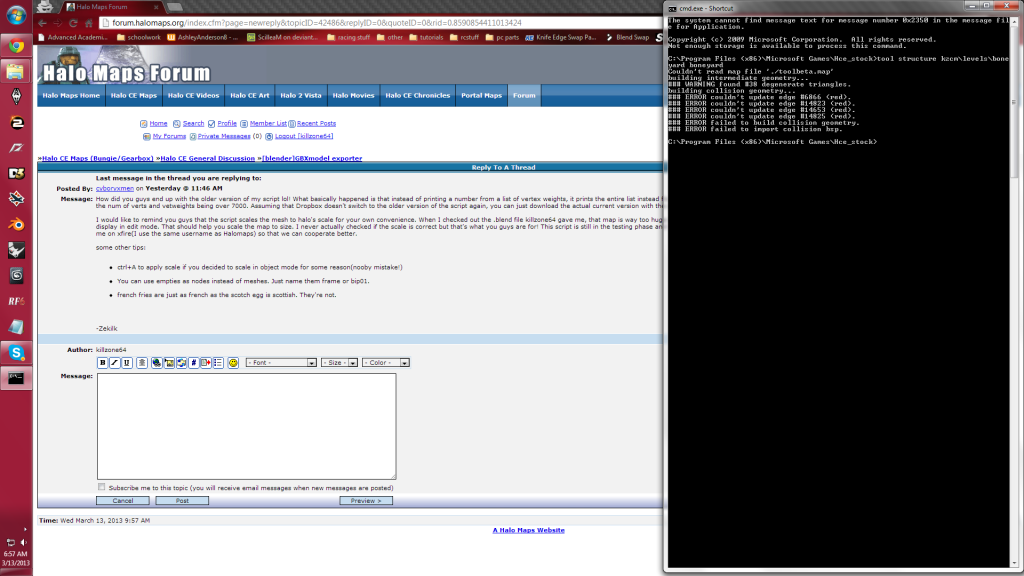 im assuming it has to deal with the 38 degenerate triangles? or can that be disregarded Edited by killzone64 on Mar 13, 2013 at 10:04 AM |
||||
|
|
|||||
|
cyboryxmen Joined: Nov 7, 2010
--CG artist-- New mission. Refuse this Mission! |
Posted: Mar 13, 2013 07:00 PM
Msg. 24 of 44
I think it is your portals. It seems that the rules apply differently for Reach than in CE. Reach uses _sky instead of +sky. Check your portal's material and replace the "_" with "+".
Also, select all(A), W>remove doubles. -Zekilk Edited by cyboryxmen on Mar 13, 2013 at 07:04 PM |
||||
|
|
|||||
|
killzone64 Joined: Jun 9, 2010
sometimes i miss the chaos occasionally |
Posted: Mar 13, 2013 08:00 PM
Msg. 25 of 44
i did the remove doubels and checked for non manifold already.
ok that removed one error time to find the other three. btw i noticed that blender will produce a large .jms when overwriting another .jms of the same name Edited by killzone64 on Mar 13, 2013 at 08:54 PM hay i just found my old bsp, i can actually finish it now...      Edited by killzone64 on Mar 13, 2013 at 09:06 PM |
||||
|
|
|||||
|
Dennis Joined: Jan 27, 2005
"We are made of starstuff.” ― Carl Sagan |
Posted: Mar 20, 2013 08:26 PM
Msg. 26 of 44
Is this a working script for Blender to be used to make maps? If so can some submit it to the File archive so that it doesn't get lost in the forum post? If people can use blender and this script to make maps it may increase the number of map makers but some.
Thank you. |
||||
|
|
|||||
|
cyboryxmen Joined: Nov 7, 2010
--CG artist-- New mission. Refuse this Mission! |
Posted: Apr 9, 2013 08:08 AM
Msg. 27 of 44
GAHHHHHHHHHHHHHHHHHHHHHHHHHHHHHHHHH
Lol error... That's one long post gone. Basically, I made an update that lets you make regions by grouping objects together and you do not have to use a special naming convention for it to work. Also, I assume that everyone knows how to group objects together because I am not explaining that again. It's in the objects tab. You can't miss it. Also memos. #memo # support for bones not yet implemented # experiment on sealed world rules # test if scale is correct Someone please send me a .jms file of something rigged and it's .3ds. I don't want to implement the export of bones yet because the .jms only accepts the vertweight of one group and this is a problem because you usually link verts to 2 bones for deformation. This means that you have 2 vert groups with 2 wertsweights and I have no idea what to do with this. Should I just multiply the two or something? I dunno. I just learnt how to rig characters. Even then, there is still the testing of the scale left into account before I can actually release this. Sorry Dennis. -Zekilk Edited by cyboryxmen on Apr 9, 2013 at 08:12 AM |
||||
|
|
|||||
|
Tommyhill98 Joined: Dec 25, 2012 because I couldn't have 99 |
Posted: Jun 5, 2013 01:59 PM
Msg. 28 of 44
I can't download it, I get an error 403
|
||||
|
|
|||||
|
cyboryxmen Joined: Nov 7, 2010
--CG artist-- New mission. Refuse this Mission! |
Posted: Jun 6, 2013 07:55 AM
Msg. 29 of 44
right click and "save link as".
-Zekilk |
||||
|
|
|||||
|
ODSTSpartan238 Joined: Jun 8, 2013 asdrfkl;' |
Posted: Jun 8, 2013 04:41 PM
Msg. 30 of 44
i keep on getting error messages that say "lol you fail"
|
||||
|
|
|||||
|
cyboryxmen Joined: Nov 7, 2010
--CG artist-- New mission. Refuse this Mission! |
Posted: Jun 9, 2013 10:41 AM
Msg. 31 of 44
Windows>Toggle system console
This should show you the entire error. -Zekilk |
||||
|
|
|||||
|
Grunter Joined: Apr 6, 2015 
I'm back from the dead and reporting for duty! |
Posted: Aug 19, 2015 10:26 AM
Msg. 32 of 44
I need a importer, Gmax is unusable and i don't have 9999,9999,9999,999 $ to spare for 3ds max.
Edited by Grunter on Aug 19, 2015 at 10:28 AM Edited by Grunter on Aug 19, 2015 at 10:29 AM |
||||
|
|
|||||
|
MEGA_VKNG Joined: Dec 23, 2013 
|
Posted: Aug 19, 2015 12:59 PM
Msg. 33 of 44
Or just get a student license like everyone else.
|
||||
|
|
|||||
|
DaLode Joined: Oct 4, 2014 
Ho ho hooooly doodle! |
Posted: Aug 19, 2015 03:41 PM
Msg. 34 of 44
Some people are old farts like me, and therefore can't get a student license.
Though ofc we do have jobz, but still, 3DS Max just is way too expensive for hobbyist modelers who want their software to be legit. |
||||
|
|
|||||
|
Mootjuh Joined: Mar 12, 2008 
Hilariously derailing oneliner |
Posted: Aug 19, 2015 05:18 PM
Msg. 35 of 44
I got the license before I was a student, how do they validate that you're a student?
Anyways there is an alternative to get a monthly paid license but it's pretty expensive. Around 160 big ones a month if I recal correctly. |
||||
|
|
|||||
| Page 1 of 2 | Go to page: · [1] · 2 · Next |

|
