A Community discussion forum for Halo Custom Edition, Halo 2 Vista, Portal and Halo Machinima
|
 Home
Home Search
 Register
 Login
Login Member List
 Recent Posts
| »Forums Index »Halo Custom Edition (Bungie/Gearbox) »Halo CE General Discussion »HUD - Works in Process thread [WIP] | 
|
| Page 18 of 44 | Go to page: · 1 · ... · 15 · 16 · 17 · [18] · 19 · 20 · 21 · ... · 44 · Prev · Next |
| Author | Topic: HUD - Works in Process thread [WIP] (1514 messages, Page 18 of 44) | ||||
| Moderators: Dennis | |||||
 lil_bankhead Joined: Dec 12, 2008 
What you look'n at huh? I'll bit ya! |
Posted: Aug 9, 2009 08:29 PM
Msg. 596 of 1514
Yeah it true and it work almost the same way the sniper does :)
|
||||


|
|||||
|
Donut Joined: Sep 30, 2006 
I swear I'm not actually dead |
Posted: Aug 9, 2009 09:10 PM
Msg. 597 of 1514
and in h3 when you pull the SL out the reticle spins a little bit
|
||||
|
|
|||||
|
Advancebo Joined: Jan 14, 2008 
|
Posted: Aug 9, 2009 09:48 PM
Msg. 598 of 1514
Colors should be black hurp durp.
|
||||
|
|
|||||
|
HDoan Joined: Feb 19, 2007 
"'Tis only happens to them Asians" - ODX 2008 |
Posted: Aug 10, 2009 05:03 AM
Msg. 599 of 1514
http://img37.imageshack.us/img37/1125/h3mthud.png
HUD Almost done, just need ammo counters. Everything by me except weapon icons by AVP Dragon. Edited by HDoan on Aug 10, 2009 at 05:36 AM |
||||
|
|
|||||
|
BeachParty clan Joined: Oct 12, 2008 
Sooo... You wanna switch to Red team huh? |
Posted: Aug 10, 2009 08:54 AM
Msg. 600 of 1514
doan, your hud was meant for a 4:3 ratio, in halo 3 the radar only sticks out in 4:3, so make a screenshot in that ratio, it looks out of proportions as of now.
also  Edited by BeachParty clan on Aug 10, 2009 at 09:01 AM My own HUD meant for 16:9 ratio would also look weird if i used the ratio which it wasnt meant for, like 4:3  so keep that in mind next time Edited by BeachParty clan on Aug 10, 2009 at 09:06 AM |
||||
|
|
|||||
|
BeachParty clan Joined: Oct 12, 2008
Sooo... You wanna switch to Red team huh? |
Posted: Aug 10, 2009 10:03 AM
Msg. 601 of 1514
Quote: --- Original message by: Dratt Quote: --- Original message by: BeachParty clan My own HUD meant for 16:9 ratio would also look weird if i used the ratio which it wasnt meant for, like 4:3 Edited by BeachParty clan on Aug 10, 2009 at 09:06 AM We all Have different sized monitors. Some happen to be 16:9, some happen to be 4:3. Alot of the newer ones are 16:9 though. for proper feedback it is required to post a screenshot how it's meant to be. you can run in a normal ratio editing the command parameters: halo.exe" -windowed -novideo -vidmode 1280,1024,75 if you post it deformed because of the ratio, it won't look good in whatsoever way. the radar element is over the outline, which indicates it was made for 4:3 on purpose. so yea, just some advice with good intentions. Edited by BeachParty clan on Aug 10, 2009 at 10:04 AM |
||||
|
|
|||||
|
lil_bankhead Joined: Dec 12, 2008
What you look'n at huh? I'll bit ya! |
Posted: Aug 10, 2009 10:59 AM
Msg. 602 of 1514
Quote: --- Original message by: BeachParty clan Quote: --- Original message by: Dratt Quote: --- Original message by: BeachParty clan My own HUD meant for 16:9 ratio would also look weird if i used the ratio which it wasnt meant for, like 4:3 Edited by BeachParty clan on Aug 10, 2009 at 09:06 AM We all Have different sized monitors. Some happen to be 16:9, some happen to be 4:3. Alot of the newer ones are 16:9 though. for proper feedback it is required to post a screenshot how it's meant to be. you can run in a normal ratio editing the command parameters: halo.exe" -windowed -novideo -vidmode 1280,1024,75 if you post it deformed because of the ratio, it won't look good in whatsoever way. the radar element is over the outline, which indicates it was made for 4:3 on purpose. so yea, just some advice with good intentions. Edited by BeachParty clan on Aug 10, 2009 at 10:04 AM How can I get halo run 1680x1050 which btw advancebo my revolution didn't fail cuz halo didn't support my rev for some reason anyway some reason halo support 1680x1050 when it was on analog but on digital it doesn't seem to support it so plz tell me how to get it to run on that revolution thx :) |
||||
|
|
|||||
|
BeachParty clan Joined: Oct 12, 2008
Sooo... You wanna switch to Red team huh? |
Posted: Aug 10, 2009 12:47 PM
Msg. 603 of 1514
I've fixed the scope colour, it seems that it had nothing to do with the alpha channel i was using.
also, when you zoom, the Outline will dissappear, since it zooms out of the helmet, like h3. I also made the flashing elements for low ammo or low shield etc etc to not appear when zoomed, so the meters won't be wrapping around an outline that's not there. all in all, i'm sastisfied.  |
||||
|
|
|||||
|
AlwinRoth Joined: Jan 4, 2008 
|
Posted: Aug 10, 2009 01:59 PM
Msg. 604 of 1514
the numbers for the ammo and grenade count look a bit... meh..
|
||||
|
|
|||||
|
BeachParty clan Joined: Oct 12, 2008
Sooo... You wanna switch to Red team huh? |
Posted: Aug 10, 2009 03:12 PM
Msg. 605 of 1514
Yea I need to scale those ASAP, but since scaling fonts does not work, except for high resolution which makes them too small, no other option rests me than to make a new font... i'll make it later on the way though =)
|
||||
|
|
|||||
|
The Barron Joined: Oct 14, 2007 
Howdy |
Posted: Aug 10, 2009 03:56 PM
Msg. 606 of 1514
 only thing i think you need to change is the FONT and COLOR other then that its good  picture is self explanatory picture is self explanatory |
||||
|
|
|||||
|
jigsaw_jimmy Joined: Aug 1, 2009 |
Posted: Aug 10, 2009 04:11 PM
Msg. 607 of 1514
that hud looks likes it has jpg comppresion lol
|
||||
|
|
|||||
|
Advancebo Joined: Jan 14, 2008
|
Posted: Aug 11, 2009 03:37 PM
Msg. 608 of 1514
Quote: --- Original message by: HDoan http://img37.imageshack.us/img37/1125/h3mthud.png HUD Almost done, just need ammo counters. Everything by me except weapon icons by AVP Dragon. Edited by HDoan on Aug 10, 2009 at 05:36 AM really nice  |
||||
|
|
|||||
|
Jesse Joined: Jan 18, 2009 Discord: Holy Crust#4500 |
Posted: Aug 11, 2009 10:03 PM
Msg. 609 of 1514
Made a meter for CMT's Ma5k. (H2 hud).
 It's my own, as i designed, alpha'ed, and drew it myself. Edited by jesse on Aug 11, 2009 at 10:07 PM |
||||
|
|
|||||
|
Gamma927 Joined: Jun 12, 2008 
Steam: gamma927 |
Posted: Aug 11, 2009 10:07 PM
Msg. 610 of 1514
Remove the gametype icon already :V
As for the HUD itself, overlay, scale it down a bit, and move it up. It looks too close to the bottom as it is right now. |
||||
|
|
|||||
|
mastersotelo Joined: May 7, 2009 
I intend to live forever - so far, so good. |
Posted: Aug 11, 2009 10:36 PM
Msg. 611 of 1514
Quote: --- Original message by: jesse Made a meter for CMT's Ma5k. (H2 hud). It's my own, as i designed, alpha'ed, and drew it myself. Edited by jesse on Aug 11, 2009 at 10:07 PM Chucho, i very disappointed in you latest hud... i taught you better than this. go back to the drawing board. |
||||
|
|
|||||
|
HDoan Joined: Feb 19, 2007
"'Tis only happens to them Asians" - ODX 2008 |
Posted: Aug 12, 2009 03:21 AM
Msg. 612 of 1514
     |
||||
|
|
|||||
|
Roflcopter Joined: Jan 30, 2009 
|
Posted: Aug 12, 2009 03:28 AM
Msg. 613 of 1514
I'm doing this because everyone else is :S
 This is my first HUD, some crit would be nice :) |
||||
|
|
|||||
|
Advancebo Joined: Jan 14, 2008
|
Posted: Aug 12, 2009 06:10 AM
Msg. 614 of 1514
Quote: --- Original message by: HDoan images custom rules. |
||||
|
|
|||||
|
Buggy Virus Joined: Aug 11, 2009 
Tastes like happiness |
Posted: Aug 12, 2009 09:53 AM
Msg. 615 of 1514
Wow...
|
||||
|
|
|||||
|
Advancebo Joined: Jan 14, 2008
|
Posted: Aug 12, 2009 02:46 PM
Msg. 616 of 1514
Doans numbers look better in a way.
|
||||
|
|
|||||
|
Gamma927 Joined: Jun 12, 2008
Steam: gamma927 |
Posted: Aug 12, 2009 02:55 PM
Msg. 617 of 1514
Quote: --- Original message by: HDoan *images* Overlays look awesome. Edited by Gamma927 on Aug 12, 2009 at 04:24 PM |
||||
|
|
|||||
|
Advancebo Joined: Jan 14, 2008
|
Posted: Aug 12, 2009 04:40 PM
Msg. 618 of 1514
32 bit gives the best quality.
And all you did was put ingame a visor, anyone can do that. |
||||
|
|
|||||
|
Advancebo Joined: Jan 14, 2008
|
Posted: Aug 12, 2009 07:40 PM
Msg. 619 of 1514
Quote: --- Original message by: h3freak09 Hey just want to post my halo 2 HUD. Tell me if its good. 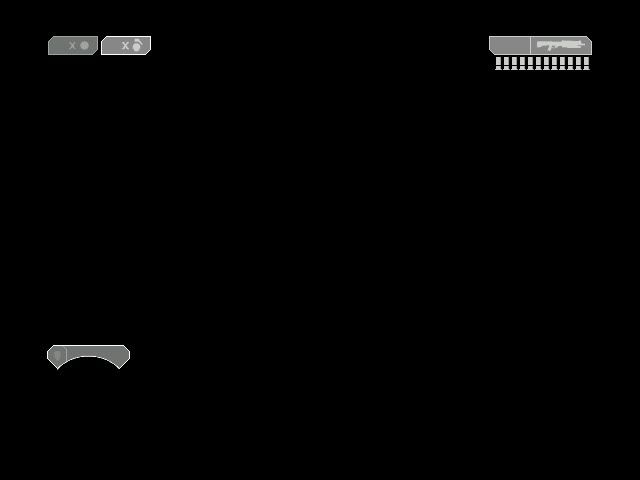 Link: http://i465.photobucket.com/albums/rr20/halo123freak14/Halo2HudPhotobucket.jpg ftfy Looks ok, the shield bar seems a little small. And make it higher res. Edited by Advancebo on Aug 12, 2009 at 07:41 PM |
||||
|
|
|||||
|
Gamma927 Joined: Jun 12, 2008
Steam: gamma927 |
Posted: Aug 12, 2009 07:57 PM
Msg. 620 of 1514
Overlay is placed in a nice location.
|
||||
|
|
|||||
|
DEEhunter Joined: Dec 16, 2006 
|
Posted: Aug 12, 2009 07:59 PM
Msg. 621 of 1514
Quote: --- Original message by: Advancebo 32 bit gives the best quality. And all you did was put ingame a visor, anyone can do that. You don't need 32 bit image quality for something that is greyscale... |
||||
|
|
|||||
|
Jesse Joined: Jan 18, 2009 Discord: Holy Crust#4500 |
Posted: Aug 12, 2009 08:04 PM
Msg. 622 of 1514
 Not mine, but i had to post. |
||||
|
|
|||||
|
Gamma927 Joined: Jun 12, 2008
Steam: gamma927 |
Posted: Aug 12, 2009 11:21 PM
Msg. 623 of 1514
Fix'd for you
 And the weapon meter could stretch a bit more. Looks too compressed at the moment. |
||||
|
|
|||||
|
Karrde Joined: Jul 30, 2007 
Power beyond containing |
Posted: Aug 12, 2009 11:22 PM
Msg. 624 of 1514
EDIT: Gamma beat me to it.
Edited by Karrde on Aug 12, 2009 at 11:23 PM |
||||
|
|
|||||
|
CLS_GRUNT Joined: Jan 21, 2007 
Old |
Posted: Aug 12, 2009 11:32 PM
Msg. 625 of 1514
The entire HUD needs to be anti aliased. Either that or blur the edges a bit.
|
||||
|
|
|||||
|
Donut Joined: Sep 30, 2006
I swear I'm not actually dead |
Posted: Aug 12, 2009 11:34 PM
Msg. 626 of 1514
Quote: --- Original message by: DEEhunter Quote: --- Original message by: Advancebo 32 bit gives the best quality. And all you did was put ingame a visor, anyone can do that. You don't need 32 bit image quality for something that is greyscale... have you tried compiling a gradient in something other than 32 bit? it gets all splotchy |
||||
|
|
|||||
|
CLS_GRUNT Joined: Jan 21, 2007
Old |
Posted: Aug 12, 2009 11:46 PM
Msg. 627 of 1514
I'm pretty sure there's a setting specifically for HUD interface bitmaps. Its what I'm using for my HUD icons.
|
||||
|
|
|||||
|
DEEhunter Joined: Dec 16, 2006
|
Posted: Aug 13, 2009 12:25 AM
Msg. 628 of 1514
Quote: --- Original message by: Donut Quote: --- Original message by: DEEhunter Quote: --- Original message by: Advancebo 32 bit gives the best quality. And all you did was put ingame a visor, anyone can do that. You don't need 32 bit image quality for something that is greyscale... have you tried compiling a gradient in something other than 32 bit? it gets all splotchy 8bit  32bit There is no way of posting a 32 bit image on the web so just look at this .tif http://deelekgolo.wmclan.net/32bit.tif I see no real splotching here. Can you show a picture of what you mean? Edited by DEEhunter on Aug 13, 2009 at 12:35 AM |
||||
|
|
|||||
|
Donut Joined: Sep 30, 2006
I swear I'm not actually dead |
Posted: Aug 13, 2009 12:31 AM
Msg. 629 of 1514
Quote: --- Original message by: CLS_GRUNT I'm pretty sure there's a setting specifically for HUD interface bitmaps. Its what I'm using for my HUD icons. yeah you can compile as 2d texture, 3d texture, etc... i have always used sprite for my HUDs, since when you turn the texture quality down, any bitmap defined as sprite will not lose quality. this is why some people see fuzzy reticles E: but the quality still sucked unless i set it to 32 bit E2: dee im referring to a bitmap sent through tool. im talking specifically about halo and hud elements. Edited by Donut on Aug 13, 2009 at 01:38 AM |
||||
|
|
|||||
|
Mythril - Screenshot Guru - Joined: Mar 29, 2008 
Jeffrey Albert Waldo |
Posted: Aug 13, 2009 03:26 AM
Msg. 630 of 1514
Fuzzy reticles are caused by having Minimap Count in the .bitmap set to 0 levels.
|
||||
|
|
|||||
| Page 18 of 44 | Go to page: · 1 · ... · 15 · 16 · 17 · [18] · 19 · 20 · 21 · ... · 44 · Prev · Next |

|
