A Community discussion forum for Halo Custom Edition, Halo 2 Vista, Portal and Halo Machinima
|
 Home
Home Search
 Register
 Login
Login Member List
 Recent Posts
| »Forums Index »Halo Custom Edition (Bungie/Gearbox) »Halo CE General Discussion »HUD - Works in Process thread [WIP] | 
|
| Page 20 of 44 | Go to page: · 1 · ... · 17 · 18 · 19 · [20] · 21 · 22 · 23 · ... · 44 · Prev · Next |
| Author | Topic: HUD - Works in Process thread [WIP] (1514 messages, Page 20 of 44) | ||||
| Moderators: Dennis | |||||
 Gamma927 Joined: Jun 12, 2008 
Steam: gamma927 |
Posted: Aug 22, 2009 02:15 PM
Msg. 666 of 1514
Make it further down. I can't see half of the screen.
|
||||


|
|||||
|
Koo294 Joined: Nov 30, 2008 
How is she when she doesn't surf? |
Posted: Aug 22, 2009 02:26 PM
Msg. 667 of 1514
Quote: --- Original message by: BeachParty clan I totally forgot about it, here's a pic out of the old box http://i28.tinypic.com/riyvi8.jpg <-- Higher resolution  Edited by BeachParty clan on Aug 22, 2009 at 11:52 AM hey thanks, that looks awesome. |
||||
|
|
|||||
|
lil_bankhead Joined: Dec 12, 2008 
What you look'n at huh? I'll bit ya! |
Posted: Aug 22, 2009 03:25 PM
Msg. 668 of 1514
How come you guy never criticize BP when he posted his visor in his H2 pic but when I post it in my pic you just do it right away... what up with that?
|
||||
|
|
|||||
|
Gamma927 Joined: Jun 12, 2008
Steam: gamma927 |
Posted: Aug 22, 2009 03:27 PM
Msg. 669 of 1514
Because yours covers most of the screen, while BP's only covers half of what you cover.
|
||||
|
|
|||||
|
BeachParty clan Joined: Oct 12, 2008 
Sooo... You wanna switch to Red team huh? |
Posted: Aug 22, 2009 03:28 PM
Msg. 670 of 1514
nvm
Edited by BeachParty clan on Aug 22, 2009 at 03:29 PM |
||||
|
|
|||||
|
lil_bankhead Joined: Dec 12, 2008
What you look'n at huh? I'll bit ya! |
Posted: Aug 22, 2009 04:04 PM
Msg. 671 of 1514
Quote: --- Original message by: Gamma927 Because yours covers most of the screen, while BP's only covers half of what you cover. No it doesn't his cover the most I saw how dark it was man |
||||
|
|
|||||
|
RougeSpartan414 Joined: Sep 24, 2007 
Angatar, the Iron-Father. |
Posted: Aug 22, 2009 04:37 PM
Msg. 672 of 1514
Or you can make it cover NONE of the screen...
|
||||
|
|
|||||
|
Jesse Joined: Jan 18, 2009 Discord: Holy Crust#4500 |
Posted: Aug 22, 2009 04:52 PM
Msg. 673 of 1514
Or better yet, make a blank visor and attach it and see if it blocks. If it doesn't then it's good.
|
||||
|
|
|||||
|
lil_bankhead Joined: Dec 12, 2008
What you look'n at huh? I'll bit ya! |
Posted: Aug 22, 2009 10:55 PM
Msg. 674 of 1514
Quote: --- Original message by: jesse Or better yet, make a blank visor and attach it and see if it blocks. If it doesn't then it's good. I don't get it... |
||||
|
|
|||||
|
Gamma927 Joined: Jun 12, 2008
Steam: gamma927 |
Posted: Aug 22, 2009 10:59 PM
Msg. 675 of 1514
Make the visor completely white, and not transparent. Then, try playing against some AI with that, and see if it's easy or not.
|
||||
|
|
|||||
|
Karrde Joined: Jul 30, 2007 
Power beyond containing |
Posted: Aug 22, 2009 11:17 PM
Msg. 676 of 1514
Quote: --- Original message by: lil_bankhead BP's HUD wasn't an ingame pic, it was just to show the design of the HUD before he made it. IT's not a HUD yet, so we can't do much more that say whether or not we like the looks of it.Yours was an in game pic, so everyone is more able to make criticism on it.How come you guy never criticize BP when he posted his visor in his H2 pic but when I post it in my pic you just do it right away... what up with that? And Stargate Fails, with a capital F. |
||||
|
|
|||||
|
Gamma927 Joined: Jun 12, 2008
Steam: gamma927 |
Posted: Aug 23, 2009 01:00 AM
Msg. 677 of 1514
Here's what we would see if you replaced the visor with a completely white visor.
 Try playing a few games while only being able to see that much. |
||||
|
|
|||||
|
Donut Joined: Sep 30, 2006 
I swear I'm not actually dead |
Posted: Aug 23, 2009 01:01 AM
Msg. 678 of 1514
the difference is that if its transparent, it does mess with your view a bit, but you can still see through it
|
||||
|
|
|||||
|
UnevenElefant5 Joined: May 3, 2008 
its been fun yall, i'll never forget this site :') |
Posted: Aug 23, 2009 01:30 AM
Msg. 679 of 1514
Quote: --- Original message by: Donut the difference is that if its transparent, it does mess with your view a bit, but you can still see through it Actually, I've found that if I unfocus my eyes and move the mouse and walk around, I start to unconsciously block out the parts of my HUD visor. It's kinda weird. |
||||
|
|
|||||
|
BeachParty clan Joined: Oct 12, 2008
Sooo... You wanna switch to Red team huh? |
Posted: Aug 23, 2009 03:24 AM
Msg. 680 of 1514
Quote: --- Original message by: UnevenElefant5 Quote: --- Original message by: Donut the difference is that if its transparent, it does mess with your view a bit, but you can still see through it Actually, I've found that if I unfocus my eyes and move the mouse and walk around, I start to unconsciously block out the parts of my HUD visor. It's kinda weird. Ehh you're right, how odd |
||||
|
|
|||||
|
Advancebo Joined: Jan 14, 2008 
|
Posted: Aug 23, 2009 02:07 PM
Msg. 681 of 1514
Quote: --- Original message by: BeachParty clan I totally forgot about it, here's a pic out of the old box http://i28.tinypic.com/riyvi8.jpg <-- Higher resolution Edited by BeachParty clan on Aug 22, 2009 at 11:52 AM its angled to much. |
||||
|
|
|||||
|
BeachParty clan Joined: Oct 12, 2008
Sooo... You wanna switch to Red team huh? |
Posted: Aug 23, 2009 04:28 PM
Msg. 682 of 1514
Quote: --- Original message by: Advancebo Quote: --- Original message by: BeachParty clan I totally forgot about it, here's a pic out of the old box http://i28.tinypic.com/riyvi8.jpg <-- Higher resolution Edited by BeachParty clan on Aug 22, 2009 at 11:52 AM its angled to much. You're basing it on....? It's custom dude, there is nothing wrong when it's custom. try another crackdown on me. |
||||
|
|
|||||
|
Advancebo Joined: Jan 14, 2008
|
Posted: Aug 23, 2009 04:32 PM
Msg. 683 of 1514
The elements are bulged out to much. It looks lame like that.
|
||||
|
|
|||||
|
Jesse Joined: Jan 18, 2009 Discord: Holy Crust#4500 |
Posted: Aug 23, 2009 06:31 PM
Msg. 684 of 1514
Quote: --- Original message by: UnevenElefant5 Quote: --- Original message by: Donut the difference is that if its transparent, it does mess with your view a bit, but you can still see through it Actually, I've found that if I unfocus my eyes and move the mouse and walk around, I start to unconsciously block out the parts of my HUD visor. It's kinda weird. It's the same way when you wear glasses that flip the vision upside down for a week, you get used to them and your mind percieves it as a normal view, however once you remove them, it will be as when you first wore the glasses, thus requiring you to get used to the view again. The mind is a weird thing people. |
||||
|
|
|||||
|
Marka Haiyana Joined: Mar 24, 2009 
w0rt |
Posted: Aug 23, 2009 08:51 PM
Msg. 685 of 1514
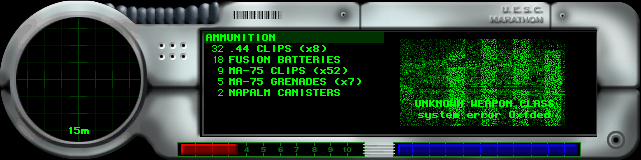
Okay, so I need advice. This completely stumped me and Polar Bear. I'm working on a Marathon-style hud, based on this:
 working in the health bar. I have a background:  and the meter.  The alpha on the background is completely white, and the meter is as you'd expect, black with a gradient over where the bar is. So, these are the tags. (Background is not referenced in this picture) 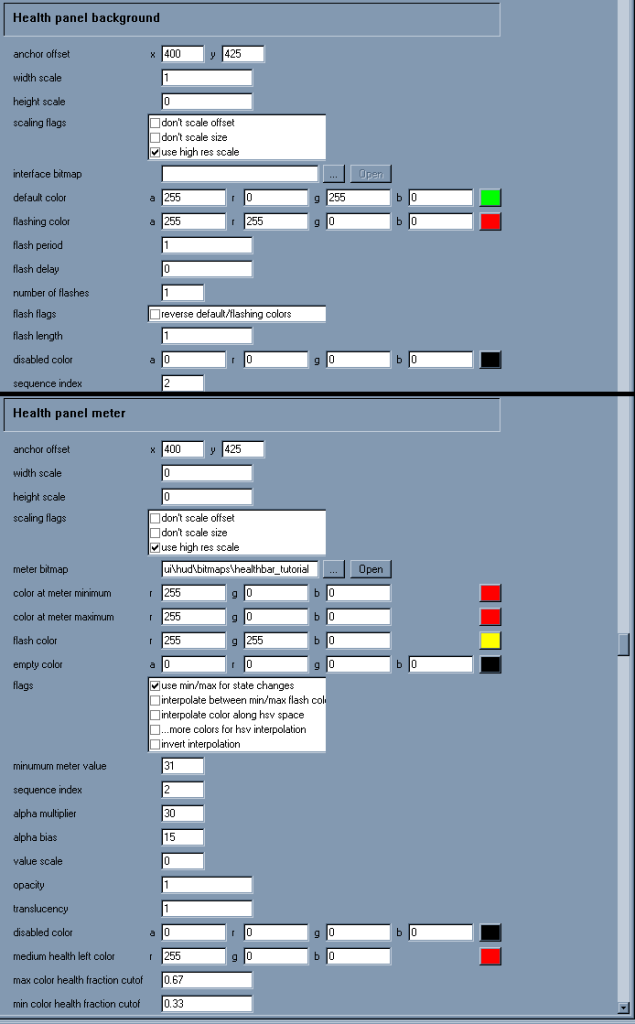 In-game, the background renders perfectly. However the meter is half see-through. The meter seems to be rendering behind the background, so when the background is referenced I do not see the meter. Background and meter referenced: 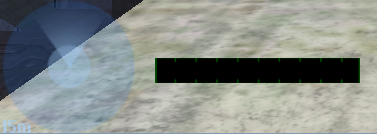 Only meter referenced: 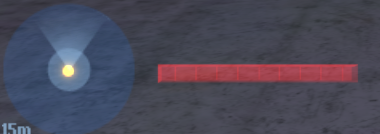 What the tits did I miss something Edited by Marka Haiyana on Aug 23, 2009 at 08:52 PM |
||||
|
|
|||||
|
Advancebo Joined: Jan 14, 2008
|
Posted: Aug 23, 2009 08:56 PM
Msg. 686 of 1514
You cant make the background all white, just alpha the lines.
|
||||
|
|
|||||
|
Marka Haiyana Joined: Mar 24, 2009
w0rt |
Posted: Aug 23, 2009 08:57 PM
Msg. 687 of 1514
If I did that, wouldn't it get rid of the black areas? I want to keep the black area
What I want is for the meter to render in front of the background, and not be see-through Edited by Marka Haiyana on Aug 23, 2009 at 09:01 PM |
||||
|
|
|||||
|
Advancebo Joined: Jan 14, 2008
|
Posted: Aug 23, 2009 09:04 PM
Msg. 688 of 1514
The black area can be part of the metal thing.
|
||||
|
|
|||||
|
Marka Haiyana Joined: Mar 24, 2009
w0rt |
Posted: Aug 23, 2009 10:17 PM
Msg. 689 of 1514
metal thing?
|
||||
|
|
|||||
|
BeachParty clan Joined: Oct 12, 2008
Sooo... You wanna switch to Red team huh? |
Posted: Aug 24, 2009 02:40 AM
Msg. 690 of 1514
Quote: --- Original message by: Marka Haiyana You have to set alpha to 255 to make it totally opaque. Furthermore, instead of making a seperate background, make the first alpha the same colour as the background, merging your background with the health meter. Then, set the health meter disabled colour to black, that means that the health that is gone, will leave a black background. Now, you have to set your spawn to have 1 health value less ofcourse, take that into consideration of your alpha so you wont notice it ingame, script it in to set your health to 99 when it detects 100 health so your background will never dissappear. Voila, that's all about it, if it doesn't work you probably did something wrong, because this is what I did with my ODST HUD to make a red background when the fatigue runs out, leaving a red trail. If you have any more questions, add me on xfire if you havn't already. sar93 |
||||
|
|
|||||
|
Marka Haiyana Joined: Mar 24, 2009
w0rt |
Posted: Aug 24, 2009 08:34 AM
Msg. 691 of 1514
I'm not sure what you mean. The meters need to have gradient in the alpha in order to work. If I were to set the meter to have 225 alpha, the gradient would not work properly.
Could you go into detail? Oh, and a glimpse of what I've got done so far hud-wise: 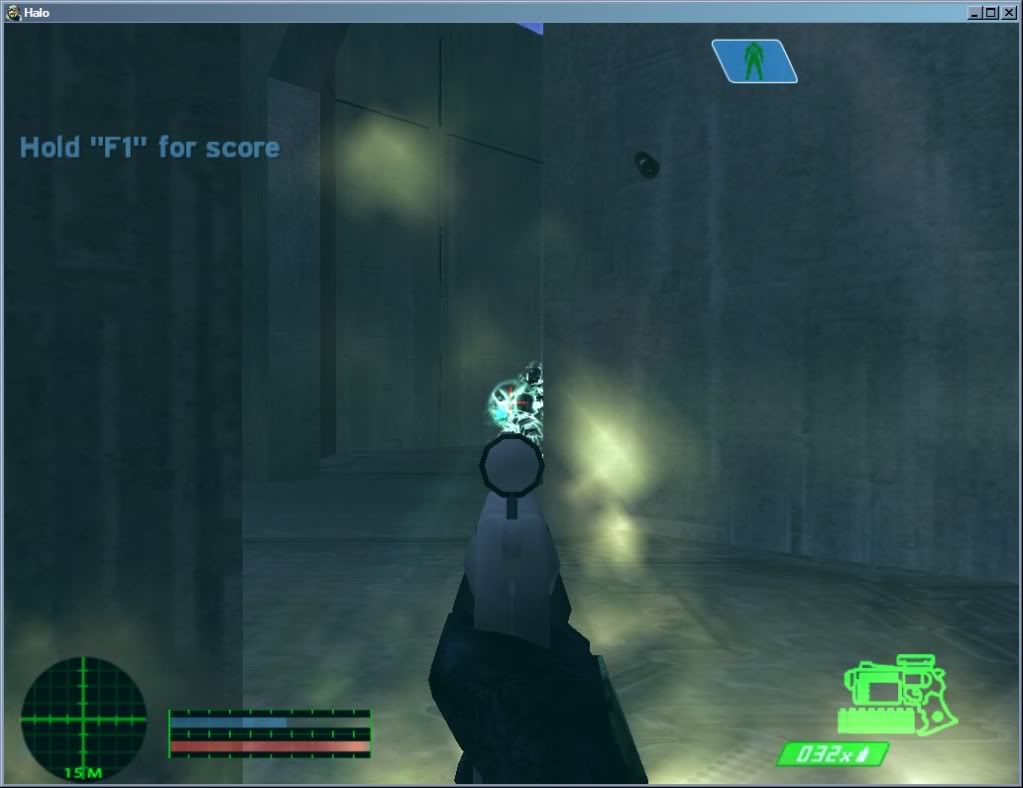 Based on:  Every weapon has an icon and a working meter. Edited by Marka Haiyana on Aug 24, 2009 at 09:37 AM |
||||
|
|
|||||
|
BeachParty clan Joined: Oct 12, 2008
Sooo... You wanna switch to Red team huh? |
Posted: Aug 24, 2009 01:41 PM
Msg. 692 of 1514
I would broadcast it for you, or show my current ODST hud to prove/show the concept, but I don't have Halo installed atm, basically you want 1 alpha value of the gradient to stay, the rest will deplete.
Making this opaque in the correct way will keep the meter working You know, you can even do it without the health script i mentioned, if you invert alpha in the tags oh and, if you wanna show secondary weapon, well halo supports up to 5 if im correct, you can use gamma's script system which is refined by masterz through the use of fonts Give me some time to port my halo data back and i'll send my odst hud tag that has the options set, you can work on teh rest meanwhile lol btw if you're gonna use the background hud of marathons screenshot as really opaque, watch the order of which the hud elements are rendered |
||||
|
|
|||||
|
Advancebo Joined: Jan 14, 2008
|
Posted: Aug 24, 2009 02:44 PM
Msg. 693 of 1514
Fix the radar.
|
||||
|
|
|||||
|
Donut Joined: Sep 30, 2006
I swear I'm not actually dead |
Posted: Aug 24, 2009 02:53 PM
Msg. 694 of 1514
BP can you explain how to show the secondary weapon? so far iv seen 3 people talking about it but none of them will explain how to do it
|
||||
|
|
|||||
|
Advancebo Joined: Jan 14, 2008
|
Posted: Aug 24, 2009 02:56 PM
Msg. 695 of 1514
Bp did it through the FP model.
Gamma did it through scripting I believe. Gamma is working on Masterz method. |
||||
|
|
|||||
|
Marka Haiyana Joined: Mar 24, 2009
w0rt |
Posted: Aug 24, 2009 06:42 PM
Msg. 696 of 1514
Quote: --- Original message by: Advancebo Fix the radar. Better? 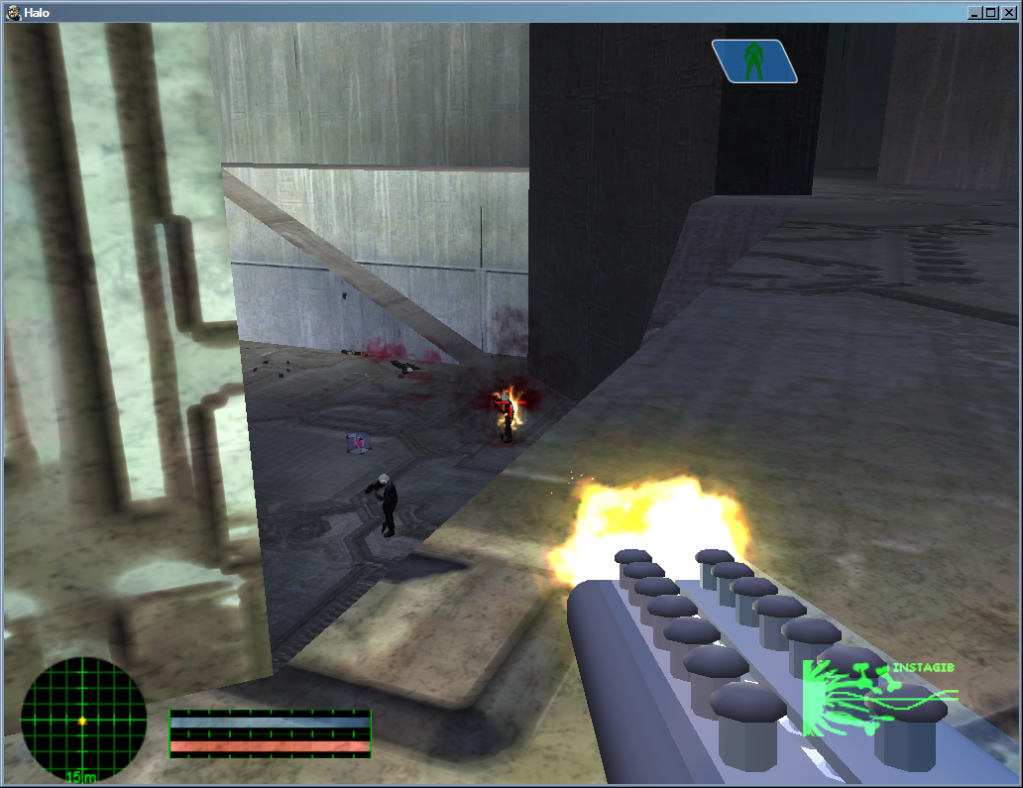 Quote: --- Original message by: BeachParty clan I would broadcast it for you, or show my current ODST hud to prove/show the concept, but I don't have Halo installed atm, basically you want 1 alpha value of the gradient to stay, the rest will deplete. Making this opaque in the correct way will keep the meter working You know, you can even do it without the health script i mentioned, if you invert alpha in the tags oh and, if you wanna show secondary weapon, well halo supports up to 5 if im correct, you can use gamma's script system which is refined by masterz through the use of fonts Give me some time to port my halo data back and i'll send my odst hud tag that has the options set, you can work on teh rest meanwhile lol btw if you're gonna use the background hud of marathons screenshot as really opaque, watch the order of which the hud elements are rendered So what you're saying, is have an area of the alpha to be set to 1/1/1 RGB, and have the rest 255/255/255 RGB. The area of 1 will be the last to be depleted, while the 255 will gradually deplete toward wherever the area of 1 is? Or are you saying to have 2 alpha channels? Sorry, I'm a bit of a nub in photoshop heh |
||||
|
|
|||||
|
Donut Joined: Sep 30, 2006
I swear I'm not actually dead |
Posted: Aug 24, 2009 07:17 PM
Msg. 697 of 1514
2 alpha channels will not work
i dont even think thats possible |
||||
|
|
|||||
|
Marka Haiyana Joined: Mar 24, 2009
w0rt |
Posted: Aug 24, 2009 09:27 PM
Msg. 698 of 1514
|
||||
|
|
|||||
|
Jesse Joined: Jan 18, 2009 Discord: Holy Crust#4500 |
Posted: Aug 24, 2009 09:57 PM
Msg. 699 of 1514
off the top of my head.
Set the minimum meter value to 5 invert alphas make your gradient set the disabled color to the same values as default. |
||||
|
|
|||||
|
BeachParty clan Joined: Oct 12, 2008
Sooo... You wanna switch to Red team huh? |
Posted: Aug 25, 2009 12:45 PM
Msg. 700 of 1514
Quote: --- Original message by: Marka Haiyana yeah, that's why I'm a bit confused. eh. progress. http://www.xfire.com/video/11de7e/ Please, got for an authentic hud, use an opaque background. I've taken the background from a screenshot and cleaned it up as template for y00  It's the correct size, just make it tiff and compile, doesnt need any alpha. insert it in a slot rendered first so that the rest will overlay it. |
||||
|
|
|||||
| Page 20 of 44 | Go to page: · 1 · ... · 17 · 18 · 19 · [20] · 21 · 22 · 23 · ... · 44 · Prev · Next |

|
