A Community discussion forum for Halo Custom Edition, Halo 2 Vista, Portal and Halo Machinima
|
 Home
Home Search
 Register
 Login
Login Member List
 Recent Posts
| »Forums Index »Halo Custom Edition (Bungie/Gearbox) »Halo CE General Discussion »OS_jaho1.0AlphaHaloCE.OSHEKSuperTool,Development thread & Preview App. | 
|
| Author | Topic: OS_jaho1.0AlphaHaloCE.OSHEKSuperTool,Development thread & Preview App. (18 messages, Page 1 of 1) | ||||
| Moderators: Dennis | |||||
 jackrabbit Joined: Apr 27, 2005 
Fight Against the Machine of Deth! |
Posted: Nov 6, 2013 04:43 PM
Msg. 1 of 18
Official Development Thread For  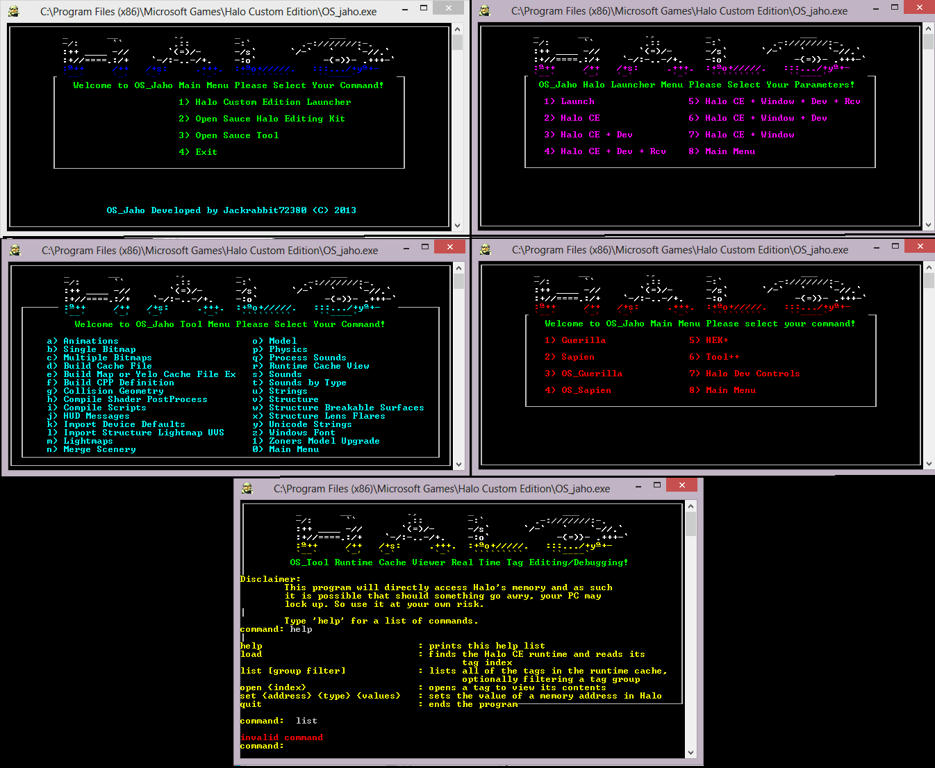 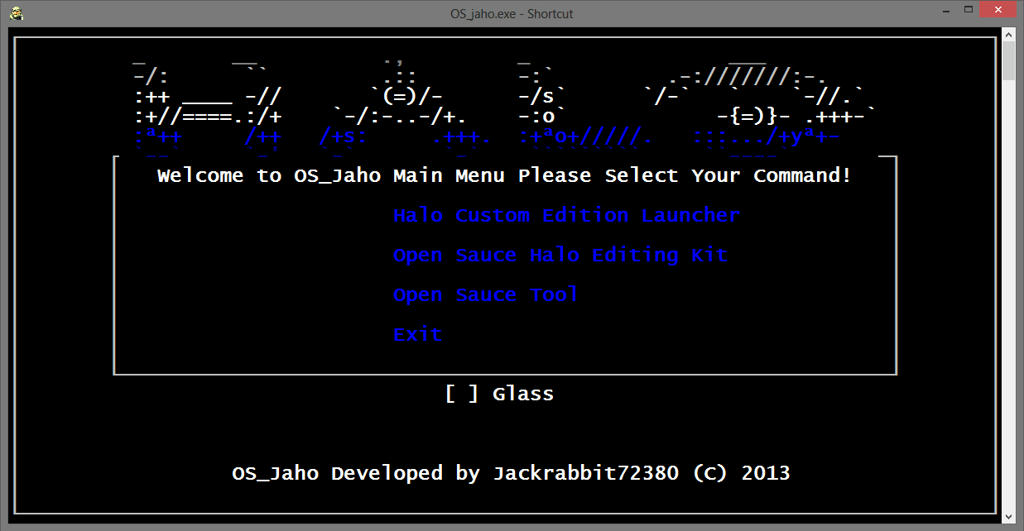 OS_Jaho serves as a Launcher for one of the most useful but unused command's in Open Sauce The "Os_Tool runtime-cache-view" Command. ;-------------------------------------------------------------------- //////////////////////////////////////////////////////////////////////////////// This Application aims to give Real Time Tag editing & debugging a simple & quick Transparent User Interface to run from. & A jump start if you will While displaying your game in as much of your screen's landscape as humanly possible so that you may actually view the tags you are editing in a better environment. Former similar unreleased applications displayed your game running in a small window while talking up valuable screen real estate to edit your content. Instead OS_Jaho provides you with a nice transparent overlay Window for you to make your calculations in game. ;-------------------------------------------------------------------- //////////////////////////////////////////////////////////////////////////////// For over a decade HEK Users have been forced to edit their content without being able to test & make adjustment on the fly. OS_Jaho changes that with one click & launches your console with a friendly UI & because this is an Exclutible application you can add it as a shortcut on your desktop or even as a shortcut in HEK+ No More Will you need to constantly test tags and restart halo on every little change you want to test out. No more Will you need to be greeted with a annoying command prompt to type in 25 Characters to start your real time tag editing & debugging! ;-------------------------------------------------------------------- //////////////////////////////////////////////////////////////////////////////// Currently we are only in a Pre-Alpha release of this project but I feel that is enough to be a release For you all to save your self from typing up OS_tool runtime-cache-view & also make use of the shortcuts. ;-------------------------------------------------------------------- //////////////////////////////////////////////////////////////////////////////// We will be trying to provide you with the best tool possible. If you have ever used this command in OS_Tool before then you may know just how painful it is to run your game in a small window While having your command open in a 2nd window & your notepad open in a 3rd window for copying content. ;-------------------------------------------------------------------- //////////////////////////////////////////////////////////////////////////////// My project aims to build a GUI that works much like Xfire & hooks it self on to the running process of halo so that you may have RTE From with inside halo. At the heart of OS_Jaho It will be a console application But not only! ;-------------------------------------------------------------------- //////////////////////////////////////////////////////////////////////////////// :Os_Jaho Was Built with Specific Arguments in mind for making The Halo Editing Kit Better & easy to work with Through Convienience, Siplicity & Speed. ;-------------------------------------------------------------------- //////////////////////////////////////////////////////////////////////////////// For the sake of having to compile everything again, without having to run OS_tool through command prompt again & again! ;-------------------------------------------------------------------- //////////////////////////////////////////////////////////////////////////////// OS_Jaho has only been in development for a very short time But I am very happy with current progress as I feel the project has turned out to be quite a success. ;-------------------------------------------------------------------- //////////////////////////////////////////////////////////////////////////////// OS_Jaho is an Advanced Fast CMD Command Line based Console Application Programmed in the ancient language of Batch & C With Extended commands & :P ;-------------------------------------------------------------------- //////////////////////////////////////////////////////////////////////////////// The reason for this is so that we can get in on Processes & do some dirty deeds to Halo's memory & other running applications. ;-------------------------------------------------------------------- //////////////////////////////////////////////////////////////////////////////// :I have hopes that my projects and research will take me to find more ways to implement my concepts in to Halo CE! ;-------------------------------------------------------------------- //////////////////////////////////////////////////////////////////////////////// :To do! :1. target the process of the game. :2. search its process memory for d3d.dll/opengl.dll. :3. inject into the process a DLL containing the custom interface logic. :4. connect interface's functions to the program flow by manually writing assembly jumps in the d3d/opengl functions found in the process memory. :5. add function to open it with a hot key inside the game some how. :6. Much more. ;-------------------------------------------------------------------- //////////////////////////////////////////////////////////////////////////////// :Concept & Developed by Jackrabbit (C) 2013 With help From Hobbet360 & The Doctor :Current Team Members Involved With Development. Jackrabbit The Doctor Hobbet360 ;-------------------------------------------------------------------- //////////////////////////////////////////////////////////////////////////////// We are currently looking for another Developer to Join our Project! If you have Experience in Batch, Blam!, C++, C#,VB Silverlight or just have some code to share let us know. ;-------------------------------------------------------------------- //////////////////////////////////////////////////////////////////////////////// :Note from developer! I'm sorry that it does not do more! in its current state. My new feature & Transparent User Interface is quite buggy & I do not want to add it in to this release just yet because it's unstable. ;-------------------------------------------------------------------- //////////////////////////////////////////////////////////////////////////////// Installation: Put OS_Jaho in C:\Program files (x86)\Microsoft Games\Halo Custom Edition\ Privilege Level: Run this Program as an administrator Start it As with any Command line Application You may configure window style & font through shortcut property on your desktop However Colors are predefined! System Requirements: Vista,W7,W8 Only ;-------------------------------------------------------------------- //////////////////////////////////////////////////////////////////////////////// Change Log... Version 1.1 -Pre-Alpha2-In-Development. -Changed the Launcher menu from purple to green. -All Launcher Menus Working -Changed color of Title menu for green to white -Added a Y or N prompt to see if you want to exit the app when launching the game. -HEK Menu Shortcuts Guerilla, Sapien, OS_Guerilla, OS_Sapien Working! -Added Glass Switch In the Main Menu (Glass Not included yet!) -Please Report any bugs with the launcher menu! Version 0.1 -Pre-Alpha-In-Development. -Mouse works in some menu's -Runtime Cache Viewer Works. -Developed the first stable version. -this is just a preview! -that's about it. ;-------------------------------------------------------------------- //////////////////////////////////////////////////////////////////////////////// This OP is SUBJECT TO CHANGE! ..._...|..____________________, , ....../ '---Download V1.1_______|]= http://www.mediafire.com/download/7bdn1bgwuh3tk9c/OS_Jaho_v1.1.zip ...../_==o;;;;;;;;_______.:/ .....), ---.(_(__) / ....// (..) ), ----" ...//___// ..//___// .//___// Edited by jackrabbit on Nov 11, 2013 at 04:52 PM |
||||


|
|||||
|
solitude Joined: Sep 2, 2013 
chfan |
Posted: Nov 6, 2013 04:50 PM
Msg. 2 of 18
Mmmmm can you make engine better?
|
||||
|
|
|||||
|
Higuy Joined: Mar 6, 2007 
@lucasgovatos |
Posted: Nov 6, 2013 04:57 PM
Msg. 3 of 18
Dear god, please learn how to type and use English in a decent form. That thread title isn't even legible.
Otherwise, nice app. |
||||
|
|
|||||
|
OrangeJuice Joined: Jan 29, 2009 
Documentation and debug.txt |
Posted: Nov 6, 2013 05:16 PM
Msg. 4 of 18
If you want things to get REALLY realtime, you use your phone/tablet as the command prompt, that way you don't have to alt-tab
 |
||||
|
|
|||||
|
Dumb AI Joined: Sep 18, 2011 
Dead. |
Posted: Nov 6, 2013 10:19 PM
Msg. 5 of 18
Quote: --- Original message by: rangerDanger Quote: --- Original message by: Higuy Dear god, please learn how to type and use English in a decent form. That thread title isn't even legible. Otherwise, nice app. Ru stupid fag? He had to abrevbiate and use engrish and spanglish so it could fit in the thread titile u stupid. No Spanish, Spanglish or Engrish were used in the thread title. Edited by Dumb AI on Nov 6, 2013 at 10:20 PM |
||||
|
|
|||||
|
DOOM899 Joined: Jul 23, 2013 
{DM} [gamesmaster] if i can ill help maybe |
Posted: Nov 7, 2013 02:25 AM
Msg. 6 of 18
can it be done so the texters on the map to need to done so map making is better
Edited by DOOM899 on Nov 7, 2013 at 02:26 AM |
||||
|
|
|||||
|
Jesse Joined: Jan 18, 2009 Discord: Holy Crust#4500 |
Posted: Nov 7, 2013 01:13 PM
Msg. 7 of 18
Why do I think jackrabbit is in the credits for the ride...
|
||||
|
|
|||||
|
DOOM899 Joined: Jul 23, 2013
{DM} [gamesmaster] if i can ill help maybe |
Posted: Nov 7, 2013 05:58 PM
Msg. 8 of 18
that look good I may download it if I got some time
|
||||
|
|
|||||
|
DOOM899 Joined: Jul 23, 2013
{DM} [gamesmaster] if i can ill help maybe |
Posted: Nov 7, 2013 10:13 PM
Msg. 9 of 18
now I did download it
|
||||
|
|
|||||
|
jackrabbit Joined: Apr 27, 2005
Fight Against the Machine of Deth! |
Posted: Nov 8, 2013 12:17 AM
Msg. 10 of 18
  Got a lot done today! Changed the Launcher menu from purple to green. Fixed the bug with Glass Finely & added a switch for it in the main menu. Added in Halo CE modes submenu Added in Halo CE Developer mode + Runtime mode submenu Added in Halo CE Window modes submenu No mouse in submenus yet though, Oh and added a yes or no prompt to see if you want to exit the app when launching the game. |
||||
|
|
|||||
|
Hobbet360 Joined: Jan 10, 2012 
ProTools > ToolPro |
Posted: Nov 8, 2013 02:59 AM
Msg. 11 of 18
Quote: --- Original message by: rangerDanger What does this do!? REAL TIME TAG EDITOR! ...bro. |
||||
|
|
|||||
|
kirby_422 Joined: Jan 22, 2006 
Apparently public enemy number 1? |
Posted: Nov 8, 2013 10:41 AM
Msg. 12 of 18
Quote: --- Original message by: hobbet360 Quote: --- Original message by: rangerDanger What does this do!? REAL TIME TAG EDITOR! ...bro. More accurately, its a shell for OS Tool's real time editor, as well as a HCE launcher. At the moment, it looks like they have it as an overlay to HCE, but given the new info that appeared along side the image, im assuming this is the 'glass' option, and instead of being an overlay, it's just transparent and they still had to tab out anyways. Really, instead of working on a console app, they should just grab the OS source code, and make a GUI or something for the editor, or at the very least make their own implementation, otherwise there is no reason to grab this application when you can just open OStool on your own. |
||||
|
|
|||||
|
jackrabbit Joined: Apr 27, 2005
Fight Against the Machine of Deth! |
Posted: Nov 8, 2013 02:04 PM
Msg. 13 of 18
Window resize will be done by options inside the app or so that's the plan it will come up sort of like x fire but when you are in game you will be able to have different options for window placement.
Yes currently its an overlay & I still have to alt+tab out but that will change when I add in the dev controls section, I have made a clone of the OS Repository quite some time ago A pm from korn is like a gift from god lol. I have been looking at modifying the runtime-cache-view quite a lot. In it's current state it's acting as a transparent & borderless wrapper but this is just the start. I can only work on one thing at a time so please bare with me as I try new things & implement more code & trying to make it work. This task is not easy by any means. usefull innovation is difficult. How to make things work & better is also an unremarkable thinking process all in it self. when I do start extending the runtime cache viewer. I'm planning on trying to add buttons for... _runtime_cache_command_help, _runtime_cache_command_load, _runtime_cache_command_quit, _runtime_cache_command_list, _runtime_cache_command_list_filtered, _runtime_cache_command_open, _runtime_cache_command_set, I'm not sure if you read through the thread for the other real time tag editer that was in development & never released? But there was a reason it was not & the developer chose not to release the application to the public due to people being quite rude to him on the forum & other issues and also because people didn't like the fact that you had to run halo in window mode to use it. There is a reason I'm developing a console application and it's certainly not because it's easy. So anyway that led me to thinking what about an in game tag editer? something far better than forge? and then I began a daunting task of thinking how? to /build// I'm trying... I'm no C++ or C# programmer. I did develop a version windows phone 7.8 OS with OS Builder that is quite popular over on the XDA forums though and I do have some experience with wright windows registry & Silverlight programing. little html, xhtml, Xml Hex, c, java, Blam , some others. I' know what I know. I don't know everything. But my research & development continues. I'm up for suggestions the HEK menu is looking a little empty I will probably try and input fires bitmaps apps in there if not something better. Often it's not about writing code that makes the difference is about writing beautiful code! many projects have faild but I feel that this project is enough, only time will tell as I progress & also as to who may contribute. Your input is greatly valued Kirby 422 But I do not think you Realize the Benefits of Pa point and Click command line based application. If you have any in site as to what to add please share. I was thinking about making part of it a script editor specifically for blam. buy editing and moding a project template called notepad2 made buy the same dev who made notepad++ however I don't have as much experience in blam scripting as you do. I will be Embedding other applications inside Os_jaho. Glass is just the first one so far. as I stated in the OP only the hart of Os jaho is a console application. I have about got the launcher menu finished. I Still need to calculate mouse cords. I'm up to 1679 lines of code. just getting & started, BBS. Edited by jackrabbit on Nov 8, 2013 at 05:14 PM |
||||
|
|
|||||
|
jackrabbit Joined: Apr 27, 2005
Fight Against the Machine of Deth! |
Posted: Nov 8, 2013 11:32 PM
Msg. 14 of 18
@the doctor No.
Does anyone have VS studio 2008 or 2010 on there PC? I was trying to compile a version of the source code. for Halo Dev Controls found here. http://hce.halomaps.org/index.cfm?fid=6168 It comes with the source code. if someone can compile a version then maybe I could input new Features But I cant seem to get it to work. my vs want to run a conversion on it to use it and it seems as its missing a file. if someone could take a look at it that would be great! |
||||
|
|
|||||
|
jackrabbit Joined: Apr 27, 2005
Fight Against the Machine of Deth! |
Posted: Nov 9, 2013 02:41 AM
Msg. 15 of 18
What video?
|
||||
|
|
|||||
|
jackrabbit Joined: Apr 27, 2005
Fight Against the Machine of Deth! |
Posted: Nov 10, 2013 02:19 PM
Msg. 16 of 18
Updated OP!
Version 1.1 -Pre-Alpha2 Released! -Please Report any bugs with the launcher menu! As with any Command line Application You may configure window style & font through shortcut property on your desktop However Colors are predefined! Change Log... Version 1.1 -Pre-Alpha2-In-Development. -Changed the Launcher menu from purple to green. -All Launcher Menus Working -Changed color of Title menu for green to white -Added a Y or N prompt to see if you want to exit the app when launching the game. -HEK Menu Shortcuts Guerilla, Sapien, OS_Guerilla, OS_Sapien Working! -Added Glass Switch In the Main Menu (Glass Not included yet!) -Please Report any bugs with the launcher menu! Version 0.1 -Pre-Alpha-In-Development. -Mouse works in some menu's -Runtime Cache Viewer Works. -Developed the first stable version. -this is just a preview! -that's about it. ;-------------------------------------------------------------------- //////////////////////////////////////////////////////////////////////////////// http://www.mediafire.com/download/7bdn1bgwuh3tk9c/OS_Jaho_v1.1.zip Edited by jackrabbit on Nov 10, 2013 at 04:18 PM |
||||
|
|
|||||
|
savinpvtmike Joined: Apr 18, 2010 
It's heavily inserted |
Posted: Nov 10, 2013 04:02 PM
Msg. 17 of 18
this tool is going to be very useful can't wait to see it finished looks good keep up the work.
|
||||
|
|
|||||
|
nihao123456ftw Joined: Mar 24, 2012 |
Posted: Nov 13, 2013 05:31 AM
Msg. 18 of 18
colourful console :3
|
||||
|
|
|||||

|
