A Community discussion forum for Halo Custom Edition, Halo 2 Vista, Portal and Halo Machinima
|
 Home
Home Search
 Register
 Login
Login Member List
 Recent Posts
| »Forums Index »Halo Custom Edition (Bungie/Gearbox) »Halo CE General Discussion »R93 Sniper's thread of random stuff (WIPs/Releases) | 
|
| Page 9 of 16 | Go to page: · 1 · ... · 6 · 7 · 8 · [9] · 10 · 11 · 12 · ... · 16 · Prev · Next |
| Author | Topic: R93 Sniper's thread of random stuff (WIPs/Releases) (558 messages, Page 9 of 16) | ||||
| Moderators: Dennis | |||||
 R93_Sniper Joined: Feb 13, 2011 
When in Doubt, RUN! |
Posted: Aug 11, 2013 03:51 AM
Msg. 281 of 558
I'm not talking about the way they're used, im talking about the way they look. Everything looks like rubber to me, especially on the promethean stuff. It's a personal choice here
As for animations, I never said all, I said most. Either Keyframed or Hybrid. Little mocap was used for ingame animation |
||||


|
|||||
|
Dumb AI Joined: Sep 18, 2011 
Dead. |
Posted: Aug 11, 2013 10:45 PM
Msg. 282 of 558
Quote: --- Original message by: waffles rubber=future I honestly like the cleanly-ness of the unsc stuff. All the detail is actually within the mesh and normals. I thought jumpsuits were the future. |
||||
|
|
|||||
|
R93_Sniper Joined: Feb 13, 2011
When in Doubt, RUN! |
Posted: Aug 11, 2013 10:55 PM
Msg. 283 of 558
I thought it was bullpups
|
||||
|
|
|||||
|
Stevedoggen Joined: Jan 14, 2013 
#Byf4Lyf |
Posted: Aug 12, 2013 05:41 AM
Msg. 284 of 558
I thought the future was the same as now, just more shiny.
|
||||
|
|
|||||
|
R93_Sniper Joined: Feb 13, 2011
When in Doubt, RUN! |
Posted: Aug 12, 2013 07:36 AM
Msg. 285 of 558
So, I was reading Elefant's Project Innie thread, where I stumbled upon this post:
Quote: --- Original message by: Tiel Shield Innie carries this? .png) I was intrigued by the thought of having a Riot shield based on the Difficulty emblem. Hr3shy made the sword a while back (see here), so I decided that it would also be nice to have the full set.   Note, I haven't made a model in an extremely long time, and this isn't textured (and its not final, im going to send this to Hr3shy to see if he wants to try his hand at making it look nicer, but still, its a nice base to work from I hope). Also, I've been working more on the reach weapons, whenever I have my little tidbits of time to do so. So you can expect to see those sooner than later Edited by R93_Sniper on Aug 12, 2013 at 07:38 AM |
||||
|
|
|||||
|
ELVEVERX Joined: Oct 5, 2012 
For the great journey |
Posted: Aug 12, 2013 08:21 AM
Msg. 286 of 558
Quote: --- Original message by: R93_Sniper So, I was reading Elefant's Project Innie thread, where I stumbled upon this post: Quote: --- Original message by: Tiel Shield Innie carries this? http://images1.wikia.nocookie.net/__cb20091217190542/halo/images/2/21/TLJ_Easy_Difficulty_(ODST).png I was intrigued by the thought of having a Riot shield based on the Difficulty emblem. Hr3shy made the sword a while back (see here), so I decided that it would also be nice to have the full set. http://i43.tinypic.com/6jkrd3.jpg http://i40.tinypic.com/17dzrc.jpg Note, I haven't made a model in an extremely long time, and this isn't textured (and its not final, im going to send this to Hr3shy to see if he wants to try his hand at making it look nicer, but still, its a nice base to work from I hope). Also, I've been working more on the reach weapons, whenever I have my little tidbits of time to do so. So you can expect to see those sooner than later Edited by R93_Sniper on Aug 12, 2013 at 07:38 AM This is so awesome you should make a varient that has a elite head nailed to it |
||||
|
|
|||||
|
bourrin33 Joined: Oct 19, 2009 
HEK not installed tho |
Posted: Aug 12, 2013 10:19 AM
Msg. 287 of 558
Looks like it's a lot more curved to me...
|
||||
|
|
|||||
|
xnx Joined: Feb 12, 2013 
h2 marine anims or i detonate the vest |
Posted: Aug 12, 2013 12:31 PM
Msg. 288 of 558
It looks great but I noticed with shield weapons it's hard to line up the actual shield with the first person animation. So technically it would be pretty difficult to know if your shield would protect you or not unless you play in third person.
Was this just for the kicks or do you plan on putting it in-game? |
||||
|
|
|||||
|
Delicon20 Joined: Oct 3, 2008 
Still here. Still loves bacon |
Posted: Aug 12, 2013 03:27 PM
Msg. 289 of 558
Quote: --- Original message by: bourrin33 Looks like it's a lot more curved to me... agreed |
||||
|
|
|||||
|
R93_Sniper Joined: Feb 13, 2011
When in Doubt, RUN! |
Posted: Aug 12, 2013 07:06 PM
Msg. 290 of 558
Quote: --- Original message by: bourrin33 Looks like it's a lot more curved to me... I suck at making anything look round ish (the inner part looks rounded in the picture, but not in the model as you can see). One day I will make it work, one day Quote: --- Original message by: xnx It looks great but I noticed with shield weapons it's hard to line up the actual shield with the first person animation. So technically it would be pretty difficult to know if your shield would protect you or not unless you play in third person. Was this just for the kicks or do you plan on putting it in-game? It was mainly for the kicks, but if I can actually get Hr3shy to make it better, I'll put it ingame (though I'll need to make 3P animations for it and figure out how to make it repel bullets and junk) |
||||
|
|
|||||
|
R93_Sniper Joined: Feb 13, 2011
When in Doubt, RUN! |
Posted: Sep 30, 2013 05:57 PM
Msg. 291 of 558
Alright, since i havent put an update in a while, and because i've been looking at people making less than amazing shaders recently, i think it might be a nice idea to make a very basic shader tutorial, adding in something that i stumbled upon some time ago and think should be known.
I am by NO means an expert on shaders, nor am I very able to answer questions concerning the topic. I'm just trying to get some basic knowladge out there for those who dont know how. It is very possible that some of the information will be innacurate, so don't expect to rely on this 100%. Also note that this is for Vanilla Halo Shaders So lets start with the most commonly used shader type as i see it, the .shader_model type. You'll start off with something like this  You'll first want to know what your material is made out of, and then change the shader type accordingly. By default, you'll notice that everything seems to be made out of dirt. you can change that by clicking this button and changing the material type  Nextly, you would want to actually set your bitmaps. You'll be working with the following area of your shader.  You can Bitmaps that are used come in 4 basic varieties: Diffuse, Multipurpose, Detail, and Cubemaps. Lets quickly break down what each of the four are Diffuse: Basic Color Information. These are the "main" bitmaps used and act as the base bitmap. Multipurpose: A Bitmap that suffices for 4 different purposes, based upon the RGBA Channels. I'll go more indepth on this a bit further on. Detail: Bitmaps that add extra detail to a bitmap, as the name suggests. Called bump maps when dealing with weapons (Detail Bumps to be exact). Cubemaps: Cubemaps are used to show reflected detail on models. They're split into 6 different images (formatted in a way that it looks like you cut open a cube and layed it flat, thus cubemap). I'll be using the Halo: Reach Magnum as an example for this. Here's the Bitmaps that come with it by defautl Diffuse  Specular  Normal  Now, you may be asking "But Sniper, you said we'll be using Diffuse, Multipurpose and Detail Mapping, what are we gonna do with Specular and Normal Maps?" Answer? You convert them. Lets start with Specular -> Multipurpose As i said before, i was going to go a bit more indepth as to how multipurpose maps work. Multipurpose maps use the RGBA Channels in a bitmap to work in a lot of different details. Heres what each channel does Red: Detail Mask Green: Self-Illumination Blue: Specular/Reflection Properties Alpha: Color Change (Abbreviated as CC, a lot) You'll want to use a program that can handle multiple channels to work with Multipurpose maps. I use Photoshop, but Paint.Net and GIMP i hear are able to do so as well. Now, Open the Specular map in your program of choice, it should look like this  Since the entire gun except for the handle is made out of a shiny metal material, you would want to select the handle, then invert the selection. Fill in the area outside the handle with white. You can keep what's there, though. You should end up with this in your Blue channel.  Since the Magnum's self illumination is pretty much only along the small lights on the sides, you would make those areas white, while the rest of the gun black in the green channel. You should end up with something like this in the end  And Now you have the Red channel. Since we want the entire model to be affected by the converted detail map, we'll make the whole thing white. I dont need to show a picture for that because that serves no purpose. Now you have the Alpha/CC Map. Even though the Reach Magnum doesnt actually have a Color Change, i'm going to put make the sights have a bit of color change just for the sake of this tutorial. Same with the rest, highlight what you want, black it out, white out the rest. Your finished Multipurpose would look like this  Now that you have the multipurpose done, time to convert the normal map into a detail map. Open up the Normal map, and go to the channels, you'll notice something interesting.  The Red and Green maps are Greyscale? Thats interesting, Let's see what they look like   They look pretty close to what a Detail map should look like, but they dont seem to be precise to the normal map. So, what do we do? We extract them and put them on seperate layers. Go to the Red Channel, and Copy the entire thing into a seperate layer in the RGB Channel, same with the Green Channel, You'll get something like this  Now, what do you do to make them look like a normal map? Simple. Overlay one onto the other, and it should work out nicely  Now, Lets compare that to the normal map The reason this is possible is because i learned that the red and green channel determine how much detail is to be applied to a bitmap based on lighting. Red is Vertical, Green is Horizontal. Blue Channel controls depth of the detail, but it's set local to the model itself, so it can be ignored since it doesnt make too much of an extensive difference. Note: Normal maps have a tendancy of not using Power of 2 Dimensions, best idea would be to upsize them so that they are the correct size. Now that all of that is done, we can place our bitmaps in the appropriate shader slots in Guerilla after we run them through tool  Now, lets scroll down to the bottom of the shader where we can find our cubemap properties. I've already prepared a cubemap for this from H3, but if you want to know how to set up your own cubemaps, you should look at Maniac's Tutorial, he was the one show showed me. Anyways, since we want the magnum to have a white-ish reflection, we'll be giving the tint colors 1 in all the slots. However, since we want it to be a bit duller, we'll set the brightness to .5 in it's appropriate slot. You should get this.  Since im Lazy, I used CaptainVidya's Pistol as a base. Heres what it'll look like ingame (note, i did some extra stuff including having transparency maps on the decal maps)  Hope this tutorial was informational! |
||||
|
|
|||||
|
Dumb AI Joined: Sep 18, 2011
Dead. |
Posted: Sep 30, 2013 06:30 PM
Msg. 292 of 558
Any progress on the tutorial about porting Reach content (I think you said something about bipeds)?
|
||||
|
|
|||||
|
Xiao Joined: Nov 14, 2012 
Keiichi-kun o mitsuketa. |
Posted: Oct 2, 2013 11:29 PM
Msg. 293 of 558
That's the wrong way to use fakebumping, and you forgot to flip the channels in the normal map if you wanted to fakebump. The details are inverted right now.
|
||||
|
|
|||||
|
Dumb AI Joined: Sep 18, 2011
Dead. |
Posted: Oct 3, 2013 09:58 AM
Msg. 294 of 558
Quote: --- Original message by: waffles Changing the material type for shader_model does absolutely nothing. The shader can't be used on bsp's therefore don't get surface properties. Surface properties are defined by collision model on all dynamic objects. Its only there because it was the very base setup for all shaders. One quick question though, does the metal material types reflect bullets? |
||||
|
|
|||||
|
Hobbet360 Joined: Jan 10, 2012 
ProTools > ToolPro |
Posted: Oct 3, 2013 10:21 AM
Msg. 295 of 558
Depends of the projectile tag... Or is it the projectiles dammage_effect tag... I can't remember... Goodnight.
|
||||
|
|
|||||
|
Dumb AI Joined: Sep 18, 2011
Dead. |
Posted: Oct 3, 2013 10:29 AM
Msg. 296 of 558
Quote: --- Original message by: hobbet360 Depends of the projectile tag... Or is it the projectiles dammage_effect tag... I can't remember... Goodnight. Well, I shot at a dead biped with a MA5B and got killed by ricocheting bullets. |
||||
|
|
|||||
|
R93_Sniper Joined: Feb 13, 2011
When in Doubt, RUN! |
Posted: Oct 4, 2013 01:35 AM
Msg. 297 of 558
Quote: --- Original message by: waffles Changing the material type for shader_model does absolutely nothing. The shader can't be used on bsp's therefore don't get surface properties. Surface properties are defined by collision model on all dynamic objects. Its only there because it was the very base setup for all shaders. I refute thee because i've done things where i shoot bipeds/weapons and they're dirt up until i change that field Quote: --- Original message by: Xiao That's the wrong way to use fakebumping, and you forgot to flip the channels in the normal map if you wanted to fakebump. The details are inverted right now. If you can show me how to do otherwise it would be extremely appreciated Edited by R93_Sniper on Oct 4, 2013 at 01:36 AM |
||||
|
|
|||||
|
Hobbet360 Joined: Jan 10, 2012
ProTools > ToolPro |
Posted: Oct 4, 2013 03:35 AM
Msg. 298 of 558
Quote: --- Original message by: Dumb AI Quote: --- Original message by: hobbet360 Depends of the projectile tag... Or is it the projectiles dammage_effect tag... I can't remember... Goodnight. Well, I shot at a dead biped with a MA5B and got killed by ricocheting bullets. That happens with every stock gun except the sniper rifle, as it's projectile tag allows it to "overpenertrate" every biped feature. Ill edit this post in a second with a picture... When I get out mah laptop. 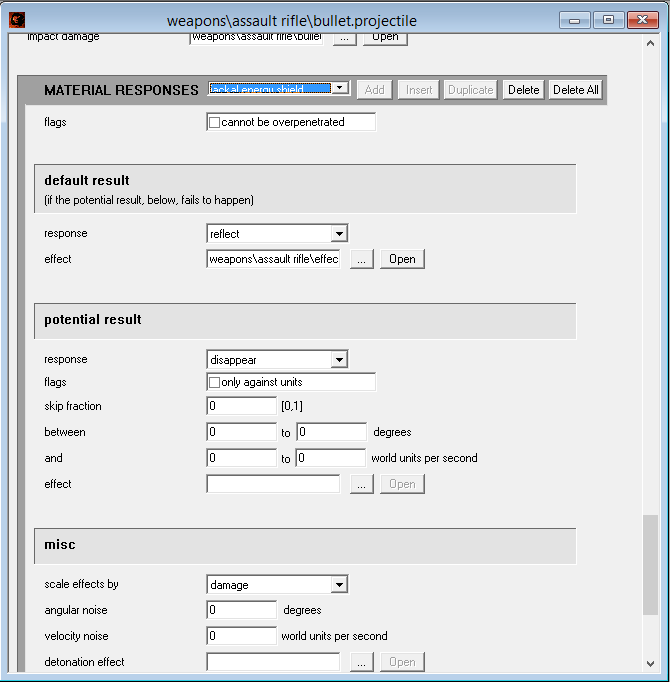 Edited by hobbet360 on Oct 5, 2013 at 01:26 AM |
||||
|
|
|||||
|
Jlx2 Joined: Sep 11, 2013 
UMT Member |
Posted: Oct 5, 2013 05:02 PM
Msg. 299 of 558
I work in the reach huds
credits: Slipknot, Lonewolft, RMT Smok3, Benjamin MK III, Leonox97 ....  and others:  |
||||
|
|
|||||
|
Dumb AI Joined: Sep 18, 2011
Dead. |
Posted: Oct 5, 2013 05:07 PM
Msg. 300 of 558
Quote: --- Original message by: Jlx2 I work in the reach huds credits: Slipknot, Lonewolft, RMT Smok3, Benjamin MK III, Leonox97 .... http://imageshack.us/f/46/9o8x.jpg/ and others: http://imageshack.us/f/843/hfvu.jpg/ You posted that in the wrong thread. DMR has 3x zoom BTW. Edited by Dumb AI on Oct 5, 2013 at 05:08 PM |
||||
|
|
|||||
|
Maniac1000 -Helpful Poster- Joined: Feb 24, 2007 
|
Posted: Oct 5, 2013 05:54 PM
Msg. 301 of 558
Waffles, I am not too sure what you mean.Sniper is right that you need to change the "dirt" to something else or the material will react as dirt. Maybe you are meaning something other than that?
|
||||
|
|
|||||
|
kirby_422 Joined: Jan 22, 2006 
Apparently public enemy number 1? |
Posted: Oct 5, 2013 06:20 PM
Msg. 302 of 558
Quote: --- Original message by: Maniac1000 Waffles, I am not too sure what you mean.Sniper is right that you need to change the "dirt" to something else or the material will react as dirt. Maybe you are meaning something other than that? Actually, waffles is right. Shader_model's, the material means nothing, since a shader_model will never be used for collision. Only materials that are accepted as BSP materials will even check what their material is. Shader_models can only be used on gbxmodels, which are render only. IF you have a BSP that uses something like a shader_enviroment, THEN you need to worry, because unless you explicitly told that BSP to use that shader as a render only, then it is also going to create a collidable area that references that shader. If for whatever reason you do not believe me or waffles, go make a scenery that only has a gbxmodel; you wont be able to shoot it. |
||||
|
|
|||||
|
Jlx2 Joined: Sep 11, 2013
UMT Member |
Posted: Oct 5, 2013 06:38 PM
Msg. 303 of 558
Quote: --- Original message by: R93_Sniper Alright, since i havent put an update in a while, and because i've been looking at people making less than amazing shaders recently, i think it might be a nice idea to make a very basic shader tutorial, adding in something that i stumbled upon some time ago and think should be known. I am by NO means an expert on shaders, nor am I very able to answer questions concerning the topic. I'm just trying to get some basic knowladge out there for those who dont know how. It is very possible that some of the information will be innacurate, so don't expect to rely on this 100%. Also note that this is for Vanilla Halo Shaders So lets start with the most commonly used shader type as i see it, the .shader_model type. You'll start off with something like this http://i42.tinypic.com/2433yc7.jpg You'll first want to know what your material is made out of, and then change the shader type accordingly. By default, you'll notice that everything seems to be made out of dirt. you can change that by clicking this button and changing the material type http://i42.tinypic.com/2a9pqas.png Nextly, you would want to actually set your bitmaps. You'll be working with the following area of your shader. http://i42.tinypic.com/2mchnp5.png You can Bitmaps that are used come in 4 basic varieties: Diffuse, Multipurpose, Detail, and Cubemaps. Lets quickly break down what each of the four are Diffuse: Basic Color Information. These are the "main" bitmaps used and act as the base bitmap. Multipurpose: A Bitmap that suffices for 4 different purposes, based upon the RGBA Channels. I'll go more indepth on this a bit further on. Detail: Bitmaps that add extra detail to a bitmap, as the name suggests. Called bump maps when dealing with weapons (Detail Bumps to be exact). Cubemaps: Cubemaps are used to show reflected detail on models. They're split into 6 different images (formatted in a way that it looks like you cut open a cube and layed it flat, thus cubemap). I'll be using the Halo: Reach Magnum as an example for this. Here's the Bitmaps that come with it by defautl Diffuse http://i41.tinypic.com/2d1v6fq.jpg Specular http://i43.tinypic.com/33f9opi.jpg Normal http://i41.tinypic.com/e87n75.jpg Now, you may be asking "But Sniper, you said we'll be using Diffuse, Multipurpose and Detail Mapping, what are we gonna do with Specular and Normal Maps?" Answer? You convert them. Lets start with Specular -> Multipurpose As i said before, i was going to go a bit more indepth as to how multipurpose maps work. Multipurpose maps use the RGBA Channels in a bitmap to work in a lot of different details. Heres what each channel does Red: Detail Mask Green: Self-Illumination Blue: Specular/Reflection Properties Alpha: Color Change (Abbreviated as CC, a lot) You'll want to use a program that can handle multiple channels to work with Multipurpose maps. I use Photoshop, but Paint.Net and GIMP i hear are able to do so as well. Now, Open the Specular map in your program of choice, it should look like this http://i41.tinypic.com/2vao2es.png Since the entire gun except for the handle is made out of a shiny metal material, you would want to select the handle, then invert the selection. Fill in the area outside the handle with white. You can keep what's there, though. You should end up with this in your Blue channel. http://i44.tinypic.com/1058bo4.png Since the Magnum's self illumination is pretty much only along the small lights on the sides, you would make those areas white, while the rest of the gun black in the green channel. You should end up with something like this in the end http://i41.tinypic.com/2zspwlz.png And Now you have the Red channel. Since we want the entire model to be affected by the converted detail map, we'll make the whole thing white. I dont need to show a picture for that because that serves no purpose. Now you have the Alpha/CC Map. Even though the Reach Magnum doesnt actually have a Color Change, i'm going to put make the sights have a bit of color change just for the sake of this tutorial. Same with the rest, highlight what you want, black it out, white out the rest. Your finished Multipurpose would look like this http://i39.tinypic.com/34pcbwz.png Now that you have the multipurpose done, time to convert the normal map into a detail map. Open up the Normal map, and go to the channels, you'll notice something interesting. http://i39.tinypic.com/apfecx.png The Red and Green maps are Greyscale? Thats interesting, Let's see what they look like http://i44.tinypic.com/zmcb55.png http://i44.tinypic.com/2h3obo5.png They look pretty close to what a Detail map should look like, but they dont seem to be precise to the normal map. So, what do we do? We extract them and put them on seperate layers. Go to the Red Channel, and Copy the entire thing into a seperate layer in the RGB Channel, same with the Green Channel, You'll get something like this http://i44.tinypic.com/256a985.png Now, what do you do to make them look like a normal map? Simple. Overlay one onto the other, and it should work out nicely http://i41.tinypic.com/29coryp.png Now, Lets compare that to the normal map http://i41.tinypic.com/e87n75.jpg The reason this is possible is because i learned that the red and green channel determine how much detail is to be applied to a bitmap based on lighting. Red is Vertical, Green is Horizontal. Blue Channel controls depth of the detail, but it's set local to the model itself, so it can be ignored since it doesnt make too much of an extensive difference. Note: Normal maps have a tendancy of not using Power of 2 Dimensions, best idea would be to upsize them so that they are the correct size. Now that all of that is done, we can place our bitmaps in the appropriate shader slots in Guerilla after we run them through tool http://i42.tinypic.com/vqsisg.png Now, lets scroll down to the bottom of the shader where we can find our cubemap properties. I've already prepared a cubemap for this from H3, but if you want to know how to set up your own cubemaps, you should look at Maniac's Tutorial, he was the one show showed me. Anyways, since we want the magnum to have a white-ish reflection, we'll be giving the tint colors 1 in all the slots. However, since we want it to be a bit duller, we'll set the brightness to .5 in it's appropriate slot. You should get this. http://i42.tinypic.com/2zf8tmx.png Since im Lazy, I used CaptainVidya's Pistol as a base. Heres what it'll look like ingame (note, i did some extra stuff including having transparency maps on the decal maps) http://screenshot.xfire.com/s/128918731-3.jpg Hope this tutorial was informational! Please :)  |
||||
|
|
|||||
|
Maniac1000 -Helpful Poster- Joined: Feb 24, 2007
|
Posted: Oct 5, 2013 06:42 PM
Msg. 304 of 558
Ahh shader "model". I should have read that.
|
||||
|
|
|||||
|
Hobbet360 Joined: Jan 10, 2012
ProTools > ToolPro |
Posted: Oct 5, 2013 09:51 PM
Msg. 305 of 558
You need to use the direct link to make the image show up.  Or just "Right Click" on the image and select "copy image URL". Edited by hobbet360 on Oct 5, 2013 at 09:53 PM |
||||
|
|
|||||
|
Dumb AI Joined: Sep 18, 2011
Dead. |
Posted: Oct 6, 2013 10:03 AM
Msg. 306 of 558
Quote: --- Original message by: hobbet360 You need to use the direct link to make the image show up. http://img10.imageshack.us/img10/4482/92a1.jpg Or just "Right Click" on the image and select "copy image URL". Edited by hobbet360 on Oct 5, 2013 at 09:53 PM What have you done, Jonhlex?!  Edited by Dumb AI on Oct 6, 2013 at 10:04 AM |
||||
|
|
|||||
|
Jlx2 Joined: Sep 11, 2013
UMT Member |
Posted: Oct 6, 2013 10:37 AM
Msg. 307 of 558
Quote: --- Original message by: Dumb AI Quote: --- Original message by: hobbet360 You need to use the direct link to make the image show up. http://img10.imageshack.us/img10/4482/92a1.jpg Or just "Right Click" on the image and select "copy image URL". Edited by hobbet360 on Oct 5, 2013 at 09:53 PM What have you done, Jonhlex?! Edited by Dumb AI on Oct 6, 2013 at 10:04 AM This (Thanks Edwar Ayala (Slipknot) for the pistol. )  |
||||
|
|
|||||
|
Dumb AI Joined: Sep 18, 2011
Dead. |
Posted: Oct 6, 2013 11:43 AM
Msg. 308 of 558
Quote: --- Original message by: Jlx2 Quote: --- Original message by: Dumb AI Quote: --- Original message by: hobbet360 Quote: --- Original message by: Jlx2 stuff link Edited by hobbet360 on Oct 5, 2013 at 09:53 PM omg Edited by Dumb AI on Oct 6, 2013 at 10:04 AM This (Thanks Edwar Ayala (Slipknot) for the pistol. ) http://imageshack.us/scaled/thumb/819/wpqu.jpg Um, I think you should get larger images. From what I can see, you used Reach textures on a custom model made by a guy called "Moses" or custom textures on the Reach model. Either way, it looks bad. Edited by Dumb AI on Oct 6, 2013 at 11:48 AM |
||||
|
|
|||||
|
Bottletopman Joined: Feb 5, 2011 
Blessed are the cheesemakers |
Posted: Oct 6, 2013 11:39 PM
Msg. 309 of 558
HAH. What gave you that idea Dumb AI? There's no mismatched textures on that pistol model at all! It's the latest fad, get with the times, buddy!
|
||||
|
|
|||||
|
Dumb AI Joined: Sep 18, 2011
Dead. |
Posted: Oct 6, 2013 11:48 PM
Msg. 310 of 558
Quote: --- Original message by: Bottletopman HAH. What gave you that idea Dumb AI? There's no mismatched textures on that pistol model at all! It's the latest fad, get with the times, buddy! So this doesn't look weird to you... Fads can go to the afterlife. Edited by Dumb AI on Oct 6, 2013 at 11:49 PM |
||||
|
|
|||||
|
Dumb AI Joined: Sep 18, 2011
Dead. |
Posted: Oct 7, 2013 12:29 AM
Msg. 311 of 558
Quote: --- Original message by: Destroyer50 that looks fine there just the normal maps You are ignoring what the diffuse maps look like on that model. |
||||
|
|
|||||
|
Hobbet360 Joined: Jan 10, 2012
ProTools > ToolPro |
Posted: Oct 7, 2013 01:59 AM
Msg. 312 of 558
EDITTED To SAY LOL
REMOVED! Edited by hobbet360 on Oct 7, 2013 at 01:59 AM |
||||
|
|
|||||
|
Bottletopman Joined: Feb 5, 2011
Blessed are the cheesemakers |
Posted: Oct 7, 2013 04:48 AM
Msg. 313 of 558
There needs to be some sort of sarcasm tag, although I have a feeling that Dumb AI could also be sarcastic...
|
||||
|
|
|||||
|
Dumb AI Joined: Sep 18, 2011
Dead. |
Posted: Oct 7, 2013 10:30 AM
Msg. 314 of 558
Quote: --- Original message by: Bottletopman There needs to be some sort of sarcasm tag, although I have a feeling that Dumb AI could also be sarcastic... I wasn't but I could be. |
||||
|
|
|||||
|
R93_Sniper Joined: Feb 13, 2011
When in Doubt, RUN! |
Posted: Oct 7, 2013 02:06 PM
Msg. 315 of 558
I would appreciate you guys limiting the amount of stupid you're putting on my thead.
Destroyer/Killer/Whateveryouwanttocallyourselfnow, Go away. You're still a nuisance and refuse to change, so i refuse to have your stupidity here. Johnlex, wrong thread. Fix those diffuse maps, because your textures are messed up. Bottletopman, that your tone is oozing with either sarcasm or blunt force trauma. If the prior, then stahp, if the latter, my condolences. Also Dumb AI, The whole thing about porting content was just very basic stuff to get you started on being able to do ports. It was namely going to be vehicles because vehicle animations are 900x easier than any other type of animation. The Normal -> Detail map conversion was a big thing i wanted to show you guys because that helps to get normal mapping into a usable state for vanilla modders. The rest is really just scaling and repositioning. Xiao, You said something about my fakebumping not working, where's that fix of which you speak D: |
||||
|
|
|||||
| Page 9 of 16 | Go to page: · 1 · ... · 6 · 7 · 8 · [9] · 10 · 11 · 12 · ... · 16 · Prev · Next |

|
