A Community discussion forum for Halo Custom Edition, Halo 2 Vista, Portal and Halo Machinima
|
 Home
Home Search
 Register
 Login
Login Member List
 Recent Posts
| »Forums Index »Halo Custom Edition (Bungie/Gearbox) »Halo CE General Discussion »[WIP] With_Whiteness | 
|
| Page 5 of 9 | Go to page: · 1 · 2 · 3 · 4 · [5] · 6 · 7 · 8 · 9 · Prev · Next |
| Author | Topic: [WIP] With_Whiteness (307 messages, Page 5 of 9) | ||||
| Moderators: Dennis | |||||
 ChBgt909 Joined: Sep 10, 2011 
ᶘ ᵒᴥᵒᶅ |
Posted: Apr 12, 2012 08:36 PM
Msg. 141 of 307
Quote: --- Original message by: goldkilla88 Jeez, stop spamming the smiles. lol   i don't use to do that i'm just excited XD i don't use to do that i'm just excited XD...and don't get mad lol anyway, i'd love to see an update on the map, |
||||


|
|||||
|
Maniac1000 -Helpful Poster- Joined: Feb 24, 2007 
|
Posted: Apr 12, 2012 08:37 PM
Msg. 142 of 307
You are welcome.
|
||||
|
|
|||||
|
GAIGHER Joined: Nov 5, 2008 
|
Posted: Apr 13, 2012 07:23 AM
Msg. 143 of 307
Quote: --- Original message by: Maniac1000 Paint Shop is not useful !Already done that :). http://forum.halomaps.org/index.cfm%3Fpage=topic&topicID=40404 Use mspaint >_<" 1. Select the line button. 2. Select the line size 3. Select the line color 4. Draw the line. (Pres Maj for locked angle to 45° or 90°)  Ctrl + z = For back.  Edited by GAIGHER on May 20, 2012 at 09:43 AM |
||||
|
|
|||||
|
rugal Joined: May 11, 2008 
|
Posted: May 20, 2012 10:31 AM
Msg. 144 of 307
Thx for tut !
|
||||
|
|
|||||
|
XlzQwerty1 Joined: Aug 6, 2009 
|
Posted: May 20, 2012 10:53 AM
Msg. 145 of 307
Actually I find Photoshop much easier to use than paint. It also has more features, but that's just me. For you, you like to use paint.
|
||||
|
|
|||||
|
GAIGHER Joined: Nov 5, 2008
|
Posted: May 20, 2012 11:11 AM
Msg. 146 of 307
Ok...
Look at new pictures !    Seamless test in 3D ! With seam:  Seamless:   Ice waterfall:  In Halo 3:  Créated of the texture:  Finish in 3Ds:  |
||||
|
|
|||||
|
TM_updates Joined: Aug 31, 2011 
Superior to you, Superior Musclez near Brussels |
Posted: May 20, 2012 12:01 PM
Msg. 147 of 307
Nice cream!
|
||||
|
|
|||||
|
Spartan314 Joined: Aug 21, 2010 
Former biped rigger & FP animator |
Posted: May 20, 2012 03:55 PM
Msg. 148 of 307
Yummy
|
||||
|
|
|||||
|
Ubergoober Joined: Oct 11, 2010 |
Posted: May 21, 2012 01:47 AM
Msg. 149 of 307
oh my, i see u bring the epicness
|
||||
|
|
|||||
|
Dalek Joined: Aug 12, 2011 
|
Posted: May 23, 2012 08:33 AM
Msg. 150 of 307
Bon boulot gaigher, comme d'habitude, donne des news dès que t' as du nouveau. Nice work gg
|
||||
|
|
|||||
|
LegionofShadows Joined: Jul 10, 2011 
The Red Pill is strong in this one. |
Posted: May 24, 2012 03:54 AM
Msg. 151 of 307
Please just stop the French.
|
||||
|
|
|||||
|
grunt_eater Joined: Jan 26, 2011 
Everything except biped rigging. |
Posted: May 24, 2012 12:09 PM
Msg. 152 of 307
Yeah, i'm curious as to how you changed that flat black and white bitmap into a 3d looking texture that you could make a bump map out of. Did you use an engrave tool? or is there another way?...
|
||||
|
|
|||||
|
GAIGHER Joined: Nov 5, 2008
|
Posted: May 24, 2012 01:15 PM
Msg. 153 of 307
Quote: --- Original message by: FMT MasterChief There are many solutions.Now GAIGHER you taught us that forerunner bitmap tutorial but how do you make normal maps? ( BUMPS ) I used Gimp-normalmap plugin: https://code.google.com/p/gimp-normalmap Quote: --- Original message by: grunt_eater To believe that the bump is a difficult thing for you.Yeah, i'm curious as to how you changed that flat black and white bitmap into a 3d looking texture that you could make a bump map out of. Did you use an engrave tool? or is there another way?... This is easy ! Very easy !  It is possible with mspaint ! Hard but possible... I created this normalmap in using just mspaint:   I used this color palette:  |
||||
|
|
|||||
|
grunt_eater Joined: Jan 26, 2011
Everything except biped rigging. |
Posted: May 24, 2012 04:26 PM
Msg. 154 of 307
What i meant was how to go from something 2d like this
 To something 3d and bumped looking like this 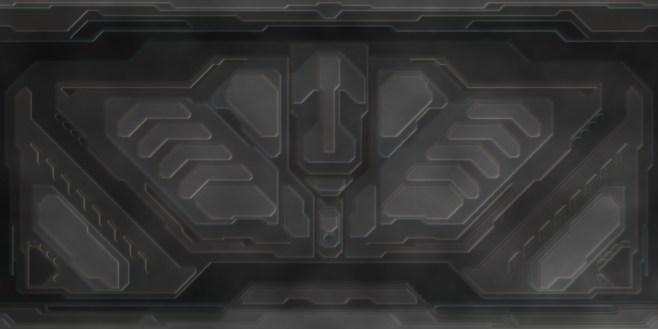 |
||||
|
|
|||||
|
XlzQwerty1 Joined: Aug 6, 2009
|
Posted: May 24, 2012 04:30 PM
Msg. 155 of 307
Quote: --- Original message by: grunt_eater What i meant was how to go from something 2d like this http://i159.photobucket.com/albums/t151/Maniac1000/wall2bump.png To something 3d and bumped looking like this http://i159.photobucket.com/albums/t151/Maniac1000/ilum1.png For your information, that first picture is already a bump map, but before it was put through a "normal map filter." It's like what a heightmap is. When run through a normal filter in photoshop, you get the blueish-purple normal map result. |
||||
|
|
|||||
|
grunt_eater Joined: Jan 26, 2011
Everything except biped rigging. |
Posted: May 24, 2012 04:53 PM
Msg. 156 of 307
Okay, my bad, but how would you go about making the effect seen in the second picture? i mean i'm sure i could do it, but i'm wondering if there's a better way of going about doing it then making brighter sections for higher and darker for lower and then putting highlights in to make it look better.
|
||||
|
|
|||||
|
GAIGHER Joined: Nov 5, 2008
|
Posted: May 25, 2012 01:24 PM
Msg. 157 of 307
Quote: --- Original message by: grunt_eater Yes !Okay, my bad, but how would you go about making the effect seen in the second picture? i mean i'm sure i could do it, but i'm wondering if there's a better way of going about doing it then making brighter sections for higher and darker for lower and then putting highlights in to make it look better. Your example is ugly !  Look and go download http://hce.halomaps.org/index.cfm?fid=6298 :  Look the tutorial for your example texture (very easy)... It is just addition !   Dirty ! Very dirty... No ? I'll make a tutorial for my method... Is not useful introduce bump in the texture, for "shader_environement". Add your bump to "bump properties" in Guerilla. This can be done for a "shader_model" Look for Z'team scenery:  New photo !  |
||||
|
|
|||||
|
Dalek Joined: Aug 12, 2011
|
Posted: May 25, 2012 02:58 PM
Msg. 158 of 307
et niveau "shader environment" t'as quoi pour la neige ?
good work again, wanna see more and more :) |
||||
|
|
|||||
|
GAIGHER Joined: Nov 5, 2008
|
Posted: Jun 1, 2012 04:24 PM
Msg. 159 of 307
Quote: --- Original message by: Dalek I tested an effect of crystals:What did you for ice (shader_environment) ? good work again, wanna see more and more :)  To look like this:  I start the base for teams.  Edited by GAIGHER on Jun 2, 2012 at 11:31 AM |
||||
|
|
|||||
|
Dalek Joined: Aug 12, 2011
|
Posted: Jun 1, 2012 05:56 PM
Msg. 160 of 307
Super la neige je suis pressé de jouer dessus, tiens moi au courant :)
|
||||
|
|
|||||
|
KingFisher Joined: Jun 10, 2011 
Creativity is the main element of level design. |
Posted: Jun 1, 2012 07:12 PM
Msg. 161 of 307
I got the hang of it now. I've always thought you would manually apply the burn and dodge to the texture, but you can just use the inner and outer glow layer styles.
|
||||
|
|
|||||
|
XlzQwerty1 Joined: Aug 6, 2009
|
Posted: Jun 1, 2012 07:40 PM
Msg. 162 of 307
Quote: --- Original message by: CaptainVidya Quote: --- Original message by: waffles you have to layer the channels from the normal map on the diffuse and blend them, i think when i faked bumped i used multiply as a blend mode? cant remember. Here's how I did it and it might refresh your memory.
Erm, that's a way to do it but it gives horrible results. |
||||
|
|
|||||
|
GAIGHER Joined: Nov 5, 2008
|
Posted: Jun 17, 2012 02:11 PM
Msg. 163 of 307
I helped "The floods remake project".
http://forum.halomaps.org/index.cfm%3Fpage=topic&topicID=40182  In 3Ds   I advance map !  I love MsPaint for Forerunner textures.  |
||||
|
|
|||||
|
SilentJacket Joined: Jun 9, 2012 
-Did I miss something?- |
Posted: Jun 17, 2012 02:21 PM
Msg. 164 of 307
Aren't the last 2 from solitude?
|
||||
|
|
|||||
|
darksoldier Joined: Dec 28, 2010 
Helo my friend, it's time to fight ;) |
Posted: Jun 17, 2012 02:28 PM
Msg. 165 of 307
Awesome update GAIGHER !!! Can't wait to play the map ;)
|
||||
|
|
|||||
|
Kal825B Joined: Jan 16, 2012 
Last son of Krypt... Oh wait, i'm a clone. |
Posted: Jun 17, 2012 10:06 PM
Msg. 166 of 307
Looks Awesome
|
||||
|
|
|||||
|
GAIGHER Joined: Nov 5, 2008
|
Posted: Aug 7, 2012 04:37 PM
Msg. 167 of 307
I finished the texture:
  I added frame door for teleporter plan:  The teleporter plan (in Halo):  Their animated (in Halo): http://gaighermod.free.fr/NH4NO3/img/news_tell.gif http://gaighermod.free.fr/NH4NO3/img/news_tell_bord.gif http://sda3.free.fr/GAIGHER/coeur.gif |
||||
|
|
|||||
|
ChBgt909 Joined: Sep 10, 2011
ᶘ ᵒᴥᵒᶅ |
Posted: Sep 3, 2012 01:02 AM
Msg. 168 of 307
so... bumpdates? :)
|
||||
|
|
|||||
|
GAIGHER Joined: Nov 5, 2008
|
Posted: Sep 21, 2012 02:16 PM
Msg. 169 of 307
Waterfall ice:
      |
||||
|
|
|||||
|
SilentJacket Joined: Jun 9, 2012
-Did I miss something?- |
Posted: Sep 21, 2012 02:24 PM
Msg. 170 of 307
This is gunna be good!
(as a side note, can you please put extra detail in the natural components, like the ice and rock, I think that this could be a truly exceptional map.) |
||||
|
|
|||||
|
Ubergoober Joined: Oct 11, 2010 |
Posted: Sep 22, 2012 04:57 AM
Msg. 171 of 307
how long do u think it will take to complete your 'with whiteness' map Gaigher?
|
||||
|
|
|||||
|
ptowery Joined: Aug 28, 2007 
oify |
Posted: Sep 25, 2012 03:08 AM
Msg. 172 of 307
This looks great. Love all the custom textures, almost look identical to halo 3's.
|
||||
|
|
|||||
|
GAIGHER Joined: Nov 5, 2008
|
Posted: Sep 28, 2012 01:40 AM
Msg. 173 of 307
Quote: --- Original message by: SilentJacketcan you please put extra detail in the natural components Halo has limits, i do not want to cross. Good texture should suffice. Quote: --- Original message by: Ubergooberhow long do u think it will take to complete your 'with whiteness' map Gaigher? I don't always have the time, 2 or 3 months, maybe...   |
||||
|
|
|||||
|
ally Joined: Jun 23, 2010 
Aye Ready |
Posted: Sep 28, 2012 01:51 AM
Msg. 174 of 307
looks spot on, i too have noticed that with the new halo3 textures gravemind made extractable,
are good for using as modeling references to get the forerunner style. just looking at for example the panel_poop_ramp_tech, i see where you got the forerunner shapes from which are the dividing walls of your model :) Edited by ally on Sep 28, 2012 at 01:51 AM |
||||
|
|
|||||
|
GAIGHER Joined: Nov 5, 2008
|
Posted: Sep 28, 2012 06:41 AM
Msg. 175 of 307
Halo 3 texture (waste_metal_bowlspike_dif):
 My version:  I preferred to do mine. For have the same color everywhere. If it is dirty in the game, i use the H3. |
||||
|
|
|||||
| Page 5 of 9 | Go to page: · 1 · 2 · 3 · 4 · [5] · 6 · 7 · 8 · 9 · Prev · Next |

|
