A Community discussion forum for Halo Custom Edition, Halo 2 Vista, Portal and Halo Machinima
|
 Home
Home Search
 Register
 Login
Login Member List
 Recent Posts
| »Forums Index »Halo Custom Edition (Bungie/Gearbox) »Halo CE General Discussion »[UnOfficial} ENB Screen Shot Thread | 
|
| Page 1 of 2 | Go to page: · [1] · 2 · Next |
| Author | Topic: [UnOfficial} ENB Screen Shot Thread (70 messages, Page 1 of 2) | ||||
| Moderators: Dennis | |||||
 K_I_D Joined: Nov 27, 2008 
If you are cool, this will be your avatar quote. |
Posted: Nov 18, 2011 11:23 PM
Msg. 1 of 70
Since So many other threads caught on, I figured why not make a catchy one myself.
If you don't know what enb does, it basically alters the graphics in your game. It is obviously much more complicated than that, so go google it and download it! Very easy to install and use.      So Go Ahead and post yours!! |
||||


|
|||||
|
OrangeJuice Joined: Jan 29, 2009 
Documentation and debug.txt |
Posted: Nov 19, 2011 12:02 AM
Msg. 2 of 70
    I'm doing it wrong. Edited by OrangeJuice on Nov 19, 2011 at 12:28 AM Edited by OrangeJuice on Nov 19, 2011 at 12:35 AM |
||||
|
|
|||||
|
Tuaha Joined: Aug 1, 2008 
|
Posted: Nov 19, 2011 12:31 AM
Msg. 3 of 70
Can you PM your config to me tommy? The blur in the second pic looks interesting.
Or did you Photoshop it :O  |
||||
|
|
|||||
|
K_I_D Joined: Nov 27, 2008
If you are cool, this will be your avatar quote. |
Posted: Nov 19, 2011 12:46 AM
Msg. 4 of 70
http://www.gtagaming.com/downloads/gta-san-andreas/misc-mods/10997
Use that. Just throw all of the files in your CE root directory. Some times it A. Won't Start B. Work on maps exposed outdoors However, if it won't start, just keep trying and eventually it will. |
||||
|
|
|||||
|
Jaz Joined: Mar 21, 2010 
[Insert sarcastic comment here] |
Posted: Nov 19, 2011 06:42 AM
Msg. 5 of 70
Bloom's kinda awkward. It looks stupid on maps with dark skies, because they shouldn't be that bright with dark skies. And it looks stupid indoors because the sun can't shine indoors unless there are windows.
I used a mod that's similar to enbseries, but that's better and can do more, and can do antialiasing, instead, and used subtle bloom; and I personally prefer it to the overpowering bloom that enbseries usually runs. It's kinda hard to see the difference with such subtle bloom though so screenshots don't show it's true glory. I'll post two anyway though, but just remember, it looks much better in-game. 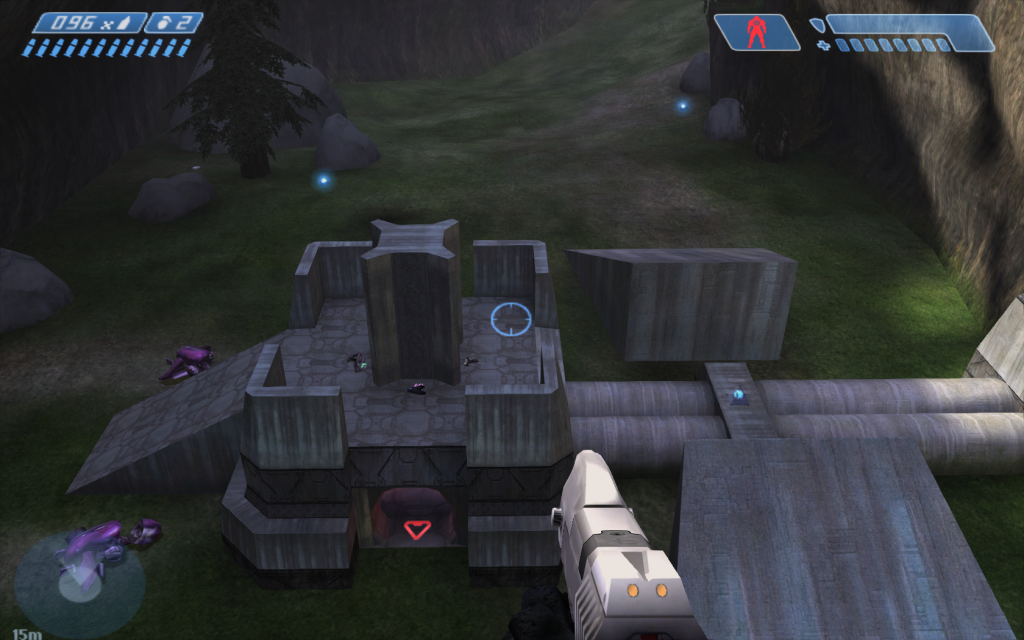 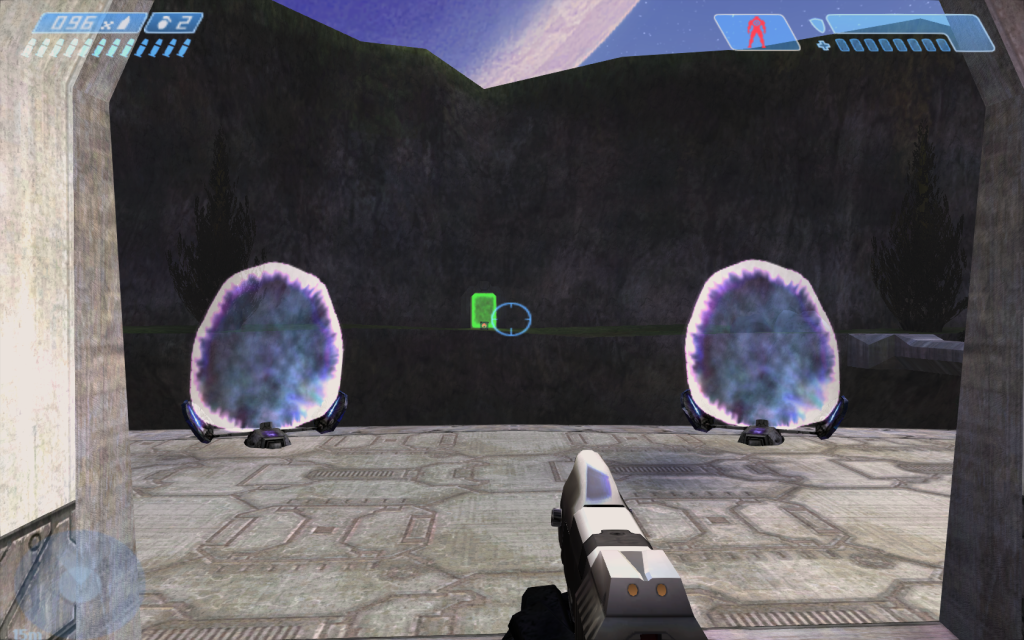 Also please note that the settings are currently WIP and I'm still improving upon them. I'm also working on up-resing some of the textures; which is failing atm cause my texturing skills suck. Edited by Jaz on Nov 19, 2011 at 06:42 AM |
||||
|
|
|||||
|
Tuaha Joined: Aug 1, 2008
|
Posted: Nov 19, 2011 07:39 AM
Msg. 6 of 70
Quote: --- Original message by: K_I_D http://www.gtagaming.com/downloads/gta-san-andreas/misc-mods/10997 Use that. Just throw all of the files in your CE root directory. Some times it A. Won't Start B. Work on maps exposed outdoors However, if it won't start, just keep trying and eventually it will. That one's too dark and gritty for my style, though can it do more effects than the normal San Andreas 0.075 version? |
||||
|
|
|||||
|
Link Joined: Aug 31, 2008 
Link here come to town! |
Posted: Nov 19, 2011 10:16 AM
Msg. 7 of 70
Here's mine, everything high with 1920x1080p resolution on my new computer:
 Kinda looks like Halo CE Anniversary graphics there doesn't it? xD |
||||
|
|
|||||
|
XlzQwerty1 Joined: Aug 6, 2009 
|
Posted: Nov 19, 2011 10:25 AM
Msg. 8 of 70
Quote: --- Original message by: SHaDoW LiNk Here's mine, everything high with 1920x1080p resolution on my new computer: http://screenshot.xfire.com/s/119446808-3.jpg Kinda looks like Halo CE Anniversary graphics there doesn't it? xD Cool, you say it's 1920x1080p yet the picture you took was not 1920x1080 resolution. |
||||
|
|
|||||
|
K_I_D Joined: Nov 27, 2008
If you are cool, this will be your avatar quote. |
Posted: Nov 19, 2011 10:51 AM
Msg. 9 of 70
Guys post your ENB settings if you want to help some people. And Shadow Link that looks amazing!
|
||||
|
|
|||||
|
Tuaha Joined: Aug 1, 2008
|
Posted: Nov 19, 2011 12:00 PM
Msg. 10 of 70
[PROXY]  Old screenshot - likely doesn't represent the settings above. |
||||
|
|
|||||
|
K_I_D Joined: Nov 27, 2008
If you are cool, this will be your avatar quote. |
Posted: Nov 19, 2011 12:04 PM
Msg. 11 of 70
WOW that looks sick! Anyone know a map with great graphics that we can try this on?
  BTW- if anyone is using the pack I linked, Just let it stay on from the start and it won't crash in any map! EDIT: I know this ENB thing kind of works off the game engine, and I have no Idea how to configure it. When I used mine in GTA SA PC the DOF actually worked. Does anyone know how to enable it in Halo?  Edited by K_I_D on Nov 19, 2011 at 12:06 PM |
||||
|
|
|||||
|
Tuaha Joined: Aug 1, 2008
|
Posted: Nov 19, 2011 12:11 PM
Msg. 12 of 70
Correct me if I'm wrong, but Halo doesn't have the right shader model to support effects like motion blur, DOF etc. And also ENB was originally made for San Andreas. Halo never was supported.
Inb4 opensauce Edited by Tuaha on Nov 19, 2011 at 12:13 PM |
||||
|
|
|||||
|
K_I_D Joined: Nov 27, 2008
If you are cool, this will be your avatar quote. |
Posted: Nov 19, 2011 12:14 PM
Msg. 13 of 70
I guess thats it then! Like I said I've got no idea how it works
|
||||
|
|
|||||
|
Jaz Joined: Mar 21, 2010
[Insert sarcastic comment here] |
Posted: Nov 19, 2011 12:26 PM
Msg. 14 of 70
Enbseries should work properly. Try contacting the creator to see if he can support Halo properly. If he's got enough time to optimize enbseries for Skyrim entirely, surely he can spend a few minutes on Halo. :I
|
||||
|
|
|||||
|
Slayer117 Joined: Oct 3, 2008 
Host of CE3 2010-forever! |
Posted: Nov 19, 2011 01:12 PM
Msg. 15 of 70
I tried this on the map Church! one word... EPIC!
|
||||
|
|
|||||
|
K_I_D Joined: Nov 27, 2008
If you are cool, this will be your avatar quote. |
Posted: Nov 19, 2011 01:15 PM
Msg. 16 of 70
Quote: --- Original message by: Slayer117 I tried this on the map Church! one word... EPIC! Y U NO PICS?zzzzz     Edited by K_I_D on Nov 19, 2011 at 01:52 PM |
||||
|
|
|||||
|
rocknroll237 Joined: Nov 19, 2011 
Rock 'N' Roll Baby! |
Posted: Nov 19, 2011 04:36 PM
Msg. 17 of 70
The ENB series mod looks too dark. Does anyone know any decent settings that I could use?
Also, which config file should I edit - the Resi 4 config or the general ENB config? Edited by rocknroll237 on Nov 19, 2011 at 04:36 PM |
||||
|
|
|||||
|
Jaz Joined: Mar 21, 2010
[Insert sarcastic comment here] |
Posted: Nov 19, 2011 05:06 PM
Msg. 18 of 70
Quote: --- Original message by: rocknroll237 The ENB series mod looks too dark. Does anyone know any decent settings that I could use? Also, which config file should I edit - the Resi 4 config or the general ENB config? Edited by rocknroll237 on Nov 19, 2011 at 04:36 PM It is far too dark and the bloom's way over the top. I personally prefer FXAA post process injector as it sticks to the Halo style while also updating the graphics immensely, without having blinding bloom. However, if you're a bloom fan, you'll probably prefer enbseries -.- I don't know how to change the saturation on enbseries, but I think you change both the config files to edit saturation. They both seem to have saturation somewhere in them. |
||||
|
|
|||||
|
Tuaha Joined: Aug 1, 2008
|
Posted: Nov 20, 2011 06:26 AM
Msg. 19 of 70
Quote: --- Original message by: rocknroll237 The ENB series mod looks too dark. Does anyone know any decent settings that I could use? Also, which config file should I edit - the Resi 4 config or the general ENB config? Edited by rocknroll237 on Nov 19, 2011 at 04:36 PM [COLORCORRECTION] DarkeningAmountDay=8 ScreenLevelDay=22 ScreenLevelNight=2 DarkeningAmountNight=-2 GammaCurveDay=3 GammaCurveNight=-1 ColorSaturationDay=1 ColorSaturationNight=-1 UsePaletteTexture=0 Generally these are the settings that control how dark or bright the game is. If you want bloom, but no changes to the brightness, then simply set the values of DarkeningAmountNight and DarkeningAmountDay to 0. Also @Jaz, I'm sure you know the ENB bloom is adjustable. Adding subtle bloom is easy. Saturation settings are also listed here. Edited by Tuaha on Nov 20, 2011 at 06:26 AM |
||||
|
|
|||||
|
Jaz Joined: Mar 21, 2010
[Insert sarcastic comment here] |
Posted: Nov 20, 2011 06:42 AM
Msg. 20 of 70
Quote: --- Original message by: Tuaha Quote: --- Original message by: rocknroll237 The ENB series mod looks too dark. Does anyone know any decent settings that I could use? Also, which config file should I edit - the Resi 4 config or the general ENB config? Edited by rocknroll237 on Nov 19, 2011 at 04:36 PM [COLORCORRECTION] DarkeningAmountDay=8 ScreenLevelDay=22 ScreenLevelNight=2 DarkeningAmountNight=-2 GammaCurveDay=3 GammaCurveNight=-1 ColorSaturationDay=1 ColorSaturationNight=-1 UsePaletteTexture=0 Generally these are the settings that control how dark or bright the game is. If you want bloom, but no changes to the brightness, then simply set the values of DarkeningAmountNight and DarkeningAmountDay to 0. Also @Jaz, I'm sure you know the ENB bloom is adjustable. Adding subtle bloom is easy. Saturation settings are also listed here. Edited by Tuaha on Nov 20, 2011 at 06:26 AM Is there any way to enable sharpening on enbseries? Those settings are pretty awesome on The Library I do admit, but I had some good sharpening settings on the FXAA injector and I'd like to port them over. |
||||
|
|
|||||
|
Tuaha Joined: Aug 1, 2008
|
Posted: Nov 20, 2011 07:17 AM
Msg. 21 of 70
Nope, sorry, the only effects that work for Halo are bloom and colour correction (which is a bit like tone mapping in this context). Technically SSAO and shadows work, but they both do absolutely nothing visually and cause severe framerate drops.
|
||||
|
|
|||||
|
Jaz Joined: Mar 21, 2010
[Insert sarcastic comment here] |
Posted: Nov 20, 2011 07:25 AM
Msg. 22 of 70
Quote: --- Original message by: Tuaha Nope, sorry, the only effects that work for Halo are bloom and colour correction (which is a bit like tone mapping in this context). Technically SSAO and shadows work, but they both do absolutely nothing visually and cause severe framerate drops. Yeah, SSAO and shadows seem useless, but they didn't give me any framerate drops whatsoever. And try setting all the bumpmapping settings in the enbs-re4 config file to 1500. Looks awesome. Then add another 0 to see what happens, which is what I'm about to do :P E: Lol, I've got some enbseries settings that look epic. I'll release them once I've checked there's no bugs. I've noticed the settings look worse on multiplayer than on singleplayer. Is the shadering system different on mp? Edited by Jaz on Nov 20, 2011 at 08:11 AM |
||||
|
|
|||||
|
K_I_D Joined: Nov 27, 2008
If you are cool, this will be your avatar quote. |
Posted: Nov 20, 2011 01:28 PM
Msg. 23 of 70
Lemme know when your settings are ready! The darkness is killing. But until then......................
    PS Bloom Nazi's- G T F O :D |
||||
|
|
|||||
|
Jaz Joined: Mar 21, 2010
[Insert sarcastic comment here] |
Posted: Nov 20, 2011 02:48 PM
Msg. 24 of 70
I can't really do anything about the darkness. In fact I made it even darker, just more realistically dark. I hate the fact that in the original graphics, lights can somehow spread through an entire area, even past walls.
|
||||
|
|
|||||
|
K_I_D Joined: Nov 27, 2008
If you are cool, this will be your avatar quote. |
Posted: Nov 20, 2011 03:03 PM
Msg. 25 of 70
Damn, so is there anything we can do to improve it?
And more people should post screen shots its fun, sometimes you just need patience if it crashes. |
||||
|
|
|||||
|
ODX Joined: Jul 26, 2007 
A rare sight, indeed. |
Posted: Nov 20, 2011 03:15 PM
Msg. 26 of 70
Try Church:
http://hce.halomaps.org/index.cfm?fid=3135 |
||||
|
|
|||||
|
K_I_D Joined: Nov 27, 2008
If you are cool, this will be your avatar quote. |
Posted: Nov 20, 2011 03:17 PM
Msg. 27 of 70
 Horribly Dark, on my settings anyway. |
||||
|
|
|||||
|
Jaz Joined: Mar 21, 2010
[Insert sarcastic comment here] |
Posted: Nov 20, 2011 03:21 PM
Msg. 28 of 70
Quote: --- Original message by: K_I_D Damn, so is there anything we can do to improve it? Yeah, you can turn ScreenLevelDay and ScreenLevelNight up in the COLORCORRECTION section. It slightly reduces the quality of graphics, but if you really hate the dark, that's the best solution. I tried turning ScreenLevelDay up to 888 and ScreenLevelNight up to 22 and there was a significant increase in brightness, while still leaving the area slightly dark at night, and bloom still running. Only tested it on the camps before the Truth and Reconciliation and on the Truth and Reconciliation so far though, so I'm not sure what my settings'd be like on ice maps or on grassy maps. |
||||
|
|
|||||
|
xKRONNiKx Joined: Nov 15, 2011 
Turkey Farm. |
Posted: Nov 20, 2011 09:51 PM
Msg. 29 of 70
hmm, seems kind of risky to be throwin this into my directory, is it safe? by safe i mean it wont randomly make my custom edition stop workin. And does it have to replace any of the files already in the directory? I dunno, I've used this with San Andreas before.
Edited by xKRONNiKx on Nov 20, 2011 at 10:06 PM |
||||
|
|
|||||
|
Slayer117 Joined: Oct 3, 2008
Host of CE3 2010-forever! |
Posted: Nov 20, 2011 10:05 PM
Msg. 30 of 70
This is perfectly safe. My CE works fine everytime with it. No it does not replace any of your original CE files.
|
||||
|
|
|||||
|
xKRONNiKx Joined: Nov 15, 2011
Turkey Farm. |
Posted: Nov 20, 2011 10:08 PM
Msg. 31 of 70
Alright, i tried it, but i just need to know if i am able to turn it off in-game like in Gta:SA. Also, are there any settings where i can up the brightness or contrast a little?
|
||||
|
|
|||||
|
Slayer117 Joined: Oct 3, 2008
Host of CE3 2010-forever! |
Posted: Nov 20, 2011 10:11 PM
Msg. 32 of 70
its one of the main files you put into your directory it should be called "enbseries" with out quotations. Thats your Settings.
I don't know if it can be turned off mid game. Edited by Slayer117 on Nov 20, 2011 at 10:12 PM |
||||
|
|
|||||
|
Wesker Joined: Jun 8, 2011 
Your Future Hinges upon This Fight!!! |
Posted: Nov 20, 2011 10:16 PM
Msg. 33 of 70
these screen shots are begining to look cinematic
|
||||
|
|
|||||
|
xKRONNiKx Joined: Nov 15, 2011
Turkey Farm. |
Posted: Nov 20, 2011 10:40 PM
Msg. 34 of 70
To toggle it on or off in game press Shift + F12
Edited by xKRONNiKx on Nov 20, 2011 at 11:09 PM |
||||
|
|
|||||
|
grunt_eater Joined: Jan 26, 2011 
Everything except biped rigging. |
Posted: Nov 21, 2011 11:18 AM
Msg. 35 of 70
Quote: --- Original message by: K_I_D http://www.gtagaming.com/downloads/gta-san-andreas/misc-mods/10997 Use that. Just throw all of the files in your CE root directory. Some times it A. Won't Start B. Work on maps exposed outdoors However, if it won't start, just keep trying and eventually it will. i extract strait to my halo ce directory and try to open it. it says "A problem occurred trying to initialize Direct3D. Hardware acceleration may be disabled, please run DXDIAG What does this mean and how do i make it work? |
||||
|
|
|||||
| Page 1 of 2 | Go to page: · [1] · 2 · Next |

|
