A Community discussion forum for Halo Custom Edition, Halo 2 Vista, Portal and Halo Machinima
|
 Home
Home Search
 Register
 Login
Login Member List
 Recent Posts
| »Forums Index »Halo Custom Edition (Bungie/Gearbox) »Halo CE General Discussion »How do you make a multi purpose map? | 
|
| Author | Topic: How do you make a multi purpose map? (13 messages, Page 1 of 1) | ||||
| Moderators: Dennis | |||||
 Dark Neon Joined: Jun 8, 2009 
|
Posted: Sep 12, 2009 12:52 PM
Msg. 1 of 13
Title. ^^^^
|
||||


|
|||||
|
MasterRyan Joined: Jul 25, 2008 
Leader of Ryan C. Designs! |
Posted: Sep 12, 2009 12:54 PM
Msg. 2 of 13
ask Rambo from Bloodcreek, his maps are made for every purpose!
|
||||
|
|
|||||
|
Gamma927 Joined: Jun 12, 2008 
Steam: gamma927 |
Posted: Sep 12, 2009 12:55 PM
Msg. 3 of 13
Don't post if you have no idea what you're talking about. He's talking about a BITMAP, not a map.
|
||||
|
|
|||||
|
Dark Neon Joined: Jun 8, 2009
|
Posted: Sep 12, 2009 01:00 PM
Msg. 4 of 13
Probally should have made that clearer. A bitmap, not a actually map.
|
||||
|
|
|||||
|
Headhunter09 Joined: May 6, 2008 
This is the truth. |
Posted: Sep 12, 2009 01:04 PM
Msg. 5 of 13
Quote: --- Original message by: MasterRyan ask Rambo from Bloodcreek, his maps are made for every purpose! Wow... |
||||
|
|
|||||
|
Maniac1000 -Helpful Poster- Joined: Feb 24, 2007 
|
Posted: Sep 12, 2009 01:58 PM
Msg. 6 of 13
 |
||||
|
|
|||||
|
delta49 Joined: Jan 23, 2007 
I don't always make shaders.. |
Posted: Sep 12, 2009 02:09 PM
Msg. 7 of 13
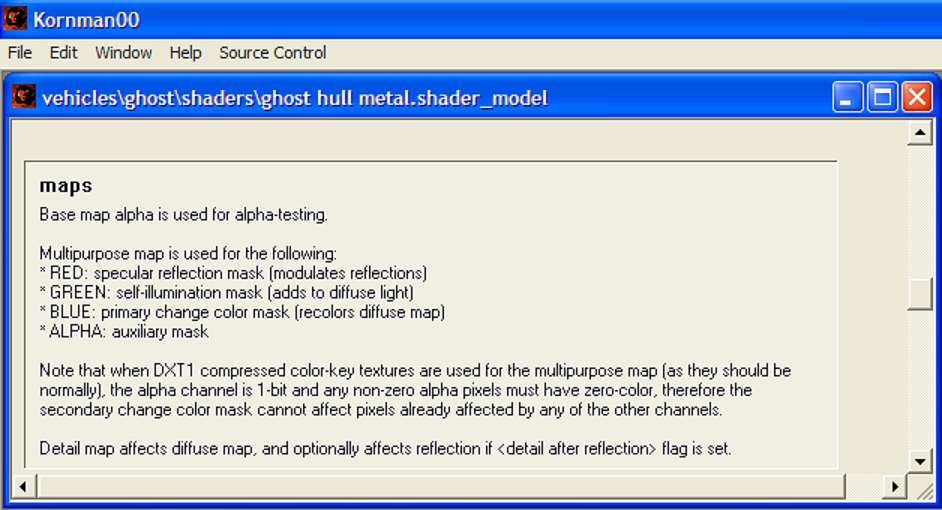
Quote: --- Original message by: Maniac1000 The color descriptions lie. Blue is not change color, the alpha is. I know Red is specular, and Green is self-illumination. Not sure what Blue is for, but I just leave it the same as the Red channel. |
||||
|
|
|||||
|
Maniac1000 -Helpful Poster- Joined: Feb 24, 2007
|
Posted: Sep 12, 2009 02:18 PM
Msg. 8 of 13
It works from the alpha/auxiliary mask.
|
||||
|
|
|||||
|
kirby_422 Joined: Jan 22, 2006 
Apparently public enemy number 1? |
Posted: Sep 12, 2009 09:42 PM
Msg. 9 of 13
Do you have something like photoshop? (gimp should be basicly the same)
You know that layers part? there is a tab there for Channels. Go into the channels, and directly edit the Green Red and Blue. After that, it really is just up to your photo editing skills and techniques (I personaly like the brite/contrast tool to bring details out on blue and red, and then use the rectangle tool on green to delete everything except light texture areas) |
||||
|
|
|||||
|
Maniac1000 -Helpful Poster- Joined: Feb 24, 2007
|
Posted: Sep 13, 2009 12:11 AM
Msg. 10 of 13
Its really odd because i was going to upload and link to that really old multi tut you gave me, but i deleted it just the day before.
sod's law i guess. |
||||
|
|
|||||
|
Advancebo Joined: Jan 14, 2008 
|
Posted: Sep 13, 2009 12:39 AM
Msg. 11 of 13
Blue has something to do with the detail map applied.
|
||||
|
|
|||||
|
Enzo03 - Screenshot Guru - Joined: Aug 3, 2007 
I'd rather go without than take what you'd bring. |
Posted: Sep 13, 2009 02:53 PM
Msg. 12 of 13
...
The screenshot posted is indeed for the most part correct, but often the color will change even if there is no blue on the multipurpose map. The detail map can be modulated through many different options, all of which I cannot remember because it has been a whole fraggin' year since I last even TOUCHED any versions of Sapien. But if I remember right, you can set the detail map to be modulated by the color and/or alpha of the multipurpose, and also set it so that it is shown "above" or "below" the reflection (cube map) applied to the model for which the multipurpose is used for and I am now just adding more and more words to make the sentence increasingly and needlessly longer so that by the end you realize that over half the ridiculously lengthy sentence was, in its entirety, offtopic and said absolutely nothing at all!!! |
||||
|
|
|||||
|
Maniac1000 -Helpful Poster- Joined: Feb 24, 2007
|
Posted: Sep 13, 2009 06:37 PM
Msg. 13 of 13
LOL
he is right, it can be modulated by different things. |
||||
|
|
|||||

|
