A Community discussion forum for Halo Custom Edition, Halo 2 Vista, Portal and Halo Machinima
|
 Home
Home Search
 Register
 Login
Login Member List
 Recent Posts
| »Forums Index »Halo Custom Edition (Bungie/Gearbox) »Halo CE General Discussion »Semi-Official Gallery [WIPS] | 
|
| Page 104 of 285 | Go to page: · 1 · ... · 101 · 102 · 103 · [104] · 105 · 106 · 107 · ... · 285 · Prev · Next |
| Author | Topic: Semi-Official Gallery [WIPS] (9951 messages, Page 104 of 285) | ||||
| Moderators: Dennis | |||||
 SeL Joined: Dec 15, 2010 
twitter.com/TeamFalldog |
Posted: Dec 2, 2011 07:24 PM
Msg. 3606 of 9951
I only made the untextured wall pieces, the rest are stock amnesia assets.
Edited by SeL on Dec 2, 2011 at 07:24 PM |
||||


|
|||||
|
Maniac1000 -Helpful Poster- Joined: Feb 24, 2007 
|
Posted: Dec 2, 2011 07:37 PM
Msg. 3607 of 9951
Everyday im shufflin.
 |
||||
|
|
|||||
|
Spartan314 Joined: Aug 21, 2010 
Former biped rigger & FP animator |
Posted: Dec 4, 2011 01:02 AM
Msg. 3608 of 9951
http://www.xfire.com/video/510326/
How's this for a newbie? |
||||
|
|
|||||
|
The Barron Joined: Oct 14, 2007 
Howdy |
Posted: Dec 4, 2011 03:27 AM
Msg. 3609 of 9951
Quote: --- Original message by: Maniac1000 Everyday im shufflin. ^One of the best songs in all existence. I would play a map with these bipeds and the song playing any day. |
||||
|
|
|||||
|
DEEhunter Joined: Dec 16, 2006 
|
Posted: Dec 4, 2011 11:21 PM
Msg. 3610 of 9951
 XSI is everything max should have been. It can snap your edge cuts to 15 degree increments. Easy forerunner architecture. |
||||
|
|
|||||
|
heempy Joined: Apr 13, 2011 
|
Posted: Dec 4, 2011 11:23 PM
Msg. 3611 of 9951
Quote: --- Original message by: Maniac1000 Everyday im shufflin. http://www.youtube.com/watch?v=1zkugyGWBiw |
||||
|
|
|||||
|
OrangeJuice Joined: Jan 29, 2009 
I hand-paint bumpmaps! ❤ desaturate is baad |
Posted: Dec 5, 2011 12:03 AM
Msg. 3612 of 9951
Those are some cool toys.
|
||||
|
|
|||||
|
Maniac1000 -Helpful Poster- Joined: Feb 24, 2007
|
Posted: Dec 5, 2011 12:18 AM
Msg. 3613 of 9951
Max can snap to grids and or verts, edges,primatives and any angle you specify.
|
||||
|
|
|||||
|
DEEhunter Joined: Dec 16, 2006
|
Posted: Dec 5, 2011 01:15 AM
Msg. 3614 of 9951
Max can snap to edges or the middle of edges and to grids. That still isn't an arbitrary 15 degree increment snap. I can even set the increments I want it to snap at. I can do this on any mesh topology as well.
I can have it test a range of input values for any modifier and it will even show me little thumbnails. 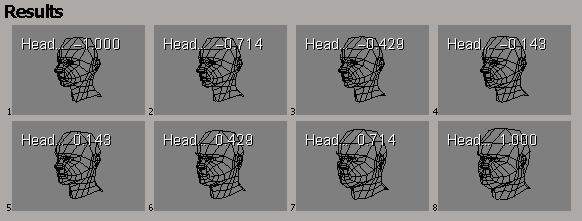 The entire software is just a dream to me. I can program GLSL shaders. Make my own procedural meshes. Unwrap like a god. It animates with a larger toolset than maya. Tabbed base workflow and full modularization of tools. Proper mesh optimization. Customizable tools. I can go on. This is just the perfect 3d modeling software. And best of all  Try getting chamfers/bevels like this in max. Edited by DEEhunter on Dec 5, 2011 at 01:16 AM |
||||
|
|
|||||
|
Spartan314 Joined: Aug 21, 2010
Former biped rigger & FP animator |
Posted: Dec 5, 2011 01:43 AM
Msg. 3615 of 9951
Challenge accepted anyone?
|
||||
|
|
|||||
|
SlappyThePirate Joined: Aug 24, 2009 
You are irritating, I'll release nothing |
Posted: Dec 5, 2011 03:22 PM
Msg. 3616 of 9951
If only it exported to halo.
|
||||
|
|
|||||
|
XlzQwerty1 Joined: Aug 6, 2009 
|
Posted: Dec 5, 2011 03:28 PM
Msg. 3617 of 9951
That is an extremely awesome chamfer. Y U NO DO THIS 3DS MAX?
What you can do is model in XSI then export to 3ds max as collada or fbx format, and then fix any export errors. Edited by XlzQwerty1 on Dec 5, 2011 at 03:29 PM |
||||
|
|
|||||
|
Jaz Joined: Mar 21, 2010 
[Insert sarcastic comment here] |
Posted: Dec 5, 2011 03:44 PM
Msg. 3618 of 9951
Quote: --- Original message by: DEEhunter http://i.imgur.com/4YdHq.gif XSI is everything max should have been. It can snap your edge cuts to 15 degree increments. Easy forerunner architecture. Looks cool but put it as a link please. I can barely type right now it's so laggy. -.- |
||||
|
|
|||||
|
DEEhunter Joined: Dec 16, 2006
|
Posted: Dec 5, 2011 06:51 PM
Msg. 3619 of 9951
Quote: --- Original message by: SlappyThePirate If only it exported to halo. If blue streak was open source it would be super easy. XSI supports C# C++ javascript and python as scripting languages. |
||||
|
|
|||||
|
XlzQwerty1 Joined: Aug 6, 2009
|
Posted: Dec 5, 2011 07:29 PM
Msg. 3620 of 9951
Maybe ask bobbysoon? He edited the bluestreak exporter... Don't know if that helps or makes a difference at all...
|
||||
|
|
|||||
|
kirby_422 Joined: Jan 22, 2006 
Apparently public enemy number 1? |
Posted: Dec 6, 2011 12:11 AM
Msg. 3621 of 9951
Quote: --- Original message by: DEEhunter Quote: --- Original message by: SlappyThePirate If only it exported to halo. If blue streak was open source it would be super easy. XSI supports C# C++ javascript and python as scripting languages. .. you've never opened a max script in notepad before, have you? The bluestreak JMS exporter is laid out pretty darn nice... serious, open it in notepad, read all about the copywrite at the top, and see the easy to read layout just below. |
||||
|
|
|||||
|
DEEhunter Joined: Dec 16, 2006
|
Posted: Dec 6, 2011 01:09 AM
Msg. 3622 of 9951
Quote: --- Original message by: kirby_422 Quote: --- Original message by: DEEhunter Quote: --- Original message by: SlappyThePirate If only it exported to halo. If blue streak was open source it would be super easy. XSI supports C# C++ javascript and python as scripting languages. .. you've never opened a max script in notepad before, have you? The bluestreak JMS exporter is laid out pretty darn nice... serious, open it in notepad, read all about the copywrite at the top, and see the easy to read layout just below. Last time I opened bluestreak in notepad it was garbage due to it being encrypted. Oh well. I don't intend to port this to XSI anyways. I haven't messed with max scripts in ages. |
||||
|
|
|||||
|
XlzQwerty1 Joined: Aug 6, 2009
|
Posted: Dec 6, 2011 08:24 AM
Msg. 3623 of 9951
aw
|
||||
|
|
|||||
|
SeL Joined: Dec 15, 2010
twitter.com/TeamFalldog |
Posted: Dec 6, 2011 12:48 PM
Msg. 3624 of 9951
 |
||||
|
|
|||||
|
DEEhunter Joined: Dec 16, 2006
|
Posted: Dec 6, 2011 12:52 PM
Msg. 3625 of 9951
Quote: --- Original message by: Private Caboose In 3ds max, just press the "s" key on your keyboard and it'll snap to the co-ordinates in full on your grid. Like XSI. Too bad that isn't what xsi was doing in my pic. XSI was snapping the edge cut by 15 degree increments. Not snapping to a grid so you can have any length or topology and it will do it properly. And S just enables snapping. Doesn't exactly snap to grid unless you tell it to in the snap options. (right click the icon with the 3 and the magnet) Also, was trying to mess with max scripts again. Found this in my tools folder. Not sure where I got it from. It lets you do quad connects around corners and such. Requires 3ds max 2010 and up.  macroScript QuadConnect Edited by DEEhunter on Dec 6, 2011 at 12:54 PM |
||||
|
|
|||||
|
DarkHalo003 Joined: Mar 10, 2008 
All ARs Need Green Little Buttons. |
Posted: Dec 6, 2011 04:56 PM
Msg. 3626 of 9951
Looking nice Sel, but you need to make the light less intrusive. I doubt it'd be that bright and intense at night.
|
||||
|
|
|||||
|
SeL Joined: Dec 15, 2010
twitter.com/TeamFalldog |
Posted: Dec 6, 2011 06:45 PM
Msg. 3627 of 9951
Quote: --- Original message by: DarkHalo003 Looking nice Sel, but you need to make the light less intrusive. I doubt it'd be that bright and intense at night. Well it's more that the skybox is currently set to black, and the beams look extra bright since they're in front of a white wall, you can see this effect on the lights too. But yeah you're right the beams do look silly as they are. |
||||
|
|
|||||
|
Spartan314 Joined: Aug 21, 2010
Former biped rigger & FP animator |
Posted: Dec 8, 2011 06:19 PM
Msg. 3628 of 9951
|
||||
|
|
|||||
|
DEEhunter Joined: Dec 16, 2006
|
Posted: Dec 8, 2011 07:19 PM
Msg. 3629 of 9951
Finally, a video on correctly making cliff geometry as opposed to the usual tri-mess that I have been seeing a lot of you guys do.
http://www.youtube.com/watch?v=4FBCTI4MLMo http://www.youtube.com/watch?v=X4zjkvxUQnY Dont go claiming it is too high poly. It is only as high poly as you make it. This person was clearly making it for next-gen purposes and he needed the extra geometry seeing that it uses vertex colors as opposed to halo CE's splat maps. http://www.polycount.com/forum/showthread.php?t=81800 |
||||
|
|
|||||
|
Higuy Joined: Mar 6, 2007 
@lucasgovatos |
Posted: Dec 8, 2011 08:21 PM
Msg. 3630 of 9951
Quote: --- Original message by: DEEhunter Finally, a video on correctly making cliff geometry as opposed to the usual tri-mess that I have been seeing a lot of you guys do. http://www.youtube.com/watch?v=4FBCTI4MLMo http://www.youtube.com/watch?v=X4zjkvxUQnY There is no "correct" way on making any geometry, (yes, there is better modeling techniques than others though), in the end it souly matters on what the end product looks like and if it works good ingame. Your technique looks good but some of the geometry looks pretty unnatural (End product ingame looked alright though??). I'll give it a try sometime. Edited by Higuy on Dec 8, 2011 at 08:23 PM |
||||
|
|
|||||
|
Joshflighter Joined: May 23, 2009 
Former CMT Team Co-Leader |
Posted: Dec 8, 2011 08:26 PM
Msg. 3631 of 9951
That wasn't created by Dee. It was created by a guy over at Polycount, who is pretty much a god at modeling. :)
EDIT: This is the guy: http://www.polycount.com/forum/showthread.php?t=81800&page=10 And yes, it looks amazing ingame. haha:    Go through the thread to see more. Fact is, what dee posted, is a very good learning source. Edited by Joshflighter on Dec 8, 2011 at 08:29 PM |
||||
|
|
|||||
|
Higuy Joined: Mar 6, 2007
@lucasgovatos |
Posted: Dec 8, 2011 08:29 PM
Msg. 3632 of 9951
oh, well my points still kinda stand :o
The ingame result does look pretty good but that geometry in max looked really wierd, especially on that one curve/buldge thing. |
||||
|
|
|||||
|
DEEhunter Joined: Dec 16, 2006
|
Posted: Dec 8, 2011 08:32 PM
Msg. 3633 of 9951
Those bulges and such are intended to be rock chunks shoved in or resurfaced from erosion and such. The way he uses it though is a tiling texture with vertex colors blending between materials. Would be nicer if the texture complimented the large details the model conveys but it works either way.
|
||||
|
|
|||||
|
KingFisher Joined: Jun 10, 2011 
Creativity is the main element of level design. |
Posted: Dec 8, 2011 09:16 PM
Msg. 3634 of 9951
Quote: --- Original message by: DEEhunter Finally, a video on correctly making cliff geometry as opposed to the usual tri-mess that I have been seeing a lot of you guys do. http://www.youtube.com/watch?v=4FBCTI4MLMo http://www.youtube.com/watch?v=X4zjkvxUQnY Dont go claiming it is too high poly. It is only as high poly as you make it. This person was clearly making it for next-gen purposes and he needed the extra geometry seeing that it uses vertex colors as opposed to halo CE's splat maps. http://www.polycount.com/forum/showthread.php?t=81800 I saw this stuff a few days ago while browsing youtube. It's a great technique that I will try to incorporate into my next project. Although Higuy is right, there is no right or wrong technique. It is hard to weld all of those verts when nothing can be opened edged in Halo. But never the less, a good technique for cryengine and UDK. |
||||
|
|
|||||
|
DEEhunter Joined: Dec 16, 2006
|
Posted: Dec 8, 2011 09:20 PM
Msg. 3635 of 9951
Quote: --- Original message by: KingFisher I saw this stuff a few days ago while browsing youtube. It's a great technique that I will try to incorporate into my next project. Although Higuy is right, there is no right or wrong technique. It is hard to weld all of those verts when nothing can be opened edged in Halo. But never the less, a good technique for cryengine and UDK. What? You mean like how he welded the top of the cliff to the rest of the level? 3Ds max has xview for a reason. Unless you are using 3ds max 8 or 9 for what ever reason... |
||||
|
|
|||||
|
Delicon20 Joined: Oct 3, 2008 
Still here. Still loves bacon |
Posted: Dec 8, 2011 09:24 PM
Msg. 3636 of 9951
nvm
Edited by Delicon20 on Dec 8, 2011 at 09:24 PM |
||||
|
|
|||||
|
KingFisher Joined: Jun 10, 2011
Creativity is the main element of level design. |
Posted: Dec 8, 2011 09:26 PM
Msg. 3637 of 9951
Quote: --- Original message by: DEEhunter Quote: --- Original message by: KingFisher I saw this stuff a few days ago while browsing youtube. It's a great technique that I will try to incorporate into my next project. Although Higuy is right, there is no right or wrong technique. It is hard to weld all of those verts when nothing can be opened edged in Halo. But never the less, a good technique for cryengine and UDK. What? You mean like how he welded the top of the cliff to the rest of the level? 3Ds max has xview for a reason. Unless you are using 3ds max 8 or 9 for what ever reason... Umm, no? I'm talking about the detailed cliff model that he created and how you will run into open edge errors if you attach such a thing to your BSP. Unless you know a solution??? I'm dying to hear it. Edit: Apparently I learn something everyday. Edited by KingFisher on Dec 8, 2011 at 09:45 PM |
||||
|
|
|||||
|
ally Joined: Jun 23, 2010 
Aye Ready |
Posted: Dec 11, 2011 07:51 PM
Msg. 3638 of 9951
wish mc had bagpipe tags that shoot from the chanter lol.
 couldn't resist it...  Edited by ally on Dec 12, 2011 at 04:21 AM |
||||
|
|
|||||
|
SeL Joined: Dec 15, 2010
twitter.com/TeamFalldog |
Posted: Dec 17, 2011 12:47 AM
Msg. 3639 of 9951
 |
||||
|
|
|||||
|
Amazingcuziam Joined: Apr 16, 2010 
Sup. |
Posted: Dec 17, 2011 12:58 AM
Msg. 3640 of 9951
Quote: --- Original message by: SeL Ooh, fancy *gawk*... Now wait, what am I doing commenting at 1:00 AM?! I really should sleep... It is nice looking, though.http://dl.dropbox.com/u/3332789/Amnesia/Props/drawers.jpg |
||||
|
|
|||||
| Page 104 of 285 | Go to page: · 1 · ... · 101 · 102 · 103 · [104] · 105 · 106 · 107 · ... · 285 · Prev · Next |

|
