A Community discussion forum for Halo Custom Edition, Halo 2 Vista, Portal and Halo Machinima
|
 Home
Home Search
 Register
 Login
Login Member List
 Recent Posts
| »Forums Index »Halo Custom Edition (Bungie/Gearbox) »Halo CE General Discussion »Bipeds - Work in Process thread [WIP] | 
|
| Page 169 of 192 | Go to page: · 1 · ... · 166 · 167 · 168 · [169] · 170 · 171 · 172 · ... · 192 · Prev · Next |
| Author | Topic: Bipeds - Work in Process thread [WIP] (6707 messages, Page 169 of 192) | ||||
| Moderators: Dennis | |||||
 grunt_eater Joined: Jan 26, 2011 
Everything except biped rigging. |
Posted: Sep 4, 2013 01:46 PM
Msg. 5881 of 6707
Quote: --- Original message by: hobbet360 I believe this may or may not fall into "Bipeds WIP" but I don't wanna make a thread this insignificant... Assassinations! ^^^ Proving myself right/wrong. :)? E- Bipeds thread link is via those H4 Grunts. >:) Edited by hobbet360 on Sep 4, 2013 at 03:32 AM http://fr.xfire.com/video/56d2e4/ That's mine. Dated middle of last year. No OS at all, as i can't use it either. http://www.youtube.com/watch?v=LtBiVPvbsBk And that's SeanTheLawn's, before mine. I didn't learn how to do it from him, because he posted that before i knew scripting, but it's all the same basic concept, i think. |
||||


|
|||||
|
solitude Joined: Sep 2, 2013 
chfan |
Posted: Sep 5, 2013 01:26 PM
Msg. 5882 of 6707
Quote: --- Original message by: grunt_eater Quote: --- Original message by: hobbet360 I believe this may or may not fall into "Bipeds WIP" but I don't wanna make a thread this insignificant... Assassinations! ^^^ Proving myself right/wrong. :)? E- Bipeds thread link is via those H4 Grunts. >:) Edited by hobbet360 on Sep 4, 2013 at 03:32 AM http://fr.xfire.com/video/56d2e4/ That's mine. Dated middle of last year. No OS at all, as i can't use it either. http://www.youtube.com/watch?v=LtBiVPvbsBk And that's SeanTheLawn's, before mine. I didn't learn how to do it from him, because he posted that before i knew scripting, but it's all the same basic concept, i think. argh its really buggy |
||||
|
|
|||||
|
Dumb AI Joined: Sep 18, 2011 
Dead. |
Posted: Sep 5, 2013 01:42 PM
Msg. 5883 of 6707
Quote: --- Original message by: solitude Quote: --- Original message by: grunt_eater Quote: --- Original message by: hobbet360 I believe this may or may not fall into "Bipeds WIP" but I don't wanna make a thread this insignificant... Assassinations! ^^^ Proving myself right/wrong. :)? E- Bipeds thread link is via those H4 Grunts. >:) Edited by hobbet360 on Sep 4, 2013 at 03:32 AM http://fr.xfire.com/video/56d2e4/ That's mine. Dated middle of last year. No OS at all, as i can't use it either. http://www.youtube.com/watch?v=LtBiVPvbsBk And that's SeanTheLawn's, before mine. I didn't learn how to do it from him, because he posted that before i knew scripting, but it's all the same basic concept, i think. argh its really buggy Many things like this don't work perfectly. |
||||
|
|
|||||
|
grunt_eater Joined: Jan 26, 2011
Everything except biped rigging. |
Posted: Sep 6, 2013 11:14 AM
Msg. 5884 of 6707
Actually, it's not that buggy. SeanTheLawn's was a little buggy with the timing it took for the killshot to actually activate, but i think that was a scripting error and could'v been fixed easily. But the concept is strong, and it works fine.
|
||||
|
|
|||||
|
Hobbet360 Joined: Jan 10, 2012 
ProTools > ToolPro |
Posted: Sep 6, 2013 11:45 PM
Msg. 5885 of 6707
I believe we have all gone at this in different ways, but with the same basic vehicle entry/exit concept. (mine being the least smoothest looking)
Sean, an invisible vehicle with custom an entry animation, custom static animation and using a stock exit animation (stand_unarmed). (killing the victim after a sleep timer that is activated by the entry of the vehicle. (no victim animations) Mine, really small white box is my vehicle, extra marker attached to the victim (or players), with the vehicle constantly attaching and detaching (without physics, so the player and victim doesn't die). custom entry anims, stock static anims and stock exit animations. (no victim animations)... also, with tweaking, implementable to MP. (maybe) Yours (Grunt_Eater)'s, probably the same basic concept, but I'm unsure how you setup the animations so they are so smooth. :D That's my take on this situation. |
||||
|
|
|||||
|
SOI_7 Joined: Mar 23, 2012 
Welcome to the true man's world |
Posted: Sep 7, 2013 05:46 AM
Msg. 5886 of 6707
Really cool concept. Does this work only when you are behind the unit?
|
||||
|
|
|||||
|
Hobbet360 Joined: Jan 10, 2012
ProTools > ToolPro |
Posted: Sep 7, 2013 06:42 AM
Msg. 5887 of 6707
I only know details about my own, and my one tells me "yesh".
:) |
||||
|
|
|||||
|
grunt_eater Joined: Jan 26, 2011
Everything except biped rigging. |
Posted: Sep 8, 2013 02:38 PM
Msg. 5888 of 6707
Quote: --- Original message by: SOI_7 Really cool concept. Does this work only when you are behind the unit? Yes, if you set the bounding radious of the vehicle to small enough, and attach it to a marker behind the biped, it will only work from behind, as i did. -Create marker on the assassinate-able biped that is placed behind it. -Create a vehicle with the entering animation of the assassin killing the person, and a one frame exiting animation that will be so fast it add's no length to the animation. -Note that the seat should be set to third person, no weapon, not driver, not gunner, just passenger. -Constantly attach and detach the new vehicle to the new marker on your biped so it will fallow it around, the detaching is so that you can still enter. -Make a continuous script that checks every game tick if the player is in the vehicle. Then, if so, wait long enough for the entering animation to play out completely and eject them. While waiting, detach the vehicle from the biped permanently, so that the player in the vehicle won't be flipped around as the biped moves, and make the biped play the animation of being assassinated. -Note, the animations of the assassin and the victim must be the same length. -Once the player's entering animation and the victim's dying animation have played out, eject the player from the vehicle, delete the vehicle, and kill the biped that was assassinated so it will lay there dead. (script continuous do-it-all (begin (objects_detach "victim" "assassin-vehicle") (sleep_until (not (vehicle_test_seat "assassin-vehicle" "passenger" (unit (list_get (players) 0))))) (objects_attach "victim" "assassination-marker" "assassin-vehicle" "")) ;;constantly attach and detach the vehicle until the seat is entered. (begin (sleep_until (vehicle_test_seat "assassin-vehicle" "passenger" (unit (list_get (players) 0)))) ;;wait for our player to enter the vehicle. (custom_animation "victim" "characters\cyborg\assassination" "assassinated" 1) ;;the vehicles already been detached by the other part of the script, so make the victim do his thing. (sleep 120) ;;wait until the animations are done. (vehicle_unload (unit (list_get (players) 0)) "passenger") ;;make player exit vehicle. (object_destroy "assassin-vehicle") ;;destroy it so they can's get back in. (unit_kill_silent "victim")) ;;kill the victim. ) Comments in green. You could also create multiple assassination animations by creating a second seat with different animations, making the bounding radius slightly different, and copying the script, but changing the seat name and victim's animation. That way it would wait until you're in the other seat, playing a different assassination animation, and make the victim play the corresponding animation for it. And that's pretty much it. Hope this was insightful, everybody. |
||||
|
|
|||||
|
Hobbet360 Joined: Jan 10, 2012
ProTools > ToolPro |
Posted: Sep 9, 2013 03:26 AM
Msg. 5889 of 6707
Could even put a seat about the victim's head to make an epic air-sassination. :)
|
||||
|
|
|||||
|
grunt_eater Joined: Jan 26, 2011
Everything except biped rigging. |
Posted: Sep 9, 2013 06:05 PM
Msg. 5890 of 6707
Probable want to put it closer to the feet, so that you get in that seat when they're in the air.
Unless you meant an assassination when you're in the air, in which case you would put it near the head so that it would be easier to enter when descending on the victim. Edited by grunt_eater on Sep 9, 2013 at 06:06 PM |
||||
|
|
|||||
|
Hobbet360 Joined: Jan 10, 2012
ProTools > ToolPro |
Posted: Sep 10, 2013 08:32 AM
Msg. 5891 of 6707
Aye, or just the "driver1 enter" marker above the head and ect.
|
||||
|
|
|||||
|
savinpvtmike Joined: Apr 18, 2010 
It's heavily inserted |
Posted: Sep 13, 2013 10:08 PM
Msg. 5892 of 6707
is it possible to rescale biped bones without it affecting the animations? like the animations sets in halo the right forarm is always scaled to 100% but i need to rescale it to 80% and when i import animations it rescales to 100% and takes the rigged model with it.
|
||||
|
|
|||||
|
savinpvtmike Joined: Apr 18, 2010
It's heavily inserted |
Posted: Sep 15, 2013 11:12 PM
Msg. 5893 of 6707
Quote: --- Original message by: waffles can you explain a little more?Use lag's cheat and place a dummy object at the root of the biped (link bip01 to dummy object). Edited by savinpvtmike on Sep 15, 2013 at 11:13 PM |
||||
|
|
|||||
|
ZOBI3KING Joined: Dec 25, 2012 
Look at me, I'm the captain now. |
Posted: Oct 4, 2013 04:23 PM
Msg. 5894 of 6707
W.I.P. marine: http://p3d.in/ZMIqy
Any constructive criticism welcomed. |
||||
|
|
|||||
|
bourrin33 Joined: Oct 19, 2009 
HEK not installed tho |
Posted: Oct 5, 2013 03:40 AM
Msg. 5895 of 6707
Looks good, like stock with more polies, I wish you luck in texturing it
|
||||
|
|
|||||
|
master noob Joined: Aug 10, 2012 
343Industries Advocate |
Posted: Oct 5, 2013 12:03 PM
Msg. 5896 of 6707
forgot to post this, but I redid the halo 4 undersuit textures to fix some baking issues. they can be downloaded here.
  left side is what they used to be. |
||||
|
|
|||||
|
ZOBI3KING Joined: Dec 25, 2012
Look at me, I'm the captain now. |
Posted: Oct 6, 2013 01:39 AM
Msg. 5897 of 6707
MARINE W.I.P. UPDATE: http://p3d.in/PyAQ9
Changes: Added smoothing groups Edited face mesh a little Added armor piece on leg TO DO LIST: Unwrap Texture Export from Blender to 3ds MAX 2010 Rig to Halo CE marine bones Put in-game Fix any major bugs Release |
||||
|
|
|||||
|
VoidsShadow Joined: Aug 27, 2012 
Kick back, drink a chai! |
Posted: Oct 7, 2013 01:02 PM
Msg. 5898 of 6707
No, that's a sangheili, duh.
|
||||
|
|
|||||
|
ZOBI3KING Joined: Dec 25, 2012
Look at me, I'm the captain now. |
Posted: Oct 7, 2013 06:51 PM
Msg. 5899 of 6707
I will try my best to make a high poly, for now I want to focus on the low poly. There are a lot of parts on the model that I might redo. This is after all my first biped. If I have too much trouble trying to make a high poly, I'll create normals from scratch (even though that would probably be more tedious -_-).
|
||||
|
|
|||||
|
master noob Joined: Aug 10, 2012
343Industries Advocate |
Posted: Oct 7, 2013 06:57 PM
Msg. 5900 of 6707
Quote: --- Original message by: Mootjuh You have to make a high-poly model and bake the Normals etc for a good model. more than half the models in Halo 3 were made without a high-poly version. are you saying halo 3 is filled with bad models? hint: yes |
||||
|
|
|||||
|
Xiao Joined: Nov 14, 2012 
Keiichi-kun o mitsuketa. |
Posted: Oct 7, 2013 07:33 PM
Msg. 5901 of 6707
Quote: --- Original message by: master noob Quote: --- Original message by: Mootjuh You have to make a high-poly model and bake the Normals etc for a good model. more than half the models in Halo 3 were made without a high-poly version. are you saying halo 3 is filled with bad models? hint: yes :O, any specifically distinct examples we are talking about here in terms of halo 3 models that were made without a high poly version? Edited by Xiao on Oct 7, 2013 at 07:34 PM |
||||
|
|
|||||
|
ZOBI3KING Joined: Dec 25, 2012
Look at me, I'm the captain now. |
Posted: Oct 7, 2013 10:24 PM
Msg. 5902 of 6707
Almost forgot to add, this is the tutorial I'm going to use for texturing the armor: http://www.game-artist.net/forums/spotlight-articles/42-tutorial-hard-surface-texture-painting.html
|
||||
|
|
|||||
|
master noob Joined: Aug 10, 2012
343Industries Advocate |
Posted: Oct 8, 2013 06:58 PM
Msg. 5903 of 6707
Quote: --- Original message by: Xiao :O, any specifically distinct examples we are talking about here in terms of halo 3 models that were made without a high poly version? the Master Chief model is p. bad in terms of proportion, and it was made without a high poly. the AR model is decent-looking in the engine, but anywhere else it looks terrible. also no high-poly. a lot of the covie weapons had some pretty bad geometry placement/topology. no high-polies for those. I can't tell why bungie made some with a high-poly(the elite, the flood, etc) and some without(marine armor, chief, etc) but the best I can guess is that one of the artists used ZBrush and the others did not. however, all of halo reach and 4 used highpoly models from zbrush, so maybe a former employee made the non-highpolies. |
||||
|
|
|||||
|
Xiao Joined: Nov 14, 2012
Keiichi-kun o mitsuketa. |
Posted: Oct 9, 2013 03:50 PM
Msg. 5904 of 6707
I swear the masterchief from halo 3 was made with a high poly model.
|
||||
|
|
|||||
|
master noob Joined: Aug 10, 2012
343Industries Advocate |
Posted: Oct 9, 2013 07:58 PM
Msg. 5905 of 6707
Quote: --- Original message by: Xiao I swear the masterchief from halo 3 was made with a high poly model. nope, but what I find really odd is that every armor permutation save for Hayabusa, Recon, and EOD had a high-poly. also, I like the hayabusa's filename. heh, easter eggs. |
||||
|
|
|||||
|
Dumb AI Joined: Sep 18, 2011
Dead. |
Posted: Oct 10, 2013 12:15 AM
Msg. 5906 of 6707
Quote: --- Original message by: master noob Quote: --- Original message by: Xiao I swear the masterchief from halo 3 was made with a high poly model. nope, but what I find really odd is that every armor permutation save for Hayabusa, Recon, and EOD had a high-poly. also, I like the hayabusa's filename. heh, easter eggs. I don't understand why Bungie named the Recon pieces mp_ninja. |
||||
|
|
|||||
|
Dumb AI Joined: Sep 18, 2011
Dead. |
Posted: Oct 10, 2013 10:34 AM
Msg. 5907 of 6707
Quote: --- Original message by: Mootjuh Maybe they didn't plan to put it in and someone put it in in the last second? Just like the H1 Pistol was nerved at the last second? Putting armor pieces at the last second wouldn't really work... The Halo 1 Pistol only needed a few changes to it's projectile damage to make it uber-powerful. |
||||
|
|
|||||
|
savinpvtmike Joined: Apr 18, 2010
It's heavily inserted |
Posted: Oct 10, 2013 02:52 PM
Msg. 5908 of 6707
Quote: --- Original message by: Mootjuh the recon, cqb, eod, and mk6 were in the halo 3 beta.Maybe they didn't plan to put it in and someone put it in in the last second? Just like the H1 Pistol was nerved at the last second? |
||||
|
|
|||||
|
Xiao Joined: Nov 14, 2012
Keiichi-kun o mitsuketa. |
Posted: Oct 10, 2013 05:35 PM
Msg. 5909 of 6707
Quote: --- Original message by: Dumb AI Quote: --- Original message by: master noob Quote: --- Original message by: Xiao I swear the masterchief from halo 3 was made with a high poly model. nope, but what I find really odd is that every armor permutation save for Hayabusa, Recon, and EOD had a high-poly. also, I like the hayabusa's filename. heh, easter eggs. I don't understand why Bungie named the Recon pieces mp_ninja. Because the helmet resembles a ninja's clothing covering over his head. Google ninja and compare the head to the recon helmet. |
||||
|
|
|||||
|
UnevenElefant5 Joined: May 3, 2008 
its been fun yall, i'll never forget this site :') |
Posted: Oct 12, 2013 08:58 PM
Msg. 5910 of 6707
Plus Bungie was kinda ninja crazy around the time of Halo 3, which was when it was first released. They put references to ninjas in a lot of their stuff, I can't really remember why. The name is probably a carryover from that era.
|
||||
|
|
|||||
|
Dumb AI Joined: Sep 18, 2011
Dead. |
Posted: Oct 12, 2013 11:52 PM
Msg. 5911 of 6707
Quote: --- Original message by: UnevenElefant5 Plus Bungie was kinda ninja crazy around the time of Halo 3, which was when it was first released. They put references to ninjas in a lot of their stuff, I can't really remember why. The name is probably a carryover from that era. Like flaming ninjas and Team Ninja. |
||||
|
|
|||||
|
killzone64 Joined: Jun 9, 2010 
sometimes i miss the chaos occasionally |
Posted: Oct 13, 2013 09:09 AM
Msg. 5912 of 6707
(cough)illjussdropthesehere(cough)
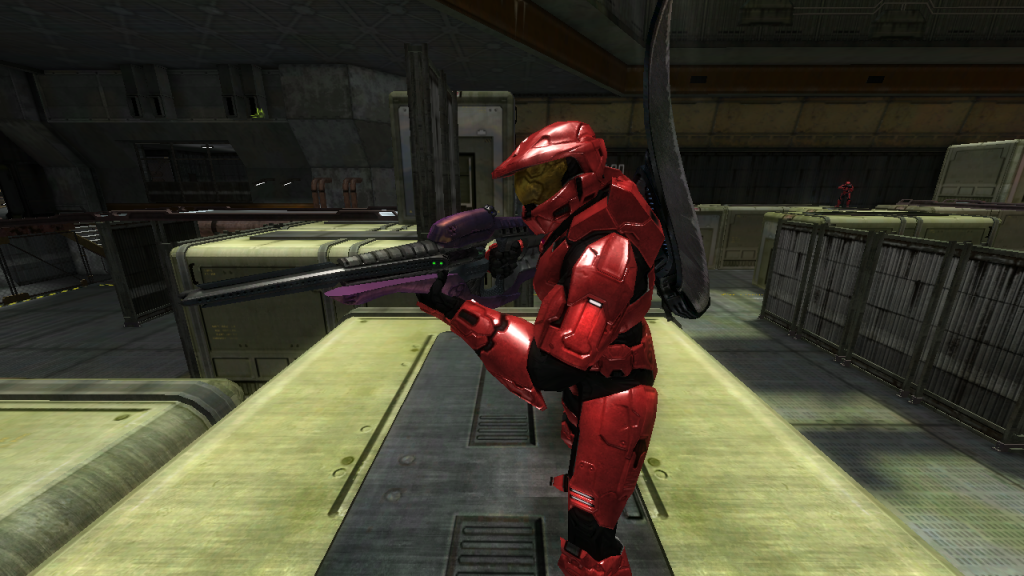 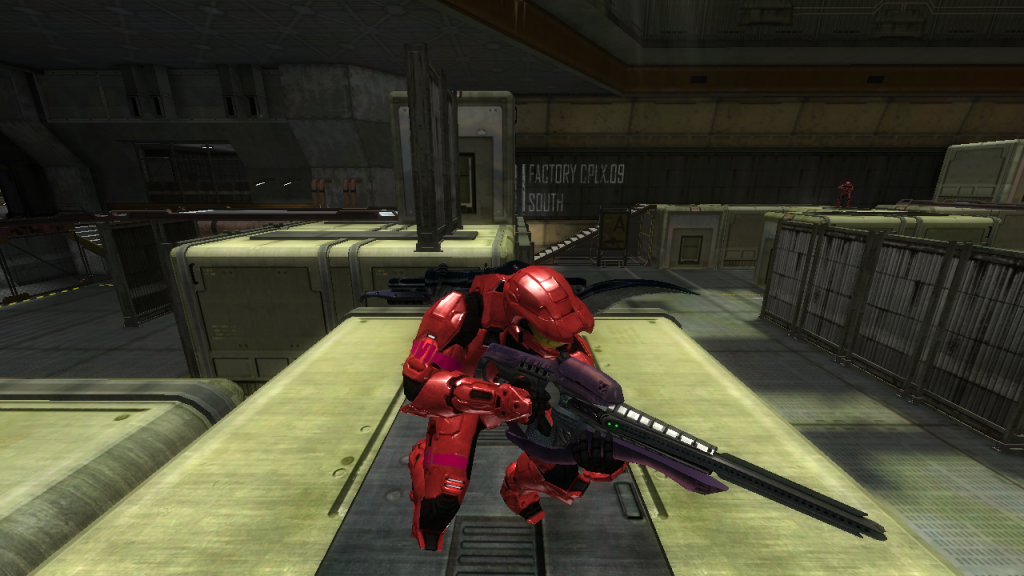 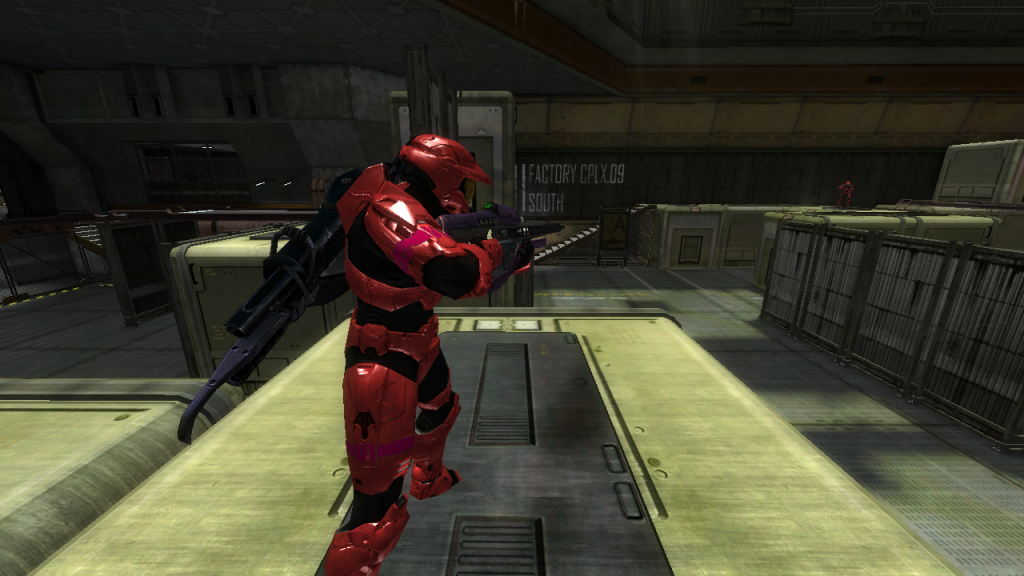 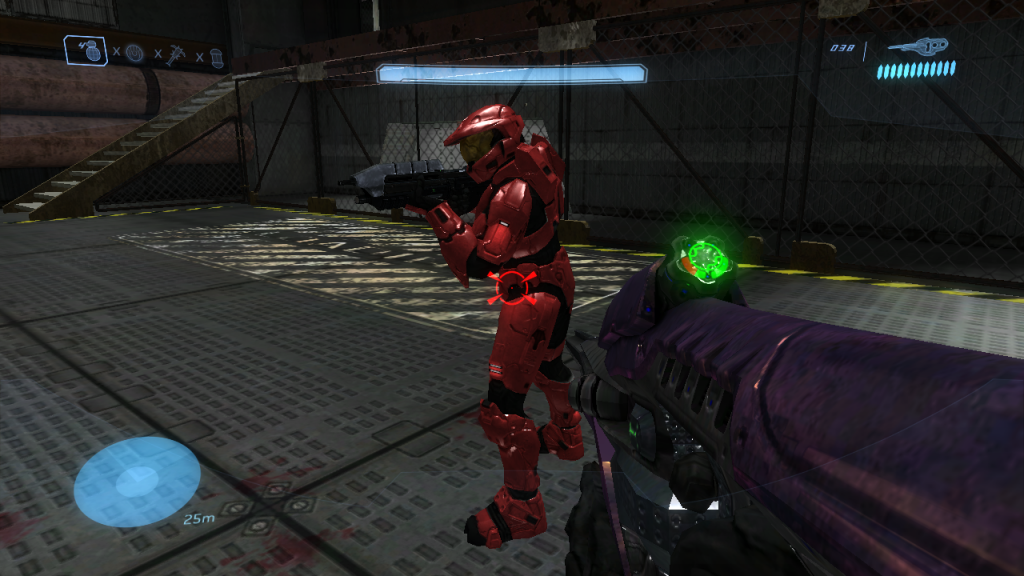 for some reason the fraps images are darker than it is ingame (possibly because its not capturing the slight bloom i added?) edit: realized the specular might be a bit bright so i dulled it a bit (thanks altis)    (the sprtans in the forefront are in direct light thats why they are brighter) Edited by killzone64 on Oct 13, 2013 at 10:34 AM |
||||
|
|
|||||
|
Dumb AI Joined: Sep 18, 2011
Dead. |
Posted: Oct 13, 2013 12:17 PM
Msg. 5913 of 6707
Hands could use some adjustments.
Can you show us more colors? (blue, orange, brown, black, etc) Edited by Dumb AI on Oct 13, 2013 at 12:18 PM |
||||
|
|
|||||
|
killzone64 Joined: Jun 9, 2010
sometimes i miss the chaos occasionally |
Posted: Oct 13, 2013 01:21 PM
Msg. 5914 of 6707
ok i shall do that, is there any way to pull up the RGB values from halo 3? like in adjutant for example?
|
||||
|
|
|||||
|
Dumb AI Joined: Sep 18, 2011
Dead. |
Posted: Oct 13, 2013 01:28 PM
Msg. 5915 of 6707
Quote: --- Original message by: killzone64 ok i shall do that, is there any way to pull up the RGB values from halo 3? like in adjutant for example? I don't think so. Use the color palette in Guerilla. I would like to see what the Spartans look like, using the stock Halo MP colors. Edited by Dumb AI on Oct 13, 2013 at 01:30 PM |
||||
|
|
|||||
| Page 169 of 192 | Go to page: · 1 · ... · 166 · 167 · 168 · [169] · 170 · 171 · 172 · ... · 192 · Prev · Next |

|
