A Community discussion forum for Halo Custom Edition, Halo 2 Vista, Portal and Halo Machinima
|
 Home
Home Search
 Register
 Login
Login Member List
 Recent Posts
| »Forums Index »Halo Custom Edition (Bungie/Gearbox) »Halo CE General Discussion »Bipeds - Work in Process thread [WIP] | 
|
| Page 163 of 192 | Go to page: · 1 · ... · 160 · 161 · 162 · [163] · 164 · 165 · 166 · ... · 192 · Prev · Next |
| Author | Topic: Bipeds - Work in Process thread [WIP] (6707 messages, Page 163 of 192) | ||||
| Moderators: Dennis | |||||
 Invader Veex Joined: Apr 11, 2007 
i make poast |
Posted: Apr 30, 2013 08:50 AM
Msg. 5671 of 6707
Quote: --- Original message by: jackrabbit black http://i18.photobucket.com/albums/b108/jackrabbitlight/0screenshot00_zpsca9ee19b.jpg:original green http://i18.photobucket.com/albums/b108/jackrabbitlight/4screenshedrg0_zps92b482e2.jpg:original red http://i18.photobucket.com/albums/b108/jackrabbitlight/4screenshot00_zps28e643d2.jpg:original blue http://i18.photobucket.com/albums/b108/jackrabbitlight/4screenshwae00_zpsb578a9e8.jpg:original gray http://i18.photobucket.com/albums/b108/jackrabbitlight/4screenwrtyt00_zps64370f40.jpg:original sage http://i18.photobucket.com/albums/b108/jackrabbitlight/cghfhfg_zps5505da77.jpg:original http://i18.photobucket.com/albums/b108/jackrabbitlight/sfghenshot00_zps0f3979d9.jpg:original Edited by jackrabbit on Apr 30, 2013 at 12:29 AM Could you post your images with stock (70) FOV please? |
||||


|
|||||
|
jackrabbit Joined: Apr 27, 2005 
Fight Against the Machine of Deth! |
Posted: Apr 30, 2013 09:13 AM
Msg. 5672 of 6707
all I did was debug_camera_save, debug_camera_load
I didn't change the FOV |
||||
|
|
|||||
|
XlzQwerty1 Joined: Aug 6, 2009 
|
Posted: Apr 30, 2013 09:15 AM
Msg. 5673 of 6707
You see, as I've already said, they look horrible with the edges being so bright (diffuse too bright).
|
||||
|
|
|||||
|
Bobblehob Joined: Aug 29, 2010 
|
Posted: Apr 30, 2013 06:00 PM
Msg. 5674 of 6707
Rabbit, the armor is wayyyyyy too shiny, tone down the specular. Look at the H4 ingame shots, how the armor has a fairly matte finish on it. What you have now is just bleh xP
|
||||
|
|
|||||
|
master noob Joined: Aug 10, 2012 
343Industries Advocate |
Posted: Apr 30, 2013 11:45 PM
Msg. 5675 of 6707
comments, crits, suggestions?
      RAINBOWS  DESERT STROOOOOOM  FOREST CAMOOOOOOOOOO  FULL ALBUUUUUUUUMMMMMMMMMMMMMMMMMMMMM I really need to work on the suit more, details from the normal map aren't translating well. Edited by master noob on Apr 30, 2013 at 11:46 PM |
||||
|
|
|||||
|
Bobblehob Joined: Aug 29, 2010
|
Posted: Apr 30, 2013 11:48 PM
Msg. 5676 of 6707
Leave the undersuit itself the normal grey color, and make them darker in general.
|
||||
|
|
|||||
|
Dumb AI Joined: Sep 18, 2011 
Dead. |
Posted: Apr 30, 2013 11:59 PM
Msg. 5677 of 6707
Desaturated CC map for in-game version please :'(
|
||||
|
|
|||||
|
master noob Joined: Aug 10, 2012
343Industries Advocate |
Posted: May 1, 2013 12:02 AM
Msg. 5678 of 6707
Quote: --- Original message by: Dumb AI Desaturated CC map for in-game version please :'( desaturate CC or darken diffuse? desaturating makes it look washed out while darkening darkens the color. |
||||
|
|
|||||
|
Bobblehob Joined: Aug 29, 2010
|
Posted: May 1, 2013 12:09 AM
Msg. 5679 of 6707
Quote: --- Original message by: master noob Quote: --- Original message by: Dumb AI Desaturated CC map for in-game version please :'( desaturate CC or darken diffuse? desaturating makes it look washed out while darkening darkens the color. Darken them |
||||
|
|
|||||
|
master noob Joined: Aug 10, 2012
343Industries Advocate |
Posted: May 1, 2013 12:21 AM
Msg. 5680 of 6707
Comparisons:
Standard  50% desaturated(note: black will appear grey, sage will appear light green, etc)  50% darkened  |
||||
|
|
|||||
|
XlzQwerty1 Joined: Aug 6, 2009
|
Posted: May 1, 2013 12:24 AM
Msg. 5681 of 6707
Desaturated looks nice in my opinion.
What if you tried a mix of darkening diffuse (darken metal parts only) and desaturation? Edited by XlzQwerty1 on May 1, 2013 at 12:28 AM |
||||
|
|
|||||
|
master noob Joined: Aug 10, 2012
343Industries Advocate |
Posted: May 1, 2013 12:33 AM
Msg. 5682 of 6707
Quote: --- Original message by: XlzQwerty1 Desaturated looks nice in my opinion. What if you tried a mix of darkening diffuse (darken metal parts only) and desaturation? you don't understand desaturating makes it look horrid on all levels, that is why there are desaturated colours(salmon for example) same with darkening, if you want desaturated or darkened colours then choose a dark or desaturated colour that is why there is colour choice; so people can have dark, desaturated, or normal colours. alternatively, people can change the textures all they want once I finish the final touches. |
||||
|
|
|||||
|
Bobblehob Joined: Aug 29, 2010
|
Posted: May 1, 2013 01:11 AM
Msg. 5683 of 6707
Desaturated colors are what these models and textures where originally made for :P and to be honest, they look fairly good that way. The Halo 1 MP armor colors look fine bright because it compliments the pallet of the environment. It was all very bright and colorful.
Halo 4 has a generally darker pallet and less bright colors, so the armor looks better with darker, less saturated colors. |
||||
|
|
|||||
|
ELVEVERX Joined: Oct 5, 2012 
For the great journey |
Posted: May 1, 2013 07:20 AM
Msg. 5684 of 6707
Quote: --- Original message by: master noob comments, crits, suggestions? http://i.imgur.com/Q0ysZuF.jpg http://i.imgur.com/uQN1y4w.jpg http://i.imgur.com/WiY1x9T.jpg http://i.imgur.com/zvGOdH6.jpg http://i.imgur.com/8nlZd6c.jpg http://i.imgur.com/jOEvjr2.jpg RAINBOWS http://i.imgur.com/8le5jr0.jpg DESERT STROOOOOOM http://i.imgur.com/a6GpfWo.jpg FOREST CAMOOOOOOOOOO http://i.imgur.com/PPU11Bp.jpg FULL ALBUUUUUUUUMMMMMMMMMMMMMMMMMMMMM I really need to work on the suit more, details from the normal map aren't translating well. Edited by master noob on Apr 30, 2013 at 11:46 PM my suggestion is release it please |
||||
|
|
|||||
|
Echo77 Joined: Jul 20, 2010 
Humble thyself and hold thy tongue. |
Posted: May 1, 2013 07:20 AM
Msg. 5685 of 6707
I'm liking the bipeds, especially the camouflages.
|
||||
|
|
|||||
|
bourrin33 Joined: Oct 19, 2009 
HEK not installed tho |
Posted: May 1, 2013 08:54 AM
Msg. 5686 of 6707
Quote: --- Original message by: master noob Comparisons: Standard http://i.imgur.com/tz1VHXk.jpg 50% desaturated(note: black will appear grey, sage will appear light green, etc) http://i.imgur.com/RUYyHKk.jpg 50% darkened http://i.imgur.com/3hPigE2.jpg http://screenshot.xfire.com/s/126943994-4.jpg http://screenshot.xfire.com/s/126943991-4.jpg Here is how the reach spartan looks with approx 70% saturation and a good cubemap I made, I swear it looks good with all the stock colors. Also note that you can edit the colors with detail maps and blend them a little, I gave it a try and it can help sometimes Edited by bourrin33 on May 1, 2013 at 12:58 PM |
||||
|
|
|||||
|
Dumb AI Joined: Sep 18, 2011
Dead. |
Posted: May 1, 2013 09:59 AM
Msg. 5687 of 6707
Quote: --- Original message by: master noob Comparisons: Standard http://i.imgur.com/tz1VHXk.jpg 50% desaturated(note: black will appear grey, sage will appear light green, etc) http://i.imgur.com/RUYyHKk.jpg 50% darkened http://i.imgur.com/3hPigE2.jpg That's too much. Try 25%. It's too dark/too light. |
||||
|
|
|||||
|
jackrabbit Joined: Apr 27, 2005
Fight Against the Machine of Deth! |
Posted: May 1, 2013 12:31 PM
Msg. 5688 of 6707
I Think The details your trying to get out of the normal maps is working well better than you think. You just cant see it mixed with the control map because your not in game. using the details from the control map.
If you rely want to get more Instead Make your control maps white and try and get them from there. I got a lot from there almost to much. My only mistake was I used them wrong. Might help. Give it a shot I think you will be surprised on how much details you can pull from the control maps. Although I think what you have is good and once you put them in game and use the control maps It will stand out better than you think. Hear's one of the moded control maps I made very quickly done I might add. You can Probably do better with your as you say mucking about. 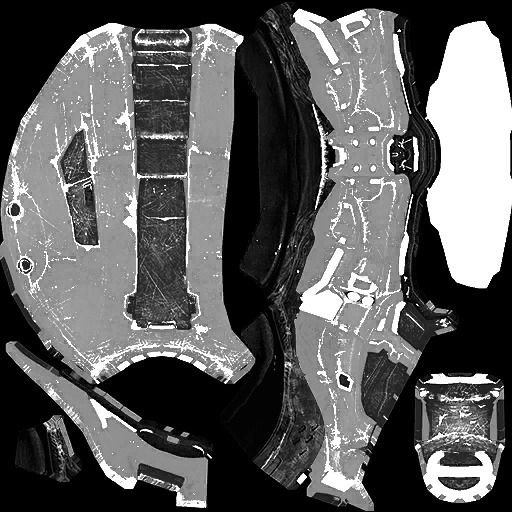 Knee cap detail came out pretty easily to. 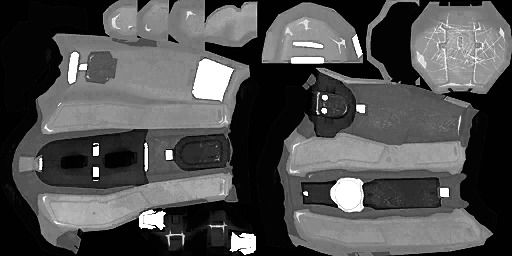 But You Probably wont need to do this assuming you are planning on using the control maps some way in game. I obviously went to far with editing the defuse and from what I can see with Mr. rainbow your stating to make the same mistake. Loving the camo looks great BTW! Edited by jackrabbit on May 1, 2013 at 01:07 PM |
||||
|
|
|||||
|
darksoldier Joined: Dec 28, 2010 
Helo my friend, it's time to fight ;) |
Posted: May 1, 2013 03:21 PM
Msg. 5689 of 6707
Quote: --- Original message by: master noob comments, crits, suggestions? http://i.imgur.com/Q0ysZuF.jpg http://i.imgur.com/uQN1y4w.jpg http://i.imgur.com/WiY1x9T.jpg http://i.imgur.com/zvGOdH6.jpg http://i.imgur.com/8nlZd6c.jpg http://i.imgur.com/jOEvjr2.jpg RAINBOWS http://i.imgur.com/8le5jr0.jpg DESERT STROOOOOOM http://i.imgur.com/a6GpfWo.jpg FOREST CAMOOOOOOOOOO http://i.imgur.com/PPU11Bp.jpg FULL ALBUUUUUUUUMMMMMMMMMMMMMMMMMMMMM I really need to work on the suit more, details from the normal map aren't translating well. Edited by master noob on Apr 30, 2013 at 11:46 PM I very like desert and forest camo ! |
||||
|
|
|||||
|
XlzQwerty1 Joined: Aug 6, 2009
|
Posted: May 1, 2013 03:39 PM
Msg. 5690 of 6707
Quote: --- Original message by: jackrabbit I Think The details your trying to get out of the normal maps is working well better than you think. You just cant see it mixed with the control map because your not in game. using the details from the control map. If you rely want to get more Instead Make your control maps white and try and get them from there. I got a lot from there almost to much. My only mistake was I used them wrong. Might help. Give it a shot I think you will be surprised on how much details you can pull from the control maps. Although I think what you have is good and once you put them in game and use the control maps It will stand out better than you think. Hear's one of the moded control maps I made very quickly done I might add. You can Probably do better with your as you say mucking about. http://i18.photobucket.com/albums/b108/jackrabbitlight/storm_masterchief_default_armor_helm_control_zpse05c3eeb.jpg~original Knee cap detail came out pretty easily to. http://i18.photobucket.com/albums/b108/jackrabbitlight/storm_masterchief_default_armor_arm_control_zpsd6f4654d.jpg~original But You Probably wont need to do this assuming you are planning on using the control maps some way in game. I obviously went to far with editing the defuse and from what I can see with Mr. rainbow your stating to make the same mistake. Loving the camo looks great BTW! Edited by jackrabbit on May 1, 2013 at 01:07 PM I don't think these look proper with the super sharp transitions from grey to white. That's like one pixel looking alright with reflection, then the next pixel right beside it looking all super bright and stuff. |
||||
|
|
|||||
|
master noob Joined: Aug 10, 2012
343Industries Advocate |
Posted: May 1, 2013 06:53 PM
Msg. 5691 of 6707
just a heads up, I will submit the files in uncompressed .pngs for ease-of-use, and will include a max 2010 file for baking overhead lighting/ambient occlusion. someone else will have to them ingame :C
if someone is willing to help see if the textures work ingame, send a PM my way. |
||||
|
|
|||||
|
jackrabbit Joined: Apr 27, 2005
Fight Against the Machine of Deth! |
Posted: May 1, 2013 09:11 PM
Msg. 5692 of 6707
I don't see any reason why that wouldn't work in game I will be happy to in game them.
Hay whatever I can do to help Let me know. Mike just ended up in the hospital I'm Not sure what happed to him Still waiting to hear back from him. I'm not sure who else has a working biped. He was very happy last he looked at the thread. If all go's well I will test this stuff out and possibly submit the biped. Assuming every thing check's out okay. Cobalt 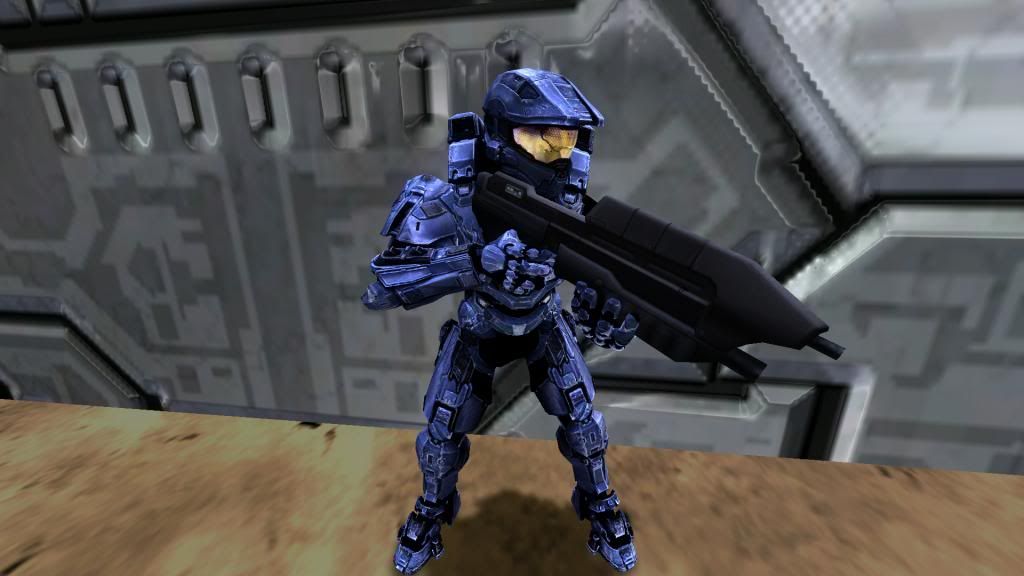 Blue 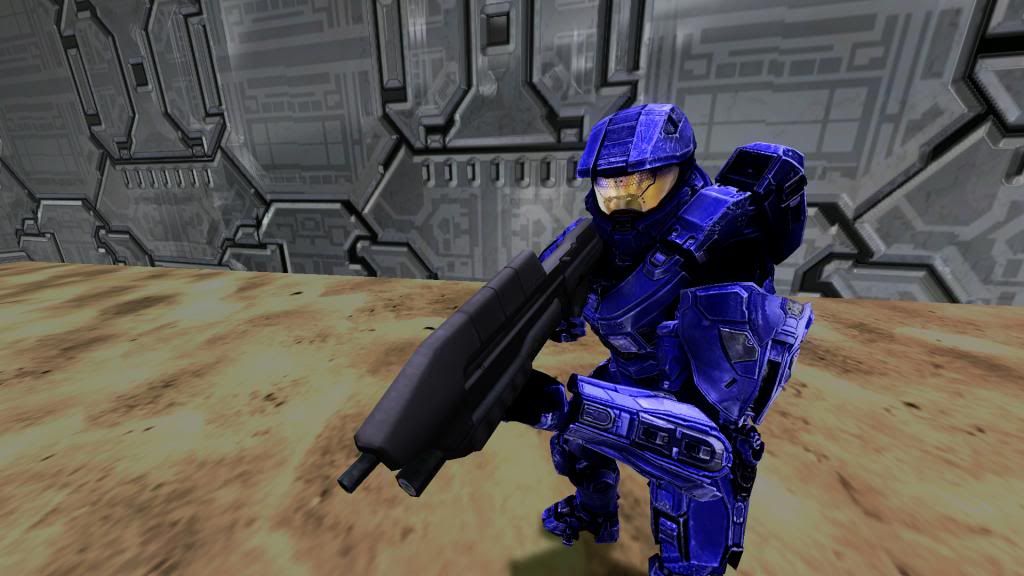 Just testing stuff out for master noob^ Sorry I know its dark and saucy in hear. Edited by jackrabbit on May 2, 2013 at 01:06 AM |
||||
|
|
|||||
|
master noob Joined: Aug 10, 2012
343Industries Advocate |
Posted: May 2, 2013 12:42 AM
Msg. 5693 of 6707
CC maps are fuuuuuuuuuuuuuuuuuuuuuuuuuuuuuuuuun
 gonna release it soon anyways, the best part of it would be the overhead rendering file |
||||
|
|
|||||
|
jackrabbit Joined: Apr 27, 2005
Fight Against the Machine of Deth! |
Posted: May 2, 2013 12:51 AM
Msg. 5694 of 6707
So now I have a working set of non os mp textures. with a Hek with Os. Yay
defuse specular and cc. cc.? Ug Edited by jackrabbit on May 2, 2013 at 01:34 AM |
||||
|
|
|||||
|
Dumb AI Joined: Sep 18, 2011
Dead. |
Posted: May 2, 2013 10:36 AM
Msg. 5695 of 6707
Specular in blue, detail in red, illumination in green and color change in alpha.
|
||||
|
|
|||||
|
jackrabbit Joined: Apr 27, 2005
Fight Against the Machine of Deth! |
Posted: May 2, 2013 03:16 PM
Msg. 5696 of 6707
Unfortunately. I don't have traditional HEK set up.
I'm using OS. I have only spec, defuse and cc. Currently I'm using spec in spec color map in the shader extension. and the defuse in the defuse slot. and I 'm not using the CC Master Noob says it's important And to look for A CC slot but I cant find one. Edited by jackrabbit on May 2, 2013 at 04:29 PM |
||||
|
|
|||||
|
XlzQwerty1 Joined: Aug 6, 2009
|
Posted: May 2, 2013 03:49 PM
Msg. 5697 of 6707
Multipurpose map.
|
||||
|
|
|||||
|
jackrabbit Joined: Apr 27, 2005
Fight Against the Machine of Deth! |
Posted: May 2, 2013 04:12 PM
Msg. 5698 of 6707
okay I put the cc in the alpha of the multi and turned off shader extentions
I didn't get a cc for the tech suit where do I put the spec? I try to put it in the blue channel of the muti but Ps wont let me remove just the blue channel? Edited by jackrabbit on May 2, 2013 at 04:52 PM |
||||
|
|
|||||
|
jackrabbit Joined: Apr 27, 2005
Fight Against the Machine of Deth! |
Posted: May 2, 2013 06:53 PM
Msg. 5699 of 6707
yeah I cant seem to get it in there ps wont let me remove just the blue channel. or paste directly to just the blue channel so I'm a little confused?
Edited by jackrabbit on May 2, 2013 at 06:58 PM |
||||
|
|
|||||
|
XlzQwerty1 Joined: Aug 6, 2009
|
Posted: May 2, 2013 08:25 PM
Msg. 5700 of 6707
I thought you said you were very experienced in photoshop. You should be able to do that if you were truly experienced.
Select blue channel and set it to be the only visible channel (The "eyes"). Try pasting now. |
||||
|
|
|||||
|
jackrabbit Joined: Apr 27, 2005
Fight Against the Machine of Deth! |
Posted: May 2, 2013 08:40 PM
Msg. 5701 of 6707
Yeah well I would think that that's exactly how it's done and is the first thing I tried but It does not work like that. at lest for me in cs6.
It does not matter if I only have one of the RGB colors selected. if I paste on to just blue it go's over all the of the RGB colors. and yes I know this should be very simple and I do have a lot of experience with layers. But I'm totally stumped because it does not work. I have ben trying to figure it out all day long. If it was that simple I think I would have had it done by now even by accident. Edited by jackrabbit on May 2, 2013 at 08:41 PM |
||||
|
|
|||||
|
jackrabbit Joined: Apr 27, 2005
Fight Against the Machine of Deth! |
Posted: May 2, 2013 09:12 PM
Msg. 5702 of 6707
Sorry that's exactly what I mean. I have the channel selected.
I cant paste directly to the channel. It does not work. I have only the blue channel selected only 1 eye. in the channels tab. I go to file paste choose the spec mask and it go's over the red green channels as well. and is no longer a multipurpose map I rely don't know how to explain it any better than that. Edited by jackrabbit on May 2, 2013 at 09:28 PM |
||||
|
|
|||||
|
jackrabbit Joined: Apr 27, 2005
Fight Against the Machine of Deth! |
Posted: May 2, 2013 09:19 PM
Msg. 5703 of 6707
It does not work.
When ever I make these new multipurpose maps with the spec In the blue It doesn't seem like thay are turning out like a multipurpose maps is supposed to look but never the less I made them and put them in game anyway. no OS used! cc in the alpha of multi spec in the blue of the multi. armor looks A+ But it seems as though the suit and hands are way to dark. 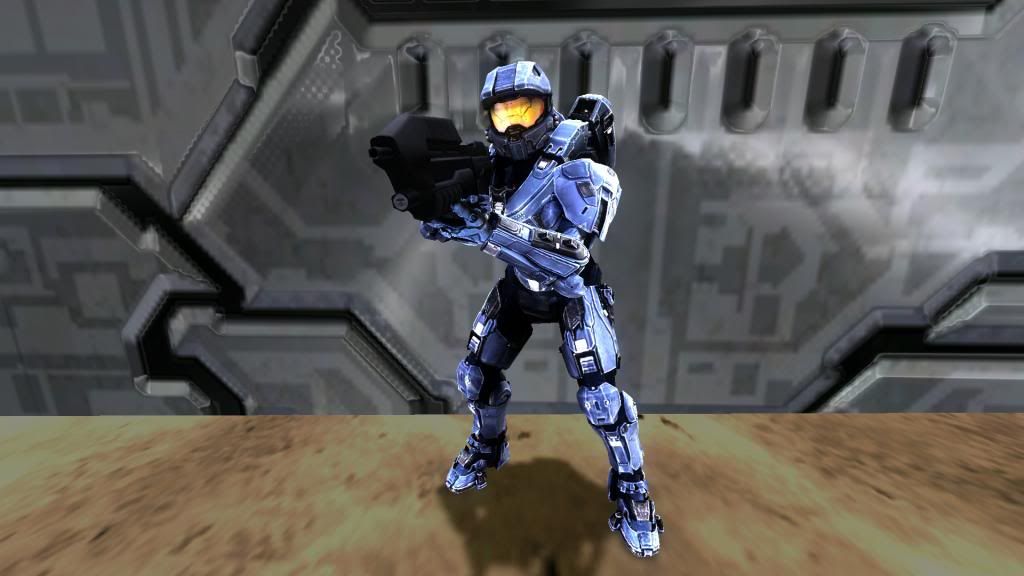 Edited by jackrabbit on May 2, 2013 at 10:20 PM |
||||
|
|
|||||
|
Dumb AI Joined: Sep 18, 2011
Dead. |
Posted: May 2, 2013 10:01 PM
Msg. 5704 of 6707
Quote: --- Original message by: jackrabbit It does not work. Edited by jackrabbit on May 2, 2013 at 09:19 PM I'll make them for you. Just send me the bitmaps. |
||||
|
|
|||||
|
XlzQwerty1 Joined: Aug 6, 2009
|
Posted: May 2, 2013 10:12 PM
Msg. 5705 of 6707
That's because you're not clicking on the blue channel itself afterwards and actually highlighting it.
|
||||
|
|
|||||
| Page 163 of 192 | Go to page: · 1 · ... · 160 · 161 · 162 · [163] · 164 · 165 · 166 · ... · 192 · Prev · Next |

|
