A Community discussion forum for Halo Custom Edition, Halo 2 Vista, Portal and Halo Machinima
|
 Home
Home Search
 Register
 Login
Login Member List
 Recent Posts
| »Forums Index »Halo Custom Edition (Bungie/Gearbox) »Halo CE General Discussion »Bipeds - Work in Process thread [WIP] | 
|
| Page 161 of 192 | Go to page: · 1 · ... · 158 · 159 · 160 · [161] · 162 · 163 · 164 · ... · 192 · Prev · Next |
| Author | Topic: Bipeds - Work in Process thread [WIP] (6707 messages, Page 161 of 192) | ||||
| Moderators: Dennis | |||||
 master noob Joined: Aug 10, 2012 
343Industries Advocate |
Posted: Apr 28, 2013 12:02 PM
Msg. 5601 of 6707
Quote: --- Original message by: jackrabbit Our main man! h4 mc mp sauced. http://i18.photobucket.com/albums/b108/jackrabbitlight/h4mc_zps31b1d8c6.jpg wow dude, no effort on editing the textures, no cubemap work, no specular work, how can you even call this work? you really need to look back and see how everything goes together to make it actually look good instead of directly importing it into halo and saying "look at this hurr open sausage" |
||||


|
|||||
|
jackrabbit Joined: Apr 27, 2005 
Fight Against the Machine of Deth! |
Posted: Apr 28, 2013 12:39 PM
Msg. 5602 of 6707
Wow jump down my Throat why don't you just because I shared a picture of my friends work What are you talking about I used cube maps on armor and his visor? I didn't just throw him in a game this is the Bipeds - Work in Process thread [WIP] YA KNOW!
Maybe what you need to do is shut the front door. How do you have any idea what I know? We actually even went an extra step and used a different cube map for his visor. And we even gave him an extra Id for the visor. so he could not use Spartan armor's cube map. I only worked on the shader's. and they look great! honestly my map also wip and not fully lit the picture doesn't really do him justice. He looks much better in game. This is not even my biped Its my friends. he asked me to do the shaders and I share the picture for him. Do you need me to post all the spectacular map settings, normal maps settings, specular tint over ride settings, specular lighting settings, reflection settings and radiosity properties? Jesus. its Wip! And nice job mike. The shader's are configured properly. Edited by jackrabbit on Apr 28, 2013 at 12:42 PM |
||||
|
|
|||||
|
master noob Joined: Aug 10, 2012
343Industries Advocate |
Posted: Apr 28, 2013 12:53 PM
Msg. 5603 of 6707
Quote: --- Original message by: SAS seeing the post above, you can probably guess why criticism is rarely given.If you think that a post sucks, provide actual criticism to help the maker improve the tag. Quote: --- Original message by: jackrabbit they don'tI only worked on the shader's. and they look great! Quote: --- Original message by: jackrabbit they aren'tThe shader's are configured properly. Edited by master noob on Apr 28, 2013 at 12:54 PM |
||||
|
|
|||||
|
bourrin33 Joined: Oct 19, 2009 
HEK not installed tho |
Posted: Apr 28, 2013 12:56 PM
Msg. 5604 of 6707
Quote: --- Original message by: jackrabbit Our main man! h4 mc mp sauced. http://i18.photobucket.com/albums/b108/jackrabbitlight/h4mc_zps31b1d8c6.jpg This is complete crap, learn to make good shaders without OS. We can't notice any detail(on suit and armor) and the visor looks like a decayed orange. Edited by bourrin33 on Apr 28, 2013 at 12:57 PM Annnd the specular doesnt blend nicely, we can't see it shine and the layout you're using is as ugly as those shaders and doesnt help anyone to give you crit. Edited by bourrin33 on Apr 28, 2013 at 12:58 PM |
||||
|
|
|||||
|
XlzQwerty1 Joined: Aug 6, 2009 
|
Posted: Apr 28, 2013 01:04 PM
Msg. 5605 of 6707
Quote: --- Original message by: jackrabbit We actually even went an extra step and used a different cube map for his visor. And we even gave him an extra Id for the visor. so he could not use Spartan armor's cube map. I only worked on the shader's. and they look great! Watch out guys, we got a badass over here. Honestly man, if you want some praise, then stop posting crap screenshots. Take them in a well lit area, even tutorial would be fine - and take your screenshots at a higher resolution. I seriously can't see any detail, so I wouldn't know if you actually put effort into this or not. The only thing that looks decent enough in my opinion is the visor, everything else is ... well, whatever other people have already stated. |
||||
|
|
|||||
|
jackrabbit Joined: Apr 27, 2005
Fight Against the Machine of Deth! |
Posted: Apr 28, 2013 01:08 PM
Msg. 5606 of 6707
Quote: --- Original message by: XlzQwerty1 what 1920x1080 is not good? & Yes visor A+Quote: --- Original message by: jackrabbit We actually even went an extra step and used a different cube map for his visor. And we even gave him an extra Id for the visor. so he could not use Spartan armor's cube map. I only worked on the shader's. and they look great! Watch out guys, we got a badass over here. Honestly man, if you want some praise, then stop posting crap screenshots. Take them in a well lit area, even tutorial would be fine - and take your screenshots at a higher resolution. I seriously can't see any detail, so I wouldn't know if you actually put effort into this or not. The only thing that looks decent enough in my opinion is the visor, everything else is ... well, whatever other people have already stated. There I switched the cubemap! to defuse metal instead of spartin armor. Now what's wrong?  Are you just going sit there and say no no no and cry or tell me some special setting I need to use? because so far your not helping. I alredy asked if you wanted the shader settings. Hear please tell me what I did so wrong. How to improve. 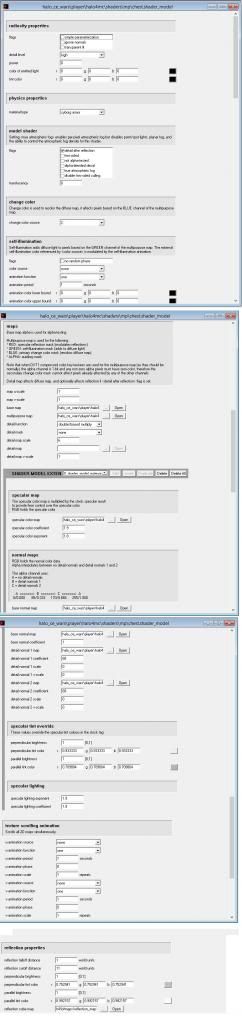 Edited by jackrabbit on Apr 28, 2013 at 02:40 PM |
||||
|
|
|||||
|
master noob Joined: Aug 10, 2012
343Industries Advocate |
Posted: Apr 28, 2013 01:15 PM
Msg. 5607 of 6707
Quote: --- Original message by: jackrabbit Hear please tell me what I did so wrong. How to improve. update those textures. they look good in halo 4, but this is halo 1. things need to change, such as baking overhead lighting and mixing the speculars around, as well as finding a good cube to use(hint hint diffuse gunmetal is a no-go) you should also smooth out the grunge on the diffuse and instead use a detail map; as it stands, chief looks like a rock. the overlay you are using for the cubemap understates the brightness, making it look murky instead of metallic. brb rendering examples. |
||||
|
|
|||||
|
jackrabbit Joined: Apr 27, 2005
Fight Against the Machine of Deth! |
Posted: Apr 28, 2013 01:57 PM
Msg. 5608 of 6707
This is a traditional mc. biped Your last post fails to make me realize what I did wrong.
Your renders wont help much in game. this is not a custom biped. If it was she would be way. sexxxy not cyborgy. I know what cube maps do I don't need examples as much as I like them. this is the mc that came out of the oven not some crazy custom biped. its just a simple mc biped. like classic h4 mc if you will. Visor 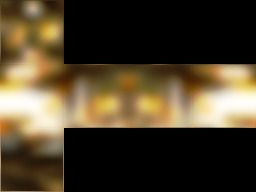 Armor. 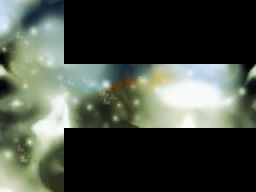 I honestly don't see a problem I'm sure he could look way more amazing. but this is 343 for Ya. this is the guy! I just posted a picture. It's Rely just a picture not a big deal. this is the start I'm sure there will be 1000 amazing variants. of him with better textures and shader's. but it starts hear with this stuff. personally I was more interested in properly putting him back together, rather than customizing him. At lest not yet anyway. If you have some advice to make him look super duper by all means create a shader and I will test it out. or maybe you can even have the tags for testing. I will have to ask. but he is not finished yet. Edited by jackrabbit on Apr 28, 2013 at 02:02 PM |
||||
|
|
|||||
|
jackrabbit Joined: Apr 27, 2005
Fight Against the Machine of Deth! |
Posted: Apr 28, 2013 02:04 PM
Msg. 5609 of 6707
Quote: --- Original message by: waffles Your right thanks for telling me.Its great that you posted your shader configuration, but its impossible to see. I guess that means someone didn't look at it hmmm... wow okay I guess dennis has changed some things on the site and pictures sizes that long don't show proper anymore. we use to post our shaders online like that but I guess it wont work anymore. I will have to make the picture a different way. Edited by jackrabbit on Apr 28, 2013 at 02:13 PM |
||||
|
|
|||||
|
Dumb AI Joined: Sep 18, 2011 
Dead. |
Posted: Apr 28, 2013 02:05 PM
Msg. 5610 of 6707
Cubemaps are very important here.
Try using different cubemaps and different values for the brightness of the cubemap. |
||||
|
|
|||||
|
master noob Joined: Aug 10, 2012
343Industries Advocate |
Posted: Apr 28, 2013 02:12 PM
Msg. 5611 of 6707
my post did not fail to tell you what's wrong, you simply could not figure out what's wrong on your own and think that what you have is perfect. you are turning everything down because "everyone is attacking you qq" but we are giving valid advice.
Quote: --- Original message by: jackrabbit If you have some advice to make him look super duper by all means create a shader and I will test it out. it's not my job to do your job dude, edit your own textures. yes, a render would help because:  that is all edited. 5 minute job. diffuse, CC, specular, default armor cubemap. learn how to edit the textures for yourself, because otherwise you would never learn how to do this. if you can't accept criticism, don't even bother asking for it. also, you're doing it again. "it was made by 343, of course it looks bad! look at how great this is!" |
||||
|
|
|||||
|
XlzQwerty1 Joined: Aug 6, 2009
|
Posted: Apr 28, 2013 02:17 PM
Msg. 5612 of 6707
If you're taking pictures in 1080p, then upload them and post them at 1080p too...
|
||||
|
|
|||||
|
jackrabbit Joined: Apr 27, 2005
Fight Against the Machine of Deth! |
Posted: Apr 28, 2013 02:18 PM
Msg. 5613 of 6707
Well your max render looks great but that's not in game and you Rely haven't told me how to do anything differently.
If you want tell me what I'm doing wrong or teach me something I'm right hear and I want to learn. I'm sorry I'm old school I started with max in v4 for god sakes. and now trying to learn 14 Quote: --- Original message by: XlzQwerty1 If you're taking pictures in 1080p, then upload them and post them at 1080p too... I'm running the game in 1080x1920. I hit print screen on my keybord that's the picture the game made. unless the website changed it. Quote: --- Original message by: Dennis 7. When posting images within the forum make sure the image size is less than 1024X768 pixels. If the image is larger the image may be deleted. (Try to keep the images reasonable in file size) -Dennis Edited by jackrabbit on Apr 28, 2013 at 02:21 PM |
||||
|
|
|||||
|
jackrabbit Joined: Apr 27, 2005
Fight Against the Machine of Deth! |
Posted: Apr 28, 2013 02:23 PM
Msg. 5614 of 6707
Quote: --- Original message by: waffles I use photobucket and no rescaleQuote: --- Original message by: XlzQwerty1 If you're taking pictures in 1080p, then upload them and post them at 1080p too... Make sure you don't have any rescaling options checked/selected before you upload (imageshack by default rescales to 800x600) |
||||
|
|
|||||
|
XlzQwerty1 Joined: Aug 6, 2009
|
Posted: Apr 28, 2013 02:39 PM
Msg. 5615 of 6707
Dennis doesn't really care about the image sizes anymore (as long as its not like 40k pixels by 40k pixels or something). 1080p pictures are fine, just post the highest resolution you can from photobucket if you're not rescaling. Or use imageshack or imgur :/
|
||||
|
|
|||||
|
Bobblehob Joined: Aug 29, 2010 
|
Posted: Apr 28, 2013 02:40 PM
Msg. 5616 of 6707
 Look at the difference, even though yours is meant for MP, the "sauce" you added looks horrid, you can barely even tell that you applied normals or specular to it because there is very little contrast. It looks like you took the unsauced base textures selected random sections of the base diffuse and used the Hue and Saturation tool to make it blue, then added in CE's super shiny cubemaps and thats about it. Edited by Bobblehob on Apr 28, 2013 at 02:42 PM Edited by Bobblehob on Apr 28, 2013 at 02:45 PM |
||||
|
|
|||||
|
master noob Joined: Aug 10, 2012
343Industries Advocate |
Posted: Apr 28, 2013 02:41 PM
Msg. 5617 of 6707
Quote: --- Original message by: jackrabbit Well your max render looks great but that's not in game and you Rely haven't told me how to do anything differently. no offense, but that is a really dense thing to say. you completely ignored the point, plus I did give pointers on how to improve the textures. are you just skimming over posts? smooth the grunge of the diffuse enhance specular contrast bake AO/overhead lighting onto diffuse & specular bake a cavity map onto the specular, if you can make the CC white/black, not greyscale take all colour out of diffuse(save for the visor) and enhance brightness of coloured parts use a reasonable cubemap; avoid completely white spots and low contrast use detail maps, don't rely on the diffuse/specular for detail smooth out compression areas(miscoloured spots, random sharp edges) darken the visor, it's glassy metal so its color comes strictly from the cubemap darken parts that get further from the light if you can't bake overhead lights speaking of, I might ask Gravemind if I can release a full edited h4 chief texture pack. Edited by master noob on Apr 28, 2013 at 02:43 PM |
||||
|
|
|||||
|
master noob Joined: Aug 10, 2012
343Industries Advocate |
Posted: Apr 28, 2013 02:51 PM
Msg. 5618 of 6707
Quote: --- Original message by: waffles Visor's are made out of metal? And why would you need to ask gravemind? The original textures were leaked already. well, some visors such as in deus ex HR and blacklight retribution are made of metal with screens displayed inside the helmet, and logically in halo reach the only way emile could get his visor to be scratched(with metal showing underneath and without hampering his vision) is if the halo visors worked on the same principle. |
||||
|
|
|||||
|
jackrabbit Joined: Apr 27, 2005
Fight Against the Machine of Deth! |
Posted: Apr 28, 2013 02:59 PM
Msg. 5619 of 6707
No i'm not skimming I gess its because I don't understand what your saying can you dumb it down for me alittle bit?
smooth the grunge of the diffuse> like how? enhance specular contrast > currently 1.9 what's good? bake AO/overhead lighting onto diffuse & specular>I honestly don't know how to do that? I know people taking about bakeing a lot but even after watching some videos I just didn't understand how its done. bake a cavity map onto the specular, if you can>JNo clue what your saying. make the CC white/black, not greyscale> what? take all colour out of diffuse(save for the visor) and enhance brightness of coloured parts> Okay color is all redy gone I will can Brighten him up. use a reasonable cubemap; avoid completely white spots and low contrast.>Noted. use detail maps, don't rely on the diffuse/specular for detail> I planed on it just haven't gotten that far yet. smooth out compression areas(miscoloured spots, random sharp edges)>Are you talking about the model or the texture? not sure what you mean on this one. compression? darken the visor, it's glassy metal so its color comes strictly from the cubemap> Well I can. do that. darken parts that get further from the light if you can't bake overhead lights>not sure. speaking of, I might ask Gravemind if I can release a full edited h4 chief texture pack.>sweet. I'm pretty good with photoshop but unfamiliar with you terminology. Edited by jackrabbit on Apr 28, 2013 at 03:01 PM |
||||
|
|
|||||
|
Dumb AI Joined: Sep 18, 2011
Dead. |
Posted: Apr 28, 2013 03:00 PM
Msg. 5620 of 6707
Quote: --- Original message by: master noob Quote: --- Original message by: waffles Visor's are made out of metal? And why would you need to ask gravemind? The original textures were leaked already. well, some visors such as in deus ex HR and blacklight retribution are made of metal with screens displayed inside the helmet, and logically in halo reach the only way emile could get his visor to be scratched(with metal showing underneath and without hampering his vision) is if the halo visors worked on the same principle. I guess he could see through those eye holes on his helmet's skull face. |
||||
|
|
|||||
|
Bobblehob Joined: Aug 29, 2010
|
Posted: Apr 28, 2013 03:02 PM
Msg. 5621 of 6707
Quote: --- Original message by: master noob Quote: --- Original message by: waffles Visor's are made out of metal? And why would you need to ask gravemind? The original textures were leaked already. well, some visors such as in deus ex HR and blacklight retribution are made of metal with screens displayed inside the helmet, and logically in halo reach the only way emile could get his visor to be scratched(with metal showing underneath and without hampering his vision) is if the halo visors worked on the same principle. Halo visors are glass, *see Halo Reach and the cracking of the HUD ingame, the hole in the visor in the cutscene, and Kats visor getting shot.  |
||||
|
|
|||||
|
master noob Joined: Aug 10, 2012
343Industries Advocate |
Posted: Apr 28, 2013 03:05 PM
Msg. 5622 of 6707
Quote: --- Original message by: Bobblehob Halo visors are glass, *see Halo Reach and the cracking of the HUD ingame, the hole in the visor in the cutscene, and Kats visor getting shot. http://static.gamesradar.com/images[...]article_image.jpg alternatively, the shock of getting shot with plasma(not projectiles, which impact a specific point to make cracks) shatters the internal screens and the metal sheet inside of the visors are thin enough to get shot through. halo is full of these inconsistencies. Quote: --- Original message by: Dumb AI I guess he could see through those eye holes on his helmet's skull face. then explain the metal scratches on his visor. Quote: --- Original message by: waffles Theres also the fact that metal can't be polarized :V (as a mentioned feature that the s-III's had on onyx, plus the ODST helmet visors). display screens can be polarized. Edited by master noob on Apr 28, 2013 at 03:06 PM Edited by Dennis on Apr 28, 2013 at 03:21 PM |
||||
|
|
|||||
|
jackrabbit Joined: Apr 27, 2005
Fight Against the Machine of Deth! |
Posted: Apr 28, 2013 03:12 PM
Msg. 5623 of 6707
I will save troubles hear s all 42!
 uping! |
||||
|
|
|||||
|
Bobblehob Joined: Aug 29, 2010
|
Posted: Apr 28, 2013 03:19 PM
Msg. 5624 of 6707
Quote: --- Original message by: master noob alternatively, the shock of getting shot with plasma(not projectiles, which impact a specific point to make cracks) shatters the internal screens and the metal sheet inside of the visors are thin enough to get shot through. halo is full of these inconsistencies. Quote: --- Original message by: Dumb AI I guess he could see through those eye holes on his helmet's skull face. then explain the metal scratches on his visor. Quote: --- Original message by: waffles Theres also the fact that metal can't be polarized :V (as a mentioned feature that the s-III's had on onyx, plus the ODST helmet visors). display screens can be polarized. Edited by master noob on Apr 28, 2013 at 03:06 PM Lets add in this: https://www.youtube.com/watch?v=U1d0EFmbb0A 1:15 in visor is completely translucent. As far as the scratches are concerned, I think the scratches are in a secondary layer on the outside. Emiles helmet is the EVA which has extra protection from radiation and against damage to keep the user alive in space. @Waffles yeah, the gungnir is definitely metal, with a small camera, but the rest are multiple layers of glass. Edited by Bobblehob on Apr 28, 2013 at 03:24 PM |
||||
|
|
|||||
|
master noob Joined: Aug 10, 2012
343Industries Advocate |
Posted: Apr 28, 2013 03:27 PM
Msg. 5625 of 6707
Quote: --- Original message by: jackrabbit like how? smooth tool Quote: --- Original message by: jackrabbit I honestly don't know how to do that? it's creating a separate texture and overlaying/multiplying/adding to the existing. for example, cavity map+diffuse=enhance edges  Quote: --- Original message by: jackrabbit make the CC white/black, not greyscale> what? the CC shows which parts get a color multiplied onto them; if there is grey, areas will become faded/washed out and will not look good unless specifically tweaked to look as such. Quote: --- Original message by: jackrabbit take all colour out of diffuse(save for the visor) and enhance brightness of coloured parts> Okay color is all redy gone I will can Brighten him up. make sure the dark parts(mouth area of the helmet) is the same colour as the light parts for consistency, such as in the previous page's render. Quote: --- Original message by: jackrabbit smooth out compression areas(miscoloured spots, random sharp edges)>Are you talking about the model or the texture? not sure what you mean on this one. compression? sometimes textures will be compressed, like below. smooth out the sharp areas and miscoloured blotches.  Quote: --- Original message by: jackrabbit I'm pretty good with photoshop but unfamiliar with you terminology. |
||||
|
|
|||||
|
master noob Joined: Aug 10, 2012
343Industries Advocate |
Posted: Apr 28, 2013 03:39 PM
Msg. 5626 of 6707
Quote: --- Original message by: waffles Dat cavity map. Never really heard of it before, but looks pretty good. Are you using max to bake the cavity map? cavity maps are the coolest things ever(albeit they sometimes don't work) there's some math magic or something with it, but basically you take a normal map and calculate edges from cavities and brighten/darken as necessary. I use XNormal, a free photoshop/3dsmax plugin that auto-generates one from normal maps. |
||||
|
|
|||||
|
Dumb AI Joined: Sep 18, 2011
Dead. |
Posted: Apr 28, 2013 03:44 PM
Msg. 5627 of 6707
Quote: --- Original message by: master noob Quote: --- Original message by: Dumb AI I guess he could see through those eye holes on his helmet's skull face. then explain the metal scratches on his visor. Edited by master noob on Apr 28, 2013 at 03:06 PM Edited by Dennis on Apr 28, 2013 at 03:21 PM Well! All I said was that he could have seen through the holes. Nothing about the material that the visor is made of. Edited by Dumb AI on Apr 28, 2013 at 03:45 PM |
||||
|
|
|||||
|
master noob Joined: Aug 10, 2012
343Industries Advocate |
Posted: Apr 28, 2013 04:28 PM
Msg. 5628 of 6707
Quote: --- Original message by: Mootjuh You can use the "find edges" filter in Photoshop, but I guess your method is easier. they aren't the same. one calculates cavities and edges by using normals and makes a greyscale texture that can be overlayed by highlighting edges and darkening cavities, the other just finds edges(albeit rather poorly).   Edited by master noob on Apr 28, 2013 at 04:30 PM |
||||
|
|
|||||
|
jackrabbit Joined: Apr 27, 2005
Fight Against the Machine of Deth! |
Posted: Apr 28, 2013 05:00 PM
Msg. 5629 of 6707
Quote: --- Original message by: waffles Oh btw, the green channel of the control bitmaps can be utilized with OS, make a specular color bitmap and slap it in the alpha, and tick "use alpha as exp source". The green channel is the exponent source for halo 4: white is a larger exponent, and grey/black are smaller exponent values. Just trying to get this right, so basicly I can take the green channel form the control map and put it in the alpha of a defuse map and use that as specular map? Is that what you mean when you say make a specular color bitmap? because I'm not exactly sure what a specular color map looks like. The only specular maps I have seen are gray and black and white. But what I want to know is how do you make a specular color bitmap. Also maybe you guys can add some clarity on exactly how to make use of these control maps. And exactly what we should be doing with them. master noob if you could give me a quick rundown of how to use XNormal to create cavity map and get it in to my defuse that would be great. If not its cool I will just mess with it and see what I can come up with. And where exactly do I tick use alpha as exp source? Edited by jackrabbit on Apr 28, 2013 at 05:11 PM |
||||
|
|
|||||
|
master noob Joined: Aug 10, 2012
343Industries Advocate |
Posted: Apr 28, 2013 05:17 PM
Msg. 5630 of 6707
Quote: --- Original message by: jackrabbit master noob if you could give me a quick rundown of how to use XNormal to create cavity map and get it in to my defuse that would be great. open photoshop open normal map filters>XNormal>Normals2Cavity>EMB>Continue Adjustments>Brightness/Contrast?Brightness+48>OK copy/paste onto diffuse, set layer to Overlay, adjust fill/opacity as needed |
||||
|
|
|||||
|
jackrabbit Joined: Apr 27, 2005
Fight Against the Machine of Deth! |
Posted: Apr 28, 2013 05:30 PM
Msg. 5631 of 6707
Thanks i'm always happy to learn some new tech to make my project better.
did I read you have a program that makes cube maps?  |
||||
|
|
|||||
|
jackrabbit Joined: Apr 27, 2005
Fight Against the Machine of Deth! |
Posted: Apr 28, 2013 09:08 PM
Msg. 5632 of 6707
 |
||||
|
|
|||||
|
Dumb AI Joined: Sep 18, 2011
Dead. |
Posted: Apr 28, 2013 09:18 PM
Msg. 5633 of 6707
Quote: --- Original message by: jackrabbit http://i18.photobucket.com/albums/b108/jackrabbitlight/okayyyyy_zps437a176f.png:original Try some other colors. Black stands a bit too much against that light background. I think the visor should be less orange as well. Mix a little yellow in it. Edited by Dumb AI on Apr 28, 2013 at 09:20 PM |
||||
|
|
|||||
|
jackrabbit Joined: Apr 27, 2005
Fight Against the Machine of Deth! |
Posted: Apr 28, 2013 09:22 PM
Msg. 5634 of 6707
its Colbert blue.
I need to brighten the textures and add detail maps I found his default micro detail normal map but cant find his regular one. I also went back to default cyborg_armor cubemap what color? its mp so all colors need to look good. Hear is sage and better one of the visor.  Edited by jackrabbit on Apr 28, 2013 at 09:43 PM |
||||
|
|
|||||
|
Dumb AI Joined: Sep 18, 2011
Dead. |
Posted: Apr 28, 2013 09:25 PM
Msg. 5635 of 6707
Quote: --- Original message by: jackrabbit its Colbert blue. I need to brighten the textures and add detail maps I found his default micro detail normal map but cant find his regular one. I also went back to default cyborg_amor cubemap what color? Edited by jackrabbit on Apr 28, 2013 at 09:23 PM That's cobalt?! Your diffuse is way too dark. It looks like black. Either I'm colorblind or your diffuse isn't light enough. Or your color change map is set at pure white, not gray. Edited by Dumb AI on Apr 28, 2013 at 09:27 PM |
||||
|
|
|||||
| Page 161 of 192 | Go to page: · 1 · ... · 158 · 159 · 160 · [161] · 162 · 163 · 164 · ... · 192 · Prev · Next |

|
