A Community discussion forum for Halo Custom Edition, Halo 2 Vista, Portal and Halo Machinima
|
 Home
Home Search
 Register
 Login
Login Member List
 Recent Posts
| »Forums Index »Halo Custom Edition (Bungie/Gearbox) »Halo CE General Discussion »Bipeds - Work in Process thread [WIP] | 
|
| Page 159 of 192 | Go to page: · 1 · ... · 156 · 157 · 158 · [159] · 160 · 161 · 162 · ... · 192 · Prev · Next |
| Author | Topic: Bipeds - Work in Process thread [WIP] (6707 messages, Page 159 of 192) | ||||
| Moderators: Dennis | |||||
 XlzQwerty1 Joined: Aug 6, 2009 
|
Posted: Feb 26, 2013 04:48 PM
Msg. 5531 of 6707
I don't understand how that would mess up UV and texturing if all you're doing is detaching faces and reattaching and welding it to another mesh. The only thing that would mess up would be the rig/skin modifier weights.
|
||||


|
|||||
|
jabberwockxeno Joined: Jan 16, 2013 
|
Posted: Feb 26, 2013 08:51 PM
Msg. 5532 of 6707
Quote: --- Original message by: XlzQwerty1 I don't understand how that would mess up UV and texturing if all you're doing is detaching faces and reattaching and welding it to another mesh. The only thing that would mess up would be the rig/skin modifier weights. Actually, I don;t think that will work. There's no feasible way for me to wield it on the body mesh. Is there a way to partially apply the symmetry modifier, soonly some faces get mirrored? Also, for the torso, it should weight ALL of the body, limbs included, so that way when it tunrs or moves, everything turns with it, right? |
||||
|
|
|||||
|
killzone64 Joined: Jun 9, 2010 
sometimes i miss the chaos occasionally |
Posted: Feb 28, 2013 09:55 AM
Msg. 5533 of 6707
me. but its not ready for pics yet, its almost there though
|
||||
|
|
|||||
|
Dumb AI Joined: Sep 18, 2011 
Dead. |
Posted: Feb 28, 2013 07:02 PM
Msg. 5534 of 6707
So,why bother asking if you already know he's doing it?
|
||||
|
|
|||||
|
Dumb AI Joined: Sep 18, 2011
Dead. |
Posted: Feb 28, 2013 11:01 PM
Msg. 5535 of 6707
I wonder what did you do with the poor guy in the back.
Edited by Dumb AI on Feb 28, 2013 at 11:01 PM |
||||
|
|
|||||
|
jabberwockxeno Joined: Jan 16, 2013
|
Posted: Mar 1, 2013 06:37 PM
Msg. 5536 of 6707
Well, I detached and attached that portion of the torso from the arm mesh to the body mesh, and the UV unwrap modifier got removed, and after I reloaded the scene, that object now doesn't display the textures on it in the viewport. Still shows up in the render, it seems at first glance.
|
||||
|
|
|||||
|
XlzQwerty1 Joined: Aug 6, 2009
|
Posted: Mar 1, 2013 06:45 PM
Msg. 5537 of 6707
Quote: --- Original message by: jabberwockxeno Well, I detached and attached that portion of the torso from the arm mesh to the body mesh, and the UV unwrap modifier got removed, and after I reloaded the scene, that object now doesn't display the textures on it in the viewport. Still shows up in the render, it seems at first glance. When importing into 3ds max, checking or unchecking the UV unwrap modifier makes absolutely no difference. Having it checked means that it's there for you to be able to modify the UV of the meshes. Even so, in the end one would either collapse the modifier or delete it entirely. Baiscally without the modifier it makes no difference. You will have to reassign materials and material groups - that's it. Hit me up on xfire if you need more help. |
||||
|
|
|||||
|
jabberwockxeno Joined: Jan 16, 2013
|
Posted: Mar 1, 2013 07:24 PM
Msg. 5538 of 6707
Quote: --- Original message by: XlzQwerty1 Quote: --- Original message by: jabberwockxeno Well, I detached and attached that portion of the torso from the arm mesh to the body mesh, and the UV unwrap modifier got removed, and after I reloaded the scene, that object now doesn't display the textures on it in the viewport. Still shows up in the render, it seems at first glance. When importing into 3ds max, checking or unchecking the UV unwrap modifier makes absolutely no difference. Having it checked means that it's there for you to be able to modify the UV of the meshes. Even so, in the end one would either collapse the modifier or delete it entirely. Baiscally without the modifier it makes no difference. You will have to reassign materials and material groups - that's it. Hit me up on xfire if you need more help. Nevermind, I just needed to uncheck display vertex colors or something along those lines in the object prop. menu. Anyways, I figured out a way to get around all of my issues, so i'm making good progress now. I just need tips on how to make the knee bend look good, but other than that, I think i'm set. Thanks for all your patience. Also, an unrelated note: I can't figure out how to rotate the hands or arms of the brute bipeds without the joints twisting into themselves like the end of a twisted/tied balloon. |
||||
|
|
|||||
|
Cheddars Joined: Oct 30, 2010 
Rave to the Grave. |
Posted: Mar 9, 2013 04:19 PM
Msg. 5539 of 6707
tried my new computer on open sauce:
  |
||||
|
|
|||||
|
RainyMonday Joined: Jun 24, 2009 Excuse me, ladies. |
Posted: Mar 9, 2013 06:21 PM
Msg. 5540 of 6707
It's pretty!
Where have you been? |
||||
|
|
|||||
|
Cheddars Joined: Oct 30, 2010
Rave to the Grave. |
Posted: Mar 9, 2013 06:55 PM
Msg. 5541 of 6707
oh ya know. with dah ladies
|
||||
|
|
|||||
|
master noob Joined: Aug 10, 2012 
343Industries Advocate |
Posted: Mar 9, 2013 07:03 PM
Msg. 5542 of 6707
Quote: --- Original message by: jabberwockxeno Welp. It seems some of the torso is part of the arm object, not the body, on one side. super late, but that is because the arm can be readily replaced with the robot permutation, as there is no left robot arm permutation. |
||||
|
|
|||||
|
Spartan314 Joined: Aug 21, 2010 
Former biped rigger & FP animator |
Posted: Mar 9, 2013 07:07 PM
Msg. 5543 of 6707
Beautiful grunt. Just lovely.
 |
||||
|
|
|||||
|
killzone64 Joined: Jun 9, 2010
sometimes i miss the chaos occasionally |
Posted: Mar 9, 2013 08:33 PM
Msg. 5544 of 6707
great job chedars, your grunt turned out better than my grunts
|
||||
|
|
|||||
|
Cheddars Joined: Oct 30, 2010
Rave to the Grave. |
Posted: Mar 9, 2013 08:42 PM
Msg. 5545 of 6707
Thanks! My rigs messed up though because I rotated the pelvis before rigging
|
||||
|
|
|||||
|
killzone64 Joined: Jun 9, 2010
sometimes i miss the chaos occasionally |
Posted: Mar 10, 2013 04:37 PM
Msg. 5546 of 6707
here's my poor neglected grunts, i'm going back to finish them as soon as i'm done with my falcon.
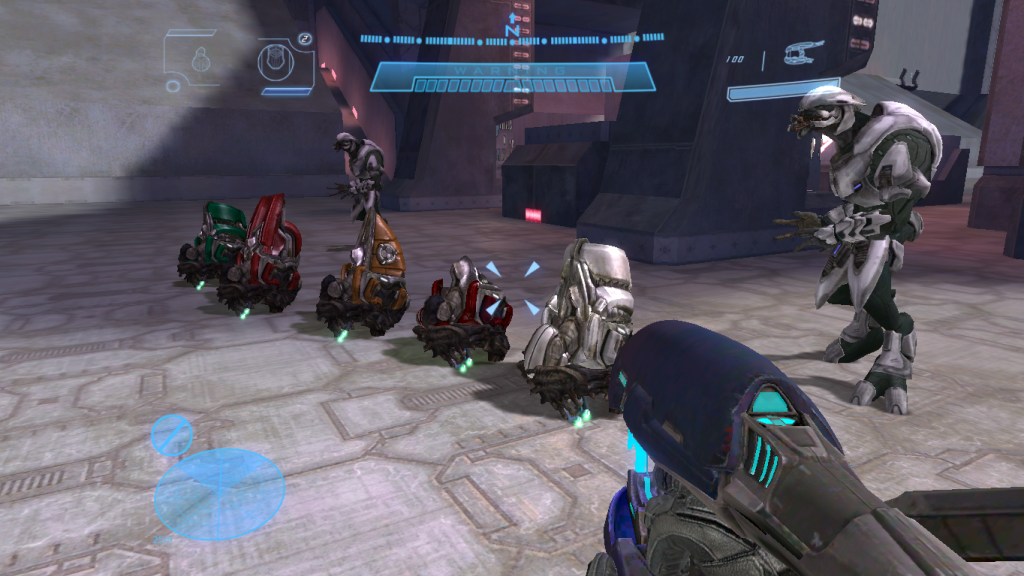 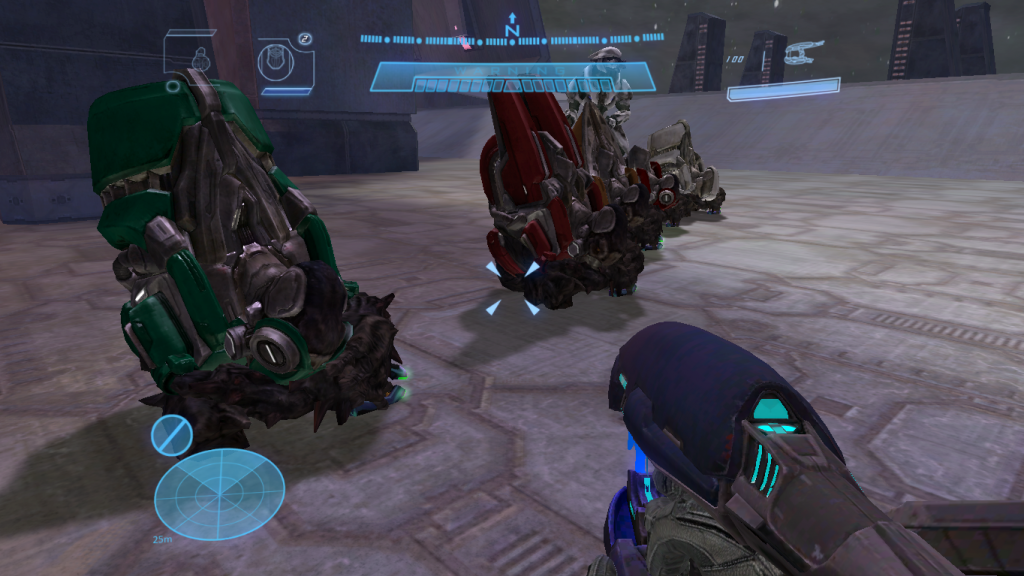 |
||||
|
|
|||||
|
ReconNinja117 Joined: Nov 11, 2011 
|
Posted: Mar 10, 2013 05:30 PM
Msg. 5547 of 6707
The red and green look a bit saturated, but the orange and white are nice. Also, if you're going for accuracy, Reach's grunt heavies are a greenish brown, rather than a greenish blue.
Reach grunt heavy: http://imagenes.levelup.com/uploads/gallery/pics/gallery_pic_3519_0_30804.jpg |
||||
|
|
|||||
|
killzone64 Joined: Jun 9, 2010
sometimes i miss the chaos occasionally |
Posted: Mar 10, 2013 05:37 PM
Msg. 5548 of 6707
yea they were 30 second slap on shaders, im definately redoing them. i actually havent touched them since the reach extration tools became public
Edited by killzone64 on Mar 10, 2013 at 05:38 PM |
||||
|
|
|||||
|
master noob Joined: Aug 10, 2012
343Industries Advocate |
Posted: Mar 10, 2013 05:39 PM
Msg. 5549 of 6707
anyone know where I can get a student license for max 2009 from the autodesk website? it doesn't show up in my products page, and this does have something to do with bipeds.
|
||||
|
|
|||||
|
killzone64 Joined: Jun 9, 2010
sometimes i miss the chaos occasionally |
Posted: Mar 10, 2013 06:06 PM
Msg. 5550 of 6707
why 2009? you cna use 2012 just fine with ce?
|
||||
|
|
|||||
|
master noob Joined: Aug 10, 2012
343Industries Advocate |
Posted: Mar 10, 2013 06:16 PM
Msg. 5551 of 6707
Quote: --- Original message by: killzone64 why 2009? you cna use 2012 just fine with ce? certain plugins I've found only work with 2009. some file importers, additional formats, etc |
||||
|
|
|||||
|
killzone64 Joined: Jun 9, 2010
sometimes i miss the chaos occasionally |
Posted: Mar 10, 2013 06:41 PM
Msg. 5552 of 6707
what kind of plugins?, currently compatible with max 2012 there is an animation importer\exporter, model exporter\importer, and an emf importer.
|
||||
|
|
|||||
|
master noob Joined: Aug 10, 2012
343Industries Advocate |
Posted: Mar 10, 2013 07:27 PM
Msg. 5553 of 6707
Quote: --- Original message by: killzone64 what kind of plugins?, currently compatible with max 2012 there is an animation importer\exporter, model exporter\importer, and an emf importer. I hope you understand if I say I have to keep it under wraps. |
||||
|
|
|||||
|
killzone64 Joined: Jun 9, 2010
sometimes i miss the chaos occasionally |
Posted: Mar 10, 2013 07:44 PM
Msg. 5554 of 6707
2009 isn't available on there sorry
 |
||||
|
|
|||||
|
savinpvtmike Joined: Apr 18, 2010 
It's heavily inserted |
Posted: Mar 10, 2013 08:43 PM
Msg. 5555 of 6707
i use 3ds max 8 and 3ds max 2012 they both work grate i use 2012 for bipeds and i use max 8 for scenery, weapons, vehicles and animations. it works best that way.
|
||||
|
|
|||||
|
Cheddars Joined: Oct 30, 2010
Rave to the Grave. |
Posted: Mar 11, 2013 01:51 AM
Msg. 5556 of 6707
Quote: --- Original message by: waffles The color values for the varients are in the biped or hlmt tags meta (at least for h3) in adjutant. Even then various factors such as specular lighting and cubemaps affect the "overall" color. yeah just tried. you cant do it with reach :( |
||||
|
|
|||||
|
jabberwockxeno Joined: Jan 16, 2013
|
Posted: Mar 11, 2013 08:12 AM
Msg. 5557 of 6707
Quote: --- Original message by: ReconNinja117 The red and green look a bit saturated, but the orange and white are nice. Also, if you're going for accuracy, Reach's grunt heavies are a greenish brown, rather than a greenish blue. Reach grunt heavy: http://imagenes.levelup.com/uploads/gallery/pics/gallery_pic_3519_0_30804.jpg Actually, they are iridescent/pearlescent. For the majors, their body armor is a copper, with greenish specular highlights. Their "starscream" prongs are crimson with copper highlights or vis versa. Spec ops have a dark maroon with a sagish specular highlights, heavies are sage with a very slight brown specular highlight, minors and ultras don't really have a separate specular color, but they are still pearlsecent. With the ultra, the helmet and backpack may have a slight pinkish specular color. In max, the easiest way to do this is with the mental ray car paint mat/shader. I can give some specific set ups to simulate each grunt's armor later. All covie metals tend to be pearlsecent/iridescent to a certain degree, so generally, car paint is the way to go. |
||||
|
|
|||||
|
klasher1000 Joined: Nov 1, 2012 
|
Posted: Mar 13, 2013 11:21 AM
Msg. 5558 of 6707
Anyone here like Tribes Ascend? If so I'm working on rigging and getting some of the Tribes Ascend bipeds ingame for ce.
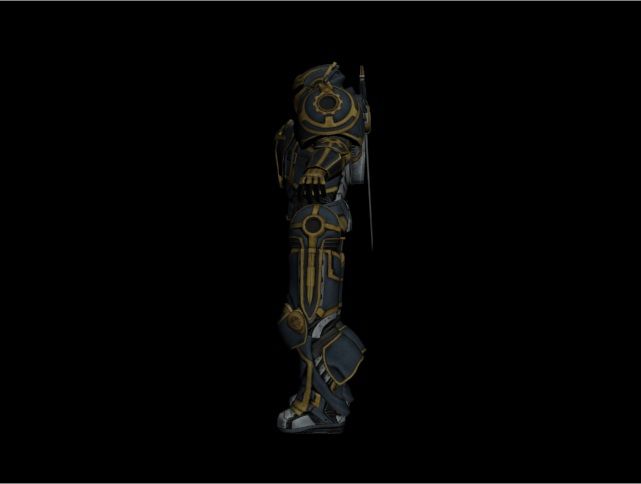 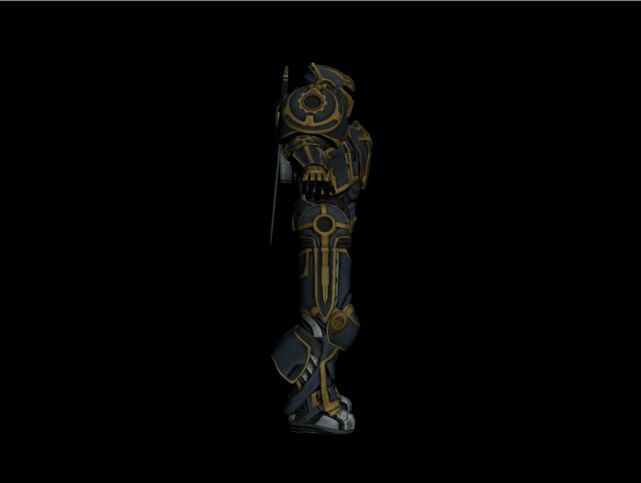 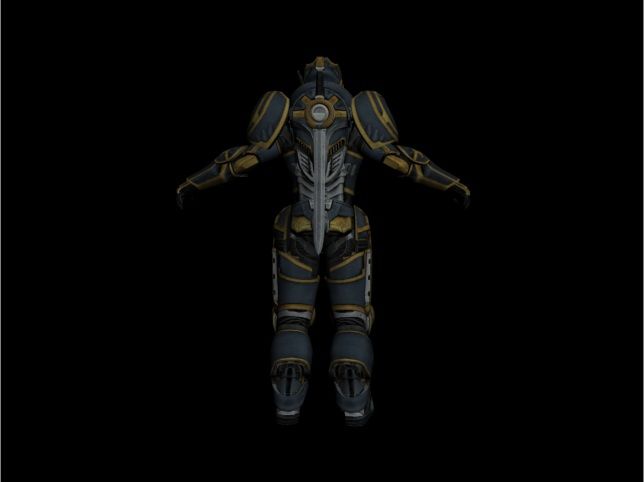 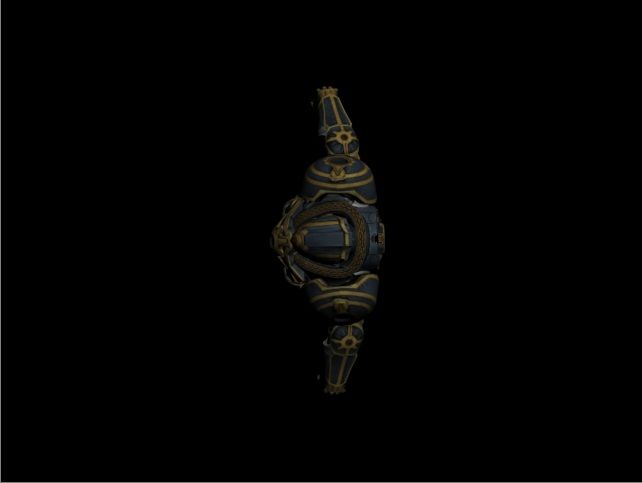 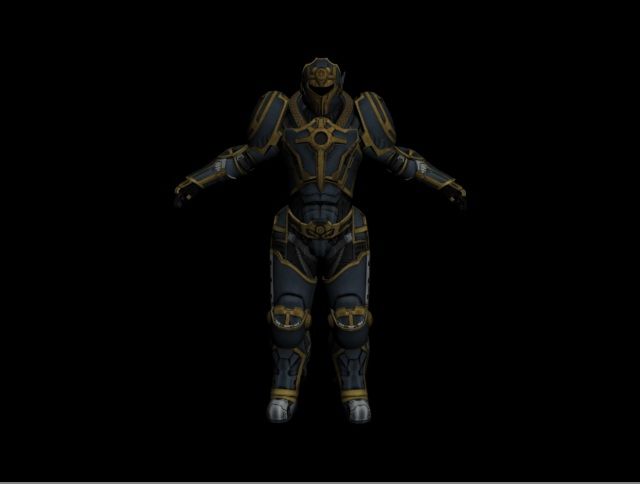 Edited by klasher1000 on Mar 13, 2013 at 11:40 AM |
||||
|
|
|||||
|
Dumb AI Joined: Sep 18, 2011
Dead. |
Posted: Mar 13, 2013 06:22 PM
Msg. 5559 of 6707
Looks like a mix of medieval knight armor and Section 8's battle armor.
|
||||
|
|
|||||
|
killzone64 Joined: Jun 9, 2010
sometimes i miss the chaos occasionally |
Posted: Mar 13, 2013 08:56 PM
Msg. 5560 of 6707
looks nice, tribes was cool but what i really want to see is the planetside stuff in ce.
still trying to figure out how to rip from it Edited by killzone64 on Mar 13, 2013 at 08:57 PM |
||||
|
|
|||||
|
Bobblehob Joined: Aug 29, 2010 
|
Posted: Mar 14, 2013 01:55 AM
Msg. 5561 of 6707
Quote: --- Original message by: killzone64 looks nice, tribes was cool but what i really want to see is the planetside stuff in ce. still trying to figure out how to rip from it Edited by killzone64 on Mar 13, 2013 at 08:57 PM Planetsides models and such are so drab compared to Tribes though, I mean look at that suit of armor up there... then look at the lame spray painted body armor on any of the PS2 factions... |
||||
|
|
|||||
|
master noob Joined: Aug 10, 2012
343Industries Advocate |
Posted: Mar 14, 2013 02:08 AM
Msg. 5562 of 6707
Quote: --- Original message by: Bobblehob Planetsides models and such are so drab compared to Tribes though, I mean look at that suit of armor up there... then look at the lame spray painted body armor on any of the PS2 factions... except the Vanu. they have the best sniper/max armor. |
||||
|
|
|||||
|
Bobblehob Joined: Aug 29, 2010
|
Posted: Mar 14, 2013 02:59 AM
Msg. 5563 of 6707
Quote: --- Original message by: master noob Quote: --- Original message by: Bobblehob Planetsides models and such are so drab compared to Tribes though, I mean look at that suit of armor up there... then look at the lame spray painted body armor on any of the PS2 factions... except the Vanu. they have the best sniper/max armor. The Vanu is slightly more interesting, but even it is still boring compared to tribes. |
||||
|
|
|||||
|
klasher1000 Joined: Nov 1, 2012
|
Posted: Mar 14, 2013 10:39 AM
Msg. 5564 of 6707
Since I was having some problems with models I ripped before I have to re-rip and re extract the models, textures etc. So it will take some time for me to get the bipeds ready to be rigged for animation. Also anyone know where I can get a Halo 1 Masterchief animations and rig for a project I'm working on?
EDIT: Problem solved found the old rig I ripped with HEK+ before Edited by klasher1000 on Mar 15, 2013 at 05:24 PM |
||||
|
|
|||||
|
Cheddars Joined: Oct 30, 2010
Rave to the Grave. |
Posted: Mar 15, 2013 07:38 PM
Msg. 5565 of 6707
mmmmmmmmmmmmmmmm im terrible at shaders :(
   the skins lighter ingame Edited by Cheddars on Mar 15, 2013 at 07:38 PM |
||||
|
|
|||||
| Page 159 of 192 | Go to page: · 1 · ... · 156 · 157 · 158 · [159] · 160 · 161 · 162 · ... · 192 · Prev · Next |

|
