A Community discussion forum for Halo Custom Edition, Halo 2 Vista, Portal and Halo Machinima
|
 Home
Home Search
 Register
 Login
Login Member List
 Recent Posts
| »Forums Index »Halo Custom Edition (Bungie/Gearbox) »Halo CE General Discussion »Weapons - Works in Process thread [WIP] | 
|
| Page 230 of 371 | Go to page: · 1 · ... · 227 · 228 · 229 · [230] · 231 · 232 · 233 · ... · 371 · Prev · Next |
| Author | Topic: Weapons - Works in Process thread [WIP] (12975 messages, Page 230 of 371) | ||||
| Moderators: Dennis | |||||
 new101 Joined: May 18, 2009 
All for one and one for all |
Posted: Feb 21, 2011 01:08 PM
Msg. 8016 of 12975
I believe pro boolean may have caused some of the messier mesh. I did save time though because I didn't have to cut into the faces manually. As for the mess of polys near the stock would be a screw like grove to adjust the how far the stock is away from the gun. Are there any alternatives to pro boolean besides cutting in the faces directly?
Also the weld seem is still in the model in case I decide to alter some faces and re mirror them. Edited by new101 on Feb 21, 2011 at 01:09 PM |
||||


|
|||||
|
Maniac1000 -Helpful Poster- Joined: Feb 24, 2007 
|
Posted: Feb 21, 2011 01:10 PM
Msg. 8017 of 12975
|
||||
|
|
|||||
|
anonymous_2009 Joined: Jun 13, 2009 
|
Posted: Feb 21, 2011 01:44 PM
Msg. 8018 of 12975
Quote: --- Original message by: new101 Sorry 2011 has slightly different material editor than 8 did. Also I believe my render settings need work because the wire frame doesn't show up on the clay model. Anyway here is what I was able to render. http://img202.imageshack.us/i/hkwire.jpg/ Edited by new101 on Feb 21, 2011 at 12:33 PM Max 11 has the exact same material editor as other versions, apart from they have tried to make it more like unreal kismet. It's LITERALLY the same apart from the fact you link things together as well, no improvements at all lol. It's just one of the stupid new things they have done in it, another stupid thing they have done is make the new dialog for extrude ect render in the 3d space is seems. Just SO stupid, I'm not switching to Max 11 simply because of that horrible change which uses more memory. You can switch it back undo the "File" menu I think it is, well the first drop down menu. It says something like "Switch to Compact Editor". |
||||
|
|
|||||
|
Maniac1000 -Helpful Poster- Joined: Feb 24, 2007
|
Posted: Feb 21, 2011 01:49 PM
Msg. 8019 of 12975
When you "create/target weld" the tool stays selected even when switching between vert/edge/poly/element modes, how stupid.
|
||||
|
|
|||||
|
new101 Joined: May 18, 2009
All for one and one for all |
Posted: Feb 21, 2011 02:13 PM
Msg. 8020 of 12975
Thanks for the tutorial. I will look into this and modify my model accordingly. As for the material editor I did change it back to the default view. I still have problems with the wire frame showing on the clay model. I do apply a push modifier to a copy of .1 and assign a wireframe material to the object yet when I go to render it the "wireframe" is a solid material yet in the perspective view with smooth + highlights it shows the wireframe.
|
||||
|
|
|||||
|
Maniac1000 -Helpful Poster- Joined: Feb 24, 2007
|
Posted: Feb 21, 2011 02:19 PM
Msg. 8021 of 12975
A better way
1. Create a standard material, the color you want. 2. Create a standard material and set the color to black (or whatever color you want your wireframe) and then check “wire” under the “Shader Basic Parameters”. 3. Now create a “Composite” material. You’ll see a list like “Mat. 1″, “Mat. 2″, “Mat. 3″ and so on. 3.a. Drag the material created on step 1 and instance it to the “Mat. 1″ slot. 3.b. Drag the material created on step 2 and instance it to the “Mat. 2″ slot. 4. Apply your “Composite” material to the objects on the scene and hit Render. For a better result, increase the quality of the image sampling (antialisaing). Something around min 1 and max 4 or higher might be good. Adjust it as needed (higher is better, but will take more time to render). |
||||
|
|
|||||
|
Dwood Joined: Oct 23, 2007 
Judge Ye Therefore |
Posted: Feb 24, 2011 03:13 AM
Msg. 8022 of 12975
Quote: --- Original message by: Maniac1000 When you "create/target weld" the tool stays selected even when switching between vert/edge/poly/element modes, how stupid. The last good version of Max was 9, imo. Edit: I honestly don't get why you guys grab the latest and greatest every time a new update comes out. Kind of silly imo. Edited by Dwood on Feb 24, 2011 at 03:14 AM |
||||
|
|
|||||
|
Maniac1000 -Helpful Poster- Joined: Feb 24, 2007
|
Posted: Feb 24, 2011 12:19 PM
Msg. 8023 of 12975
I use max 8 for almost everything, i only tryed 2011 to test the viewport painting tools, which are terrible.
|
||||
|
|
|||||
|
eliteslasher Joined: Jun 30, 2008 
Crysis 3!!!!!!! All I have to say. :D |
Posted: Feb 24, 2011 04:44 PM
Msg. 8024 of 12975
Quote: --- Original message by: Maniac1000 I use max 8 for almost everything, i only tryed 2011 to test the viewport painting tools, which are terrible. If they are what I think they are, aren't they also in 2010? If so, I think you are incorrect there Maniac. They are UNGODLY TERRIBLE!!! |
||||
|
|
|||||
|
AGLion Joined: Jun 29, 2010 
- Animator... suck it - |
Posted: Feb 24, 2011 04:54 PM
Msg. 8025 of 12975
Quote: --- Original message by: eliteslasher Quote: --- Original message by: Maniac1000 I use max 8 for almost everything, i only tryed 2011 to test the viewport painting tools, which are terrible. If they are what I think they are, aren't they also in 2010? If so, I think you are incorrect there Maniac. They are UNGODLY TERRIBLE!!! You have to understand that tools such as 3DS and Maya are meant and designed for professional users. What you might find ridiculous would be found essential by somebody who models/animates for a living. |
||||
|
|
|||||
|
Skidrow925 Joined: Mar 19, 2010 
"ideological sense of respect and tact of a 5yo" |
Posted: Feb 24, 2011 04:56 PM
Msg. 8026 of 12975
Quote: --- Original message by: AGLion Quote: --- Original message by: eliteslasher Quote: --- Original message by: Maniac1000 I use max 8 for almost everything, i only tryed 2011 to test the viewport painting tools, which are terrible. If they are what I think they are, aren't they also in 2010? If so, I think you are incorrect there Maniac. They are UNGODLY TERRIBLE!!! You have to understand that tools such as 3DS and Maya are meant and designed for professional users. What you might find ridiculous would be found essential by somebody who models/animates for a living. Key word is PROFESSIONAL! |
||||
|
|
|||||
|
ICEE Joined: Mar 1, 2007 
Hark! |
Posted: Feb 24, 2011 05:39 PM
Msg. 8027 of 12975
I like 2010 for animation because of the animation layer pallet. Though I haven't used max 9, so I don't know if it has that feature. 8 does not though.
|
||||
|
|
|||||
|
Dwood Joined: Oct 23, 2007
Judge Ye Therefore |
Posted: Feb 24, 2011 06:33 PM
Msg. 8028 of 12975
Quote: --- Original message by: AGLion Quote: --- Original message by: eliteslasher Quote: --- Original message by: Maniac1000 I use max 8 for almost everything, i only tryed 2011 to test the viewport painting tools, which are terrible. If they are what I think they are, aren't they also in 2010? If so, I think you are incorrect there Maniac. They are UNGODLY TERRIBLE!!! You have to understand that tools such as 3DS and Maya are meant and designed for professional users. What you might find ridiculous would be found essential by somebody who models/animates for a living. And pros don't use them. What's that say about the tools? |
||||
|
|
|||||
|
Maniac1000 -Helpful Poster- Joined: Feb 24, 2007
|
Posted: Feb 24, 2011 08:12 PM
Msg. 8029 of 12975
Quote: --- Original message by: AGLion Quote: --- Original message by: eliteslasher Quote: --- Original message by: Maniac1000 I use max 8 for almost everything, i only tryed 2011 to test the viewport painting tools, which are terrible. If they are what I think they are, aren't they also in 2010? If so, I think you are incorrect there Maniac. They are UNGODLY TERRIBLE!!! You have to understand that tools such as 3DS and Maya are meant and designed for professional users. What you might find ridiculous would be found essential by somebody who models/animates for a living. And that would excuse the lack of effort and research that went into including such a waste of memory? |
||||
|
|
|||||
|
AGLion Joined: Jun 29, 2010
- Animator... suck it - |
Posted: Feb 24, 2011 11:32 PM
Msg. 8030 of 12975
Quote: --- Original message by: Maniac1000 And that would excuse the lack of effort and research that went into including such a waste of memory? Running it on your 4 year old laptop with 1GB of memory is not a good idea. You would only see programs like 3ds Max in the industry on high powered workstations. You would find those workstations with Xeon\Opteron, Quadro\ATI, and huge amounts of memory, not the puny Celeron that you bought off of Ebay. It's really like running a slowed down video game. You are constantly rendering geometric data and running floating point calculations, which requires memory and computing power. My 3ds Max 2010 takes ~350mb of memory when not rendering, and I have 6gb of memory with a Core i3, so its kind of a kick in the pants for my PC when I do render. Now imagine how happy the guy will be when he has upwards of 24GB of memory and those fancy 12-core Opterons. Quote: --- Original message by: Dwood And pros don't use them. What's that say about the tools? http://en.wikipedia.org/wiki/List_of_films_made_with_Autodesk_3ds_Max Takes pros to make movies like those; takes real machines to render those movies. |
||||
|
|
|||||
|
Maniac1000 -Helpful Poster- Joined: Feb 24, 2007
|
Posted: Feb 24, 2011 11:48 PM
Msg. 8031 of 12975
What does the memory required to render images (or render farms) have to do with the fact that the painting tools are useless?
and i have a i7 with 8gb ram, fyi. ha ha, i re-read your post and you think i was talking about the actual memory,i was infact wondering why such terrible tools were even included ie.waste of memory . Edited by Maniac1000 on Feb 24, 2011 at 11:57 PM |
||||
|
|
|||||
|
AGLion Joined: Jun 29, 2010
- Animator... suck it - |
Posted: Feb 25, 2011 01:04 AM
Msg. 8032 of 12975
Yeah I read your post wrong. I'm not totally sure what the painting tools are or what they're supposed to do so I can't say.
|
||||
|
|
|||||
|
Skidrow925 Joined: Mar 19, 2010
"ideological sense of respect and tact of a 5yo" |
Posted: Feb 25, 2011 05:46 PM
Msg. 8033 of 12975
Quote: --- Original message by: AGLion Yeah I read your post wrong. I'm not totally sure what the painting tools are or what they're supposed to do so I can't say. I have sort of figured them out. Not to where I will use them a lot but to a point where I figured out what they do. |
||||
|
|
|||||
|
Spartan314 Joined: Aug 21, 2010 
Former biped rigger & FP animator |
Posted: Feb 26, 2011 02:08 AM
Msg. 8034 of 12975
   Crit? |
||||
|
|
|||||
|
HaloIsAHorribleGane Joined: Nov 9, 2010 
I'd rather play yahtzee |
Posted: Feb 26, 2011 07:42 AM
Msg. 8035 of 12975
wire
|
||||
|
|
|||||
|
Sergeant 1337 Joined: May 1, 2010 
Do you even lift? |
Posted: Feb 26, 2011 03:04 PM
Msg. 8036 of 12975
Finally got around to finishing my Reach sniper:
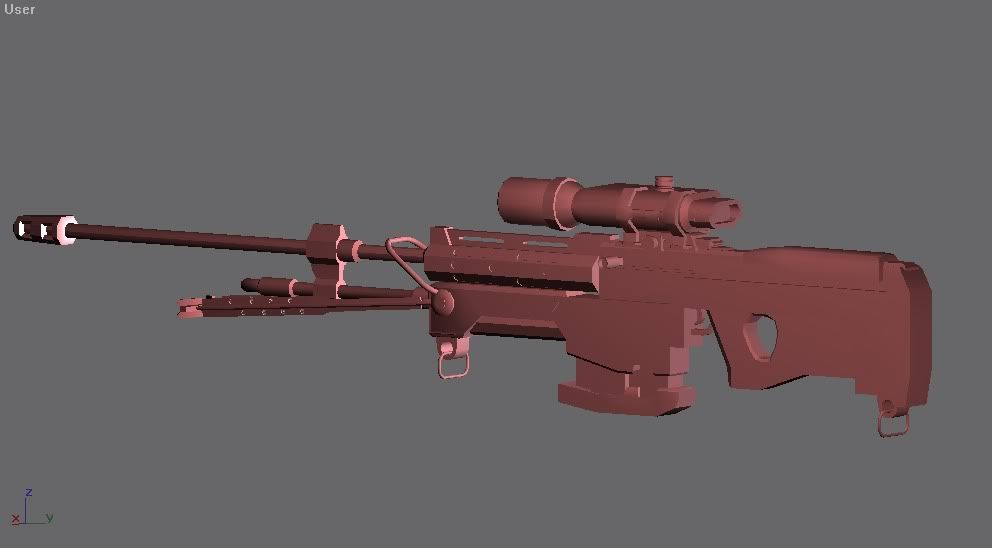 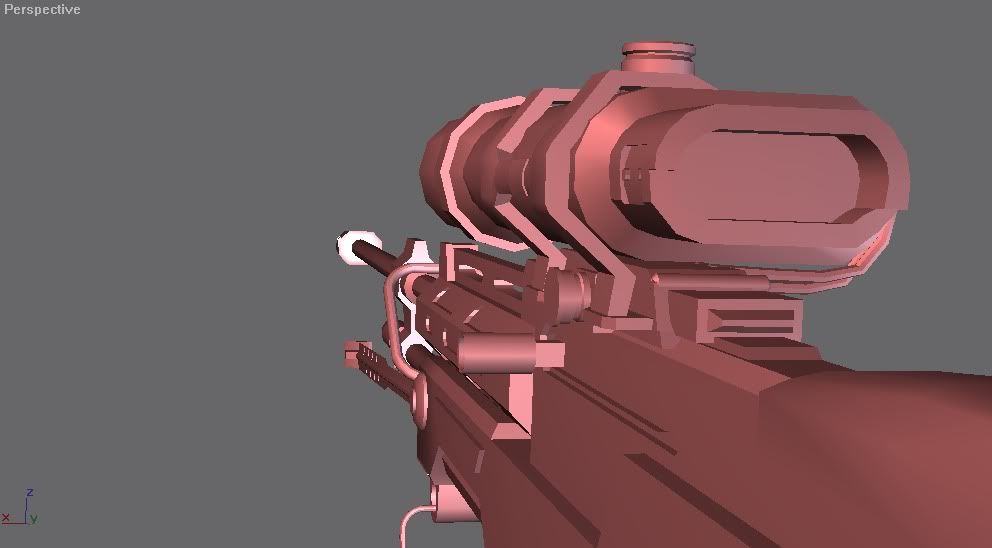 |
||||
|
|
|||||
|
anonymous_2009 Joined: Jun 13, 2009
|
Posted: Feb 26, 2011 04:09 PM
Msg. 8037 of 12975
Please can you post a wireframe? And a view in perspective not "User" as it is baddd LOl :) Looks good though :)
|
||||
|
|
|||||
|
Sergeant 1337 Joined: May 1, 2010
Do you even lift? |
Posted: Feb 26, 2011 04:34 PM
Msg. 8038 of 12975
lol my bad :P
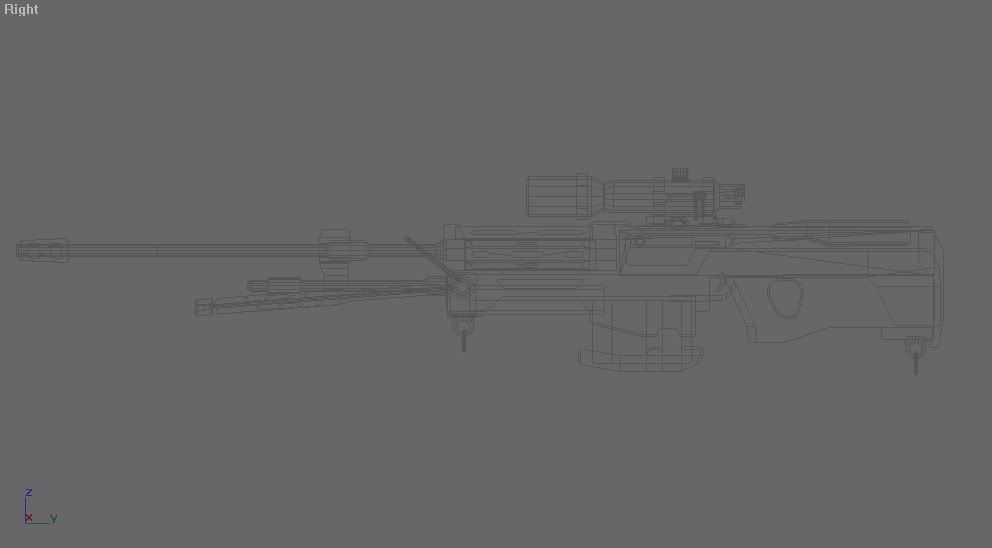 |
||||
|
|
|||||
|
anonymous_2009 Joined: Jun 13, 2009
|
Posted: Feb 26, 2011 08:48 PM
Msg. 8039 of 12975
need a wireframe in perspective with the mesh and wireeee
|
||||
|
|
|||||
|
Amazingcuziam Joined: Apr 16, 2010 
Sup. |
Posted: Feb 26, 2011 09:14 PM
Msg. 8040 of 12975
is... that... even... possible with gmax?
|
||||
|
|
|||||
|
Cheddars Joined: Oct 30, 2010 
Rave to the Grave. |
Posted: Feb 26, 2011 09:26 PM
Msg. 8041 of 12975
Quote: --- Original message by: Sergeant 1337 Finally got around to finishing my Reach sniper: can we use thsi reach sniper for our boneyard and hemmorage map? |
||||
|
|
|||||
|
AGLion Joined: Jun 29, 2010
- Animator... suck it - |
Posted: Feb 26, 2011 10:01 PM
Msg. 8042 of 12975
Quote: --- Original message by: Amazingcuziam is... that... even... possible with gmax? press f4? |
||||
|
|
|||||
|
Maniac1000 -Helpful Poster- Joined: Feb 24, 2007
|
Posted: Feb 26, 2011 10:02 PM
Msg. 8043 of 12975
If composite materials are in gmax.
1. Create a standard material, the color you want. 2. Create a standard material and set the color to black (or whatever color you want your wireframe) and then check “wire” under the “Shader Basic Parameters”. 3. Now create a “Composite” material. You’ll see a list like “Mat. 1″, “Mat. 2″, “Mat. 3″ and so on. 3.a. Drag the material created on step 1 and instance it to the “Mat. 1″ slot. 3.b. Drag the material created on step 2 and instance it to the “Mat. 2″ slot. 4. Apply your “Composite” material to the objects on the scene and hit Render. For a better result, increase the quality of the image sampling (antialisaing). Something around min 1 and max 4 or higher might be good. Adjust it as needed (higher is better, but will take more time to render). Edited by Maniac1000 on Feb 26, 2011 at 10:03 PM |
||||
|
|
|||||
|
Sergeant 1337 Joined: May 1, 2010
Do you even lift? |
Posted: Feb 27, 2011 02:57 PM
Msg. 8044 of 12975
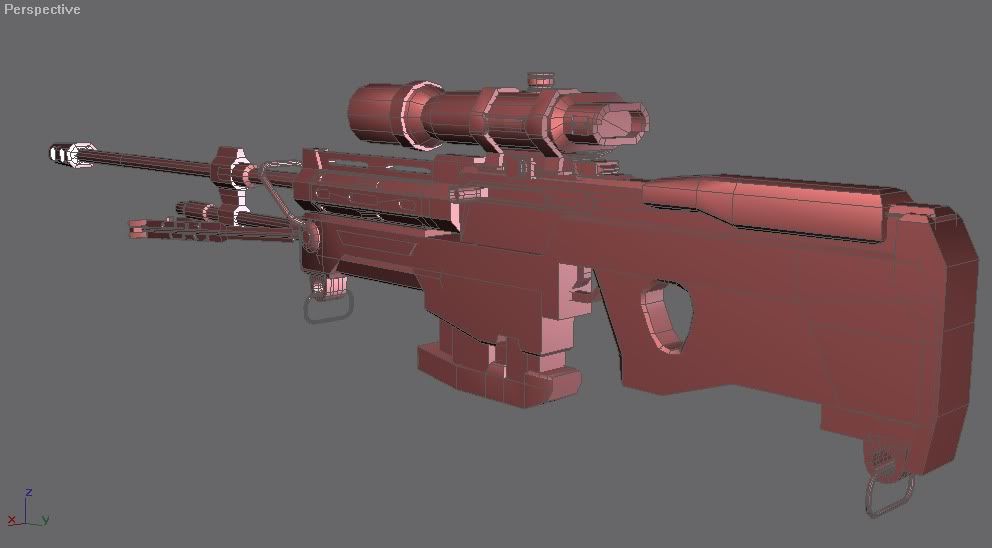
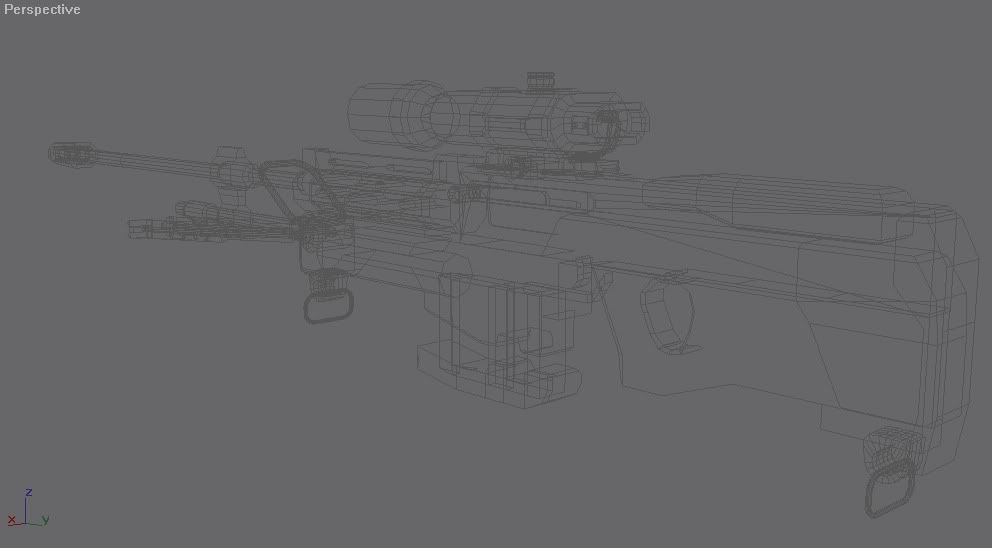
wireframe and mesh w/ wireframe
  |
||||
|
|
|||||
|
anonymous_2009 Joined: Jun 13, 2009
|
Posted: Feb 27, 2011 07:10 PM
Msg. 8045 of 12975
Could you not get the wire a different colour so we can see it... what don't people understand about wireframes...
Well, get rid of the HUGE N-gons. For example that one huge face on the stock, split it up with cut. |
||||
|
|
|||||
|
AGLion Joined: Jun 29, 2010
- Animator... suck it - |
Posted: Feb 27, 2011 07:45 PM
Msg. 8046 of 12975
I would make the barrel and gas tube much thicker, because it looks out of proportion right now.
|
||||
|
|
|||||
|
Shade117 pro Joined: Jul 2, 2009 
Yeah bro (xfire: blue117pro) I can make cubemaps |
Posted: Feb 28, 2011 04:01 PM
Msg. 8047 of 12975
Quote: --- Original message by: AGLion I would make the barrel and gas tube much thicker, because it looks out of proportion right now. That's what She said. |
||||
|
|
|||||
|
AGLion Joined: Jun 29, 2010
- Animator... suck it - |
Posted: Feb 28, 2011 04:16 PM
Msg. 8048 of 12975
That's not what you're Girlfriend said.
:P |
||||
|
|
|||||
|
Echo77 Joined: Jul 20, 2010 
Humble thyself and hold thy tongue. |
Posted: Feb 28, 2011 05:58 PM
Msg. 8049 of 12975
She's my girlfriend now! >:D
Just kidding. This is the internet.... None of us have girlfriends. Edited by Echo77 on Feb 28, 2011 at 05:59 PM |
||||
|
|
|||||
|
Newbkilla Joined: Mar 9, 2008 
- Artist, Environment Artist, Level Designer - |
Posted: Feb 28, 2011 06:15 PM
Msg. 8050 of 12975
herp derp. i have one. kthxbai. ;)
|
||||
|
|
|||||
| Page 230 of 371 | Go to page: · 1 · ... · 227 · 228 · 229 · [230] · 231 · 232 · 233 · ... · 371 · Prev · Next |

|
