A Community discussion forum for Halo Custom Edition, Halo 2 Vista, Portal and Halo Machinima
|
 Home
Home Search
 Register
 Login
Login Member List
 Recent Posts
| »Forums Index »Halo Custom Edition (Bungie/Gearbox) »Halo CE General Discussion »Using Blender 3D for making level geometry | 
|
| Author | Topic: Using Blender 3D for making level geometry (3 messages, Page 1 of 1) | ||||
| Moderators: Dennis | |||||
 killzone64 Joined: Jun 9, 2010 
sometimes i miss the chaos occasionally |
Posted: Apr 30, 2015 09:09 PM
Msg. 1 of 3
well i figured since i get quite a few pm's about me using blender for halo related projects that i would make a getting started thread for anyone who wants to try their hand at blender.
blender is an open source modeling program that has been rapidly improving over the years (if you had asked me 5 years ago about blender i would have said it was utter crap) it has most of the features of major programs all in a free to use package. http://www.blender.org/ For complete newbies watch this video tutorial series: https://www.youtube.com/watch?v=lY6KPrc4uMw&index=1&list=PLda3VoSoc_TR7X7wfblBGiRz-bvhKpGkS some of those tutorials are also helpful if you are coming from 3ds max or other modeling programs. when compared to other modeling programs blender seems a little lacking in gui buttons. it primarily uses hotkeys for most of your standard commands. (if you really feel like wasting a lot of time to you can change every single hotkey in user preferences) if you know the hotkeys for 3ds max there are hotkey presets saved online for different programs such as this one http://blenderartists.org/forum/showthread.php?186905-3dsmax-hotkey-preset-for-Blender one of the first things you will want to do when you install blender is go into preferences, in the input tab youll want to change these mouse settings on the left side bar  otherwise blender has this really weird trackball style view which is really disorenting to use. the emulate numpad function in the input tab allows you to use the number keys to change views. i personally like to use it even if i do have a numpad. the veiw keys are normally 1 for front view 2 rotates the camera down 3 is right view 4 rotates the camera left 5 switches between orthographic and perspective views 6 rotates camera right 7 is top view 8 rotates camera up some people like to change those around but i personally like to leave them how they are. here is also a nice cheat sheet for the standard hotkeys 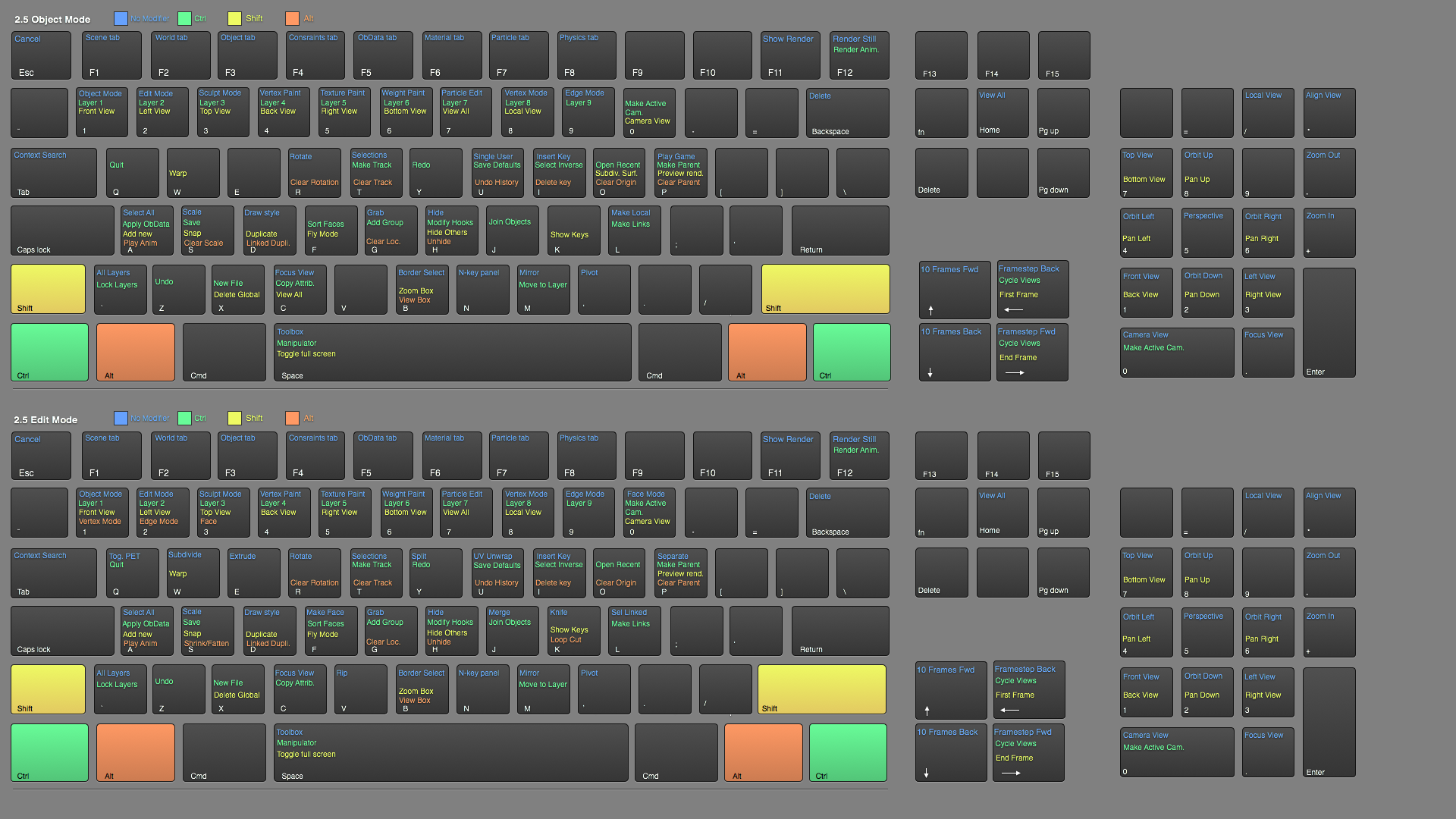 as far as workflow into halo ce goes we still have to use 3ds max. but only for export. the latest version of the fbx exporter keeps the scale from blender to max correct as well as carrys all your uv data and geometry. make sure you use the triangulate faces function before exporting in order to save yourself a lot of trouble  once the map is in 3ds max check for flipped faces. sometimes you will get odd normals when importing your .fbx (not sure if it is 3ds max's fault or blender's) then from then on it is the exact same export procedure as shown in the hek tutorial there was at one time a blender exporter plugin that was being worked on by a user here. but it has been a long time since i have seen him around and im pretty sure work on it has been discontinued. here is a link to that thread if you wish to take a look: http://forum.halomaps.org/index.cfm%3Fpage=topic&topicID=42486 |
||||


|
|||||
|
DaLode Joined: Oct 4, 2014 
Ho ho hooooly doodle! |
Posted: May 1, 2015 03:34 AM
Msg. 2 of 3
I've been learning blender myself to make some low-poly models for #UE4bestEnjin.
It took some getting used to, coming from 3DS previously. But at least it's free, and you don't have to worry about buying a 3k license if you want to use your stuff commercially. And now that I've gotten more accustomed to it, it does work pretty nicely. At least for my needs. |
||||
|
|
|||||
|
PRPatxi Joined: Oct 30, 2010 
Dennis, free me from this suffering |
Posted: May 1, 2015 10:03 AM
Msg. 3 of 3
Quote: --- Original message by: DaLode I've been learning blender myself to make some low-poly models for #UE4bestEnjin. It took some getting used to, coming from 3DS previously. But at least it's free, and you don't have to worry about buying a 3k license if you want to use your stuff commercially. And now that I've gotten more accustomed to it, it does work pretty nicely. At least for my needs. Blender has a better renderer than 3ds Max, not that you need that for video games, but I can do all that 3ds max can do in the same way for $6K less since it's free, the only problem that I see with Blender is that the keyboard shortcuts are just horrible and the fact that you need the extended numpad for the most basic tools knowing that most laptops are coming without it just shows poor planning from the Blender team, and changing them is a pain in the butt. That's why I like Softimage, you can choose from which CGI software you come and adapt the keyboard shortcuts to it. |
||||
|
|
|||||

|
