A Community discussion forum for Halo Custom Edition, Halo 2 Vista, Portal and Halo Machinima
|
 Home
Home Search
 Register
 Login
Login Member List
 Recent Posts
| »Forums Index »Halo Custom Edition (Bungie/Gearbox) »Halo CE Technical / Map Design »Troubleshooting Degenerate Triangles | 
|
| Author | Topic: Troubleshooting Degenerate Triangles (8 messages, Page 1 of 1) | ||||
| Moderators: Dennis | |||||
 renegade343 Joined: Jun 26, 2012 
CE3 Stage Modeler, Editor, and Writer |
Posted: Jan 24, 2015 06:53 PM
Msg. 1 of 8
So I'm trying to compile a map I made on 3DS Max 2012 on Tool, but I got these errors...
 So I tried importing the WRL file that Tool produced back into my original 3DS Max BSP to figure out where these stupid triangles are, like so... 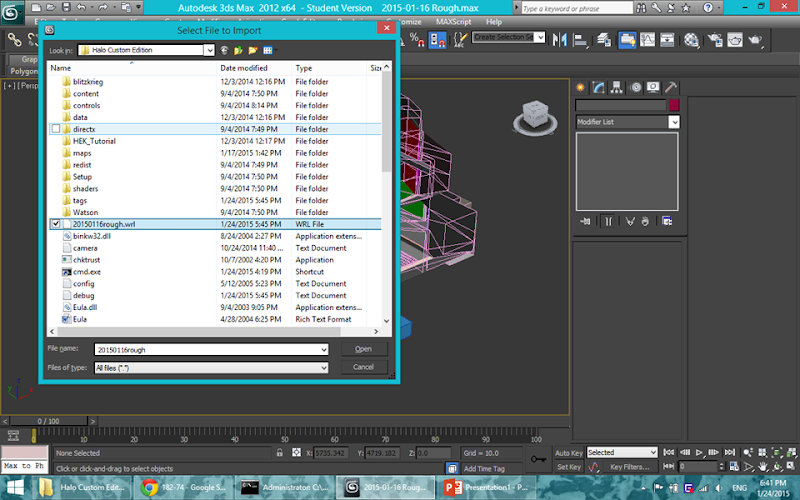 ...but then 3DS gives these complaints, in order from left to right.  What should I do to be able to see the problematic geometry (or otherwise find ways for me to identify and fix them myself)? Edited by renegade343 on Jan 24, 2015 at 06:54 PM |
||||


|
|||||
|
Super Flanker Joined: Oct 5, 2012 
The length of your life depends on my aim. |
Posted: Jan 25, 2015 06:29 AM
Msg. 2 of 8
I use 2014 but I'm pretty sure the procedure is the same.
Head over to file > Hover over import for a few seconds > Then select the "import non native files" method > From there choose the file you'd like to import. 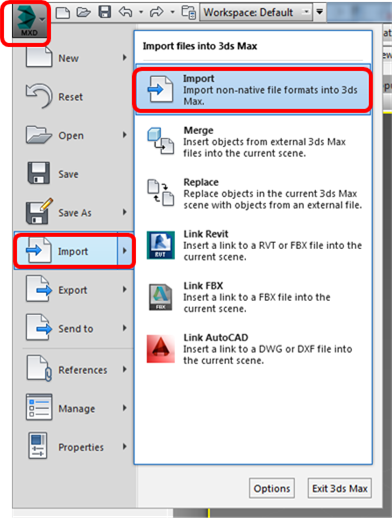 If your having any trouble fixing your degenerate triangles go ahead and pm your max file, and i'll point out where you are going wrong. (BTW before you upload a file make sure to save it in a 3dsmax 2012 format)  |
||||
|
|
|||||
|
Super Flanker Joined: Oct 5, 2012
The length of your life depends on my aim. |
Posted: Jan 25, 2015 11:48 AM
Msg. 3 of 8
Or you could pm it to the both of us.
I have time to create a video and show you where you are going wrong e.t.c First one to fix the file owns alaska. |
||||
|
|
|||||
|
renegade343 Joined: Jun 26, 2012
CE3 Stage Modeler, Editor, and Writer |
Posted: Jan 28, 2015 05:49 PM
Msg. 4 of 8
I tried Flanker's method first, but I found out WRL import doesn't work on the 64 bit version of 3DS MAX 2012 for some reason...
Then I learned Chimp can interpret the error file correctly. So I tried it, and thankfully it works now :D (yay now time for error corrections...) Thank you all though! |
||||
|
|
|||||
|
Maniac1000 -Helpful Poster- Joined: Feb 24, 2007 
|
Posted: Jan 29, 2015 12:47 AM
Msg. 5 of 8
Autodesk removed wrl import in a version or maybe two, must be 2012 i guess.
|
||||
|
|
|||||
|
Super Flanker Joined: Oct 5, 2012
The length of your life depends on my aim. |
Posted: Jan 30, 2015 10:26 AM
Msg. 6 of 8
Glad to hear it's all working for ya.
If you still have trouble fixing your errors send them to me and not sparky because I want to hunt sum moosies. |
||||
|
|
|||||
|
gruntfromhalo Joined: Nov 21, 2007 
actual loli |
Posted: Feb 4, 2015 01:29 PM
Msg. 7 of 8
Quote: --- Original message by: Maniac1000 you can still grab a plugin for it online no? Just no out of the box supportAutodesk removed wrl import in a version or maybe two, must be 2012 i guess. |
||||
|
|
|||||
|
renegade343 Joined: Jun 26, 2012
CE3 Stage Modeler, Editor, and Writer |
Posted: Feb 4, 2015 01:31 PM
Msg. 8 of 8
Quote: --- Original message by: gruntfromhalo Quote: --- Original message by: Maniac1000 you can still grab a plugin for it online no? Just no out of the box supportAutodesk removed wrl import in a version or maybe two, must be 2012 i guess. If that's really a thing, I somehow never came across it... o.o And yeah, it looks like it's gone in the 2012 version for whatever reason. |
||||
|
|
|||||

|
