A Community discussion forum for Halo Custom Edition, Halo 2 Vista, Portal and Halo Machinima
|
 Home
Home Search
 Register
 Login
Login Member List
 Recent Posts
| »Forums Index »Halo Custom Edition (Bungie/Gearbox) »Halo CE Technical / Map Design »Rip Custom H1 Xbox Maps from the Halo 1.5 Pack? | 
|
| Author | Topic: Rip Custom H1 Xbox Maps from the Halo 1.5 Pack? (9 messages, Page 1 of 1) | ||||
| Moderators: Dennis | |||||
 stunt_man Joined: Sep 22, 2009 
GMYF - Now hosting proper MLG gametypes! |
Posted: Jun 19, 2014 01:56 PM
Msg. 1 of 9
^
http://www.halo1forum.com/modding/26-halo-1-5-halo-1-5-lan-edition-download.html What needs to be done in order to rip from these Xbox maps? Will good old HEK+ suffice? Or is another program necessary? inb4 "why don't you try it for yourself?" I won't be around my PC until Sunday night. Edited by stunt_man on Jun 19, 2014 at 01:56 PM EDIT/PROGRESS: So I used Arsenic to get the Xbox tags from the map files. No problems there. However, when I try to open a .scenario file in Sapien, I get a bunch of these errors:
And, when I try to get the BSP into max with BSP Tag Converter, I get this: 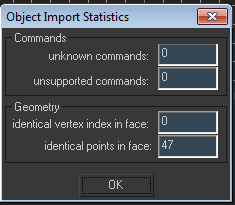 And nothing appears in the viewports (even after welding). I've hit a dead end, anyone have any ideas? Edited by stunt_man on Jun 24, 2014 at 02:05 PM Edited by stunt_man on Jun 24, 2014 at 02:05 PM |
||||


|
|||||
|
The_Purrminator Joined: May 30, 2014 
(SBB) Michelle |
Posted: Jul 8, 2014 06:23 PM
Msg. 2 of 9
I would try porting them, should be easy seeing as the stuff is in a very similar version of the engine.
(And I honestly wanna play them on pc) |
||||
|
|
|||||
|
stunt_man Joined: Sep 22, 2009
GMYF - Now hosting proper MLG gametypes! |
Posted: Jul 9, 2014 11:31 PM
Msg. 3 of 9
I read something about how BSP's on Xbox use compressed vertices and on PC they use uncompressed vertices (or vice-versa), which make them incompatible/unrippable. As you can see from my edited post, I was able to extract the tags without much trouble (using Arsenic) and now it's really down to finding a way to rip the BSP properly. The problem is, all our BSP-ripping tools are built with CE in mind (since most people wanted to rip custom CE maps - no one ever really had a reason to rip Xbox BSP's, since they're the same as PC BSP's).
Maybe it's not complicated and someone with some coding knowledge can make an alternate version of BSP Tag Converter, or something similar. Or maybe that's wishful thinking Either way it would be great to get these competitive maps into CE. Despite some great content, very few custom CE maps were made by high-level players with a competitive focus in mind. EDIT: If anyone wants the tags, let me know here and I'll PM them to you so you can try it out. Edited by stunt_man on Jul 9, 2014 at 11:32 PM |
||||
|
|
|||||
|
The_Purrminator Joined: May 30, 2014
(SBB) Michelle |
Posted: Jul 10, 2014 12:03 PM
Msg. 4 of 9
I found a way to extract the maps, I may port some soon.
Edited by Maiku3 on Jul 10, 2014 at 12:24 PM |
||||
|
|
|||||
|
altis94 Joined: Oct 5, 2012 
Join my Discord https://discord.gg/GDVEaRD |
Posted: Jul 10, 2014 12:12 PM
Msg. 5 of 9
Quote: --- Original message by: Maiku3 :DDDDDDDDDDDDDD |
||||
|
|
|||||
|
Maniac1000 -Helpful Poster- Joined: Feb 24, 2007 
|
Posted: Jul 10, 2014 02:27 PM
Msg. 6 of 9
Did you try aether?
|
||||
|
|
|||||
|
stunt_man Joined: Sep 22, 2009
GMYF - Now hosting proper MLG gametypes! |
Posted: Jul 11, 2014 08:02 PM
Msg. 7 of 9
Quote: --- Original message by: Maiku3 I found a way to extract the maps, I may port some soon. Edited by Maiku3 on Jul 10, 2014 at 12:24 PM Great. If you end up abandoning please post the process you figured out so that these maps may one day see the light of day! |
||||
|
|
|||||
|
MosesofEgypt Joined: Apr 3, 2013 
|
Posted: Jul 12, 2014 06:05 PM
Msg. 8 of 9
Yea, Xbox uses compressed vertex data and pc uses uncompressed vertex data. I'm pretty sure that you can open the map in arsenic, click the export button and export it as a custom edition map and it'll work. It has to rebuild the uncompressed vertex data from the compressed data.
For non-bsp geometry each uncompressed vertex is 68 bytes and is structured like so. It's likely similar to this for BSP's as well. Uncompressed Vertices (GBX ONLY): *PC Vertices use 68 bytes of data per block* Bytes: Data ------ (size) (type) (default value) 1 - 4: translation X (32 bit) (float) 5 - 8: translation Y (32 bit) (float) 9 - 12: translation Z (32 bit) (float) 13 - 16: normal i (32 bit) (float) 17 - 20: normal j (32 bit) (float) 21 - 24: normal k (32 bit) (float) 25 - 28: binormal i (32 bit) (float) 29 - 32: binormal j (32 bit) (float) 33 - 36: binormal k (32 bit) (float) 37 - 40: tangent i (32 bit) (float) 41 - 44: tangent j (32 bit) (float) 45 - 48: tangent k (32 bit) (float) 49 - 52: texture coordinate U (32 bit) (float) 53 - 56: texture coordinate V (32 bit) (float) 57 - 58: node 0 index (16 bit) (long) 59 - 60: node 1 index (16 bit) (long) 61 - 64: node 0 weight (32 bit) (float) 65 - 68: node 1 weight (32 bit) (float) Xbox uses the compressed vertices which are 32 bytes each instead and look like this. Compressed Vertices: Each block total size: 32 bytes Bytes: Data ------ (size) (type) (default value) 1 - 4: translation X (32 bit) (float) 5 - 8: translation Y (32 bit) (float) 9 - 12: translation Z (32 bit) (float) 13 - 16: normal (32 bit) (see footnote *) 17 - 20: binormal (32 bit) (see footnote *) 21 - 24: tangent (32 bit) (see footnote *) 25 - 26: texture coordinate U (16bit) (see footnote **) 27 - 28: texture coordinate V (16bit) (see footnote **) 29: node 0 index *** (8 bit) 30: node 1 index *** (8 bit) 31 - 32: node 0 weight**** (16 bit) * [ i, j, k ] values are allocated as [ 11bit, 11bit, 10bit ] ** normalized [ 0.0 - 1.0 ] coordinate = [ (1 + value) /32767 ] *** divide value by 3 to get actual node index **** node 1 weight is {65535 - [node 0 weight] } normals compression scheme while ( loopcount = 0; loopcount <= 2; loopcount++ ) ( n = 11 // i and j use 11 bits shiftbits = n * loopcount if loopcount = 0 ( uncompressed_vector = i ) elseif loopcount = 1 ( uncompressed_vector = j ) elseif loopcount = 2 ( uncompressed_vector = k n = 10 // wheras k only uses 10 bits else ) vector = floor( ( uncompressed_vector ) * ( 2^( n - 1) - 0.5 ) ) if vector < 0 ( vector = vector - ( 2^n - 1 ) ) vector << shiftbits compressed_normal += vector ) As far as non-BSP geometry goes, the issue is that xbox uses .model tags and pc uses .gbxmodel. there's a few differences on the binary level such as each "parts" block being 104 bytes on xbox and 132 bytes on pc(this is because they incorporated local nodes into gbxmodel tags for some unknown reason and that's where they store the data). Also, Xbox model tags use the markers at the front of the tag rather than the "local" markers under the permutation blocks(PC does vice versa and uses the local markers and ignores the "regular" markers). Edited by MosesofEgypt on Jul 12, 2014 at 06:06 PM |
||||
|
|
|||||
|
stunt_man Joined: Sep 22, 2009
GMYF - Now hosting proper MLG gametypes! |
Posted: Jul 13, 2014 04:25 PM
Msg. 9 of 9
Am I missing something? In the menu, when I click "export," PC map and CE map are greyed-out :/
|
||||
|
|
|||||

|
