A Community discussion forum for Halo Custom Edition, Halo 2 Vista, Portal and Halo Machinima
|
 Home
Home Search
 Register
 Login
Login Member List
 Recent Posts
| »Forums Index »Halo Custom Edition (Bungie/Gearbox) »Halo CE General Discussion »Weapon Box Script? | 
|
| Author | Topic: Weapon Box Script? (9 messages, Page 1 of 1) | ||||
| Moderators: Dennis | |||||
 H2 Joined: Dec 1, 2013 
Mexicans aren't real people. |
Posted: Dec 10, 2013 08:03 PM
Msg. 1 of 9
This:
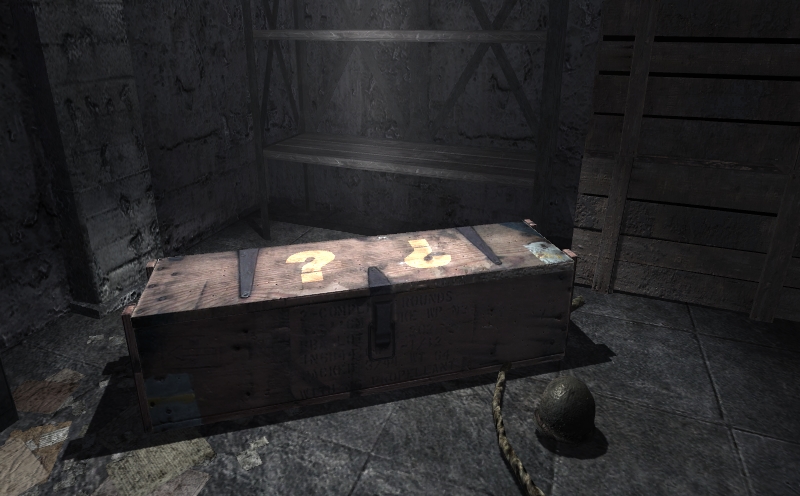 If you still don't know it's a mystery box that when opened spawns a random weapon. If someone made a script of this, plz share. Edited by H2 on Dec 10, 2013 at 08:06 PM |
||||


|
|||||
|
Maniac1000 -Helpful Poster- Joined: Feb 24, 2007 
|
Posted: Dec 10, 2013 08:04 PM
Msg. 2 of 9
What about it?
|
||||
|
|
|||||
|
H2 Joined: Dec 1, 2013
Mexicans aren't real people. |
Posted: Dec 10, 2013 08:05 PM
Msg. 3 of 9
Well... idk
|
||||
|
|
|||||
|
TailsTheGamer Joined: Mar 7, 2013 
Meow |
Posted: Dec 10, 2013 08:33 PM
Msg. 4 of 9
*Looks at Jesse's YouTube videos* You may find something...interesting there.
Edited by TailsTheGamer on Dec 10, 2013 at 08:38 PM |
||||
|
|
|||||
|
jackrabbit Joined: Apr 27, 2005 
Fight Against the Machine of Deth! |
Posted: Dec 10, 2013 08:39 PM
Msg. 5 of 9
that's zteams I think it was in the weapons they released.
Edited by jackrabbit on Dec 10, 2013 at 08:40 PM |
||||
|
|
|||||
|
kirby_422 Joined: Jan 22, 2006 
Apparently public enemy number 1? |
Posted: Dec 10, 2013 08:41 PM
Msg. 6 of 9
There is plenty of ways to do it, as well as however you want to communicate between hosts and clients (usually, this is done via biped crushing. You can do so, or use another method if you so choose)
(global short points 0) There is billions of ways to change it up, but that will work when you toss in your favorite method of host testing, and communicating with clients (most likely biped squishing) It uses scenery items to show the scrolling items, then it uses an effect to spawn the currently shown item (You could use a .weapon placed in sapien, attach-detach, but then you have to have a bunch of each weapon, incase that named weapon is already in use. Theres billions of different ways to re-write it, based on however you want it done) In all honesty, you really only need a random_range assigned to variable, check what variable it is, then create the weapon in your favorite fashion. Then, if its MP, add from there. Depending on whether your doing it in MP or not, what I gave you might even have more than what your interested in to begin with. EDIT: Quote: --- Original message by: jackrabbit that's zteams I think it was in the weapons they released. Edited by jackrabbit on Dec 10, 2013 at 08:40 PM If your refering to the video jesse released sometime recently, then that box came from some gbx he gave me, which I then added proper nodes, collision, animation quickly.. I believe it was ripped from one of the games with the DX ripper, but idk. The script I just posted is a modified version of that video (the copy im using, is a static, and it doesnt even have any client stuff) Edited by kirby_422 on Dec 10, 2013 at 08:56 PM |
||||
|
|
|||||
|
H2 Joined: Dec 1, 2013
Mexicans aren't real people. |
Posted: Dec 10, 2013 08:56 PM
Msg. 7 of 9
I'm not doing it in mp. I guess I don't need all those client things right?
|
||||
|
|
|||||
|
kirby_422 Joined: Jan 22, 2006
Apparently public enemy number 1? |
Posted: Dec 10, 2013 09:02 PM
Msg. 8 of 9
You wont need the client stuff for SP. And your box, will it have the weapons as part of the model (animated in shuffling), or separate (something like how I have the attach-detach)?
Really, it can be a super simple script depending on how much is tag related compared to script; you could really just have a script that spawns a random weapon every time the box position hits 1, with it telling the box to return to position 0. |
||||
|
|
|||||
|
jackrabbit Joined: Apr 27, 2005
Fight Against the Machine of Deth! |
Posted: Dec 11, 2013 09:49 AM
Msg. 9 of 9
Yeah that's the video I was thinking about but there was a zteam tag set released with the weapon box included. so I just thougt it was zteams
Anyway nice work! (: |
||||
|
|
|||||

|
