A Community discussion forum for Halo Custom Edition, Halo 2 Vista, Portal and Halo Machinima
|
 Home
Home Search
 Register
 Login
Login Member List
 Recent Posts
| »Forums Index »Halo Custom Edition (Bungie/Gearbox) »Halo CE General Discussion »how do you make collision geometrys??? | 
|
| Author | Topic: how do you make collision geometrys??? (10 messages, Page 1 of 1) | ||||
| Moderators: Dennis | |||||
 killzone64 Joined: Jun 9, 2010 
sometimes i miss the chaos occasionally |
Posted: Jul 22, 2013 11:08 PM
Msg. 1 of 10
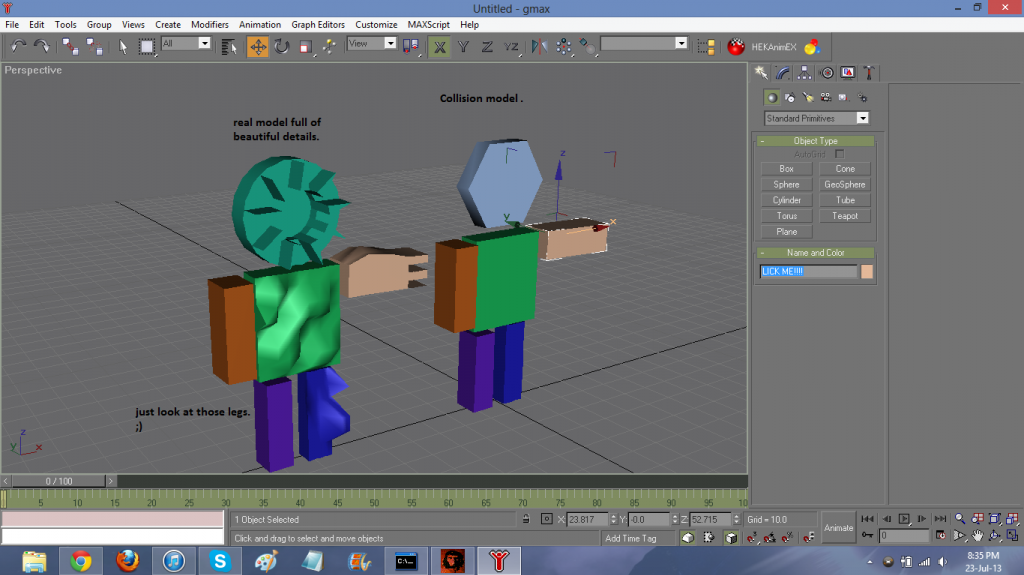
you have to model the collision in 3ds max, just make a really low poly version of the model and parent it to the frame like the other model is. if its a biped i am not sure weather or not it needs to be rigged as i have never gotten around to making bipeds so someone else can answer that.
|
||||


|
|||||
|
killzone64 Joined: Jun 9, 2010
sometimes i miss the chaos occasionally |
Posted: Jul 22, 2013 11:16 PM
Msg. 2 of 10
if you dont even know how to model in max i would suggest that you find a tutorial and take the time to learn, or learn another program instead like blender. http://www.blender.org/download/get-blender/
i use blender for custom models and collision models then i send it off to max to export. one helpful thing i have found when making collision models is to have the original model in the scene and to build the collision based off of its shape. and what error? could you paste the error message into a post so that i may read it? i may have just figured out what you meant, you make the model export it into a folder called physics in the same directory as your "model" folder that you made for the .gbx model. then you use the tool command "tool collision-geometry (path)" and bam its done, as long as you didnt seriously mess up the geometry such as making overlapping faces, open edges, etc. Edited by killzone64 on Jul 22, 2013 at 11:23 PM |
||||
|
|
|||||
|
killzone64 Joined: Jun 9, 2010
sometimes i miss the chaos occasionally |
Posted: Jul 22, 2013 11:25 PM
Msg. 3 of 10
you have open edges in your collision. did you use the ripped model as your collision? because that will only cause performance issues and a ton of other problems... make a custom collision model for it and it will save you time in the long run
Edited by killzone64 on Jul 22, 2013 at 11:30 PM |
||||
|
|
|||||
|
killzone64 Joined: Jun 9, 2010
sometimes i miss the chaos occasionally |
Posted: Jul 22, 2013 11:40 PM
Msg. 4 of 10
 read my previous posts^ Edited by killzone64 on Jul 22, 2013 at 11:41 PM |
||||
|
|
|||||
|
Dumb AI Joined: Sep 18, 2011 
Dead. |
Posted: Jul 22, 2013 11:40 PM
Msg. 5 of 10
Quote: --- Original message by: Killer5000 yes its the ripped model of the ranged flood form of halo 3 ofcourse but then what do i use as my coll????????? if the model itself doenst work or do i at least need a halo 1 model and then keep the same bones/nodes/markers that the thing used then would it be collision?? cuase all it needs is the bone right?? Make your own. It's just a bunch of boxes. They shouldn't have open edges (right? D:) Edited by Dumb AI on Jul 22, 2013 at 11:40 PM |
||||
|
|
|||||
|
killzone64 Joined: Jun 9, 2010
sometimes i miss the chaos occasionally |
Posted: Jul 22, 2013 11:45 PM
Msg. 6 of 10
its how its done, it don't have to look pretty just has to work as you will never see the collision model. oh and make sure you assign the materials from the ripped model to the corresponding areas of the collision as that is what controls material effects
|
||||
|
|
|||||
|
master noob Joined: Aug 10, 2012 
343Industries Advocate |
Posted: Jul 23, 2013 12:00 AM
Msg. 7 of 10
Quote: --- Original message by: Killer5000 plus you helped me learn to make them first i use the rigged model and ingame it then i import the model with no bones to my scene i save as coll then convert to editable mesh then select skin and only add 2 bones then link the pelvis then export as jms then compile and get no errors :D  it never listens |
||||
|
|
|||||
|
Dumb AI Joined: Sep 18, 2011
Dead. |
Posted: Jul 23, 2013 12:15 AM
Msg. 8 of 10
Quote: --- Original message by: Killer5000 creepy gif therey therey creepy gif Sali has posted creepier things. |
||||
|
|
|||||
|
Cheddars Joined: Oct 30, 2010 
Rave to the Grave. |
Posted: Jul 23, 2013 05:50 AM
Msg. 9 of 10
One does not simply make collision geometry...
|
||||
|
|
|||||
|
Hobbet360 Joined: Jan 10, 2012 
ProTools > ToolPro |
Posted: Jul 23, 2013 06:39 AM
Msg. 10 of 10
 then...  Don't feed the wildlife... or Sali. |
||||
|
|
|||||

|
