A Community discussion forum for Halo Custom Edition, Halo 2 Vista, Portal and Halo Machinima
|
 Home
Home Search
 Register
 Login
Login Member List
 Recent Posts
| »Forums Index »Halo Custom Edition (Bungie/Gearbox) »Halo CE General Discussion »Render Practice | 
|
| Author | Topic: Render Practice (28 messages, Page 1 of 1) | ||||
| Moderators: Dennis | |||||
 Yoda Joined: Jan 30, 2011 
Do or do not, there is no try |
Posted: Oct 17, 2012 11:42 PM
Msg. 1 of 28
I decided to make myself a new desktop background and get some practice with rendering.
So this is what I have come up with so far: 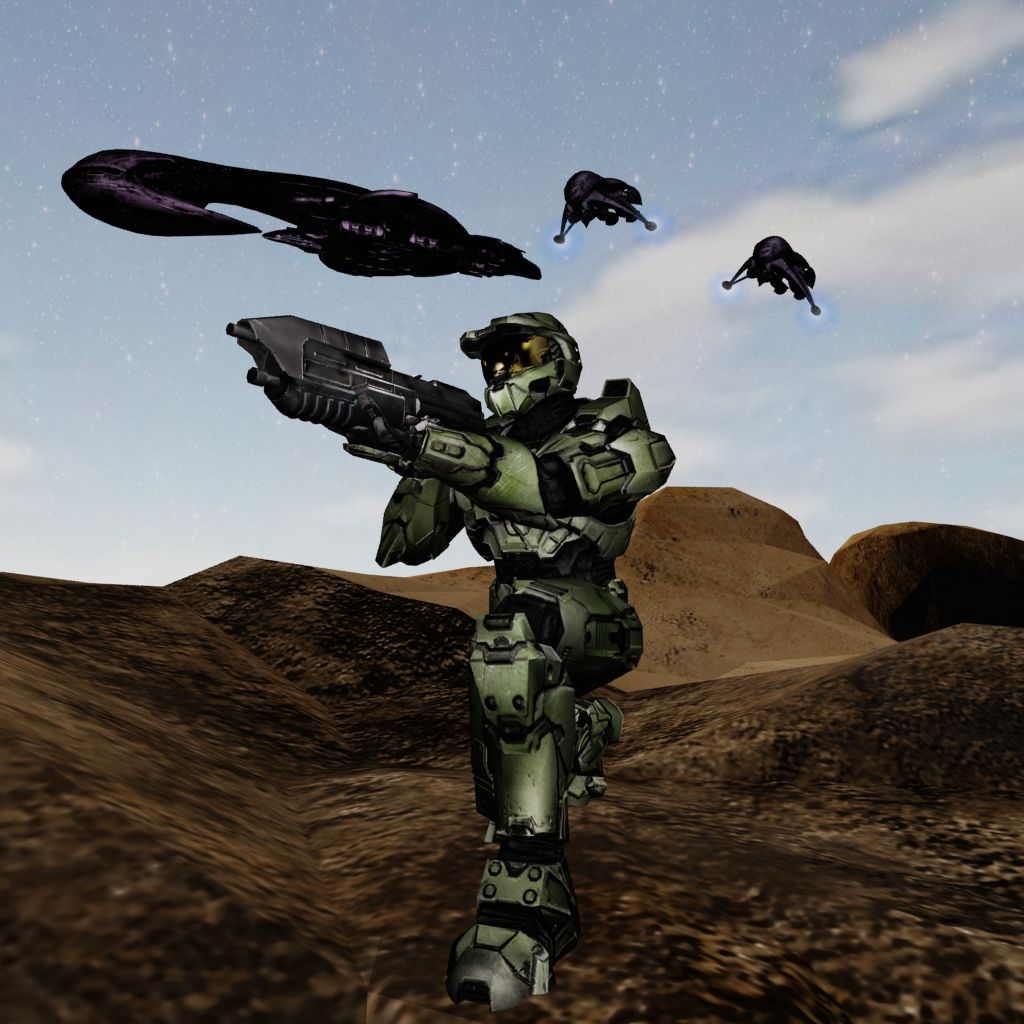 The vehicles and biped are from halo 3 (but with my own specular and such) and the rifle I made from scratch a while back. The ground is probably temporary, I just through something in there to get a better idea of how it was coming along. Still havn't decided what else I want to do with it, any suggestions would be appreciated. Also any advice from anyone who knows rendering. This is basically my first time making a render that required more work than just throwing in a couple of omni lights and hitting render. Edited by Yoda on Oct 17, 2012 at 11:43 PM |
||||


|
|||||
|
Ki11erFTW Joined: Jul 4, 2009 
You've seen nothing yet. |
Posted: Oct 17, 2012 11:54 PM
Msg. 2 of 28
Doesn't look to bad proportion wise, but I will tell you a few things to make it a little more appealing to the eye.
-It doesn't look like you have a light source, or at least a proper one. I usually use a giant Target-Spot to emulate the sun, and I make sure raytraced shadows are turned on. Though there is a sun light I believe. -Render's don't have any poly restrictions, so take advantage of that. the terrain looks a little unsmoothed, and low poly. Even if you have to apply a mesh smooth to it, it would help a lot. -Would look cool with some mountains in the background, maybe some marines behind the chief. -Some shrubbery would be nice, and is easy to do, since there is a lot included with 3ds max. Right now it is really dull and dark. When in reality the top of the banshees and the cruiser would have no shadows considering they are in the sky in broad day light. And I'm not sure if I'm a fan of your materials for the chief. He looks a little to reflective and cartoony. |
||||
|
|
|||||
|
Yoda Joined: Jan 30, 2011
Do or do not, there is no try |
Posted: Oct 18, 2012 12:08 AM
Msg. 3 of 28
Quote: --- Original message by: Ki11erFTW Doesn't look to bad proportion wise, but I will tell you a few things to make it a little more appealing to the eye. -It doesn't look like you have a light source, or at least a proper one. I usually use a giant Target-Spot to emulate the sun, and I make sure raytraced shadows are turned on. Though there is a sun light I believe. -Render's don't have any poly restrictions, so take advantage of that. the terrain looks a little unsmoothed, and low poly. Even if you have to apply a mesh smooth to it, it would help a lot. -Would look cool with some mountains in the background, maybe some marines behind the chief. -Some shrubbery would be nice, and is easy to do, since there is a lot included with 3ds max. Right now it is really dull and dark. When in reality the top of the banshees and the cruiser would have no shadows considering they are in the sky in broad day light. And I'm not sure if I'm a fan of your materials for the chief. He looks a little to reflective and cartoony. I appreciate your response, and your advice. I am having trouble with the lighting, but I will keep working on it. Maybe I will look up some tutorials or something. I didn't even make the ground, I just openned up some overly simple map that I downloaded at some point, created some makeshift normals and specular in gimp so it didn't look horrible and stuck it in for ground. So I will definately take your advice when I get around to making the ground. There is shrubbery included with 3ds? lol, I didn't even know that. The mountains idea could be cool, I will look into that. Maybe even add a halo going up into the sky. |
||||
|
|
|||||
|
Ki11erFTW Joined: Jul 4, 2009
You've seen nothing yet. |
Posted: Oct 18, 2012 12:58 AM
Msg. 4 of 28
To use foliage you simply change standard primitives to AEC Extended and select foliage. Try to refrain from using normals that are generated from the diffuse(if that is what you are doing). You'll find that a separate cliff bump, or you're own bump will look much better:)
For me, lighting was just experiment and render, over and over. It doesn't hurt experimenting with all of the options you have available. Years ago I had trouble finding tutorials, maybe that is different now. |
||||
|
|
|||||
|
XlzQwerty1 Joined: Aug 6, 2009 
|
Posted: Oct 18, 2012 07:45 AM
Msg. 5 of 28
3ds max with mental ray is master race.
|
||||
|
|
|||||
|
Yoda Joined: Jan 30, 2011
Do or do not, there is no try |
Posted: Oct 18, 2012 09:39 AM
Msg. 6 of 28
Okay, so I got rid of the placeholder ground for the moment. I make a new ground later.
I adjusted my shaders everything, especially MC, and I think it is less "cartoony" let me know what you think. I also redid my lighting focusing on one large light as the primary source of light, with a few small omni lights to help brighten up dark spots. 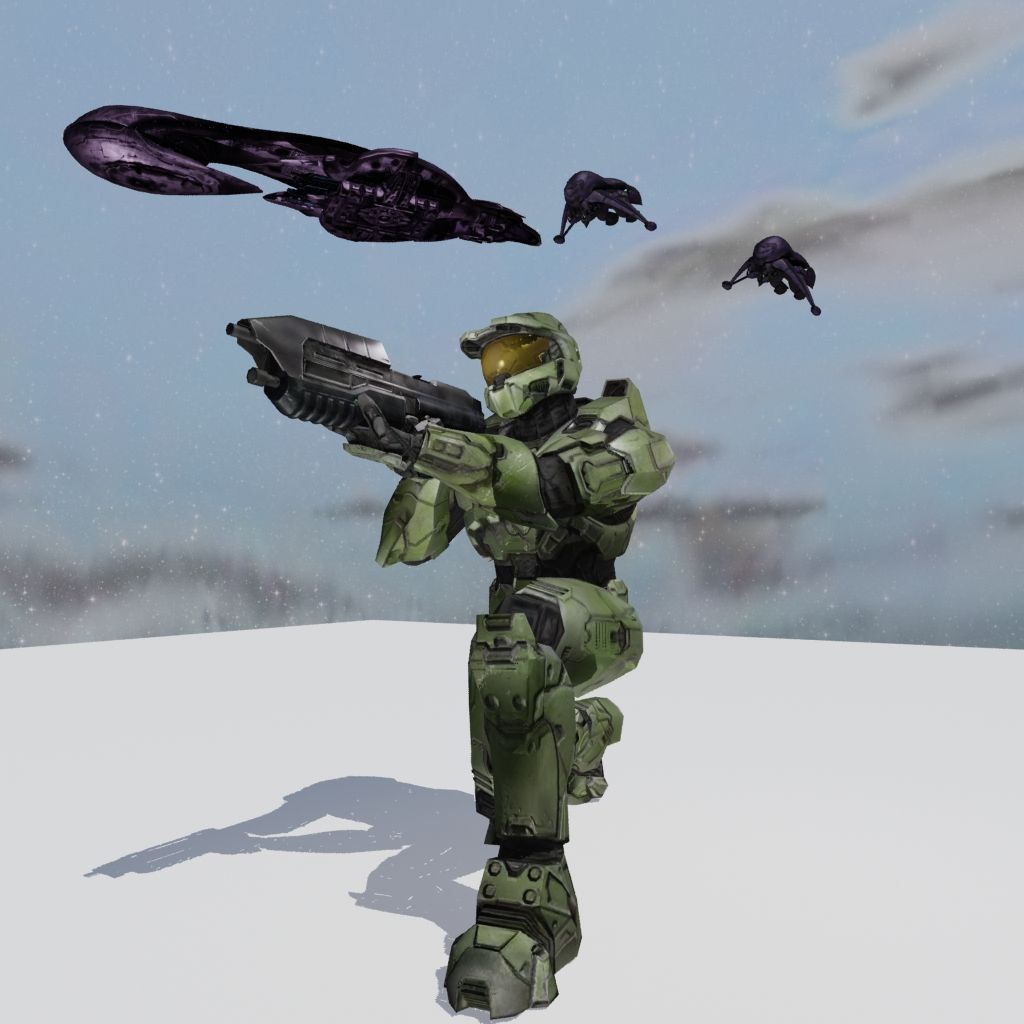 |
||||
|
|
|||||
|
Ki11erFTW Joined: Jul 4, 2009
You've seen nothing yet. |
Posted: Oct 18, 2012 02:11 PM
Msg. 7 of 28
I think the specular still needs to be turned down a bit for the chief. And you need to add the lights to him and the cruiser. You're missing a couple of illumination maps. Cruiser and banshees are still to dark if you ask me. Detail bumps/maps would look nice too:)
|
||||
|
|
|||||
|
XlzQwerty1 Joined: Aug 6, 2009
|
Posted: Oct 18, 2012 03:30 PM
Msg. 8 of 28
Mind telling me how you are trying to render the sky?
|
||||
|
|
|||||
|
bourrin33 Joined: Oct 19, 2009 
HEK not installed tho |
Posted: Oct 18, 2012 03:49 PM
Msg. 9 of 28
  Sme pics from 2009. The models usually look better if you add a little reflection on the armour |
||||
|
|
|||||
|
Yoda Joined: Jan 30, 2011
Do or do not, there is no try |
Posted: Oct 18, 2012 08:56 PM
Msg. 10 of 28
Still playing around with lighting and such.
I think this ground is better. 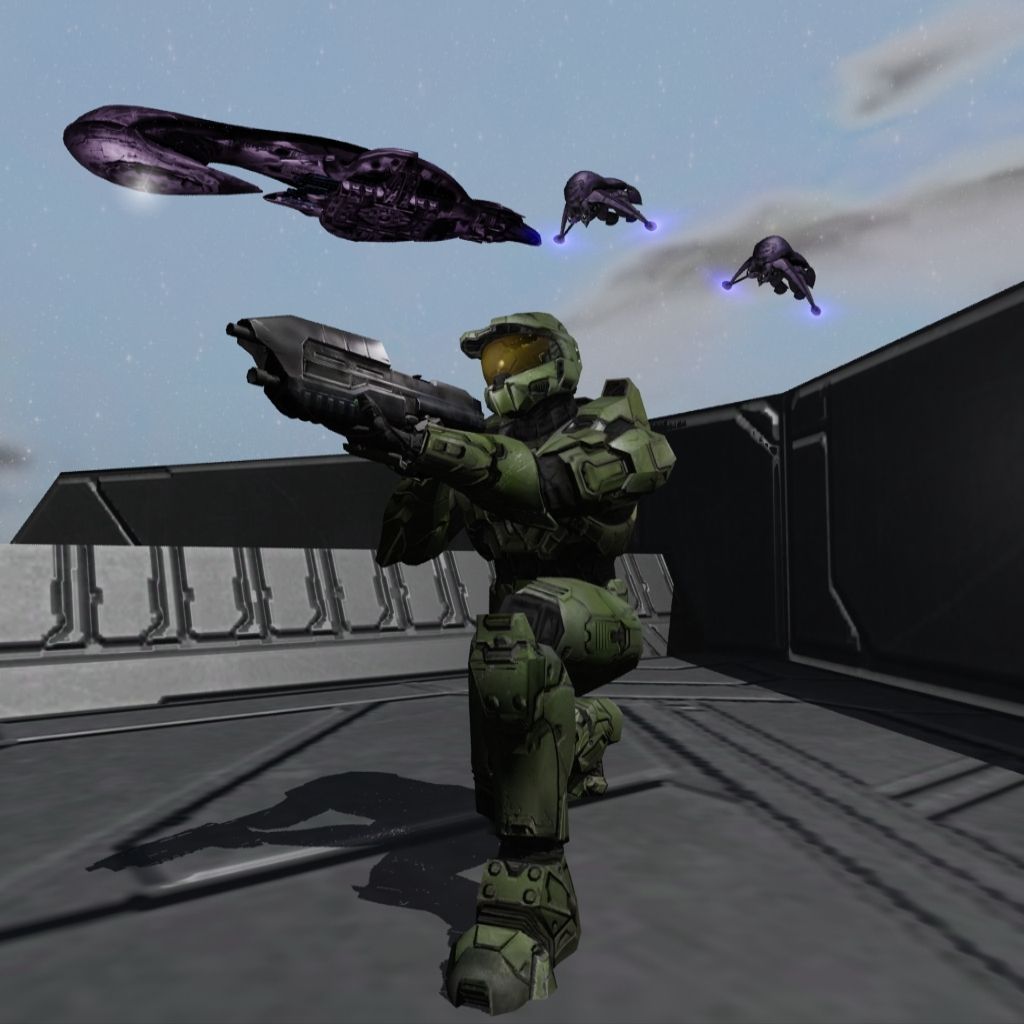 |
||||
|
|
|||||
|
Spartan314 Joined: Aug 21, 2010 
Former biped rigger & FP animator |
Posted: Oct 18, 2012 11:27 PM
Msg. 11 of 28
Personally I like the first armor shaders over the new one. Especially the first visor.
|
||||
|
|
|||||
|
CAG Gonzo Joined: Apr 2, 2009 
Retreat? Hell! We just got here! |
Posted: Oct 23, 2012 11:50 AM
Msg. 12 of 28
Quote: --- Original message by: Ki11erFTW -Some shrubbery would be nice, and is easy to do, since there is a lot included with 3ds max. You must fetch us...a shrubbery! NI! Once you figure out ideal settings and environments for you render, mind creating a tutorial with the render-incompetent in mind? Some of us *cough*me*cough* have basically no clue how to render. I'd also like to render animations. Don't know if you can do that with Max 2012. Also, can anyone recommend a good book about Max rendering and animations? |
||||
|
|
|||||
|
XlzQwerty1 Joined: Aug 6, 2009
|
Posted: Oct 23, 2012 03:43 PM
Msg. 13 of 28
Rendering isn't that hard. Google rendering in 3ds max, soo many tutorials, V-ray, scanline, mental ray, you name it.
    The first two are with mental ray, the second two are with scanline. I haven't tried V-ray before, so don't know how it'll look. |
||||
|
|
|||||
|
GAIGHER Joined: Nov 5, 2008 
|
Posted: Oct 23, 2012 04:26 PM
Msg. 14 of 28
      Edited by GAIGHER on Oct 23, 2012 at 04:27 PM |
||||
|
|
|||||
|
Higuy Joined: Mar 6, 2007 
@lucasgovatos |
Posted: Oct 23, 2012 05:38 PM
Msg. 15 of 28
Sometimes I wonder whats wrong with you, Gaigher.
|
||||
|
|
|||||
|
R93_Sniper Joined: Feb 13, 2011 
When in Doubt, RUN! |
Posted: Oct 23, 2012 07:35 PM
Msg. 16 of 28
Quote: --- Original message by: Yoda Still playing around with lighting and such. I think this ground is better. http://i1194.photobucket.com/albums/aa376/Yoda73811/Render05-1.jpg Its good, but one issue i have is with the pose. If you were to actually hold a rifle, you would have your right shoulder back while moving your left shoulder foward. Rotate the upper torso to the right on the Z axis and you SHOULD be able make it look proper. The Stock of the AR would need to fit better in the shoulder Example:  Left is what you're doing, Right is what you should be doing. Try messing with different rotations and looking at your own body when making poses, it helps |
||||
|
|
|||||
|
Yoda Joined: Jan 30, 2011
Do or do not, there is no try |
Posted: Oct 23, 2012 09:23 PM
Msg. 17 of 28
Quote: --- Original message by: R93_Sniper Quote: --- Original message by: Yoda Still playing around with lighting and such. I think this ground is better. http://i1194.photobucket.com/albums/aa376/Yoda73811/Render05-1.jpg Its good, but one issue i have is with the pose. If you were to actually hold a rifle, you would have your right shoulder back while moving your left shoulder foward. Rotate the upper torso to the right on the Z axis and you SHOULD be able make it look proper. The Stock of the AR would need to fit better in the shoulder Example: http://i46.tinypic.com/339j7ed.jpg Left is what you're doing, Right is what you should be doing. Try messing with different rotations and looking at your own body when making poses, it helps Well you are correct to some extent. However there are a bunch of things wrong with the pose on the left there, mine is not that bad. Also, I have done a fair bit of shooting and I personally find that the amount of twist in your torso depends on a number of things. Mostly it depends on the length and weight of the rifle (especially the length of the stock), in addition to the amount of recoil you expect. Master Chiefs incredible size and strength combined with the abnormally short stock on the MA5B led me to put him in the pose I had him in. I have added a bit more rotation in the torse here: 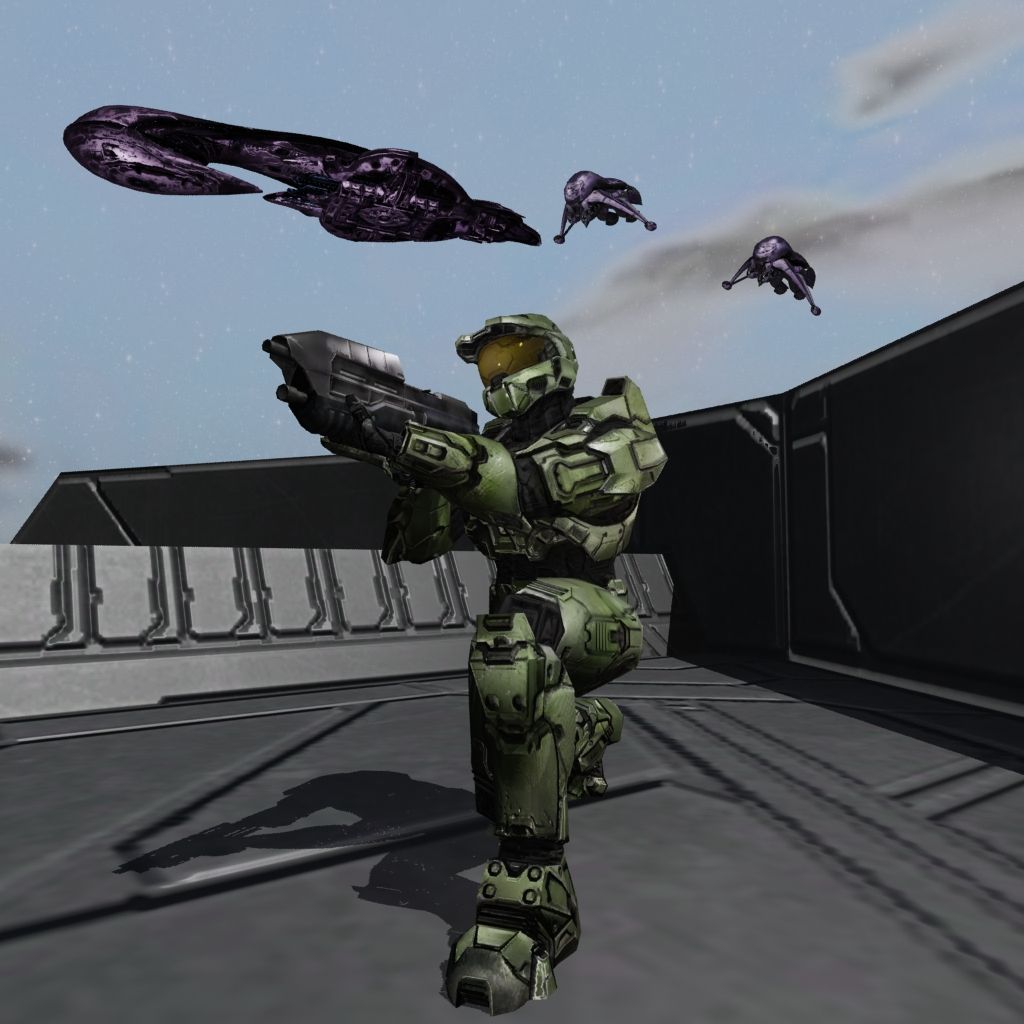 But I am still trying to decide which pose I prefer. |
||||
|
|
|||||
|
XlzQwerty1 Joined: Aug 6, 2009
|
Posted: Oct 23, 2012 09:58 PM
Msg. 18 of 28
It appears that the whole scene could be luminated a bit better. The shadow on the back of the wall is quite dark, the covenant stuff also very dark. It also seems to me that you are trying to outline the chief and the covenant vehicles in black?
|
||||
|
|
|||||
|
R93_Sniper Joined: Feb 13, 2011
When in Doubt, RUN! |
Posted: Oct 23, 2012 10:25 PM
Msg. 19 of 28
I dont really see too much of a noticable difference between your current pose and the previous one.
Also, yes, i know it was exaggerated, i was trying to make a bit of a point though, so excuse me if i was accidentally insinuating anything. Lighting looks a bit better, but maybe you should add an angular light somewhere infront of cheif (But a bit higher up) |
||||
|
|
|||||
|
Yoda Joined: Jan 30, 2011
Do or do not, there is no try |
Posted: Oct 23, 2012 10:51 PM
Msg. 20 of 28
I think the problem that everyone is pointing out with the lighting is primarily because I havn't really gotten around to doing anything with the sky.
I intend to use this for a desktop background, and I don't like bright backgrounds. So I have been working with the forground lighting with the knowledge that I intend to darken the sky. Right now it is somewhat misleading to see the bright blue sky. This one still isn't finished, but does this seem a little more consistant? 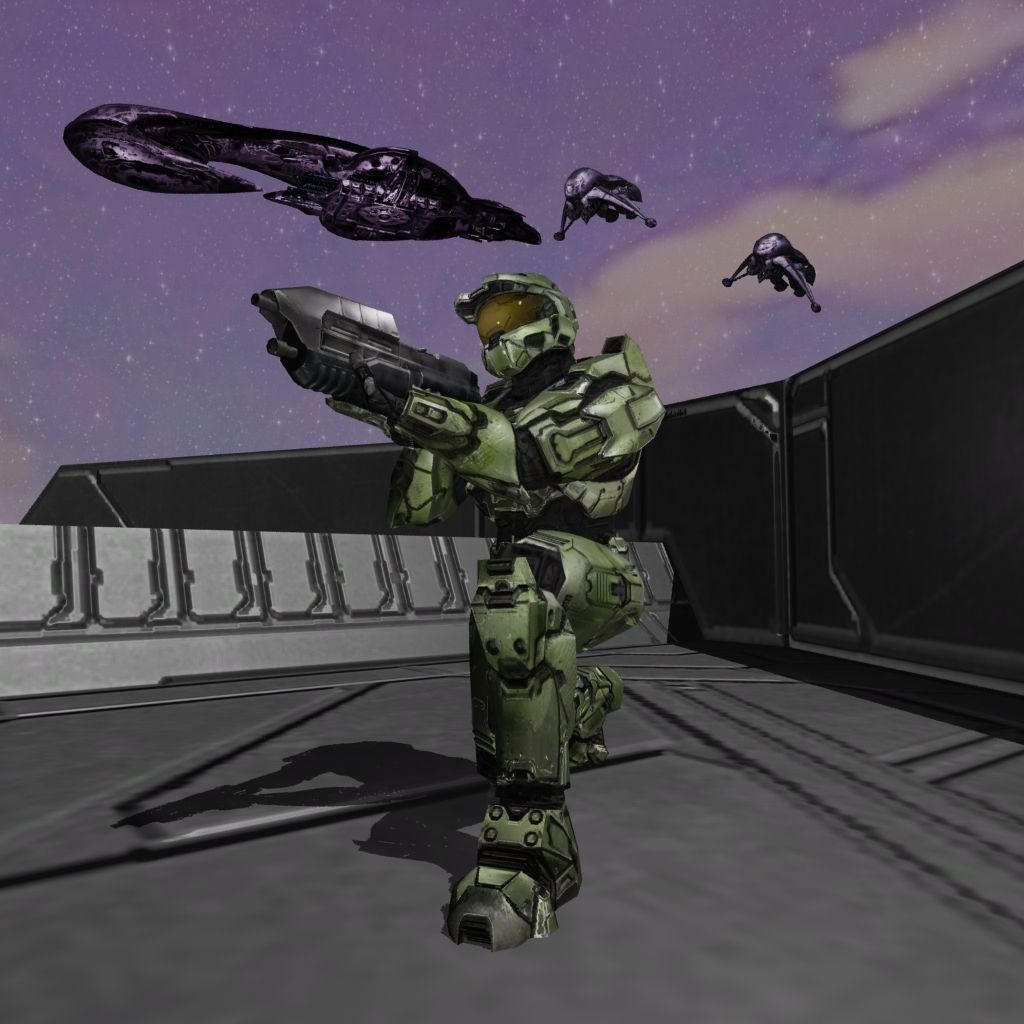 |
||||
|
|
|||||
|
XlzQwerty1 Joined: Aug 6, 2009
|
Posted: Oct 23, 2012 11:01 PM
Msg. 21 of 28
Ah yes, it looks better now, however I still think you should try to fix the dark lines of the normals on the masterchief (The shoe area is what my eyes saw first).
|
||||
|
|
|||||
|
Yoda Joined: Jan 30, 2011
Do or do not, there is no try |
Posted: Oct 23, 2012 11:20 PM
Msg. 22 of 28
Quote: --- Original message by: XlzQwerty1 Ah yes, it looks better now, however I still think you should try to fix the dark lines of the normals on the masterchief (The shoe area is what my eyes saw first). Hmm, Any better? 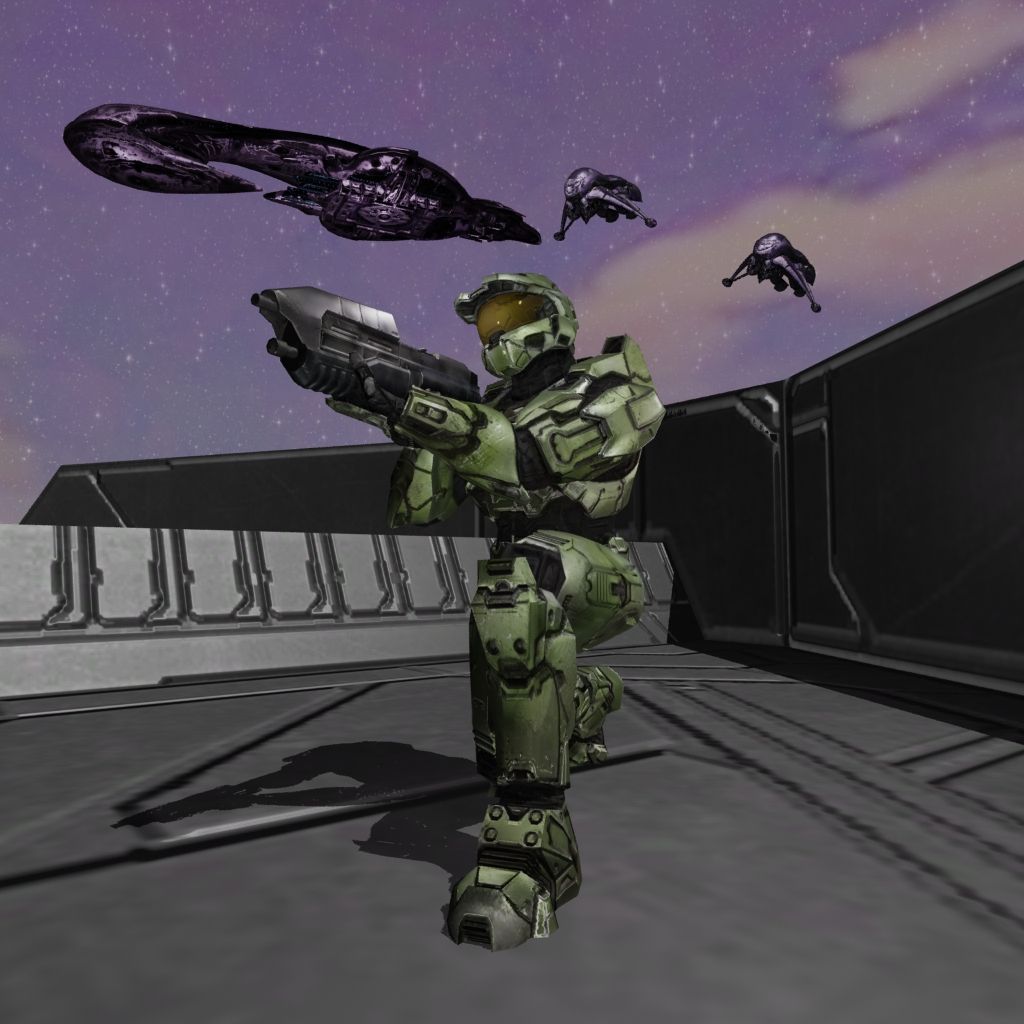 I decreased the normal maps a bit, not sure what else to do about that. I don't want to decrease them too much because I lose detail in the upper part of the armor too. Anyway, last try for tonight I got classes tomorrow morning. Thanks for all your advice, I will keep working on it next time I get a chance. |
||||
|
|
|||||
|
Corvette19 Joined: Feb 27, 2007 
|
Posted: Oct 24, 2012 12:12 AM
Msg. 23 of 28
I have to say, there are some sweet renders in here.
|
||||
|
|
|||||
|
XlzQwerty1 Joined: Aug 6, 2009
|
Posted: Oct 24, 2012 03:39 PM
Msg. 24 of 28
Hmm, it certainly looks better now. If you want, you could also add a reflecting material to the visor and maybe some cubemaps the covenant vehicles.
|
||||
|
|
|||||
|
Maniac1000 -Helpful Poster- Joined: Feb 24, 2007 
|
Posted: Oct 24, 2012 03:54 PM
Msg. 25 of 28
There are now 3 of these threads.
http://forum.halomaps.org/index.cfm%3Fpage=topic&topicID=40314 good render ideas there. Cheddars made one too. |
||||
|
|
|||||
|
Cheddars Joined: Oct 30, 2010 
Rave to the Grave. |
Posted: Oct 25, 2012 02:04 AM
Msg. 26 of 28
lol, I did? Maybe you are talking about waffles? Any ways, waffles did some nice render setups he released.
|
||||
|
|
|||||
|
ptowery Joined: Aug 28, 2007 
oify |
Posted: Oct 28, 2012 01:59 AM
Msg. 27 of 28
Quote: --- Original message by: mastur cheef I tried some vray. http://img210.imageshack.us/img210/6793/sabervray.jpg okay I see how that might fit in the bipeds section but it is totally irrelevant here. Please stop putting it everywhere. |
||||
|
|
|||||
|
ELVEVERX Joined: Oct 5, 2012 
For the great journey |
Posted: Oct 28, 2012 06:31 AM
Msg. 28 of 28
Quote: --- Original message by: Yoda Quote: --- Original message by: XlzQwerty1 Ah yes, it looks better now, however I still think you should try to fix the dark lines of the normals on the masterchief (The shoe area is what my eyes saw first). Hmm, Any better? http://i1194.photobucket.com/albums/aa376/Yoda73811/Background03.jpg I decreased the normal maps a bit, not sure what else to do about that. I don't want to decrease them too much because I lose detail in the upper part of the armor too. Anyway, last try for tonight I got classes tomorrow morning. Thanks for all your advice, I will keep working on it next time I get a chance. It looks like he is fighting with the covenant you need something like a Frigate shooting at the covanant ship or the banshees shooting at him or mariens next to him shooting at the covenant so xyou can see he is on there side |
||||
|
|
|||||

|
