A Community discussion forum for Halo Custom Edition, Halo 2 Vista, Portal and Halo Machinima
|
 Home
Home Search
 Register
 Login
Login Member List
 Recent Posts
| »Forums Index »Halo Custom Edition (Bungie/Gearbox) »Halo CE General Discussion »(Release) High Res flash h shield impact bitmap | 
|
| Author | Topic: (Release) High Res flash h shield impact bitmap (27 messages, Page 1 of 1) | ||||
| Moderators: Dennis | |||||
 Delicon20 Joined: Oct 3, 2008 
Still here. Still loves bacon |
Posted: Jul 29, 2011 08:51 PM
Msg. 1 of 27
So once upon a time there lived a sprite named Flash H Shield Impact. He was a very popular bitmap who was used in a lot of effects in Halo, but unfortunately he was made of a very small resolution. One day this idiot named Delicon20 came along and found the poor bitmap curled up in a corner, crying over his low resiness. He said, "don't frown, lil' sprite, I'll remake you at a giant resolution so you can be happy again!" so he remade this bitmap at 256 x 256 pixels and shared the bitmap with the world!
http://www.mediafire.com/?3e2yrspy8y9hq8w ^ this is used in a lot of different effects ingame, so I remade it to be more HD. Enjoy place in effects\particles\flash\bitmaps MAKE A COPY OF THE ORIGINAL BITMAP PLOXX Edited by Delicon20 on Jul 29, 2011 at 08:52 PM Edited by Delicon20 on Jul 30, 2011 at 05:47 PM Edited by Delicon20 on Aug 1, 2011 at 07:08 PM |
||||


|
|||||
|
Delicon20 Joined: Oct 3, 2008
Still here. Still loves bacon |
Posted: Jul 29, 2011 08:56 PM
Msg. 2 of 27
Quote: --- Original message by: Private Caboose cool story bro IKR? |
||||
|
|
|||||
|
Corvette19 Joined: Feb 27, 2007 
|
Posted: Jul 29, 2011 09:50 PM
Msg. 3 of 27
pics.
|
||||
|
|
|||||
|
Delicon20 Joined: Oct 3, 2008
Still here. Still loves bacon |
Posted: Jul 29, 2011 09:55 PM
Msg. 4 of 27
1. download bitmap
2. open bitmap in guerilla 3. click show bitmap 4. look at the bitmap since it is a BUILDING BLOCK for effects in halo, I don't have any pics of it on it's own ingame, just view it in guerilla you lazy sloths. PS if you're thinking, OH LORDY, i CAINT R'Place mai trusteh tagz! then please note this is a BITMAP, as in, it doesn't require anything to work so you don't HAVE to place it in any specific folder to view. Edited by Delicon20 on Jul 29, 2011 at 09:58 PM |
||||
|
|
|||||
|
Spartan314 Joined: Aug 21, 2010 
Former biped rigger & FP animator |
Posted: Jul 29, 2011 09:58 PM
Msg. 5 of 27
Well you've got people like me who haven't got a lot of internet data...
|
||||
|
|
|||||
|
Delicon20 Joined: Oct 3, 2008
Still here. Still loves bacon |
Posted: Jul 29, 2011 10:00 PM
Msg. 6 of 27
Orig:
 Mine:  Edited by Delicon20 on Jul 29, 2011 at 10:03 PM |
||||
|
|
|||||
|
SlappyThePirate Joined: Aug 24, 2009 
You are irritating, I'll release nothing |
Posted: Jul 29, 2011 10:09 PM
Msg. 7 of 27
Interesting. Would you do this for the other common particles?
|
||||
|
|
|||||
|
Delicon20 Joined: Oct 3, 2008
Still here. Still loves bacon |
Posted: Jul 29, 2011 10:17 PM
Msg. 8 of 27
I was thinking about it, I'll probably do it for at least a couple more common sprites.
|
||||
|
|
|||||
|
Dark Neon Joined: Jun 8, 2009 
|
Posted: Jul 30, 2011 06:01 AM
Msg. 9 of 27
Quote: --- Original message by: Private Caboose cool story bro Using old memes doesn't make you cool. |
||||
|
|
|||||
|
olly12345 Joined: Jul 30, 2008 
|
Posted: Jul 30, 2011 07:01 AM
Msg. 10 of 27
I might have a go at this too :O
We should just create a pack of larger, higher detail bitmaps! |
||||
|
|
|||||
|
Invader Veex Joined: Apr 11, 2007 
i make poast |
Posted: Jul 30, 2011 12:00 PM
Msg. 11 of 27
Quote: --- Original message by: Delicon20 Orig: http://img824.imageshack.us/img824/6622/flashhshieldimpactorigb.png Mine: http://img713.imageshack.us/img713/4329/unleddk.jpg Edited by Delicon20 on Jul 29, 2011 at 10:03 PM Looks cartoony. |
||||
|
|
|||||
|
Spartan314 Joined: Aug 21, 2010
Former biped rigger & FP animator |
Posted: Jul 30, 2011 05:30 PM
Msg. 12 of 27
Quote: --- Original message by: Invader Veex Looks cartoony. If you're a texture artist Delicon, then maybe you could try putting more assorted gray/whites around. |
||||
|
|
|||||
|
Delicon20 Joined: Oct 3, 2008
Still here. Still loves bacon |
Posted: Jul 30, 2011 05:42 PM
Msg. 13 of 27
Quote: --- Original message by: Invader Veex Quote: --- Original message by: Delicon20 Orig: http://img824.imageshack.us/img824/6622/flashhshieldimpactorigb.png Mine: http://img713.imageshack.us/img713/4329/unleddk.jpg Edited by Delicon20 on Jul 29, 2011 at 10:03 PM Looks cartoony. usually it's very small ingame, with color added to it, so while it may look cartoony plain, ingame it looks pretty good. I tested it out before release thinking the same thing as you, but I thought it looked pretty good ingame so I released it. http://www.bungie.net/images/Games/Reach/images/screenshots/e32010ff/full/Reach_E310_Firefight_Waterfront05.jpg I was using reach's for ref, see how it kinda has a star look to it? (bullet impact on brtute's shoulder) Edited by Delicon20 on Jul 30, 2011 at 05:47 PM Edited by Delicon20 on Jul 30, 2011 at 05:47 PM |
||||
|
|
|||||
|
XlzQwerty1 Joined: Aug 6, 2009 
|
Posted: Jul 30, 2011 06:12 PM
Msg. 14 of 27
You need to make the colors blend more
|
||||
|
|
|||||
|
Invader Veex Joined: Apr 11, 2007
i make poast |
Posted: Jul 30, 2011 06:43 PM
Msg. 15 of 27
Quote: --- Original message by: Delicon20 usually it's very small ingame, with color added to it, so while it may look cartoony plain, ingame it looks pretty good. I tested it out before release thinking the same thing as you, but I thought it looked pretty good ingame so I released it. http://www.bungie.net/images/Games/Reach/images/screenshots/e32010ff/full/Reach_E310_Firefight_Waterfront05.jpg I was using reach's for ref, see how it kinda has a star look to it? (bullet impact on brtute's shoulder) Keep in mind, this is a shield impact bitmap while the reach impact ref you used is on the metal armor. The star effect is the bullet losing energy with the impact on the metal, but if the material was just reflecting the bullet wouldn't it make a different effect? I think a more round and smokey effect would be appropriate. Which I guess is the original bitmap. >_> Bungie was smart. And by cartoony, I meant it looked low res for the size you made it. Edited by Invader Veex on Jul 30, 2011 at 06:46 PM |
||||
|
|
|||||
|
Delicon20 Joined: Oct 3, 2008
Still here. Still loves bacon |
Posted: Jul 30, 2011 08:24 PM
Msg. 16 of 27
well, actually just because it is called a shield impact doesn't mean that's the only thing it's used for, it's actually used when you shoot trees, metal, and I use it for bullet impacts on flesh.
|
||||
|
|
|||||
|
Jesse Joined: Jan 18, 2009 Discord: Holy Crust#4500 |
Posted: Jul 31, 2011 03:41 AM
Msg. 17 of 27
I gotta agree with Veex here. The bitmap may be higher res, but the level of detail is worse than even the original. Maybe try running the blur tool over it.
|
||||
|
|
|||||
|
Delicon20 Joined: Oct 3, 2008
Still here. Still loves bacon |
Posted: Aug 1, 2011 06:24 PM
Msg. 18 of 27
nvm, I'll work on them more...
 how does this look? http://www.mediafire.com/?3e2yrspy8y9hq8w Edited by Delicon20 on Aug 1, 2011 at 07:08 PM |
||||
|
|
|||||
|
Bobblehob Joined: Aug 29, 2010 
|
Posted: Aug 1, 2011 09:33 PM
Msg. 19 of 27
Still looks too low, needs to be much smoother integration between darker and lighter colors, having a well defined edge helps.
|
||||
|
|
|||||
|
Maniac1000 -Helpful Poster- Joined: Feb 24, 2007 
|
Posted: Aug 1, 2011 09:57 PM
Msg. 20 of 27
 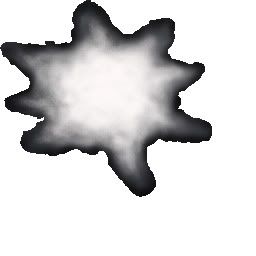 lol both look like crap. Edited by Maniac1000 on Aug 1, 2011 at 10:15 PM |
||||
|
|
|||||
|
SlappyThePirate Joined: Aug 24, 2009
You are irritating, I'll release nothing |
Posted: Aug 1, 2011 10:22 PM
Msg. 21 of 27
 |
||||
|
|
|||||
|
Advancebo Joined: Jan 14, 2008 
|
Posted: Aug 1, 2011 10:25 PM
Msg. 22 of 27
Quote: --- Original message by: SlappyThePirate http://s3.postimage.org/gqbs1p7sz/hirez.jpg |
||||
|
|
|||||
|
Delicon20 Joined: Oct 3, 2008
Still here. Still loves bacon |
Posted: Aug 1, 2011 10:29 PM
Msg. 23 of 27
Quote: --- Original message by: SlappyThePirate http://s3.postimage.org/gqbs1p7sz/hirez.jpg looks great, I like that a lot. |
||||
|
|
|||||
|
Jesse Joined: Jan 18, 2009 Discord: Holy Crust#4500 |
Posted: Aug 2, 2011 12:47 AM
Msg. 24 of 27
Quote: --- Original message by: SlappyThePirate http://s3.postimage.org/gqbs1p7sz/hirez.jpg Purrfect. @Delicon: Try making a circular gradient going from white inside to black outside and use the smudge tool going outward to make a similar effect. Edited by Jesse on Aug 2, 2011 at 12:48 AM |
||||
|
|
|||||
|
Spartan314 Joined: Aug 21, 2010
Former biped rigger & FP animator |
Posted: Aug 2, 2011 01:04 AM
Msg. 25 of 27
Quote: --- Original message by: SlappyThePirate http://s3.postimage.org/gqbs1p7sz/hirez.jpg Make the bitmap NAO!! |
||||
|
|
|||||
|
Delicon20 Joined: Oct 3, 2008
Still here. Still loves bacon |
Posted: Aug 2, 2011 09:26 AM
Msg. 26 of 27
Quote: --- Original message by: Spartan314 Quote: --- Original message by: SlappyThePirate http://s3.postimage.org/gqbs1p7sz/hirez.jpg Make the bitmap NAO!! he did, it's right in front of you. :/ |
||||
|
|
|||||
|
SlappyThePirate Joined: Aug 24, 2009
You are irritating, I'll release nothing |
Posted: Aug 2, 2011 11:52 AM
Msg. 27 of 27
Lol I was just bored.
If you want it in bitmap form, the jpeg is 256x256. IDK if these things need alphas. If they do, you can use a grayscale copy of the layer as the mask (GIMP has a button for that) |
||||
|
|
|||||

|
