A Community discussion forum for Halo Custom Edition, Halo 2 Vista, Portal and Halo Machinima
|
 Home
Home Search
 Register
 Login
Login Member List
 Recent Posts
| »Forums Index »Halo Custom Edition (Bungie/Gearbox) »Halo CE Technical / Map Design »[Tutorial] Shifting Sapien into overdrive. | 
|
| Author | Topic: [Tutorial] Shifting Sapien into overdrive. (29 messages, Page 1 of 1) | ||||
| Moderators: Dennis | |||||
 The Cereal Killer Joined: Mar 18, 2011 
Scripts, AI, cutscenes, ui_widgets, animation. |
Posted: May 2, 2011 05:31 PM
Msg. 1 of 29
The Command Console:
Many commands/globals are left out in the well-known keyword lists for scripting and these can be very valuable in taking advantage of Sapien, especially to solo map designers. Experienced developers have probably seen this type of thing before, but it's understandable if not, considering that it isn't exactly common knowledge. Here is an alphabetized list of all acceptable commands and globals via console and/or script. Sapien spat this out, but it also mixed in a ton of garbled phrases and jargon. I've been working on cleaning this up for the past few days and I finally managed to cut it out down to only commands (if you spot any leftovers, just let me know). Here it is online: http://www.cereal-killer.tucker933.com/Random/command%20list.txt Now I'll talk briefly about some of the many things that you can do with commands and globals not listed in the popular "Script Bible," "Scripting Keywords List," or, "hs_doc." There are about 2-3 times as many commands here as there are in either of those (they do not include descriptions as of yet, although I may go through it and add those in the future), and many of them are only functional in Sapien. Here are some that I tested recently and found interesting and/or useful: (rasterizer_fog_plane [boolean]) - This turns fog planes on or off, most notably in water. So, for instance, if you were dealing with something underwater and couldn't see worth anything, just set that to "true" and it'll be clear as day. This works in-game as well. (rasterizer_mode [short]) - This cycles through a few modes of the rasterizer (default is 0). They all have slight lighting changes, but mode 1 is like a ghost mode and makes geometry glow while being slightly transparent. This does not work in-game. (debug_objects [boolean]) - Setting this to "true" enables an assortment of other debug_objects commands to be used (the list is alphabetized, so you can easily find them underneath). By default when you use this, debug_objects_collision_geometry and debug_objects_bounding_spheres are "true" but you can disable them if you like. One that I really find useful is debug_objects_names which prints the name of an object next to it in a purple font. This is useful to me especially in massive army-on-army cutscenes. This does not work in-game. (run_game_scripts [boolean]) - This one is trickier to use, but it has by far the most valuable results if you're making a solo-player map. First, make sure that any scripts in the map that change the camera position are "dormant" not "startup" (it will crash if the camera_set command is used). I'd actually suggest all scripts being "dormant" for testing purposes but it's not necessary. Then you can type (wake ) and it is executed in Sapien. Now that you have that ready to go, you can simply test a cutscene in Sapien, or even some gameplay that doesn't require the player to advance. This cuts out the process of repeatedly making a tiny change then recompiling, saving you a considerably large amount of time and monotony. (debug_scripting [boolean]) - This is a useful global to use alongside run_game_scripts. Set it to "true" right before, and it renders real-time debugging of your scripts to help you if you're running into any issues. At the moment, this is all I have time to write, however do expect this post to be updated with more commands and globals in the near future - we've hardly begun to scratch the surface :) Child Scenarios: Have you ever been working on a map with so much in it that Sapien begins to lag (frequently and intensely)? Well with child scenarios, that is an easy issue to fix. Start out by creating a new scenario (can be done in Guerilla with file > new) and add the same bsp(s) that your map uses. The sky doesn't matter, the final map will use the sky(skies) from your main scenario. Now open your main scenario in Guerilla, and scroll until you see "child scenarios". Click "add" and find the one you made. Save it and you can exit Guerilla. In Sapien, open the new scenario you just made. You can continue object placement in here, as if it were your main scenario. When you use tool to compile the map, just compile the main scenario like normal; it will automatically add the objects in the child scenario(s) to the main one, since it was listed as a child to the main. Scripts in the main scenario can even reference scripts in the child scenario. Other Helpful Tidbits: Precise Object Placement: I've recently been talking to people about the benefits of Sapien over Sparkedit (these people are experienced in both, mind you) and the most common defense of Sparkedit was its "precision of object placement" in that you are able to translate objects along axes with the arrow keys. I found this odd, considering Sapien does exactly that. This brought to my attention that many people did not know Sapien had this capability: once an object is selected in the game view, up/down = y-axis, left/right = x-axis, hold shift and up/down = z-axis. It translates the object exactly 0.02 units along the axis per individual key press, holding down will smoothly slide it. Holding ctrl allows you to use the arrow keys to rotate the object. Using Different Skies Within the Same Map: So have you ever wanted to change skies in a map mid-game, but not known how? Well here's the secret, and it's not script-related! First, let's start with adding the skies you want to use for different bsps. In Guerilla, open your scenario file and click "add" on the skies section. Choose the one you want, and then open the dropdown box where it lists the skies. The first one should be 0 and the second one should be 1. Likewise, the next one you add will be 2 and so on. Save it and then open another bsp used in your map that you want to have the second sky you added (if you want to have the same bsp just change skies, then make a copy of that bsp and add it to your scenario). Bsps take a while to open sometimes, so be patient. When it finally does, scroll down until you see this: 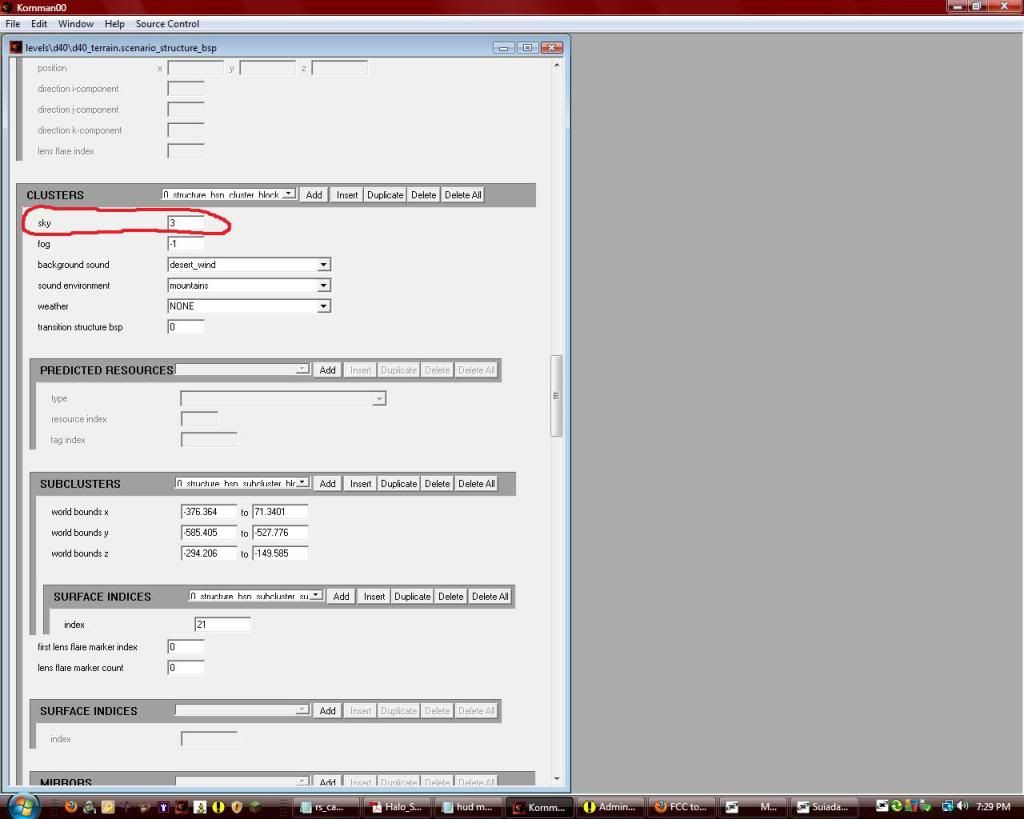 In that box, you type in the number of the sky you want the bsp to use from the scenario (starting with 0). So, if you want this bsp to use the second sky from your scenario, type "1" in the box. Also, for it to work, you have to apply it to every cluster. Right above the number, open the dropdown box and go to the next cluster. Apply it to this one as well, and so on. It is a pain in the ass, but it's the only way. Edited by The Cereal Killer on May 13, 2011 at 10:49 AM |
||||


|
|||||
|
Higuy Joined: Mar 6, 2007 
@lucasgovatos |
Posted: May 2, 2011 08:15 PM
Msg. 2 of 29
didn't know about the run_game_scripts and rasterizer_mode. seems helpful, thanks!
|
||||
|
|
|||||
|
Maniac1000 -Helpful Poster- Joined: Feb 24, 2007 
|
Posted: May 2, 2011 08:49 PM
Msg. 3 of 29
Thanks for sharing man.
|
||||
|
|
|||||
|
The Cereal Killer Joined: Mar 18, 2011
Scripts, AI, cutscenes, ui_widgets, animation. |
Posted: May 2, 2011 10:18 PM
Msg. 4 of 29
I'm happy to have benefited you. I plan to specify even more commands a little later tonight.
Well I guess not tonight. Soon though. Edited by The Cereal Killer on May 3, 2011 at 02:49 AM |
||||
|
|
|||||
|
sierra117 Joined: Jan 10, 2008 
If sex is good exercise, why are there fat sluts? |
Posted: May 3, 2011 03:30 AM
Msg. 5 of 29
*post deleted by admin for rules violation
READ THE RULES: http://forum.halomaps.org/index.cfm%3Fpage=topic&topicID=2979 Bypassed profanity filter Edited by Dennis on May 13, 2011 at 11:44 AM |
||||
|
|
|||||
|
Spartan314 Joined: Aug 21, 2010 
Former biped rigger & FP animator |
Posted: May 3, 2011 04:07 AM
Msg. 6 of 29
is that an easter egg or what? o.O
|
||||
|
|
|||||
|
The Cereal Killer Joined: Mar 18, 2011
Scripts, AI, cutscenes, ui_widgets, animation. |
Posted: May 3, 2011 11:31 AM
Msg. 7 of 29
*post deleted by admin for rules violation
READ THE RULES: http://forum.halomaps.org/index.cfm%3Fpage=topic&topicID=2979 quoted profanity Edited by Dennis on May 13, 2011 at 11:45 AM |
||||
|
|
|||||
|
DarkLord0912 Joined: Jan 17, 2009 
Works on bigger and better things |
Posted: May 4, 2011 03:37 AM
Msg. 8 of 29
You do know if your in saipen and bring up console type the beginning of a letter such a e and press tab,it will bring up a list of all possible commands beginning with e.
I didn't know people did not know these things. Edited by DarkLord0912 on May 4, 2011 at 03:37 AM |
||||
|
|
|||||
|
The Cereal Killer Joined: Mar 18, 2011
Scripts, AI, cutscenes, ui_widgets, animation. |
Posted: May 4, 2011 04:03 AM
Msg. 9 of 29
Yes that's common knowledge. But how are you to browse them?
Added a bit more to the bottom of the OP, not commands but just useful tidbits regarding Sapien that I was honestly surprised to find some people not aware of. Edited by The Cereal Killer on May 4, 2011 at 04:09 AM |
||||
|
|
|||||
|
Switchblade Joined: Jul 3, 2007 
"Do you believe my threat is ended with my death?" |
Posted: May 4, 2011 07:34 PM
Msg. 10 of 29
*post deleted by admin for rules violation
READ THE RULES: http://forum.halomaps.org/index.cfm%3Fpage=topic&topicID=2979 quoted profanity Edited by Dennis on May 13, 2011 at 11:46 AM |
||||
|
|
|||||
|
The Cereal Killer Joined: Mar 18, 2011
Scripts, AI, cutscenes, ui_widgets, animation. |
Posted: May 4, 2011 07:58 PM
Msg. 11 of 29
I think I remember hearing something about it detecting open edges. Well the tool they provided with HEK doesn't allow custom bsps to have open faces, but I know for a fact that stock campaign maps have them, I'll look to see if it highlights anything on any of those.
|
||||
|
|
|||||
|
chrisk123999 Joined: Aug 10, 2008 
=CE= Chris [Captain] [=] |
Posted: May 4, 2011 08:23 PM
Msg. 12 of 29
Stock maps don't have open edges. The BSP extractor doesn't extract all the faces. Such as the skybox.
|
||||
|
|
|||||
|
The Cereal Killer Joined: Mar 18, 2011
Scripts, AI, cutscenes, ui_widgets, animation. |
Posted: May 5, 2011 06:14 PM
Msg. 13 of 29
Quote: --- Original message by: chrisk123999 I wasn't referring to the bsp extractor, just a tip from my friend who knows quite a bit about CE... then again, maybe he was basing it off of the extraction.Stock maps don't have open edges. The BSP extractor doesn't extract all the faces. Such as the skybox. |
||||
|
|
|||||
|
SlappyThePirate Joined: Aug 24, 2009 
You are irritating, I'll release nothing |
Posted: May 5, 2011 06:27 PM
Msg. 14 of 29
*post deleted by admin for rules violation
READ THE RULES: http://forum.halomaps.org/index.cfm%3Fpage=topic&topicID=2979 quoted profanity Edited by Dennis on May 13, 2011 at 11:45 AM |
||||
|
|
|||||
|
chrisk123999 Joined: Aug 10, 2008
=CE= Chris [Captain] [=] |
Posted: May 5, 2011 06:42 PM
Msg. 15 of 29
I've extracted all the campaign maps and all of them follow sealed world rules excluding that fact that you have to re-make the skybox yourself.
|
||||
|
|
|||||
|
Maniac1000 -Helpful Poster- Joined: Feb 24, 2007
|
Posted: May 7, 2011 11:34 AM
Msg. 16 of 29
People have known about that command for years, so i doubt you knew it 1st.
|
||||
|
|
|||||
|
The Cereal Killer Joined: Mar 18, 2011
Scripts, AI, cutscenes, ui_widgets, animation. |
Posted: May 11, 2011 12:33 AM
Msg. 17 of 29
Updated with a fresh supply of a lot of info, much of it was from previous small tutorials I had written on ModHalo which I felt belonged in this one large tutorial. Also, organized into a more easy to read section/subsection format.
Edited by The Cereal Killer on May 11, 2011 at 12:37 AM |
||||
|
|
|||||
|
OpsY Joined: Feb 19, 2007 
Frobisher Bay |
Posted: May 12, 2011 07:41 AM
Msg. 18 of 29
When you make such things, you should always upload them to the Turorials database here, since searching the forum for specific is pretty complicated.
|
||||
|
|
|||||
|
The Cereal Killer Joined: Mar 18, 2011
Scripts, AI, cutscenes, ui_widgets, animation. |
Posted: May 12, 2011 10:05 AM
Msg. 19 of 29
Indeed I have, this is just not exactly complete at the moment, so I'm building on to it and will upload when it exists in its entirety.
Edited by The Cereal Killer on May 13, 2011 at 10:50 AM |
||||
|
|
|||||
|
Polamee Joined: Feb 25, 2008 
MP2SPMT's founder |
Posted: May 13, 2011 02:07 AM
Msg. 20 of 29
Certainly very helpful; and I don't think anyone has ever exploited this before. Well done. By the way, a little irrelevantly, you seem to be quite an experienced or committed member of the community, yet I havent heard of you before. Are you like new or some old person coming back under a different name? :P
|
||||
|
|
|||||
|
The Cereal Killer Joined: Mar 18, 2011
Scripts, AI, cutscenes, ui_widgets, animation. |
Posted: May 13, 2011 10:47 AM
Msg. 21 of 29
Thanks! I've been on Modhalo.net since 2009 and I just recently began branching out to other sites such as this one.
If you haven't already seen: http://forum.halomaps.org/index.cfm%3Fpage=topic&topicID=37002 Edited by The Cereal Killer on May 13, 2011 at 11:42 AM |
||||
|
|
|||||
|
Skidrow925 Joined: Mar 19, 2010 
"ideological sense of respect and tact of a 5yo" |
Posted: May 13, 2011 02:30 PM
Msg. 22 of 29
I never knew that sapien had something like sparkedit did... That's awesome.
|
||||
|
|
|||||
|
Skidrow925 Joined: Mar 19, 2010
"ideological sense of respect and tact of a 5yo" |
Posted: May 13, 2011 06:03 PM
Msg. 23 of 29
Not enough apparently.
For those who missed it: Just type into the console: "find" and then press tab and it will show you. |
||||
|
|
|||||
|
Dennis  Joined: Jan 27, 2005 
"We are made of starstuff.” ― Carl Sagan |
Posted: May 15, 2011 09:37 PM
Msg. 24 of 29
Quote: --- Original message by: idltp how was that bypassing the profanity filter? he censored the words. :\ Read the rules again! http://forum.halomaps.org/index.cfm%3Fpage=topic&topicID=2979 Cardinal Rules: Violating these rules will get you banned: 2. NO Profanity! No cursing. Do not use vulgar language. Do not post links to offensive material or use offensive language. If you or the forum software has to censor your words do not use them. Please think before you post something that could be offensive to others. Profanity is not allowed in these forums. There is no argument and no excuse. it is not allowed period. Edited by Dennis on May 15, 2011 at 09:38 PM |
||||
|
|
|||||
|
Spartan314 Joined: Aug 21, 2010
Former biped rigger & FP animator |
Posted: May 16, 2011 12:45 AM
Msg. 25 of 29
Quote: --- Original message by: The Cereal Killer Child Scenarios: Have you ever been working on a map with so much in it that Sapien begins to lag (frequently and intensely)? Well with child scenarios, that is an easy issue to fix. Start out by creating a new scenario (can be done in Guerilla with file > new) and add the same bsp(s) that your map uses. The sky doesn't matter, the final map will use the sky(skies) from your main scenario. Now open your main scenario in Guerilla, and scroll until you see "child scenarios". Click "add" and find the one you made. Save it and you can exit Guerilla. In Sapien, open the new scenario you just made. You can continue object placement in here, as if it were your main scenario. When you use tool to compile the map, just compile the main scenario like normal; it will automatically add the objects in the child scenario(s) to the main one, since it was listed as a child to the main. Scripts in the main scenario can even reference scripts in the child scenario. So lets get this straight here. This let's you increase the tag limit? Or is it still the same? |
||||
|
|
|||||
|
Skidrow925 Joined: Mar 19, 2010
"ideological sense of respect and tact of a 5yo" |
Posted: May 16, 2011 10:12 AM
Msg. 26 of 29
Quote: --- Original message by: spartan314 Quote: --- Original message by: The Cereal Killer Child Scenarios: Have you ever been working on a map with so much in it that Sapien begins to lag (frequently and intensely)? Well with child scenarios, that is an easy issue to fix. Start out by creating a new scenario (can be done in Guerilla with file > new) and add the same bsp(s) that your map uses. The sky doesn't matter, the final map will use the sky(skies) from your main scenario. Now open your main scenario in Guerilla, and scroll until you see "child scenarios". Click "add" and find the one you made. Save it and you can exit Guerilla. In Sapien, open the new scenario you just made. You can continue object placement in here, as if it were your main scenario. When you use tool to compile the map, just compile the main scenario like normal; it will automatically add the objects in the child scenario(s) to the main one, since it was listed as a child to the main. Scripts in the main scenario can even reference scripts in the child scenario. So lets get this straight here. This let's you increase the tag limit? Or is it still the same? What that does's is give you more space to place tags and I believe but am not sure that it increases the entire tag limit. |
||||
|
|
|||||
|
The Cereal Killer Joined: Mar 18, 2011
Scripts, AI, cutscenes, ui_widgets, animation. |
Posted: May 16, 2011 11:46 AM
Msg. 27 of 29
I have found that it is either the number of child scenarios or the number of bsps that determines how high your tag limit is. Haven't tested to see which of those two though.
|
||||
|
|
|||||
|
UnevenElefant5 Joined: May 3, 2008 
its been fun yall, i'll never forget this site :') |
Posted: May 16, 2011 11:08 PM
Msg. 28 of 29
This is awesome, I was looking for a way to be able to place more scenery in my SP, since I've already ran out of space. Thanks for the bit on child scenarios :)
|
||||
|
|
|||||
|
sierra117 Joined: Jan 10, 2008
If sex is good exercise, why are there fat sluts? |
Posted: May 17, 2011 04:08 AM
Msg. 29 of 29
Quote: --- Original message by: The Cereal Killer I have found that it is either the number of child scenarios or the number of bsps that determines how high your tag limit is. Haven't tested to see which of those two though. tag space (as in, the amount of actual objects that sapien lets you create within your scenario), would most likely be modified with your child scenarios & bsp size. As far as i know, adding more bsps wont give your a larger tag limit. Ie: c20 just reachs the limit of tags able to be used. Even if you add more bsps, you wont be able to add more tags in the scenario and compile. Infact you wont even be able to add more bsps without passing the limit. \: |
||||
|
|
|||||

|
