A Community discussion forum for Halo Custom Edition, Halo 2 Vista, Portal and Halo Machinima
|
 Home
Home Search
 Register
 Login
Login Member List
 Recent Posts
| »Forums Index »Halo Custom Edition (Bungie/Gearbox) »Halo CE Technical / Map Design »Gmax Layers Script | 
|
| Author | Topic: Gmax Layers Script (6 messages, Page 1 of 1) | ||||
| Moderators: Dennis | |||||
 bobbysoon Joined: Feb 1, 2007 
|
Posted: Apr 15, 2011 10:27 PM
Msg. 1 of 6
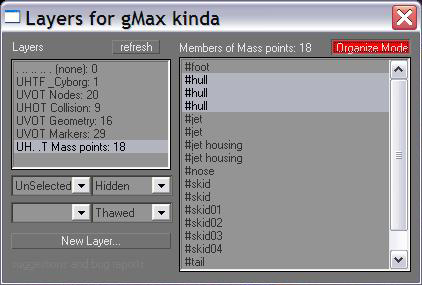 v2: http://hce.halomaps.org/index.cfm?fid=5883 Drop Layers.mzp onto gMax. It gets installed, and the Customize UI dialog opens, where you can setup the key/menu item/etc. to open the Layers dialog. For those wondering what this is about, you can use layers to group together objects into nodes, geometry, collision, markers, physics, reference, whatever you want to name a group of objects. Those groupings are then easily hidden, selected, frozen, transparented, and again in reverse. An object's layer assignment is a custom property, viewable in the object's properties dialog, custom tab. So it gets saved with the scene. Edited by bobbysoon on May 16, 2011 at 05:55 PM |
||||


|
|||||
|
ally Joined: Jun 23, 2010 
Aye Ready |
Posted: Apr 16, 2011 12:05 AM
Msg. 2 of 6
although i might not need something like this "yet" i'm sure others maybe will so thanks for taking the time and sharing.
|
||||
|
|
|||||
|
Maniac1000 -Helpful Poster- Joined: Feb 24, 2007 
|
Posted: Apr 16, 2011 12:33 AM
Msg. 3 of 6
Yea, its always good to see you posting helpful stuff bobbysoon.
|
||||
|
|
|||||
|
bobbysoon Joined: Feb 1, 2007
|
Posted: Apr 16, 2011 02:08 AM
Msg. 4 of 6
You're welcome, and thank you. Fortunately, it was simple enough that it didn't get lost in the limbo of my incomplete projects.
|
||||
|
|
|||||
|
Dennis  Joined: Jan 27, 2005 
"We are made of starstuff.” ― Carl Sagan |
Posted: Apr 24, 2011 11:16 PM
Msg. 5 of 6
Upload it again with a version number so it doesn't get deleted a duplicate.
|
||||
|
|
|||||
|
bobbysoon Joined: Feb 1, 2007
|
Posted: Apr 26, 2011 11:58 PM
Msg. 6 of 6
Layers v2 uploaded.
Now it's a dialog, and a macroscript, which means a hotkey can be assigned to open the dialog. No more callbacks. Too much trouble. I should have hyperlinked it to here rather than my pm page.. or not. idk, w/e Edited by bobbysoon on May 16, 2011 at 05:57 PM |
||||
|
|
|||||

|
