A Community discussion forum for Halo Custom Edition, Halo 2 Vista, Portal and Halo Machinima
|
 Home
Home Search
 Register
 Login
Login Member List
 Recent Posts
| »Forums Index »Halo Custom Edition (Bungie/Gearbox) »Halo CE Technical / Map Design »couldn't create new cache file (#3) | 
|
| Author | Topic: couldn't create new cache file (#3) (5 messages, Page 1 of 1) | ||||
| Moderators: Dennis | |||||
 Ro0ster Joined: Jan 21, 2008 
is a rooster |
Posted: Mar 4, 2011 08:18 PM
Msg. 1 of 5
I tried to build the cache file of my map but I got this error:
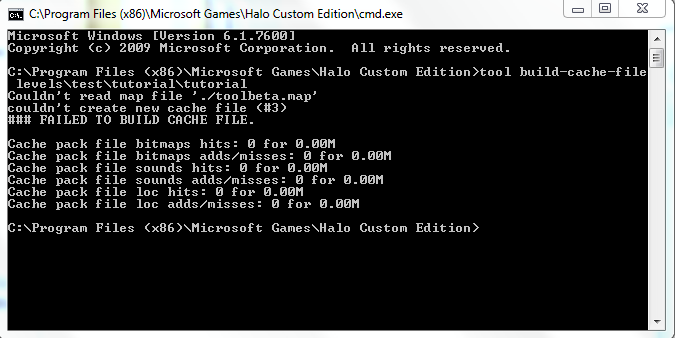 I have never seen this before and I don't know what is wrong. A few days before encountering this error it worked fine. Then all I did was recompile a bitmap, which really shouldn't cause an error. Eventually I tried reinstalling CE and the HEK, but to no avail; the default tutorial map wouldn't even compile or load in sapien. Also, this all started happening after I updated to windows 7 SP1. Could this be the problem? How can I fix this? I don't want to give up map making. |
||||


|
|||||
|
Maniac1000 -Helpful Poster- Joined: Feb 24, 2007 
|
Posted: Mar 4, 2011 08:42 PM
Msg. 2 of 5
it is because of compatibility files.
if you never ran max as admin, then the jms really does not exist. if you never ran tool as admin, then the scenario/tag, does not exist. tool does not have permission to write files. |
||||
|
|
|||||
|
Ro0ster Joined: Jan 21, 2008
is a rooster |
Posted: Mar 4, 2011 09:07 PM
Msg. 3 of 5
I already merged all the compatibility files from the virtual store to the real folder. Running cmd as admin works, but I hate right clicking run as admin. Is there anyway I can make it so I just have to double click cmd? I also use batch files to run common commands I use in tool. How can I make that work too?
|
||||
|
|
|||||
|
Maniac1000 -Helpful Poster- Joined: Feb 24, 2007
|
Posted: Mar 4, 2011 09:22 PM
Msg. 4 of 5
I am buggered if i know, i tried to give myself permissions to do that and failed.
I had to disable uac, which Dennis will recommend not to do :) |
||||
|
|
|||||
|
Ro0ster Joined: Jan 21, 2008
is a rooster |
Posted: Mar 4, 2011 09:28 PM
Msg. 5 of 5
Quote: --- Original message by: Maniac1000 Ive heard him say that its a bad idea to turn it off, but what are the risks of turning it off?I am buggered if i know, i tried to give myself permissions to do that and failed. I had to disable uac, which Dennis will recommend not to do :) EDIT:Apparently Norton has software that runs alongside the UAC, but it has a black and white list. Therefore I can tell it not to ask me again if tool can make changes to my computer. Here's the link: http://us.norton.com/theme.jsp?themeid=labs_uac&header=0&depthpath=0 I am going to try it out. Edited by Ro0ster on Mar 5, 2011 at 12:55 PM Edit2: It didn't work. It wasn't even able to install properly. Perhaps this is due to it conflicting with whatever was changed in SP1; the software was released in 2008, so it might not work with the "new and improved" UAC. Edited by Ro0ster on Mar 5, 2011 at 01:08 PM |
||||
|
|
|||||

|
