A Community discussion forum for Halo Custom Edition, Halo 2 Vista, Portal and Halo Machinima
|
 Home
Home Search
 Register
 Login
Login Member List
 Recent Posts
| »Forums Index »Halo Custom Edition (Bungie/Gearbox) »Halo CE General Discussion »[Request] Some help on this random error i never got before. | 
|
| Author | Topic: [Request] Some help on this random error i never got before. (5 messages, Page 1 of 1) | ||||
| Moderators: Dennis | |||||
 Nickster5000 Joined: Dec 11, 2010 
|
Posted: Feb 19, 2011 01:42 AM
Msg. 1 of 5
Hello, i have been fixing my level for a while now, but when everything seems good, and fixed, i try compiling it, and get this random error! im like... :/
Here's what tool says: D:\Program Files\Microsoft Games\Halo Custom Edition>tool structure levels\big_c anyon big_canyon Couldn't read map file './toolbeta.map' building intermediate geometry... building collision geometry... reducing collision geometry... building collision bsp... ### WARNING found possible T-junction (pink). ### WARNING found possible T-junction (pink). ### ERROR couldn't build bsp because of overlapping surfaces (orange). ### ERROR couldn't build bsp2d. ### ERROR couldn't build leaf. ### WARNING found nearly coplanar surfaces (red and green). ### ERROR failed to import collision bsp. All though it says overlapping faces, i dont see any in the model. Here's what it looks like in max 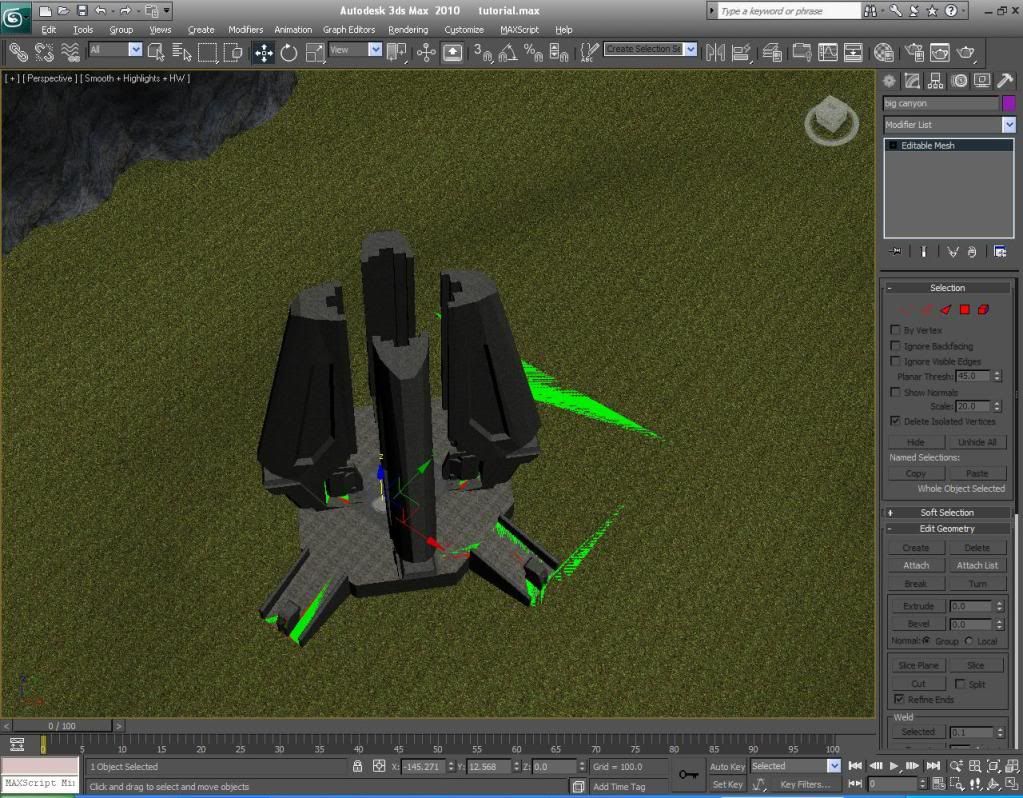 All help is appreciated. Please help me out, and future mapmakers: use this as a learning tool. Thank you. |
||||


|
|||||
|
Dwood Joined: Oct 23, 2007 
Judge Ye Therefore |
Posted: Feb 19, 2011 01:48 AM
Msg. 2 of 5
It means you have overlapping surfaces everywhere it shows. Probably bad triangulation.
|
||||
|
|
|||||
|
Nickster5000 Joined: Dec 11, 2010
|
Posted: Feb 19, 2011 01:53 AM
Msg. 3 of 5
Alright. I'll recreate all the surfaces later then. Thanks. :)
|
||||
|
|
|||||
|
UnevenElefant5 Joined: May 3, 2008 
its been fun yall, i'll never forget this site :') |
Posted: Feb 19, 2011 01:59 AM
Msg. 4 of 5
Since it looks like you already imported the .wrl, you can just look for the orange faces, and that willl show you where your overlapping faces are.
E: Try hiding your actual geometry and looking from all angles to find the orange faces. Edited by UnevenElefant5 on Feb 19, 2011 at 02:00 AM |
||||
|
|
|||||
|
DarkLord0912 Joined: Jan 17, 2009 
Works on bigger and better things |
Posted: Feb 19, 2011 03:50 AM
Msg. 5 of 5
Yeah the only bit of those errors that stop your map from building is the overlapping error "orange".
Usually I find the error depending on what way the mesh is made and what it is by going to face selection mode and checking ignore back facing and selecting,then if a face is selected check to see if it's correct then remove. |
||||
|
|
|||||

|
