A Community discussion forum for Halo Custom Edition, Halo 2 Vista, Portal and Halo Machinima
|
 Home
Home Search
 Register
 Login
Login Member List
 Recent Posts
| »Forums Index »Halo Custom Edition (Bungie/Gearbox) »Halo CE General Discussion »Feedback: Tunnels "Forunnerish" Enough? | 
|
| Page 1 of 2 | Go to page: · [1] · 2 · Next |
| Author | Topic: Feedback: Tunnels "Forunnerish" Enough? (39 messages, Page 1 of 2) | ||||
| Moderators: Dennis | |||||
 The Spartan Joined: Feb 22, 2007 
Aerial Dave |
Posted: Sep 6, 2008 09:58 PM
Msg. 1 of 39
I've been messing with my Relinquished map today (no I haven't dropped the project but only work on it about 30 minutes a month), and I started to redo the tunnels. The old ones where just place holders and where extremely boxy and bland. I haven't added final textures to them so just try to judge the overall model.
Please state your opinion and what can be done to look more "Forunnerish". 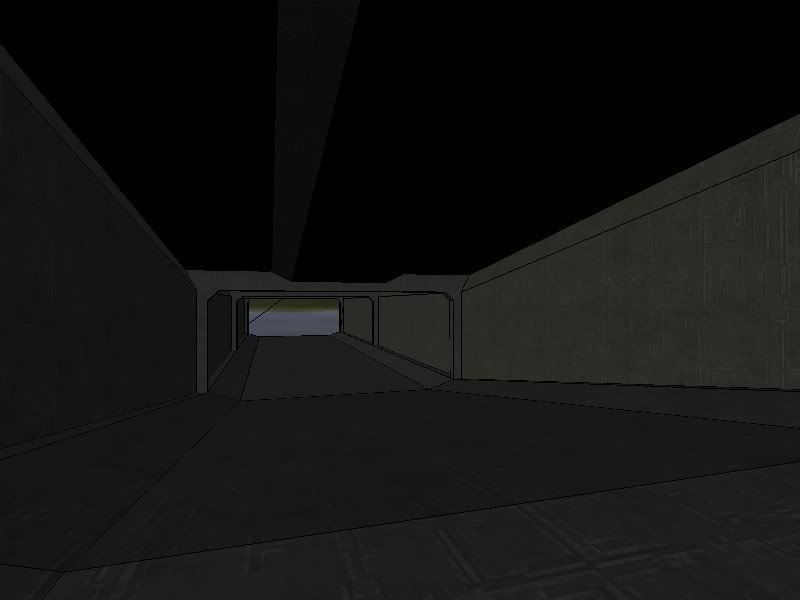 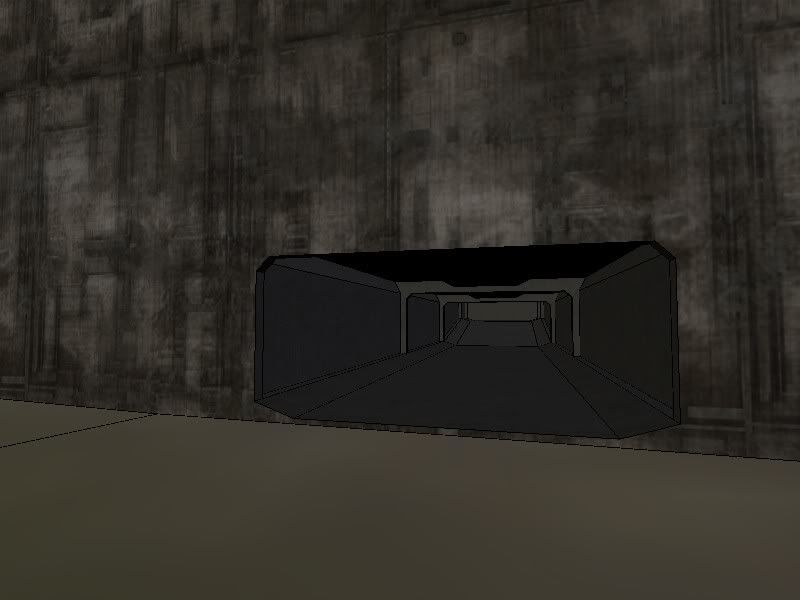 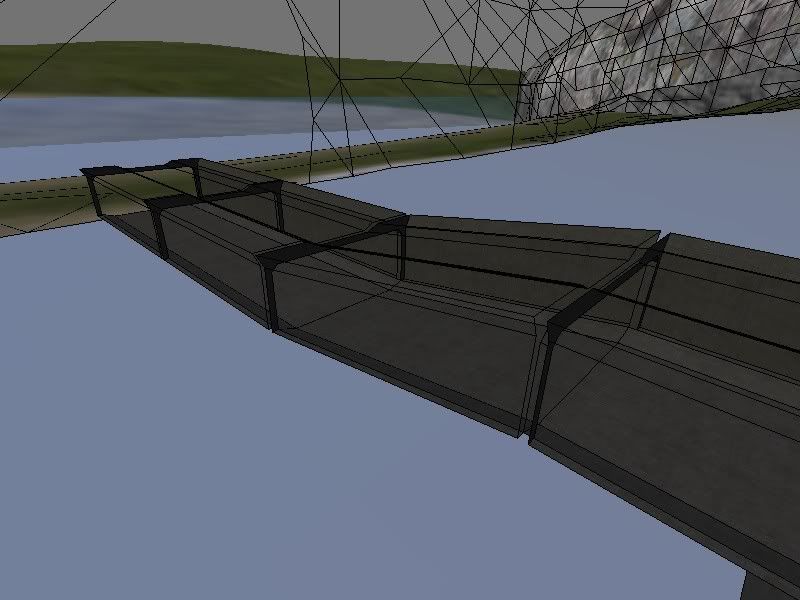 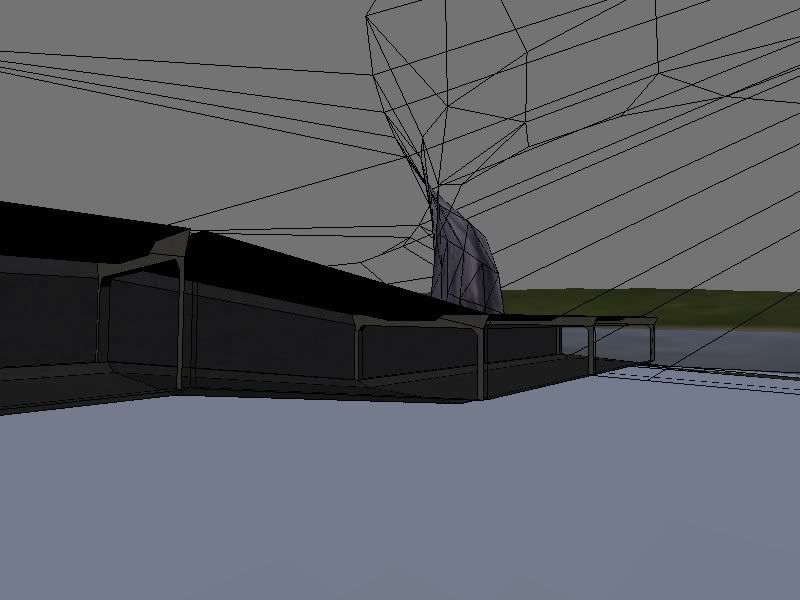 I haven't got hardly anything done on the map in the last few months but I'll try to start working on it more and you might can expect a beta within a few months. |
||||


|
|||||
|
Higuy Joined: Mar 6, 2007 
@lucasgovatos |
Posted: Sep 6, 2008 10:00 PM
Msg. 2 of 39
There ok, but you could add alot more to it.
|
||||
|
|
|||||
|
DarkHalo003 Joined: Mar 10, 2008 
All ARs Need Green Little Buttons. |
Posted: Sep 6, 2008 10:00 PM
Msg. 3 of 39
It looks human to be honest. The angles sloping downward from the wall need to be bigger OR the wall needs to be taller. That's my opinion though.
|
||||
|
|
|||||
|
Officer egg Joined: Mar 16, 2008 
Dancing is forbidden. |
Posted: Sep 6, 2008 10:01 PM
Msg. 4 of 39
Forerunner structures have lots of detail and are full of straight lines. Keep that in mind.
|
||||
|
|
|||||
|
The Spartan Joined: Feb 22, 2007
Aerial Dave |
Posted: Sep 6, 2008 10:02 PM
Msg. 5 of 39
Quote: --- Original message by: DarkHalo003 It looks human to be honest. The angles sloping downward from the wall need to be bigger OR the wall needs to be taller. That's my opinion though. It's actually bigger than it looks, it's probably just because it's in Blender instead of 3dsMax. |
||||
|
|
|||||
|
Higuy Joined: Mar 6, 2007
@lucasgovatos |
Posted: Sep 6, 2008 10:03 PM
Msg. 6 of 39
Get max or gmax. It would be alot easier to use then that.
|
||||
|
|
|||||
|
Mythril - Screenshot Guru - Joined: Mar 29, 2008 
Jeffrey Albert Waldo |
Posted: Sep 6, 2008 10:06 PM
Msg. 7 of 39
I like it, but it looks more human than forerunner. Forerunner = mass of details.
 Now, that is pure forerunner. Add more detail on the walls, and keep things symetrical (that is so not how to spell it) EDIT No, I did NOT make that. Edited by Mythril on Sep 6, 2008 at 10:07 PM |
||||
|
|
|||||
|
The Spartan Joined: Feb 22, 2007
Aerial Dave |
Posted: Sep 6, 2008 10:07 PM
Msg. 8 of 39
Quote: --- Original message by: Higuy Get max or gmax. It would be alot easier to use then that. I do, but I just never figured out how to model good in it, so I just import one section at a time when tweaking the BSP. That's another reason why it usaully takes longer to model in my maps. Anyone know how hard it would be to create a Blender exporter if even possible?  Quote: --- Original message by: Mythril I like it, but it looks more human than forerunner. Forerunner = mass of details. Now, that is pure forerunner. Add more detail on the walls, and keep things symetrical (that is so not how to spell it) EDIT No, I did NOT make that. Edited by Mythril on Sep 6, 2008 at 10:07 PM Detail.. Dang I'm not good at that. It might look a little better when I get proper textures applied and mapped. Anyway, thanks everyone for the feedback. Edited by The Spartan on Sep 6, 2008 at 10:13 PM |
||||
|
|
|||||
|
Higuy Joined: Mar 6, 2007
@lucasgovatos |
Posted: Sep 6, 2008 10:13 PM
Msg. 9 of 39
You dont need that much detail... Half of that looks like a bump on the texture.
|
||||
|
|
|||||
|
Mythril - Screenshot Guru - Joined: Mar 29, 2008
Jeffrey Albert Waldo |
Posted: Sep 6, 2008 10:14 PM
Msg. 10 of 39
True. Still, one look and it reeks forerunner.
|
||||
|
|
|||||
|
Higuy Joined: Mar 6, 2007
@lucasgovatos |
Posted: Sep 6, 2008 10:16 PM
Msg. 11 of 39
Actully, after looking and examining it, some parts odnt look forrunner. :| stupid halo wars.
|
||||
|
|
|||||
|
The Spartan Joined: Feb 22, 2007
Aerial Dave |
Posted: Sep 6, 2008 10:16 PM
Msg. 12 of 39
I might even try to make a new shader for it, but my texture making skills are sadly worse than my modelling skills, so yeah...
Also would making some of the floor transparent/glass and something under it help? Edited by The Spartan on Sep 6, 2008 at 10:18 PM |
||||
|
|
|||||
|
Mythril - Screenshot Guru - Joined: Mar 29, 2008
Jeffrey Albert Waldo |
Posted: Sep 6, 2008 10:17 PM
Msg. 13 of 39
Quote: --- Original message by: Higuy Actully, after looking and examining it, some parts odnt look forrunner. :| stupid halo wars. I see little things that look like model houses... O_o Texturing, the default textures are alright, but not exactly for something as large scale as that. |
||||
|
|
|||||
|
DarkHalo003 Joined: Mar 10, 2008
All ARs Need Green Little Buttons. |
Posted: Sep 6, 2008 10:18 PM
Msg. 14 of 39
Quote: --- Original message by: Higuy You dont need that much detail... Half of that looks like a bump on the texture. |
||||
|
|
|||||
|
Exception Joined: Jul 9, 2008 
Been So So long since I have been on this Forum |
Posted: Sep 6, 2008 10:18 PM
Msg. 15 of 39
i cannot model forerunner
probabilly cus i dont think that way. i think a different way to forerunner. if i do model forerunner i model from a pic or some sort of refrence. and the tunnel looks really, like human, anyway, if u want a tip from the person that sucks at forerunner (me) i rekon u need some sort of detail in the walls like where u hav the beams. make some sort of thing like kinda like. well hard to explain. semetrical defentally. and textur with like blus, silvers, oranges, like ckeck some pics for texturs. anyway this is only what i think EDIT: well i had a pic in that huge gap but it doesnt really turn out. so its kinda like the top of mythrils pic. like the thing that sticks up, but as beams in ur walls Edited by KA0S on Sep 6, 2008 at 10:20 PM |
||||
|
|
|||||
|
Higuy Joined: Mar 6, 2007
@lucasgovatos |
Posted: Sep 6, 2008 10:20 PM
Msg. 16 of 39
No. You need a intresting shape, and know the way of foreruner, and forerunner angles.
Edited by Higuy on Sep 6, 2008 at 10:20 PM |
||||
|
|
|||||
|
DarkHalo003 Joined: Mar 10, 2008
All ARs Need Green Little Buttons. |
Posted: Sep 6, 2008 10:20 PM
Msg. 17 of 39
Ask Selentic.
|
||||
|
|
|||||
|
The Spartan Joined: Feb 22, 2007
Aerial Dave |
Posted: Sep 6, 2008 10:21 PM
Msg. 18 of 39
I was going to get the tunnels off of an original Halo map, but considering I use Blender that would be hard.
Edited by The Spartan on Sep 6, 2008 at 10:22 PM |
||||
|
|
|||||
|
Higuy Joined: Mar 6, 2007
@lucasgovatos |
Posted: Sep 6, 2008 10:22 PM
Msg. 19 of 39
Thats why you need max ^_^
|
||||
|
|
|||||
|
Exception Joined: Jul 9, 2008
Been So So long since I have been on this Forum |
Posted: Sep 6, 2008 10:22 PM
Msg. 20 of 39
In 3ds max, use a lot of chamfering, because it stops things from looking so "boxy" and sometimes creates more detail.
Edited by KA0S on Sep 6, 2008 at 10:24 PM |
||||
|
|
|||||
|
Higuy Joined: Mar 6, 2007
@lucasgovatos |
Posted: Sep 6, 2008 10:23 PM
Msg. 21 of 39
chamfer messes up my models, I use cut.
|
||||
|
|
|||||
|
Mythril - Screenshot Guru - Joined: Mar 29, 2008
Jeffrey Albert Waldo |
Posted: Sep 6, 2008 10:24 PM
Msg. 22 of 39
Cut is useful, especially for forerunner detail, or you can use slice plane.
|
||||
|
|
|||||
|
Exception Joined: Jul 9, 2008
Been So So long since I have been on this Forum |
Posted: Sep 6, 2008 10:26 PM
Msg. 23 of 39
i mean like edge chamfer. i hate all other 1s. only chamfer in edge. and onlg chamfer it abit
|
||||
|
|
|||||
|
The Spartan Joined: Feb 22, 2007
Aerial Dave |
Posted: Sep 6, 2008 10:26 PM
Msg. 24 of 39
Quote: --- Original message by: KA0S In 3ds max, use a lot of chamfering, because it stops things from looking so "boxy" and sometimes creates more detail. Edited by KA0S on Sep 6, 2008 at 10:24 PM Blender has some pretty good tools that would make this a whole lot easier, but they sometimes produces degenerate triangles. Edited by The Spartan on Sep 6, 2008 at 10:31 PM |
||||
|
|
|||||
|
Mythril - Screenshot Guru - Joined: Mar 29, 2008
Jeffrey Albert Waldo |
Posted: Sep 6, 2008 10:28 PM
Msg. 25 of 39
What do degenerate triangles do? I saw somewhere they mess up texturing, but maybe that was something else...
|
||||
|
|
|||||
|
DarkHalo003 Joined: Mar 10, 2008
All ARs Need Green Little Buttons. |
Posted: Sep 6, 2008 10:29 PM
Msg. 26 of 39
Quote: --- Original message by: Mythril What do degenerate triangles do? I saw somewhere they mess up texturing, but maybe that was something else... Yeah, they screw-up textures. They don't really affect the compiling of the model though. |
||||
|
|
|||||
|
The Spartan Joined: Feb 22, 2007
Aerial Dave |
Posted: Sep 6, 2008 10:30 PM
Msg. 27 of 39
Quote: --- Original message by: DarkHalo003 Quote: --- Original message by: Mythril What do degenerate triangles do? I saw somewhere they mess up texturing, but maybe that was something else... Yeah, they screw-up textures. They don't really affect the compiling of the model though. They do me. Edited by The Spartan on Sep 6, 2008 at 10:37 PM |
||||
|
|
|||||
|
Higuy Joined: Mar 6, 2007
@lucasgovatos |
Posted: Sep 6, 2008 10:31 PM
Msg. 28 of 39
LOL. Degrente triangles will mess up your model. :)
|
||||
|
|
|||||
|
DarkHalo003 Joined: Mar 10, 2008
All ARs Need Green Little Buttons. |
Posted: Sep 6, 2008 10:33 PM
Msg. 29 of 39
Quote: --- Original message by: Higuy LOL. Degrente triangles will mess up your model. :) Or rather, they don't mess up weapon models too bad. You don't want degenerate triangles in a BSP though. Those are Fatal. xP |
||||
|
|
|||||
|
Exception Joined: Jul 9, 2008
Been So So long since I have been on this Forum |
Posted: Sep 6, 2008 10:36 PM
Msg. 30 of 39
really? i never take any notice of degen triangles and i dont get any problems. unless ur really fussy and u want whateva it is to be fully perfect.
oh and with weapon models nothing really matters when creating collision because u dont creat collision. weapons dong get collisions so thats y i love moddeling them cus u dont have to care what u do. well besids makeing the model look good |
||||
|
|
|||||
|
Mythril - Screenshot Guru - Joined: Mar 29, 2008
Jeffrey Albert Waldo |
Posted: Sep 6, 2008 10:37 PM
Msg. 31 of 39
Quote: --- Original message by: DarkHalo003 Quote: --- Original message by: Higuy LOL. Degrente triangles will mess up your model. :) Or rather, they don't mess up weapon models too bad. You don't want degenerate triangles in a BSP though. Those are Fatal. xP Oops.  That's from Dee, randomly found on deviantart. EDIT: Fixed image link Edited by Mythril on Sep 6, 2008 at 10:38 PM |
||||
|
|
|||||
|
Higuy Joined: Mar 6, 2007
@lucasgovatos |
Posted: Sep 6, 2008 10:39 PM
Msg. 32 of 39
Looks kinda wierd.
|
||||
|
|
|||||
|
Exception Joined: Jul 9, 2008
Been So So long since I have been on this Forum |
Posted: Sep 6, 2008 10:40 PM
Msg. 33 of 39
yea thats quite forerunnerish
Edited by KA0S on Sep 6, 2008 at 10:44 PM |
||||
|
|
|||||
|
DarkHalo003 Joined: Mar 10, 2008
All ARs Need Green Little Buttons. |
Posted: Sep 6, 2008 10:49 PM
Msg. 34 of 39
whoa.....that's a cool model(?).....
Edited by DarkHalo003 on Sep 6, 2008 at 10:49 PM |
||||
|
|
|||||
|
DEEhunter Joined: Dec 16, 2006 
|
Posted: Sep 6, 2008 11:41 PM
Msg. 35 of 39
Oh look. My forerunner hallway model.
|
||||
|
|
|||||
| Page 1 of 2 | Go to page: · [1] · 2 · Next |

|
