A Community discussion forum for Halo Custom Edition, Halo 2 Vista, Portal and Halo Machinima
|
 Home
Home Search
 Register
 Login
Login Member List
 Recent Posts
| »Forums Index »Halo Custom Edition (Bungie/Gearbox) »Halo CE General Discussion »Weapons - Works in Process thread [WIP] | 
|
| Page 341 of 371 | Go to page: · 1 · ... · 338 · 339 · 340 · [341] · 342 · 343 · 344 · ... · 371 · Prev · Next |
| Author | Topic: Weapons - Works in Process thread [WIP] (12975 messages, Page 341 of 371) | ||||
| Moderators: Dennis | |||||
 master noob Joined: Aug 10, 2012 
343Industries Advocate |
Posted: Jan 13, 2014 07:13 PM
Msg. 11901 of 12975
Quote: --- Original message by: YakZSmelk To get an AO from your Normal, you can always grab the Blue Channel and multiply it over your diffuse. no no, no no no no, no no. AO is dependent on how light reflects, whereas the blue channel stores zdepth. multiplying the blue channel of a normal map does not emulate AO as it will not properly convey shadows.  the left is a normal map's blue channel whereas the right is the AO bake. notice how, in the blue channel, shadows aren't properly conveyed in the corners and insets, and only the 2 pieces' shapes are identifiable. on the right, insets get darker as they get further from the light and more shapes are easily visible/defined. the completely black parts are where shapes intersect/where the render cuts off, allowing for a more visual representation of where shapes slot into the mesh, allowing for an easier time painting things like rust stains, leaks, dust, or other corner-dependent details. Edited by master noob on Jan 13, 2014 at 07:16 PM |
||||


|
|||||
|
YakZSmelk Joined: Apr 3, 2006 
- Environment Artist - robhow.com |
Posted: Jan 13, 2014 08:47 PM
Msg. 11902 of 12975
Quote: --- Original message by: master noob Quote: --- Original message by: YakZSmelk To get an AO from your Normal, you can always grab the Blue Channel and multiply it over your diffuse. no no, no no no no, no no. AO is dependent on how light reflects, whereas the blue channel stores zdepth. multiplying the blue channel of a normal map does not emulate AO as it will not properly convey shadows. https://dl.dropboxusercontent.com/u/53550883/dgh.jpg the left is a normal map's blue channel whereas the right is the AO bake. notice how, in the blue channel, shadows aren't properly conveyed in the corners and insets, and only the 2 pieces' shapes are identifiable. on the right, insets get darker as they get further from the light and more shapes are easily visible/defined. the completely black parts are where shapes intersect/where the render cuts off, allowing for a more visual representation of where shapes slot into the mesh, allowing for an easier time painting things like rust stains, leaks, dust, or other corner-dependent details. Edited by master noob on Jan 13, 2014 at 07:16 PM You're not wrong, but utilizing the Blue Channel is a very common technique used by industry artists. If you have a good normal the blue channel can easily be Blurred Multiplied to created a believable AO. It should be noted that when using the Blue Channel Method you do want to have an AO bake of the lowpoly to combine with. Edited by YakZSmelk on Jan 13, 2014 at 08:48 PM Quote: --- Original message by: bourrin33 Quote: --- Original message by: YakZSmelk Quote: --- Original message by: bourrin33 I'd like to make a highpoly to get those details with ambient occlusion that I don't have the skills in texturing to make, a lot more details and such. I'm not a texturer at all and I fail at adding the big details I want to put To get an AO from your Normal, you can always grab the Blue Channel and multiply it over your diffuse. You'll want to also create an AO from the lowpoly so that your AO matches better. That's if you just use nDo. Now for baking why are you trying to use the push modifier? Doesnt the model needs to be right over the surface of the baking reciever ? I'm assuming you mean the lowpoly? And the answer is no, you tend to get artifacting in the bakes if the models sit directly on top of one another but this can be remedied by applying a transparent material to the lowpoly before baking. Also you will want to play around with the anti-aliasing setting in your rendered to try and keep edges clean. Edited by YakZSmelk on Jan 13, 2014 at 10:29 PM |
||||
|
|
|||||
|
master noob Joined: Aug 10, 2012
343Industries Advocate |
Posted: Jan 14, 2014 06:31 PM
Msg. 11903 of 12975
Quote: --- Original message by: YakZSmelk You're not wrong, but utilizing the Blue Channel is a very common technique used by industry artists. If you have a good normal the blue channel can easily be Blurred Multiplied to created a believable AO. It should be noted that when using the Blue Channel Method you do want to have an AO bake of the lowpoly to combine with. bad industry artists, yes. and if you have the time for an AO bake then go all out for the good looks. the job calls for what will look good, not what might look good. |
||||
|
|
|||||
|
YakZSmelk Joined: Apr 3, 2006
- Environment Artist - robhow.com |
Posted: Jan 15, 2014 02:34 PM
Msg. 11904 of 12975
Quote: --- Original message by: master noob Quote: --- Original message by: YakZSmelk You're not wrong, but utilizing the Blue Channel is a very common technique used by industry artists. If you have a good normal the blue channel can easily be Blurred Multiplied to created a believable AO. It should be noted that when using the Blue Channel Method you do want to have an AO bake of the lowpoly to combine with. bad industry artists, yes. and if you have the time for an AO bake then go all out for the good looks. the job calls for what will look good, not what might look good. Eh.....I'd give them more credit than calling them bad, since they have to pump out numerous amounts of assets in a short amount of time. As opposed to the years the Halomaps community has to finish a single asset. :P But if time permits there's n reason no to bake an AO, which brings me to the next post. Quote: --- Original message by: Mootjuh Anyone using mental ray for AO? I've been using scanline with lighttracer up till now. I use Scanline for it's speed, Mental Ray seems a little funny on my computer, from time to time it's really fast! But the majority of the time is slow as hell... I usually end up using Mental Ray when GoZ turns it on for me and I don't catch it before the render. |
||||
|
|
|||||
|
PRPatxi Joined: Oct 30, 2010 
Dennis, free me from this suffering |
Posted: Jan 18, 2014 05:56 PM
Msg. 11905 of 12975
Starting to model H4 Light Rifle. Could pr0lly ripp it from the game but where's the fun in that?
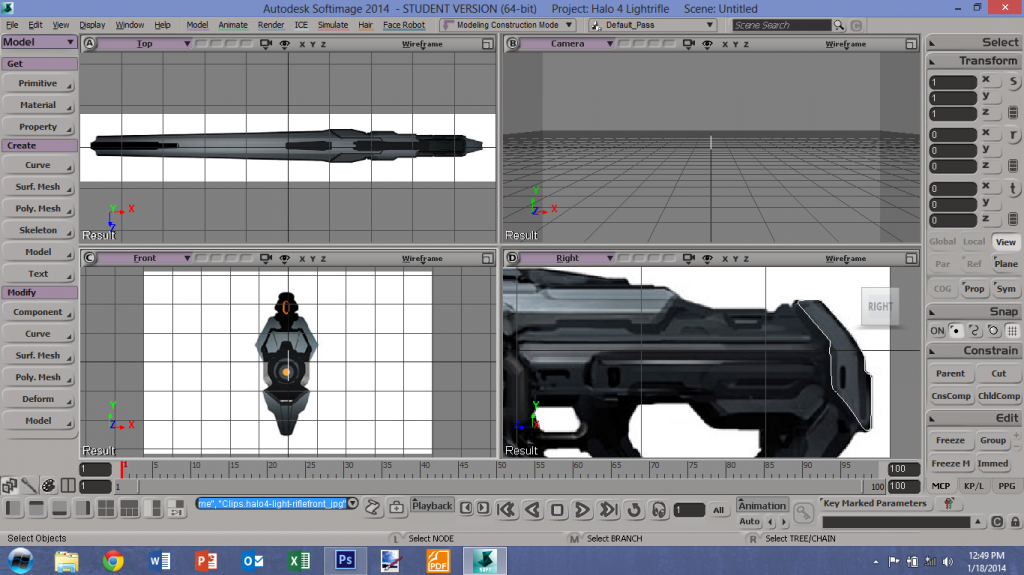 as well I haven't modeled in 3 years so I guess this is a good start-up project. |
||||
|
|
|||||
|
Spiral Joined: Apr 3, 2011 
I hope i'm out of the way |
Posted: Jan 18, 2014 07:08 PM
Msg. 11906 of 12975
Just in case you get lazy http://tf3dm.com/3d-model/halo-4-light-rifle-49251.html Edited by spiral on Jan 18, 2014 at 07:08 PM |
||||
|
|
|||||
|
Dumb AI Joined: Sep 18, 2011 
Dead. |
Posted: Jan 18, 2014 10:14 PM
Msg. 11907 of 12975
I think I did a bit better this time...
http://www.youtube.com/watch?v=D8CHgnf1oqM&feature=youtu.be |
||||
|
|
|||||
|
SAS Joined: Feb 26, 2013 
I comment every once in a while |
Posted: Jan 19, 2014 03:41 PM
Msg. 11908 of 12975
For the firing and melee anims, you need to up the initial speed. Like, for the firing animation, the gun should be the farthest back at around 3 frames in (just an example frame)
|
||||
|
|
|||||
|
Dumb AI Joined: Sep 18, 2011
Dead. |
Posted: Jan 19, 2014 11:00 PM
Msg. 11909 of 12975
Quote: --- Original message by: SAS For the firing and melee anims, you need to up the initial speed. Like, for the firing animation, the gun should be the farthest back at around 3 frames in (just an example frame) It may look too fast (or just weird at worst) |
||||
|
|
|||||
|
ODX Joined: Jul 26, 2007 
A rare sight, indeed. |
Posted: Jan 23, 2014 12:46 PM
Msg. 11910 of 12975
|
||||
|
|
|||||
|
Dumb AI Joined: Sep 18, 2011
Dead. |
Posted: Jan 23, 2014 07:22 PM
Msg. 11911 of 12975
I bet it looks quite nice when played at a different speed. |
||||
|
|
|||||
|
R93_Sniper Joined: Feb 13, 2011 
When in Doubt, RUN! |
Posted: Jan 24, 2014 05:34 PM
Msg. 11912 of 12975
Quote: --- Original message by: Dumb AI I think I did a bit better this time... http://www.youtube.com/watch?v=D8CHgnf1oqM&feature=youtu.be Animations are extremely stiff. I think you'd be better off firstly finding a better model to work with so that you can get the hang of animating. GameBananna has some good ones you can use. HARSH CRITISISM WARNING Firstly, those origins are terrible. The gun is too low and the hand position is just no. Look at this to see about where the hands should look like. Positioning of the gun itself could be different but the hand position is about right. Secondly, there's literally no force being shown through your animations. Its a tough thing to get used to (I still haven't gotten 100% used to it, i'll be honest), but practice does make perfect. Looking at some references, you might be able to understand how to emulate force. I'll link you some animation tutorials at the end of this post, but here's a video of somebody using a UMP45 http://www.youtube.com/watch?v=dFqr1NKccwM Try to see how that works Thirdly, Even for halo you wouldn't Melee like that. The gun is bigger than you have it, and you have to recall it still has weight. The fire animation has a LOT of recoil and is really slow. Speed up the animation and make it less overdramatic. The reload animation's method is ok but I think execution could be done better. Here's the links to Lag's and Flame's tutorials Lag's: http://www.youtube.com/watch?v=VTOv4O6ZlRo Flame's: http://www.youtube.com/watch?v=yKRjrSwVNVM And as a bonus here's Broke's channel with a TON of tutorials: http://www.youtube.com/user/imbrokeru/videos |
||||
|
|
|||||
|
Dumb AI Joined: Sep 18, 2011
Dead. |
Posted: Jan 24, 2014 06:12 PM
Msg. 11913 of 12975
Quote: --- Original message by: R93_Sniper Quote: --- Original message by: Dumb AI I think I did a bit better this time... http://www.youtube.com/watch?v=D8CHgnf1oqM&feature=youtu.be Animations are extremely stiff. I think you'd be better off firstly finding a better model to work with so that you can get the hang of animating. GameBananna has some good ones you can use. HARSH CRITISISM WARNING Firstly, those origins are terrible. The gun is too low and the hand position is just no. Look at this to see about where the hands should look like. Positioning of the gun itself could be different but the hand position is about right. Secondly, there's literally no force being shown through your animations. Its a tough thing to get used to (I still haven't gotten 100% used to it, i'll be honest), but practice does make perfect. Looking at some references, you might be able to understand how to emulate force. I'll link you some animation tutorials at the end of this post, but here's a video of somebody using a UMP45 http://www.youtube.com/watch?v=dFqr1NKccwM Try to see how that works Thirdly, Even for halo you wouldn't Melee like that. The gun is bigger than you have it, and you have to recall it still has weight. The fire animation has a LOT of recoil and is really slow. Speed up the animation and make it less overdramatic. The reload animation's method is ok but I think execution could be done better. Here's the links to Lag's and Flame's tutorials Lag's: http://www.youtube.com/watch?v=VTOv4O6ZlRo Flame's: http://www.youtube.com/watch?v=yKRjrSwVNVM And as a bonus here's Broke's channel with a TON of tutorials: http://www.youtube.com/user/imbrokeru/videos Thank for the tutorials (I already know where to get em) and I am aware of those issues you mentioned. However, I do not really understand why you think the origins are so "bad". |
||||
|
|
|||||
|
R93_Sniper Joined: Feb 13, 2011
When in Doubt, RUN! |
Posted: Jan 26, 2014 03:32 AM
Msg. 11914 of 12975
i explained why already. Gun is too low and the left Hand position is bad
|
||||
|
|
|||||
|
Dumb AI Joined: Sep 18, 2011
Dead. |
Posted: Jan 26, 2014 12:55 PM
Msg. 11915 of 12975
Quote: --- Original message by: R93_Sniper i explained why already. Gun is too low and the left Hand position is bad Left hand position is bad? That hardly seems like a legit reason to consider the origins to be bad. Why not explain why and how it's bad? It's a pretty natural position and that's not too bad of a way to hold the weapon. Edited by Dumb AI on Jan 26, 2014 at 12:58 PM |
||||
|
|
|||||
|
master noob Joined: Aug 10, 2012
343Industries Advocate |
Posted: Jan 26, 2014 01:27 PM
Msg. 11916 of 12975
Quote: --- Original message by: Dumb AI Quote: --- Original message by: R93_Sniper i explained why already. Gun is too low and the left Hand position is bad Left hand position is bad? That hardly seems like a legit reason to consider the origins to be bad. Why not explain why and how it's bad? It's a pretty natural position and that's not too bad of a way to hold the weapon. pose as if you were holding a rifle. more often than not your elbow would be near-level with your left hand, if only a little lower. a human's torso has a tendency to push the arm outward and upward, especially if said person is muscular. having the arm face downward as in your animation causes stress on the shoulder. same can be applied to punching; you don't flex your arm completely straight(elbow pointing down), you flex your arm outward so that your elbow faces to the side. most animation questions/problems can be solved by trying to replicate them yourself and seeing what is and isn't awkward for the human body to do. Edited by master noob on Jan 26, 2014 at 01:28 PM |
||||
|
|
|||||
|
Dumb AI Joined: Sep 18, 2011
Dead. |
Posted: Jan 26, 2014 10:42 PM
Msg. 11917 of 12975
Thank you for explaining why.
So, I've got a problem with animating the slide/charging handle/op handle... With the way it's set up in most models, the child bones affect the parent bones when moved. I can't move any child bones without affecting the parent bone. Any ideas on how I can fix this? I looked on Google but I couldn't find much relevant information. Edited by Dumb AI on Jan 26, 2014 at 10:48 PM |
||||
|
|
|||||
|
Invader Veex Joined: Apr 11, 2007 
i make poast |
Posted: Jan 27, 2014 06:42 PM
Msg. 11918 of 12975
 Glad to see you've still got it. |
||||
|
|
|||||
|
Wiki Joined: Jan 27, 2014 
What would you do if you weren't afraid? |
Posted: Jan 28, 2014 10:26 AM
Msg. 11919 of 12975
Nice.
Edited by Wiki on Jan 28, 2014 at 11:18 AM |
||||
|
|
|||||
|
R93_Sniper Joined: Feb 13, 2011
When in Doubt, RUN! |
Posted: Jan 28, 2014 04:42 PM
Msg. 11920 of 12975
Quote: --- Original message by: Dumb AI Thank you for explaining why. So, I've got a problem with animating the slide/charging handle/op handle... With the way it's set up in most models, the child bones affect the parent bones when moved. I can't move any child bones without affecting the parent bone. Any ideas on how I can fix this? I looked on Google but I couldn't find much relevant information. Edited by Dumb AI on Jan 26, 2014 at 10:48 PM You would use nodes instead of bones and you wouldn't have an issue. If you have xfire, PM me and i'll be willing to run you through animation in a nutshell to help alleviate your issues. |
||||
|
|
|||||
|
Dumb AI Joined: Sep 18, 2011
Dead. |
Posted: Jan 28, 2014 07:30 PM
Msg. 11921 of 12975
Quote: --- Original message by: R93_Sniper Quote: --- Original message by: Dumb AI Thank you for explaining why. So, I've got a problem with animating the slide/charging handle/op handle... With the way it's set up in most models, the child bones affect the parent bones when moved. I can't move any child bones without affecting the parent bone. Any ideas on how I can fix this? I looked on Google but I couldn't find much relevant information. Edited by Dumb AI on Jan 26, 2014 at 10:48 PM You would use nodes instead of bones and you wouldn't have an issue. If you have xfire, PM me and i'll be willing to run you through animation in a nutshell to help alleviate your issues. Oh, I see. Thank you for your offer. :) |
||||
|
|
|||||
|
savinpvtmike Joined: Apr 18, 2010 
It's heavily inserted |
Posted: Jan 31, 2014 10:11 PM
Msg. 11922 of 12975
 this is good for my second weapon  |
||||
|
|
|||||
|
Bottletopman Joined: Feb 5, 2011 
Blessed are the cheesemakers |
Posted: Feb 1, 2014 08:40 AM
Msg. 11923 of 12975
so...you removed the muzzle?
EDIT: and the magazine? Edited by Bottletopman on Feb 1, 2014 at 08:41 AM |
||||
|
|
|||||
|
savinpvtmike Joined: Apr 18, 2010
It's heavily inserted |
Posted: Feb 1, 2014 09:48 AM
Msg. 11924 of 12975
i have not made them yet I wanted to do th uvw unwrap so I can try to leave room for the detail
|
||||
|
|
|||||
|
Echo77 Joined: Jul 20, 2010 
Humble thyself and hold thy tongue. |
Posted: Feb 1, 2014 01:48 PM
Msg. 11925 of 12975
http://www.halopedia.org/XM510_Multishot_Grenade_Launcher
Speaking of Halo Wars weapons, has anyone considered creating something based on the XM510 grenade launcher? |
||||
|
|
|||||
|
MEGA_VKNG Joined: Dec 23, 2013 
|
Posted: Feb 1, 2014 03:39 PM
Msg. 11926 of 12975
That gun is so cod no.
|
||||
|
|
|||||
|
Echo77 Joined: Jul 20, 2010
Humble thyself and hold thy tongue. |
Posted: Feb 1, 2014 03:42 PM
Msg. 11927 of 12975
Quote: --- Original message by: MEGASEAN2812 That gun is so cod no. It's so CoD, it's in Halo. O: |
||||
|
|
|||||
|
Spiral Joined: Apr 3, 2011
I hope i'm out of the way |
Posted: Feb 1, 2014 04:20 PM
Msg. 11928 of 12975
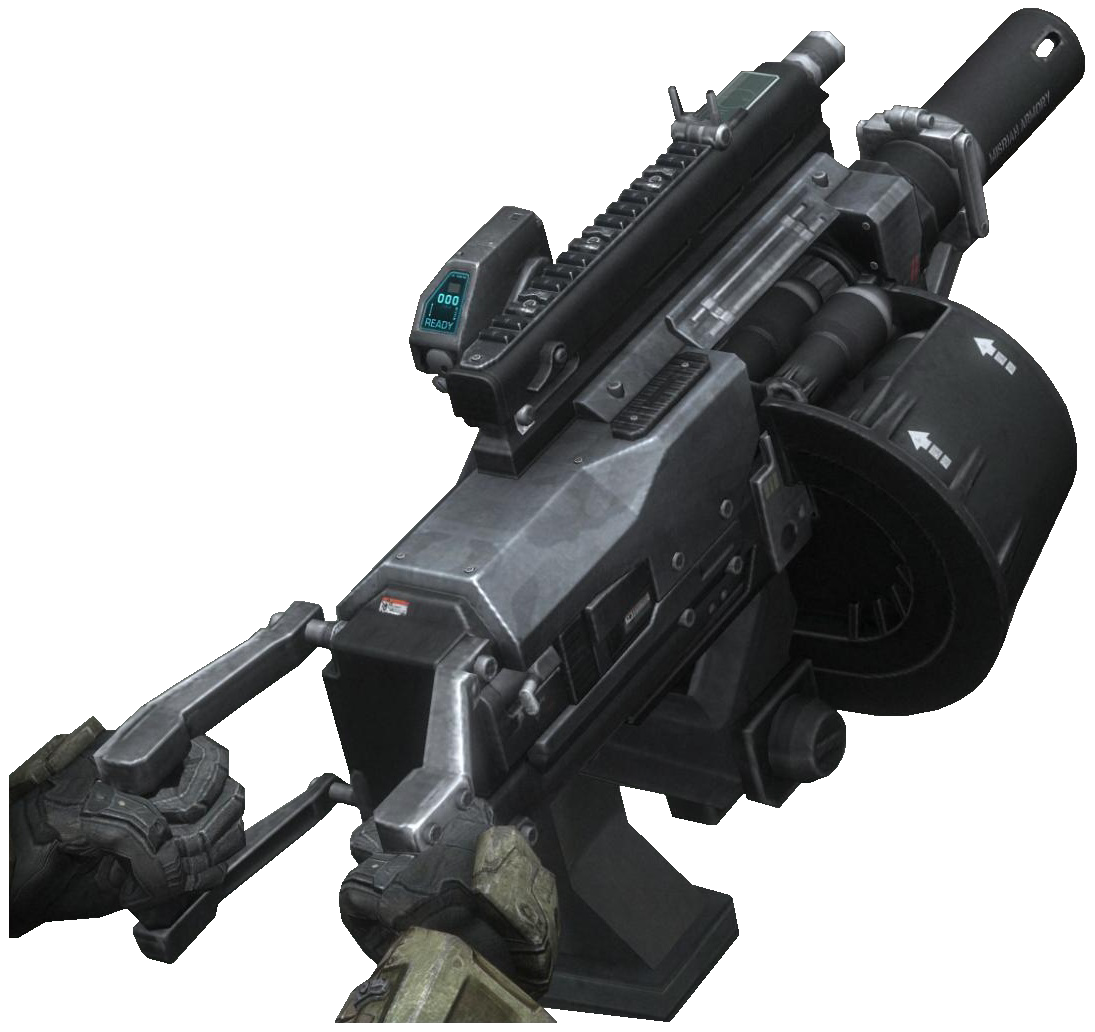 make it halo like! |
||||
|
|
|||||
|
Echo77 Joined: Jul 20, 2010
Humble thyself and hold thy tongue. |
Posted: Feb 1, 2014 04:25 PM
Msg. 11929 of 12975
Quote: --- Original message by: spiral http://static3.wikia.nocookie.net/__cb20111206233845/halo/images/0/04/MG460-AutomaticGrenadeLauncher-transparent.png make it halo like! That's a different thing, although I wouldn't mind seeing a man-portable variant of that in the spirit of the support weapons in Halo 3. The revolver action one from Halo Wars seems like it'd be better suited for general use, though. A bit like a UNSC equivalent to the Brute Shot. Edit: "So CoD" Edited by Echo77 on Feb 1, 2014 at 04:27 PM |
||||
|
|
|||||
|
savinpvtmike Joined: Apr 18, 2010
It's heavily inserted |
Posted: Feb 1, 2014 11:42 PM
Msg. 11930 of 12975
a gl is a gl not cod
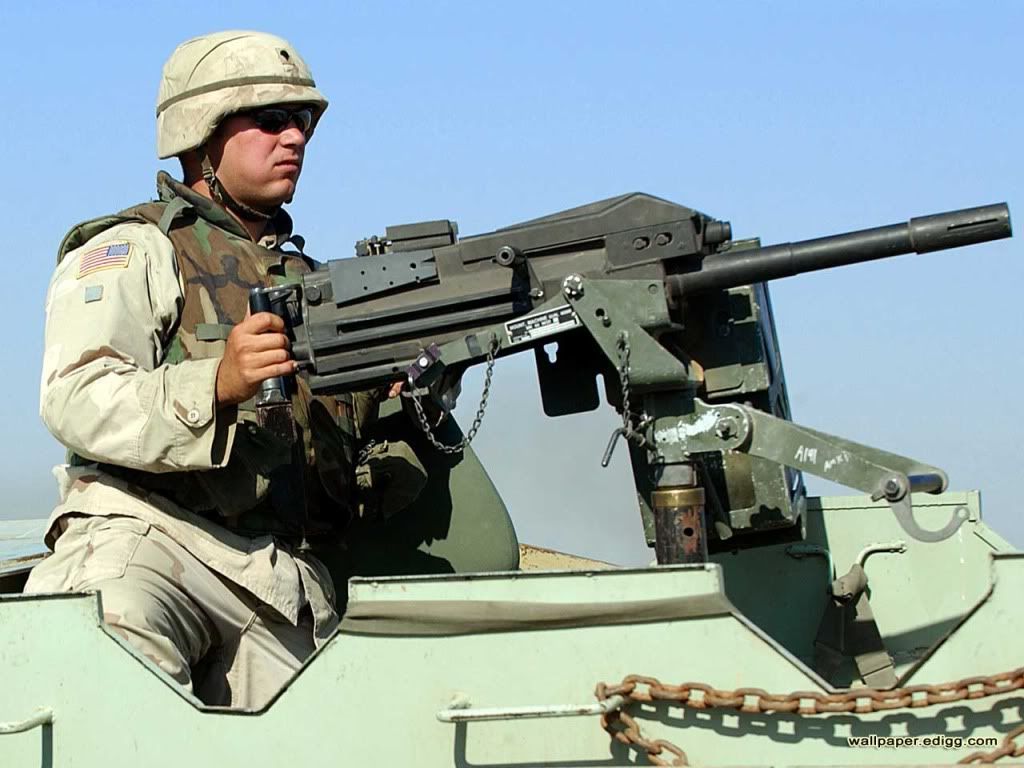   |
||||
|
|
|||||
|
Echo77 Joined: Jul 20, 2010
Humble thyself and hold thy tongue. |
Posted: Feb 2, 2014 01:40 PM
Msg. 11931 of 12975
Quote: --- Original message by: savinpvtmike a gl is a gl not cod My thoughts exactly. It'd be cool to see a little more variety in regards to the available UNSC grenade launchers in CE, rather than just the break-action M319 from Reach. |
||||
|
|
|||||
|
ODX Joined: Jul 26, 2007
A rare sight, indeed. |
Posted: Feb 2, 2014 01:49 PM
Msg. 11932 of 12975
CMT had the BR grenade launcher that was awesome. Not sure of any others I've really seen.
As far as I know though, no one's really animated this thing well/I've not seen it so...  |
||||
|
|
|||||
|
Spiral Joined: Apr 3, 2011
I hope i'm out of the way |
Posted: Feb 2, 2014 03:26 PM
Msg. 11933 of 12975
The zteam tag pack included an animated HR grenade launcher.
as for a revolving grenade launcher, I haven't seen any high quality tags. |
||||
|
|
|||||
|
ODX Joined: Jul 26, 2007
A rare sight, indeed. |
Posted: Feb 2, 2014 03:44 PM
Msg. 11934 of 12975
Quote: --- Original message by: spiral Ah, there was a ZTeam tag pack? I know they released the Halo 3 tags (<3), and I was kinda guessing there was something else cause there's Reach tags flying around. Saw CAD's concussion rifle in one map so that had me wondering. Where is that?The zteam tag pack included an animated HR grenade launcher. as for a revolving grenade launcher, I haven't seen any high quality tags. |
||||
|
|
|||||
|
MEGA_VKNG Joined: Dec 23, 2013
|
Posted: Feb 2, 2014 04:04 PM
Msg. 11935 of 12975
|
||||
|
|
|||||
| Page 341 of 371 | Go to page: · 1 · ... · 338 · 339 · 340 · [341] · 342 · 343 · 344 · ... · 371 · Prev · Next |

|
