A Community discussion forum for Halo Custom Edition, Halo 2 Vista, Portal and Halo Machinima
|
 Home
Home Search
 Register
 Login
Login Member List
 Recent Posts
| »Forums Index »Halo Custom Edition (Bungie/Gearbox) »Halo CE General Discussion »Questions about exporting BSP Geometry | 
|
| Author | Topic: Questions about exporting BSP Geometry (9 messages, Page 1 of 1) | ||||
| Moderators: Dennis | |||||
 Markel Joined: Sep 12, 2015 |
Posted: Sep 12, 2015 08:11 PM
Msg. 1 of 9
So I wanted to export out the BSPs from some of CE's multiplayer maps to fool around with. I downloaded HEK+ and the BSP tag converter but I ran into a problem. That being, I can export out the BSP geometry as an .obj and the textures out as whatever format I want, but if I import the .obj into blender, all the geometry is one object, which means it would be very difficult for me to apply the seperate textures to where they are supposed to be applied. Is there a way I can export out the geometry as seperate .obj files depending on their materials?
|
||||


|
|||||
|
DOOM899 Joined: Jul 23, 2013 
{DM} [gamesmaster] if i can ill help maybe |
Posted: Sep 12, 2015 08:16 PM
Msg. 2 of 9
Quote: --- Original message by: Markel yeah I would not know. why not use 3dx max 2010?So I wanted to export out the BSPs from some of CE's multiplayer maps to fool around with. I downloaded HEK+ and the BSP tag converter but I ran into a problem. That being, I can export out the BSP geometry as an .obj and the textures out as whatever format I want, but if I import the .obj into blender, all the geometry is one object, which means it would be very difficult for me to apply the seperate textures to where they are supposed to be applied. Is there a way I can export out the geometry as seperate .obj files depending on their materials? Edited by DOOM899 on Sep 12, 2015 at 08:16 PM |
||||
|
|
|||||
|
R93_Sniper Joined: Feb 13, 2011 
When in Doubt, RUN! |
Posted: Sep 12, 2015 08:55 PM
Msg. 3 of 9
Ignore doom altogether, since he's being useless
Assuming you're using the latest BSP Tag Converter, there's a checkbox that says "Separate Objects by Material" when you Decompile the bsp. Given this is checked off you should be set. However if the problem still persists your best solution would be to export one material at a time as multiple obj files and go from there. |
||||
|
|
|||||
|
Maniac1000 -Helpful Poster- Joined: Feb 24, 2007 
|
Posted: Sep 12, 2015 09:32 PM
Msg. 4 of 9
Aether does a great job of exporting.
|
||||
|
|
|||||
|
Markel Joined: Sep 12, 2015 |
Posted: Sep 12, 2015 09:39 PM
Msg. 5 of 9
How would I export one material at a time as multiple obj files? "Separate Objects by Material" just exports one single .obj.
|
||||
|
|
|||||
|
Tnnaas Joined: Jan 3, 2015 
Venez voir maman. Avatar credit: kevinsano |
Posted: Sep 12, 2015 10:34 PM
Msg. 6 of 9
Quote: --- Original message by: Markel You don't, but you don't need to. Each different material surface is a different selectable mesh when you import the .obj, or at least that's how it should be if you didn't mess anything up.How would I export one material at a time as multiple obj files? "Separate Objects by Material" just exports one single .obj. 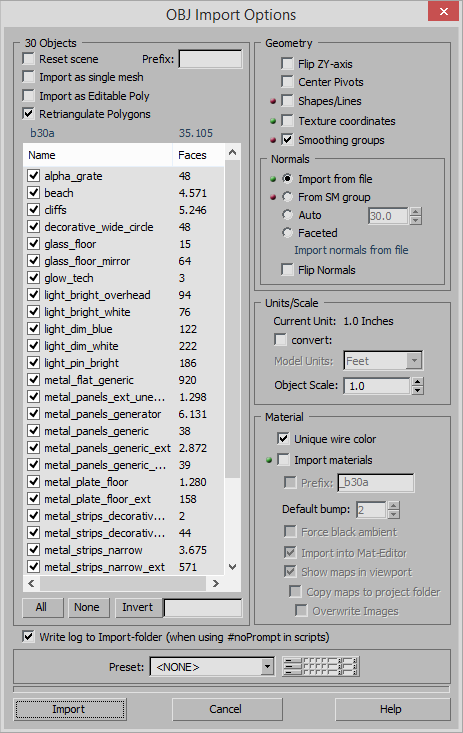 Otherwise, if you want to do it by hand, you can always export and import it is as one big mesh and select one material ID at a time. Edited by Tnnaas on Sep 12, 2015 at 10:39 PM |
||||
|
|
|||||
|
DOOM899 Joined: Jul 23, 2013
{DM} [gamesmaster] if i can ill help maybe |
Posted: Sep 12, 2015 10:40 PM
Msg. 7 of 9
Quote: --- Original message by: R93_Sniper oi Im not useless I said I don't know next time read my postIgnore doom altogether, since he's being useless Assuming you're using the latest BSP Tag Converter, there's a checkbox that says "Separate Objects by Material" when you Decompile the bsp. Given this is checked off you should be set. However if the problem still persists your best solution would be to export one material at a time as multiple obj files and go from there. |
||||
|
|
|||||
|
Markel Joined: Sep 12, 2015 |
Posted: Sep 13, 2015 12:57 AM
Msg. 8 of 9
Thanks all, I figured it out. :)
|
||||
|
|
|||||
|
MEGA_VKNG Joined: Dec 23, 2013 
|
Posted: Sep 13, 2015 02:02 AM
Msg. 9 of 9
Quote: --- Original message by: DOOM899 Quote: --- Original message by: R93_Sniper oi Im not useless I said I don't know next time read my postIgnore doom altogether, since he's being useless Assuming you're using the latest BSP Tag Converter, there's a checkbox that says "Separate Objects by Material" when you Decompile the bsp. Given this is checked off you should be set. However if the problem still persists your best solution would be to export one material at a time as multiple obj files and go from there. thats why he said you were being useless. if you do not know the answer, its recommended not to reply period. |
||||
|
|
|||||

|
