A Community discussion forum for Halo Custom Edition, Halo 2 Vista, Portal and Halo Machinima
|
 Home
Home Search
 Register
 Login
Login Member List
 Recent Posts
| »Forums Index »Halo Custom Edition (Bungie/Gearbox) »Halo CE General Discussion »how can i get illumination to glow very bright | 
|
| Author | Topic: how can i get illumination to glow very bright (10 messages, Page 1 of 1) | ||||
| Moderators: Dennis | |||||
 savinpvtmike Joined: Apr 18, 2010 
It's heavily inserted |
Posted: Jan 11, 2015 12:35 AM
Msg. 1 of 10
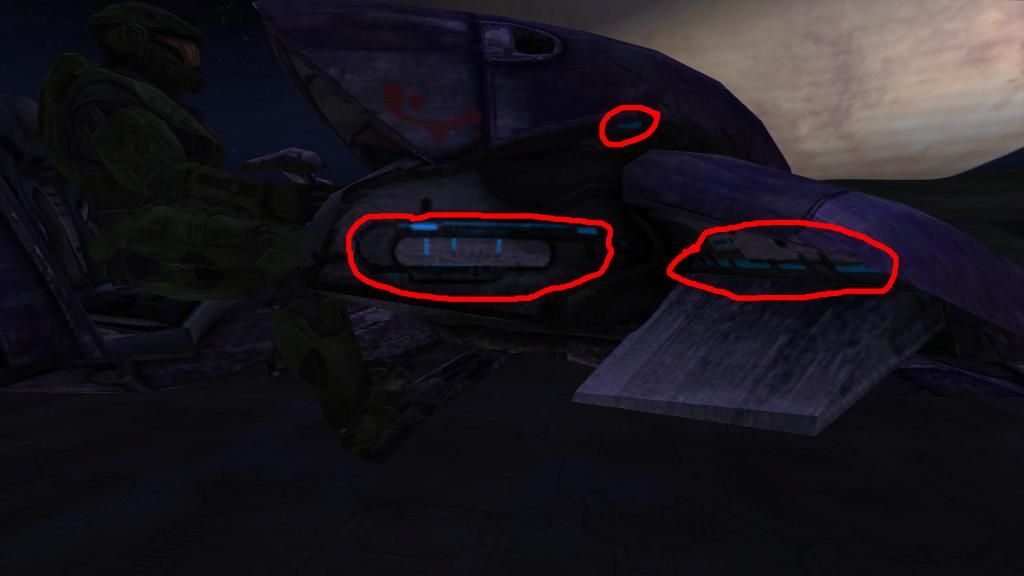 its too dim and i want more glow its too dim and i want more glow |
||||


|
|||||
|
NeX Joined: Apr 11, 2013 
|
Posted: Jan 11, 2015 01:37 AM
Msg. 2 of 10
Quote: --- Original message by: savinpvtmike http://i1048.photobucket.com/albums/s376/savinprivtemike/haloce2015-01-1020-57-49-11.jpg its too dim and i want more glow What color are those areas in the diffuse |
||||
|
|
|||||
|
savinpvtmike Joined: Apr 18, 2010
It's heavily inserted |
Posted: Jan 11, 2015 01:49 AM
Msg. 3 of 10
Quote: --- Original message by: NeX Quote: --- Original message by: savinpvtmike http://i1048.photobucket.com/albums/s376/savinprivtemike/haloce2015-01-1020-57-49-11.jpg its too dim and i want more glow What color are those areas in the diffuse well i am getting but what i was told its wight now it it looks fine but i will like to try to get it to glow like on cmts ghost (blue lights not the lights glowing under) is it dun by lens flares? https://www.youtube.com/watch?v=ABy4AEaWCDU Edited by savinpvtmike on Jan 11, 2015 at 02:20 AM |
||||
|
|
|||||
|
savinpvtmike Joined: Apr 18, 2010
It's heavily inserted |
Posted: Jan 11, 2015 02:32 AM
Msg. 4 of 10
Quote: --- Original message by: Mootjuh If you want it to actually glow, you'll bloom. how do i apply bloom? |
||||
|
|
|||||
|
rcghalohell Joined: Feb 25, 2009 
I can jump?Weeeee (pop!) (No1 heard from it again) |
Posted: Jan 11, 2015 09:31 PM
Msg. 5 of 10
did anyone read the thread title wrong and see "illuminati"?
|
||||
|
|
|||||
|
OrangeJuice Joined: Jan 29, 2009 
Documentation and debug.txt |
Posted: Jan 11, 2015 10:46 PM
Msg. 6 of 10
try lens-flare markers
|
||||
|
|
|||||
|
SGT Arroyo Joined: Jul 23, 2014 
golden |
Posted: Jan 12, 2015 04:14 AM
Msg. 7 of 10
Quote: --- Original message by: OrangeJuice heh exactly what I said.try lens-flare markers |
||||
|
|
|||||
|
SGT Arroyo Joined: Jul 23, 2014
golden |
Posted: Jan 12, 2015 07:59 AM
Msg. 8 of 10
Quote: --- Original message by: Altearose or that xDOr just edit the bitmaps and put some shades of the color in the parts of the bitmaps so making it seem its glowing or some crap, I don't know how to explain it well. https://fbcdn-sphotos-h-a.akamaihd.net/hphotos-ak-xpa1/v/t34.0-12/10913127_1398576033774936_1769521233_n.jpg?oh=7615fb946a6c1f38cfc4b23574a8d020&oe=54B701FA&__gda__=1421232171_93ea31c729c197818ba7af70e67445fb |
||||
|
|
|||||
|
OrangeJuice Joined: Jan 29, 2009
Documentation and debug.txt |
Posted: Jan 12, 2015 11:58 AM
Msg. 9 of 10
nope,
am a BSP modeler |
||||
|
|
|||||
|
gruntfromhalo Joined: Nov 21, 2007 
actual loli |
Posted: Jan 12, 2015 08:45 PM
Msg. 10 of 10
Or instead of all this work you could just light your monitor on fire and pretend it's the texture glowing. Heck, it'll glow brighter than you could pull off through conventional methods too!
|
||||
|
|
|||||

|
