A Community discussion forum for Halo Custom Edition, Halo 2 Vista, Portal and Halo Machinima
|
 Home
Home Search
 Register
 Login
Login Member List
 Recent Posts
| »Forums Index »Halo Custom Edition (Bungie/Gearbox) »Halo CE General Discussion »need help with os shaders | 
|
| Author | Topic: need help with os shaders (12 messages, Page 1 of 1) | ||||
| Moderators: Dennis | |||||
 MEGA_VKNG Joined: Dec 23, 2013 
|
Posted: Mar 15, 2014 05:50 PM
Msg. 1 of 12
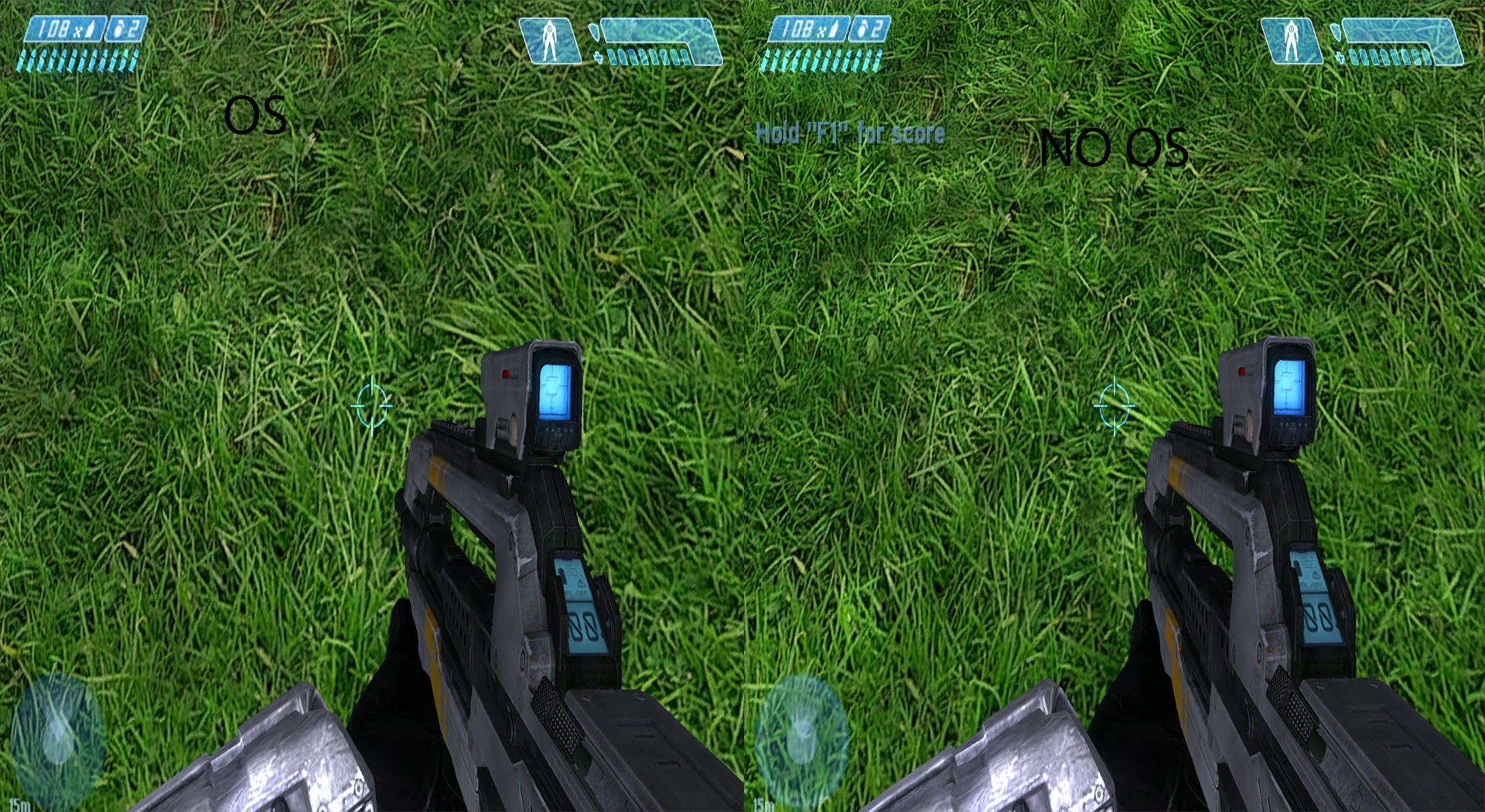
im trying to figure it out. i tried editing a cmt shader with the bitmaps i need to see what they did but nothing happens! i tried applying the control as a multipurpose but that doesnt work.
 |
||||


|
|||||
|
Dumb AI Joined: Sep 18, 2011 
Dead. |
Posted: Mar 15, 2014 05:53 PM
Msg. 2 of 12
You should not use the control map itself as multipurpose.
The control map has the things you need for the multipurpose but you need to make one. Here a tutorial for multipurpose : http://hce.halomaps.org/index.cfm?fid=6222 Here is some info, courtesy of Waffles.
Edited by Dumb AI on Mar 15, 2014 at 05:57 PM |
||||
|
|
|||||
|
MEGA_VKNG Joined: Dec 23, 2013
|
Posted: Mar 15, 2014 05:56 PM
Msg. 3 of 12
thanks. :D ill check it out and post an update when i get something, also. what about specular maps? how are those done?
|
||||
|
|
|||||
|
Dumb AI Joined: Sep 18, 2011
Dead. |
Posted: Mar 15, 2014 05:58 PM
Msg. 4 of 12
Well, it's either located in the diffuse's alpha channel or in the control map.
|
||||
|
|
|||||
|
MEGA_VKNG Joined: Dec 23, 2013
|
Posted: Mar 15, 2014 06:05 PM
Msg. 5 of 12
my bitmap doesnt have an alpha channel?
nvm found it im stupid but why is it red? Edited by MEGASEAN2812 on Mar 15, 2014 at 06:12 PM |
||||
|
|
|||||
|
AlekosGR Joined: Aug 13, 2013 
ACE Moding Team (Azura Computer Entertainment) |
Posted: Mar 16, 2014 01:15 AM
Msg. 6 of 12
For Normal/Specular maping download "CrazyBump" Easy as hell to use, with FANTASTIC results. You will just need to create a specular and place it in the extra os_shader field. To do so, open your diffuse map in crazy bump and select the specular map field. Adjust and DONE! (Give specular coeficient and everything a value of 1, it's the best, in querilla) Also, have you compiled the map in yelo? It won't work otherwise!
Edited by AlekosGR on Mar 16, 2014 at 01:17 AM Edited by AlekosGR on Mar 16, 2014 at 01:19 AM |
||||
|
|
|||||
|
MEGA_VKNG Joined: Dec 23, 2013
|
Posted: Mar 16, 2014 01:34 AM
Msg. 7 of 12
I will look at it tommorow. Killer5000 sent me his shader and it looks like someone poured milk on the gun. Lol.
|
||||
|
|
|||||
|
Dumb AI Joined: Sep 18, 2011
Dead. |
Posted: Mar 16, 2014 10:47 AM
Msg. 8 of 12
Quote: --- Original message by: AlekosGR For Normal/Specular maping download "CrazyBump" Easy as hell to use, with FANTASTIC results. You will just need to create a specular and place it in the extra os_shader field. To do so, open your diffuse map in crazy bump and select the specular map field. Adjust and DONE! (Give specular coeficient and everything a value of 1, it's the best, in querilla) Also, have you compiled the map in yelo? It won't work otherwise! Edited by AlekosGR on Mar 16, 2014 at 01:17 AM Edited by AlekosGR on Mar 16, 2014 at 01:19 AM It's best to experiment with the values. 1 isn't always going to work just fine. I prefer to use the original normal and specular maps. Edited by Dumb AI on Mar 16, 2014 at 10:49 AM |
||||
|
|
|||||
|
Maniac1000 -Helpful Poster- Joined: Feb 24, 2007 
|
Posted: Mar 16, 2014 12:13 PM
Msg. 9 of 12
If all you have is a diffuse, crazy bump is not "bad"
You obviously need to learn how to tweak the settings right though. |
||||
|
|
|||||
|
MEGA_VKNG Joined: Dec 23, 2013
|
Posted: Mar 16, 2014 04:13 PM
Msg. 10 of 12
can someone send me a screen of some good crazybump settings? my specs dont seem to work :/
|
||||
|
|
|||||
|
AlekosGR Joined: Aug 13, 2013
ACE Moding Team (Azura Computer Entertainment) |
Posted: Mar 17, 2014 12:38 AM
Msg. 11 of 12
Just lower that "shape recognision" thing, and add a metalic colour to it (last setting). But black and white works just fine too. Also, what's your setting in querilla? This may affects you specular too.
|
||||
|
|
|||||
|
R93_Sniper Joined: Feb 13, 2011 
When in Doubt, RUN! |
Posted: Mar 17, 2014 01:45 AM
Msg. 12 of 12
If you're going to convert a control map into a multipurpose map, the process is pretty simple actually.
1. Take the Red Channel of the bitmap out, and make it your RGB Channel 2. Go to the Blue Channel and delete it in its entirety 3. Export that as your multipurpose 4. In your OpenSauce shader_model file, go to the specular exponent/coefficient and mess around with the values. I think using 3 for exp and 10 for coeff usually did it for me. 5. Go to your parallel and perpendicular brightness and mess with those. 6. Go to your normal map and put it in the "Base Normal Map" slot and set it's coefficient to 1. 7. ????? 8. Profit |
||||
|
|
|||||

|
