A Community discussion forum for Halo Custom Edition, Halo 2 Vista, Portal and Halo Machinima
|
 Home
Home Search
 Register
 Login
Login Member List
 Recent Posts
| »Forums Index »Halo Custom Edition (Bungie/Gearbox) »Halo CE General Discussion »A few questions to the AI and Sapien, need help! | 
|
| Author | Topic: A few questions to the AI and Sapien, need help! (13 messages, Page 1 of 1) | ||||
| Moderators: Dennis | |||||
 paddy369 Joined: Oct 27, 2013 
|
Posted: Oct 27, 2013 11:57 AM
Msg. 1 of 13
Hello, i hope it is not to late with Halo modding, because i have a few questions to the AI and Sapien and other Stuff, so lets get started.
Q1: I downloaded a few actor_variant Tags, then i put them into my Tags folder, but when i open Sapien and try to add these Tags for my Project, it says "You selected one or more files that couldn't be loaded correctly. Contact your nearest...." the debug says i get this error 0x00000002 and just now i got this error 0x00000003, to the first one it says, it cant find the file and to the error 03 it says it cant find the path, but the path is right, it should be in the tag folder. Help pls, or i cant use the downloaded tags. Q2: How can i make biped files to actor variant files? Because i want my cyborg to use a Scorpion, i saw a lot of Guys, that had spartans which where fighting. There doesnt exist a actor variant file for the cyborg only the biped. Q3: How can I make the units to use the scorpion properply, has someone the correct settings in guerilla for the scorpion tag? I now that you have to tick the ai fly option in guerilla, but its not enough, they only drive forward, and yes i did commands and path points in sapien. Q4: Its the same question like Q3, but now i want to do the same with a Ghost, i got an elite to use the ghost, but he only drives little circles, i think i ruined the ghost tag in guerilla, and he doesnt realy shoot, what a the right settings for the ghost tag? Sorry for my bad english. Edited by paddy369 on Oct 27, 2013 at 11:58 AM |
||||


|
|||||
|
jackrabbit Joined: Apr 27, 2005 
Fight Against the Machine of Deth! |
Posted: Oct 27, 2013 12:13 PM
Msg. 2 of 13
Quote: --- Original message by: paddy369 Q1: I downloaded a few actor_variant Tags, then i put them into my Tags folder, but when i open Sapien and try to add these Tags for my Project, it says "You selected one or more files that couldn't be loaded correctly. Contact your nearest...." the debug says i get this error 0x00000002 and just now i got this error 0x00000003, to the first one it says, it cant find the file and to the error 03 it says it cant find the path, but the path is right, it should be in the tag folder. Help pls, or i cant use the downloaded tags. Edited by paddy369 on Oct 27, 2013 at 11:58 AM Open the actor veriant tag in gurila check it out make sure nothing is red make sure all of the tags are pointing to the right place and to the biped your useing. or maybe thats the other way around. What ever the case maybe just have a look see! if you find anythang in red point it to the file its looking for. Edited by jackrabbit on Oct 27, 2013 at 12:14 PM |
||||
|
|
|||||
|
paddy369 Joined: Oct 27, 2013
|
Posted: Oct 27, 2013 12:16 PM
Msg. 3 of 13
Thanks Jackrabbit, yes you helped me now it works with the actor variant tags :), now there only remains 3 more questions
|
||||
|
|
|||||
|
jackrabbit Joined: Apr 27, 2005
Fight Against the Machine of Deth! |
Posted: Oct 27, 2013 12:27 PM
Msg. 4 of 13
Quote: --- Original message by: jackrabbit Q2: How can i make biped files to actor variant files? You cant! These files use eachother but you can edit them in gurila as with any tag! Edited by jackrabbit on Oct 27, 2013 at 12:29 PM |
||||
|
|
|||||
|
paddy369 Joined: Oct 27, 2013
|
Posted: Oct 27, 2013 12:52 PM
Msg. 5 of 13
Ok
Can someone move this thread into the technican section, because i think it is wrong here Edited by paddy369 on Oct 27, 2013 at 02:38 PM |
||||
|
|
|||||
|
game user10 Joined: Dec 9, 2011 
Who is the Overseer? |
Posted: Oct 27, 2013 09:13 PM
Msg. 6 of 13
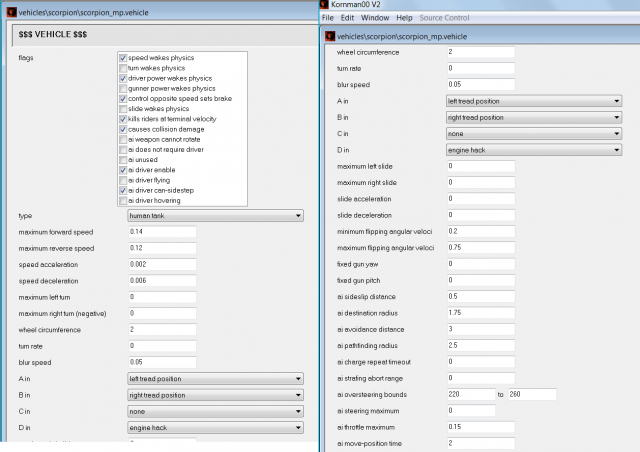
Checking the 'AI driver flying' flag means they will always be in FLOOR IT mode. Check AI driver can side-step instead. They won't move as much, but they look less retarded.
If they don't move at all, try decreasing the AI pathfinding radius. |
||||
|
|
|||||
|
paddy369 Joined: Oct 27, 2013
|
Posted: Oct 28, 2013 05:24 AM
Msg. 7 of 13
thanks, but the last think were i need help is with the scorpion, it is moving only forward even when i say to stop at this point, and when i turn of the "ai flying" box it doesnt even drive
|
||||
|
|
|||||
|
The Sun Joined: Sep 16, 2013 
I will never understand this place. Oh well. |
Posted: Oct 28, 2013 06:03 AM
Msg. 8 of 13
Quote: Q1: I downloaded a few actor_variant Tags, then i put them into my Tags folder, but when i open Sapien and try to add these Tags for my Project, it says "You selected one or more files that couldn't be loaded correctly. Contact your nearest...." the debug says i get this error 0x00000002 and just now i got this error 0x00000003, to the first one it says, it cant find the file and to the error 03 it says it cant find the path, but the path is right, it should be in the tag folder. Help pls, or i cant use the downloaded tags. Solution 1 - Re-download the file, then extract the tags with their proper folders (Sometimes if you skip a folder and directly extract, it can cause the tags to break) Solution 2 - What jackrabbit said. Solution 3 - Try and find out if any component of the tags not included with the tag file are missing. (For ex: If you download an elite actor variant with a carbine weapon, but don't have the carbine tags, the error will show) Download those components (weapons tags, supporting biped tags etc.) Quote: Q2: How can i make biped files to actor variant files? Because i want my cyborg to use a Scorpion, i saw a lot of Guys, that had spartans which where fighting. There doesnt exist a actor variant file for the cyborg only the biped. Solution 1 - Well, I haven't done exactly what you're aiming for, but this might work - open up Guerilla/Kornman00, then select new -> actor_variant. add the animations, base biped etc. etc., edit the numerous properties, and save your new cyborg.actor_variant. Solution 2 -Alternatively ask around for a few cyborg.actor_variant(s) on the forum. Quote: Q3: How can I make the units to use the scorpion properply, has someone the correct settings in guerilla for the scorpion tag? I now that you have to tick the ai fly option in guerilla, but its not enough, they only drive forward, and yes i did commands and path points in sapien. Q4: Its the same question like Q3, but now i want to do the same with a Ghost, i got an elite to use the ghost, but he only drives little circles, i think i ruined the ghost tag in guerilla, and he doesnt realy shoot, what a the right settings for the ghost tag? Solution 1 - Don't uncheck "driver flying". instead check all three - "driver enabled", "driver flying" & "driver can side-step". Cheers! Edited by The Sun on Oct 28, 2013 at 06:07 AM |
||||
|
|
|||||
|
paddy369 Joined: Oct 27, 2013
|
Posted: Oct 28, 2013 07:34 AM
Msg. 9 of 13
thanks guys, it works now almost everything fine, but the only thing with the tank is, that he only shoots when he is far away from the enemys.
Btw. do you know how to let the vehicles explode, i think in the campaign the ghosts can explode. Edited by paddy369 on Oct 28, 2013 at 07:34 AM |
||||
|
|
|||||
|
A Juicy Frank Joined: Oct 28, 2013 
|
Posted: Oct 28, 2013 01:45 PM
Msg. 10 of 13
I believe what the tank is doing is adhering to some kind of 'safe distance' so it doesn't kill itself with the blast, like how fuel rod grunts don't fire at point-blank range.
I'm not sure what or where the exact property would be, but check in both the .actor and .actor_variant tags for something regarding [minimum] safe distance, preferred fighting distances, or even the AI's target range (it may be set too far and literally won't see enemies up close, idk). To have either the Ghost and Banshee explode when taking damage, you'd need to use their non _mp.vehicle variants. Those use a different collision model without a health system, making them invulnerable. Just know though, that vehicle damage falls under the list of many things that do not sync when people join multiplayer games. So unless you plan on resetting the damage every time a player joins, then adding the damage back by script, expect issues. |
||||
|
|
|||||
|
paddy369 Joined: Oct 27, 2013
|
Posted: Oct 29, 2013 03:36 AM
Msg. 11 of 13
But, when you make the tank not to move, then he shoots everywhere, even when it is just next to him, it has something to do with the driving, but i look for that in guerilla, thx
|
||||
|
|
|||||
|
game user10 Joined: Dec 9, 2011
Who is the Overseer? |
Posted: Oct 29, 2013 04:01 AM
Msg. 12 of 13
Try these settings, they worked OK for me...
 |
||||
|
|
|||||
|
paddy369 Joined: Oct 27, 2013
|
Posted: Nov 2, 2013 08:06 AM
Msg. 13 of 13
when i dont turn on ai driver flying it is not moving,
but i have a other question, how cani make my marines to run?. Because now when i tell them to move somewhere they only walk? Edited by paddy369 on Nov 3, 2013 at 04:48 AM |
||||
|
|
|||||

|
