A Community discussion forum for Halo Custom Edition, Halo 2 Vista, Portal and Halo Machinima
|
 Home
Home Search
 Register
 Login
Login Member List
 Recent Posts
| »Forums Index »Halo Custom Edition (Bungie/Gearbox) »Halo CE General Discussion »Open Sauce - Shaders - HELP!! | 
|
| Author | Topic: Open Sauce - Shaders - HELP!! (6 messages, Page 1 of 1) | ||||
| Moderators: Dennis | |||||
 Ghostgamer021 Joined: Apr 21, 2013 
Noob |
Posted: May 19, 2013 07:12 PM
Msg. 1 of 6
Well, first I'm new to shaders do with Open Sauce ... and well I want me clarify some doubts that I have about this, but first, the weapon I've been using to test is this:
 So you see no effects , and well the truth and know how to make shaders with OS, but I can not any effect, and as i was watching some tutorials on how to do it but nothing ... This gun with "OS_shader" in the game: 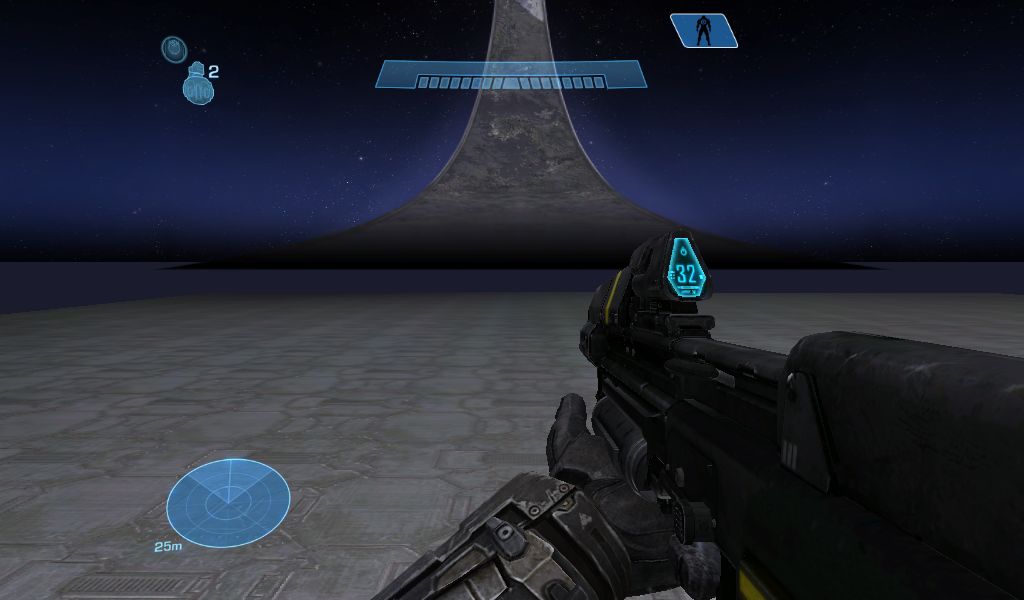 Well, according to the tutorial, you should be with the effects, but nothing, and as Alexis: http://forum.halomaps.org/index.cfm%3Fpage=userinfo&viewuserid=11481 Well the I was explaining how to do it, and thanks for your help, but it was almost the same with the tutorial:http://forum.halomaps.org/index.cfm%3Fpage=topic&topicID=40170 Now my doubts about this ... 1 - The "Specular map", well that I put the gun is this:http://www.mediafire.com/?069j9w8cio62tt7, is not mine is from another user ... okay that as Specular map, or must be different ...  2 - The "Normal maps", really do not quite understand that, but according i was looking at are the details that is added to the weapon, well the truth is not the one with the gun is this:http://www.mediafire.com/?qb1a1o7bflqpo63, is well that it has or not ... 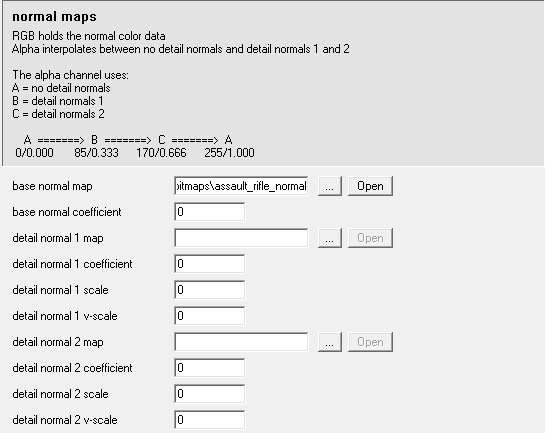 3 - The "Specular tint overrider", do not really understand that funsion has, but according the tutorial should be white, but the truth when I put it gives no effect ... 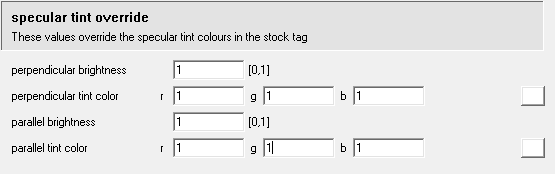 4 - The "Specular lighting", which funsion has, or gives effect to the weapon ...  Well that's it, almost need a full tutorial if you do not mind ... I do not understand why I get no results with this, maybe it's my PC, because in the map of Truth and Reconciliation.yelo, I can not activate the VISR and rocks appear dark and without texture ... well I think it may be that... And I'm really interested in learning to do this in order, to rub in the face of a friend who says that Open Sauce does not work, it's a s!#"$, and also because I like what you can do with this ... |
||||


|
|||||
|
killzone64 Joined: Jun 9, 2010 
sometimes i miss the chaos occasionally |
Posted: May 19, 2013 10:11 PM
Msg. 2 of 6
whats up with the specular coefficient and exponents..... you never ever, ever, need that high of a number...
let me post part of an opensauce tutorial i was making Part III: Opensauce Extensions Opensauce is a third party extension to halo ce made by kornman and fireyscythe that allows for a higher level of graphical capabilities to halos rendering system. At this time the only affected shader type is shader_model. Opensauce adds a whole new section just below where you add the bitmaps in the normal shader_model tag. This includes a place for specular maps, normal maps, and specular lighting override. Coefficient - modulates the specular power; lower values dull and fade the specular lighting, and higher values intensify brightness. Exponent- the size of the specular hi light spot. Typical values of this rage value from 1 – 20 specular color coefficient – modulates the power of the specular bitmap if you chose to use one. Specular color exponent – adjusts the size of the area affected by the color coefficient. also make sure you set your normal map coefficient to 1 and what does your specular map look like? Edited by killzone64 on May 19, 2013 at 10:14 PM |
||||
|
|
|||||
|
Ki11erFTW Joined: Jul 4, 2009 
You've seen nothing yet. |
Posted: May 19, 2013 10:34 PM
Msg. 3 of 6
If you know what you're doing, you can literally develop your shader in 3ds max and transfer it to an OS shader_model tag.
|
||||
|
|
|||||
|
Ghostgamer021 Joined: Apr 21, 2013
Noob |
Posted: May 20, 2013 06:54 AM
Msg. 4 of 6
killzone64.
well, first of the coefficient and exponent specular, not very well understood, but according to your explanation, I should not put such high numbers, but I put between 1-20 ... Right?. coefficient - what kind of values should I put?, because the truth I have no very clear that ... exponent - ..... exponent speculates color - the truth is not as it should wear a specular map ... and the specular map, there was a link by mediafire, the first. I did not find how to upload a photo as PC screen is small and not full out bitmaps .... and another thing, as I am new to this and I just did the steps according to a tutorial ... but would like to see how they should wear a "normal map", "specular map" and a "multipurpose map" .... Edited by Ghostgamer021 on May 20, 2013 at 07:03 AM |
||||
|
|
|||||
|
R93_Sniper Joined: Feb 13, 2011 
When in Doubt, RUN! |
Posted: May 21, 2013 10:09 AM
Msg. 5 of 6
Quote: --- Original message by: Ghostgamer021 1 - The "Specular map", well that I put the gun is this:http://www.mediafire.com/?069j9w8cio62tt7, is not mine is from another user ... okay that as Specular map, or must be different ... http://i1365.photobucket.com/albums/r745/Ghostgamer02/1_zpsd2cf124a.png Change The Exponent and Coefficient to 1 if you want it to show up 2 - The "Normal maps", really do not quite understand that, but according i was looking at are the details that is added to the weapon, well the truth is not the one with the gun is this:http://www.mediafire.com/?qb1a1o7bflqpo63, is well that it has or not ... http://i1365.photobucket.com/albums/r745/Ghostgamer02/2_zps62bad4bf.png Base Normal Coefficient needs to be at minimum 1, if you want it to have more depth, use 1.5 3 - The "Specular tint overrider", do not really understand that funsion has, but according the tutorial should be white, but the truth when I put it gives no effect ... http://i1365.photobucket.com/albums/r745/Ghostgamer02/3_zpsd3236436.png This should work fine 4 - The "Specular lighting", which funsion has, or gives effect to the weapon ... http://i1365.photobucket.com/albums/r745/Ghostgamer02/4_zpsd3c27313.png At MAX, this should be 5. Set the Exponent to 1 and coefficient to 5, that might get you some good results |
||||
|
|
|||||
|
Ghostgamer021 Joined: Apr 21, 2013
Noob |
Posted: May 21, 2013 06:49 PM
Msg. 6 of 6
Quote: --- Original message by: waffles OS shader tutorial Thank ally for actually holding onto it for all this time and uploading it. It explains basically every field from the 3.0.1-2 updates. Made this ages ago when the first public releases included the extension. Edited by waffles on May 21, 2013 at 02:17 PM Thank you for showing how to do this, and very good tutorial... |
||||
|
|
|||||

|
