A Community discussion forum for Halo Custom Edition, Halo 2 Vista, Portal and Halo Machinima
|
 Home
Home Search
 Register
 Login
Login Member List
 Recent Posts
| »Forums Index »Halo Custom Edition (Bungie/Gearbox) »Halo CE Technical / Map Design »cant fix model =( | 
|
| Author | Topic: cant fix model =( (33 messages, Page 1 of 1) | ||||
| Moderators: Dennis | |||||
 jackrabbit Joined: Apr 27, 2005 
Fight Against the Machine of Deth! |
Posted: Apr 13, 2013 03:44 AM
Msg. 1 of 33
so I am working on my base like for ever now. and I have all erros fixed have imported the wrl like 100 times, and finaly no error but yet still error I just don't get this at all.
I import my wrl and thare is an error marker and error in mid air if I zoom in all the way I see a little box, tool hates me, tells me nearly coplanar I have removed it checked it in all modes thare is no vert there is no face. I have flipped stuff done everything =( what is it how can I get rid of it? its right in the center of my grid. Edited by jackrabbit on Apr 13, 2013 at 02:12 PM |
||||


|
|||||
|
mapzy18 Joined: Jul 18, 2010 
Sup. |
Posted: Apr 13, 2013 01:03 PM
Msg. 2 of 33
can send it me to take a look if you like? or post more information, but don't mind having a quick look to see if I can help fix it. add my xfire waitingforjade
|
||||
|
|
|||||
|
jackrabbit Joined: Apr 27, 2005
Fight Against the Machine of Deth! |
Posted: Apr 13, 2013 02:05 PM
Msg. 3 of 33
this is my error in the center of my grid. There is no vert there is no face.
 Edited by jackrabbit on Apr 13, 2013 at 02:12 PM |
||||
|
|
|||||
|
jawa Joined: Jun 26, 2011 
Utinni! |
Posted: Apr 13, 2013 11:52 PM
Msg. 4 of 33
Can you post exactly what tool says? It would really help, maybe a picture of tool. Also, is the error actually touching any geometry? Are there any other errors? And lastly, is this bsp or scenery? It looks bsp to me.
|
||||
|
|
|||||
|
jackrabbit Joined: Apr 27, 2005
Fight Against the Machine of Deth! |
Posted: Apr 14, 2013 01:08 AM
Msg. 5 of 33
Tool says...
Error found z buffered triangles (red) I have put the model and collision in game and fly through the base there is nothing there the error is only in max and tool not in game. but still the error z buffered triangles (red) causes collision problum's in game for instance Im standing on the top and fall through the floor. that shouldn't be happening. I have it in game as scenery at the moment. but im planning on making it part of my bsp in the future but I cant do that if I cant get rifd of this error. I tried everything you sayed to do and even flipped everything inside out there is nothing there but a green box of lines. its not on my model like I sayed its in mid air in the center of my grid inside the center of my base. I tried making a new max file and merging jus the base and making a new frame the error is still there. its mind bogling. pix http://forum.halomaps.org/index.cfm%3Fpage=topic&topicID=42687 Edited by jackrabbit on Apr 14, 2013 at 01:39 AM |
||||
|
|
|||||
|
kirby_422 Joined: Jan 22, 2006 
Apparently public enemy number 1? |
Posted: Apr 14, 2013 01:50 PM
Msg. 6 of 33
Quote: --- Original message by: jackrabbit Error found z buffered triangles (red) This means you have two objects penetrating each other. You need to prevent them penetrating each other. (Imagine having a solid metal rod stabbing through your gut; the bar is obviously undamaged, but what about if your gut was somehow untouched too? Thats what a Z buffer is. You need to either hollow a hole out for one, or completely fuse them.) |
||||
|
|
|||||
|
jackrabbit Joined: Apr 27, 2005
Fight Against the Machine of Deth! |
Posted: Apr 14, 2013 04:10 PM
Msg. 7 of 33
as much has I want to I don't understand your post.
you want me to attach this box that is nothing to my model? how do I hollow a hole out of nothing? |
||||
|
|
|||||
|
Maniac1000 -Helpful Poster- Joined: Feb 24, 2007 
|
Posted: Apr 14, 2013 04:49 PM
Msg. 8 of 33
Do you have any hidden faces or geometry?
|
||||
|
|
|||||
|
kirby_422 Joined: Jan 22, 2006
Apparently public enemy number 1? |
Posted: Apr 14, 2013 04:52 PM
Msg. 9 of 33
Z-Buffer:
 See how the two cubes go threw each other with both of them being solid objects? Not a Z-Buffer:  See how there is a hole in the one object, so the second one never actually touches? This is what stabbing someone with a pole would be like; its within the laws of physics. Not a Z-Buffer:  This one, the two objects where successfully merged as one object. Neither are penetrating the surfaces of each other, they have become one solid shape. |
||||
|
|
|||||
|
jackrabbit Joined: Apr 27, 2005
Fight Against the Machine of Deth! |
Posted: Apr 14, 2013 05:17 PM
Msg. 10 of 33
yeah I understand what a z buffer error is but there is no other object in my scene.
I pmed you. the model Edited by jackrabbit on Apr 14, 2013 at 05:18 PM |
||||
|
|
|||||
|
XlzQwerty1 Joined: Aug 6, 2009 
|
Posted: Apr 14, 2013 05:28 PM
Msg. 11 of 33
It doesn't have to be a whole other object. It can be just one face protruding out of another
|
||||
|
|
|||||
|
kirby_422 Joined: Jan 22, 2006
Apparently public enemy number 1? |
Posted: Apr 14, 2013 05:31 PM
Msg. 12 of 33
the indented walls (which im assuming have lights in them) are going all the way through the wall piercing out the other side.
 Either make the wall thicker, or decrease the depth of the indentations. |
||||
|
|
|||||
|
jackrabbit Joined: Apr 27, 2005
Fight Against the Machine of Deth! |
Posted: Apr 14, 2013 06:49 PM
Msg. 13 of 33
well I pulled the front of the walls out and the error is still there. right in the center of my grid. same place.
the walls where tested previously though and nev3er casused a problem. before. I had the whole bottom part in game with no errors before I even started modeling the top part the error came in when I was modeling the bottom underneath part. Edited by jackrabbit on Apr 14, 2013 at 06:53 PM |
||||
|
|
|||||
|
kirby_422 Joined: Jan 22, 2006
Apparently public enemy number 1? |
Posted: Apr 14, 2013 09:42 PM
Msg. 14 of 33
 Do you even import the wrl files?.. it shows quiet clearly the Z buffer right where the walls are coming through. There was also on in the roof down there, but the walls cover most of it. |
||||
|
|
|||||
|
jackrabbit Joined: Apr 27, 2005
Fight Against the Machine of Deth! |
Posted: Apr 14, 2013 09:48 PM
Msg. 15 of 33
interesting my import is not showing me that.
I have fixed many models with wrl import its nothing new to me. what could possibly be my problem? Edited by jackrabbit on Apr 14, 2013 at 10:01 PM |
||||
|
|
|||||
|
ally Joined: Jun 23, 2010 
Aye Ready |
Posted: Apr 14, 2013 10:10 PM
Msg. 16 of 33
your problem will be not importing the .wrl correctly, and when it's imported go to the select by name button, click it and select each error 1 at a time and hit Z to zoom in on it.
you have so many uneven edges too that you might have to fix the height of most of the verts on the levels of that model too. Edited by ally on Apr 14, 2013 at 10:11 PM |
||||
|
|
|||||
|
jackrabbit Joined: Apr 27, 2005
Fight Against the Machine of Deth! |
Posted: Apr 14, 2013 10:45 PM
Msg. 17 of 33
that's what I do evey time.
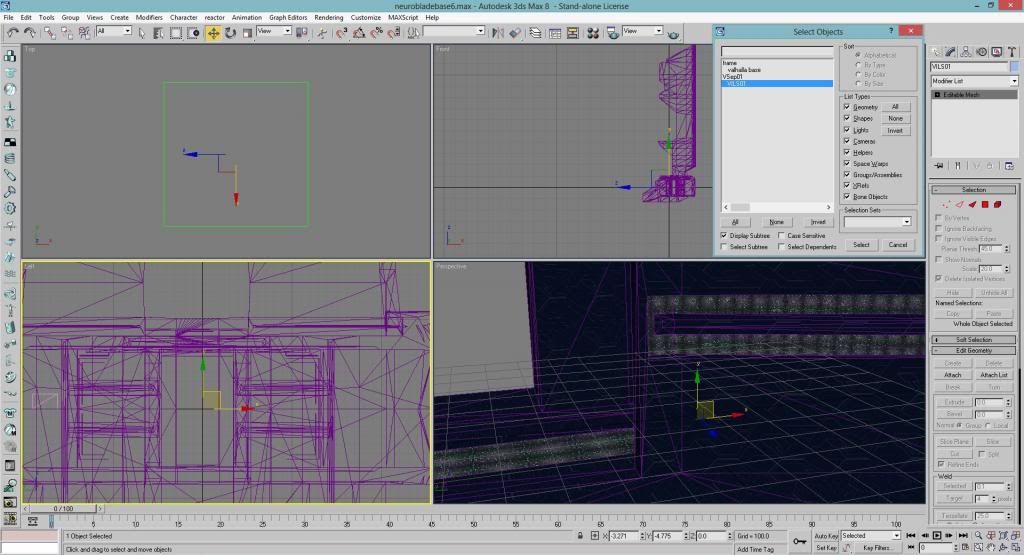
file import, box pops up, I select debug.wrl from my halo ce root. vrml import options untic reset scene and turn to 3ds coordinates, leave only create primitives checked. then click select by name in the select objects list I see VsEP01 & VILS01 hit z it zoomes in on the center of my grid displaying a box of lines. Edited by jackrabbit on Apr 14, 2013 at 10:48 PM |
||||
|
|
|||||
|
ally Joined: Jun 23, 2010
Aye Ready |
Posted: Apr 14, 2013 10:50 PM
Msg. 18 of 33
Vsep01, Vsep02, Vsep03 etc names, are only markers they sit on the grid anyway (delete them after you work with the other makers), the errors are marked on the geometry with the Vils01, Vils02, VilsS03 etc names, they are the only ones to show where the errors are on the geometry.
so yeah if you select any Vsep, expect to be directed to the center of the grid. |
||||
|
|
|||||
|
jackrabbit Joined: Apr 27, 2005
Fight Against the Machine of Deth! |
Posted: Apr 14, 2013 11:18 PM
Msg. 19 of 33
Quote: --- Original message by: ally Vsep01, Vsep02, Vsep03 etc names, are only markers they sit on the grid anyway (delete them after you work with the other makers), the errors are marked on the geometry with the Vils01, Vils02, VilsS03 etc names, they are the only ones to show where the errors are on the geometry. so yeah if you select any Vsep, expect to be directed to the center of the grid. Look I just imported my wrl and selected the error WHATS MY PROBLUM? YOU CAN SEE I HAVE THE VILS01 SELECTED.  Edited by jackrabbit on Apr 14, 2013 at 11:20 PM |
||||
|
|
|||||
|
ally Joined: Jun 23, 2010
Aye Ready |
Posted: Apr 15, 2013 12:20 AM
Msg. 20 of 33
okay since you know that there is part of the model you said you fall through, then it must be just a certain part right?
so you import the .wrl, select the 1st vil.blah, select polygon mode, scroll over the model and the part with the error being the vil.blah should be highlighted, hit Z to zoom. look, if that doesn't work you are doing something wrong. |
||||
|
|
|||||
|
jackrabbit Joined: Apr 27, 2005
Fight Against the Machine of Deth! |
Posted: Apr 15, 2013 12:27 AM
Msg. 21 of 33
that's worked fine for the past couple years.
my debug.wrl is not showing me any error on this model. just the box in the middle of the grid. z buff's casue collision problums everywhere not in just one spot. I'm not doing anything wrong. I simply can not see the errors Kirby is seeing why? I have tried everything. I know how to properly import a wrl file and use it to fix errors I have been using hek 3ds max sence 3ds max v0.4 Edited by jackrabbit on Apr 15, 2013 at 12:29 AM |
||||
|
|
|||||
|
ally Joined: Jun 23, 2010
Aye Ready |
Posted: Apr 15, 2013 12:30 AM
Msg. 22 of 33
try your mapsname.wrl instead of the debug.wrl.
|
||||
|
|
|||||
|
jackrabbit Joined: Apr 27, 2005
Fight Against the Machine of Deth! |
Posted: Apr 15, 2013 12:37 AM
Msg. 23 of 33
debug.wrl is the only .wrl there is.
|
||||
|
|
|||||
|
jawa Joined: Jun 26, 2011
Utinni! |
Posted: Apr 15, 2013 10:47 AM
Msg. 24 of 33
What are you using to import the .wrl? I have found that chimp and 3ds import the .wrl differently. Perhaps using a different importer will show the errors better.
|
||||
|
|
|||||
|
jackrabbit Joined: Apr 27, 2005
Fight Against the Machine of Deth! |
Posted: Apr 15, 2013 02:29 PM
Msg. 25 of 33
Quote: --- Original message by: jawa I use Import from the file menu.What are you using to import the .wrl? I have found that chimp and 3ds import the .wrl differently. Perhaps using a different importer will show the errors better. Edited by jackrabbit on Apr 15, 2013 at 02:29 PM |
||||
|
|
|||||
|
ally Joined: Jun 23, 2010
Aye Ready |
Posted: Apr 15, 2013 02:35 PM
Msg. 26 of 33
jawa will mean which importer, chimp or blitzkrieg.
seeing you use max8 blitzkrieg should be what you use. |
||||
|
|
|||||
|
jackrabbit Joined: Apr 27, 2005
Fight Against the Machine of Deth! |
Posted: Apr 15, 2013 08:09 PM
Msg. 27 of 33
Quote: --- Original message by: kirby_422 do you mind showing me exactly where this error is because I have looked at the model for hr's and still cant find the problem.http://img687.imageshack.us/img687/9778/zbuffer.png Do you even import the wrl files?.. it shows quiet clearly the Z buffer right where the walls are coming through. There was also on in the roof down there, but the walls cover most of it. |
||||
|
|
|||||
|
kirby_422 Joined: Jan 22, 2006
Apparently public enemy number 1? |
Posted: Apr 15, 2013 08:26 PM
Msg. 28 of 33
From the front side, pass through the exterior walls, parts of the details are sticking through. Those wall indentations.
 This is the wrl I get. http://www.mediafire.com/?2858z2leuue2fb8 |
||||
|
|
|||||
|
jackrabbit Joined: Apr 27, 2005
Fight Against the Machine of Deth! |
Posted: Apr 15, 2013 10:34 PM
Msg. 29 of 33
I tried that and still box in the center I pulled those walls out and still box in the center the wrl Kirby sent be does not match up sense I saved over that file with the one with the walls puled out.
basely the wrl he sent me is showing me errors all around but I cant find them any of them. |
||||
|
|
|||||
|
ally Joined: Jun 23, 2010
Aye Ready |
Posted: Apr 15, 2013 10:37 PM
Msg. 30 of 33
but when you fix things you then run the tool commands again to see if errors still show, that will give a new .wrl, so you don't keep trying to use the same 1 for old errors.
|
||||
|
|
|||||
|
jackrabbit Joined: Apr 27, 2005
Fight Against the Machine of Deth! |
Posted: Apr 15, 2013 11:18 PM
Msg. 31 of 33
Ug yes I know how tool works I have only been using it for 10 years.
THIS IS JUST SO ODD, after looking at your wrl I desided to remove the lights on the celing just to get them out of the way, I left some faces on there so it would cause an error and so I import my wrl and it shows me those errors but still box In the center, long story shot I made some improvments to the model but same z buff error, still square, Edited by jackrabbit on Apr 15, 2013 at 11:19 PM |
||||
|
|
|||||
|
jawa Joined: Jun 26, 2011
Utinni! |
Posted: Apr 16, 2013 12:24 AM
Msg. 32 of 33
If you still cannot see the .wrl correctly in 3ds you might want to try using chimp just to import the .wrl.
From what I can gather the lights are causing the errors. So you could try deleting them to make sure the errors go away. Then move them off the wall so there is an unnoticeable amount of space between them, or fuse them into the wall. One other thought, do you need to the lights to be bsp? If not you could make them scenery while everything else is bsp. Then there would be no overlap issues. |
||||
|
|
|||||
|
jackrabbit Joined: Apr 27, 2005
Fight Against the Machine of Deth! |
Posted: Apr 19, 2013 06:36 AM
Msg. 33 of 33
Thanks for Trying to help I still cant figure out what's wrong. I removed the lights Totally.
I simply can not see the errors Kirby shows me. even in game with debug objects on and in max the walls are not gong through not even close to the edge. Edited by jackrabbit on Apr 19, 2013 at 06:38 AM |
||||
|
|
|||||

|
