A Community discussion forum for Halo Custom Edition, Halo 2 Vista, Portal and Halo Machinima
|
 Home
Home Search
 Register
 Login
Login Member List
 Recent Posts
| »Forums Index »Halo Custom Edition (Bungie/Gearbox) »Halo CE Technical / Map Design »I need help on a problem when compiling a weapon | 
|
| Author | Topic: I need help on a problem when compiling a weapon (8 messages, Page 1 of 1) | ||||
| Moderators: Dennis | |||||
 LS NICOLAS Joined: Mar 25, 2013 
|
Posted: Mar 25, 2013 09:28 PM
Msg. 1 of 8
I get this when compiling help
c:\program files\microsof games\halo custom edition>tool models reach\weapons\focus_rifle couldnīt read map file ī./toolbeta.mapī ### focus_rifle.jms ### waring found #10 degenerate triangles. EAX :0xFFFFFFFE EBX :0x04963701 ECX :0x0012F590 EDX :0x000002CC EDI :0x0012F590 ESI :0x0000000 EBP :0x0012F468 ESP :0x0012F458 EIP :0x77A770B4, C3 8D A4 24 ????? EXEPTION halt in \halopc\haloce\source\memory\array.c,#130: index>=0 && index<array->count |
||||


|
|||||
|
jackrabbit Joined: Apr 27, 2005 
Fight Against the Machine of Deth! |
Posted: Mar 26, 2013 12:24 AM
Msg. 2 of 8
import the wrl file in the directory debug.wrl then it will show you were the errors are in max. also what version of max are you useing?
|
||||
|
|
|||||
|
LS NICOLAS Joined: Mar 25, 2013
|
Posted: Mar 26, 2013 11:59 AM
Msg. 3 of 8
I use max 8
|
||||
|
|
|||||
|
jawa Joined: Jun 26, 2011 
Utinni! |
Posted: Mar 26, 2013 11:02 PM
Msg. 4 of 8
Are you using a multi material on it? I know Blue streak has to have a multi material.
Quote: --- Original message by: LS NICOLAS I use max 8 You can use chimp to import the .wrl if you need to. |
||||
|
|
|||||
|
Daniloc Joined: Mar 10, 2013 
:D |
Posted: Mar 31, 2013 06:15 PM
Msg. 5 of 8
Jmmm could use the jms exporter "no script" the old plugin :) maybe
with that tool you can compile the model :D use blitzkrieg :) Blitzkrieg=weapons vehicles scenery etc Nno jms Exporter Jms exporter = bipeds and bsp :) |
||||
|
|
|||||
|
LS NICOLAS Joined: Mar 25, 2013
|
Posted: Apr 3, 2013 05:49 PM
Msg. 6 of 8
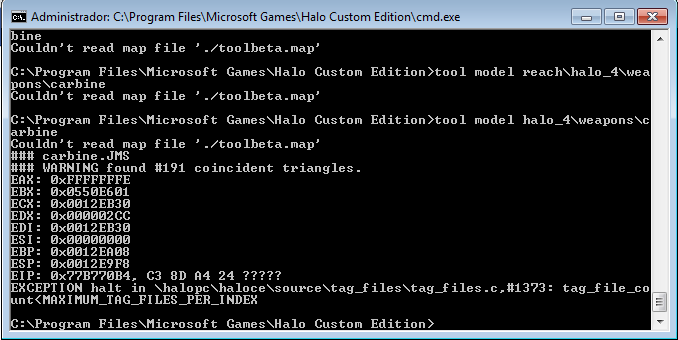 this is my problem |
||||
|
|
|||||
|
LS NICOLAS Joined: Mar 25, 2013
|
Posted: Apr 3, 2013 05:59 PM
Msg. 7 of 8
how to make this
|
||||
|
|
|||||
|
Hobbet360 Joined: Jan 10, 2012 
ProTools > ToolPro |
Posted: Apr 8, 2013 10:19 PM
Msg. 8 of 8
Or....
1. Select a few folders in your tags directory. 2. Hit "ctrl + X" on your keyboard. 3. Make a random folder on your desktop. 4. Open that folder and hit "ctrl + V" on yarr keyboard. 5. Recompile. 6. If it does it again, do the same with more things in your tags directory. (Folders, not single tags.) 7. If it works, open up that folder, hit "ctrl + A" on yarr keyboard. Then hit "ctrl + X". 8. Open up your tags directory and hit "ctrl + V". And they lived happily ever after. The End. Edited by hobbet360 on Apr 8, 2013 at 10:20 PM |
||||
|
|
|||||

|
