A Community discussion forum for Halo Custom Edition, Halo 2 Vista, Portal and Halo Machinima
|
 Home
Home Search
 Register
 Login
Login Member List
 Recent Posts
| »Forums Index »Halo Custom Edition (Bungie/Gearbox) »Halo CE General Discussion »HEK+ OS_Tool.exe Plugin. | 
|
| Author | Topic: HEK+ OS_Tool.exe Plugin. (12 messages, Page 1 of 1) | ||||
| Moderators: Dennis | |||||
 jackrabbit Joined: Apr 27, 2005 
Fight Against the Machine of Deth! |
Posted: Mar 20, 2013 06:39 AM
Msg. 1 of 12
HEK+ OS_Tool.exe Plugin.
HI can someone help us we need a GUI for OS_Tool.exe Currently trying to build new Tool EX GUI Definitions.xml file or new plugin for use in HEK+ with OS_tool.exe. I'm not even sure if its been done or not? so figured I'd ask? Dose anyone have something along the lines of a GUI for OS_Tool.exe? I find it odd if this has not been done yet. I'm not sure about how to go about editing the Tool.dll file within HEK+ or if editing it is even needed or not? I'm not sure exactly what would have to be changed but I don't see it being that hard to figure out. I used tool++ a lot before I used os_tool and typing up directory's all day is not something I'm looking forward to. I gess my biggest problem is that Im new to os_tool I figured it shouldn't be to hard to make a new Tool EX GUI Definitions or plugin. but after adding to the GUI it self I got lazy and figured I'd ask for help. 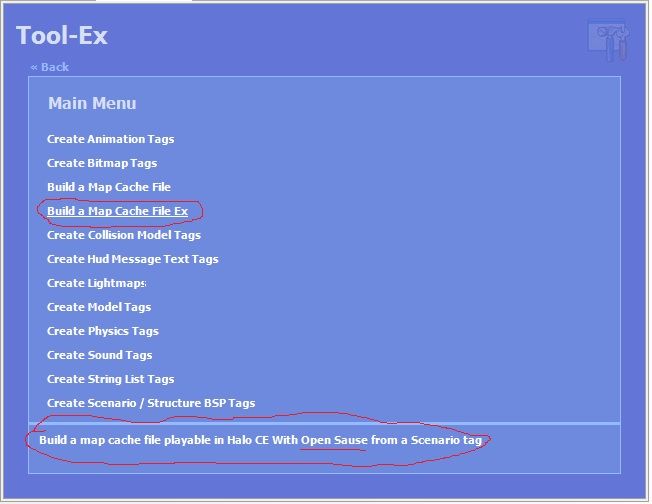 but as for this cmd and the help yelo im not sure what else to add? I want to do it proper but it dose'nt look to me like much has changed am I missing something? I added... <MenuItem Text="Build a Map Cache File Ex" Description="Build a map cache file playable in Halo CE With Open Sause from a Scenario tag"> <FileItem Text="Scenario Tag" Name="Scenario" Filter="Scenario Tags (*.scenario)|*.scenario" Description="Scenario tag to create a map cache file from." /> <Tool Arguments="build-cache-file-ex [Scenario]" /> </MenuItem> but os_tool just spits out.. Tool.exe > build-cache-file-ex "levels\cryotech\cryotech" Please wait... usage: C:\Program Files (x86)\Microsoft Games\Halo Custom Edition\tool.exe verb <options..> build-cache-file-ex <mod-name> <create-anew> <store-resources> <use-memory-upgrades> <scenario-name> Process completed... do I have the cmd wrong or something? Edited by jackrabbit on Mar 20, 2013 at 10:32 PM |
||||


|
|||||
|
Hobbet360 Joined: Jan 10, 2012 
ProTools > ToolPro |
Posted: Mar 20, 2013 07:13 AM
Msg. 2 of 12
Os_tool build-cache-file levels\cryotech\cryotech would work... Without GUI?
...wouldn't it? |
||||
|
|
|||||
|
killzone64 Joined: Jun 9, 2010 
sometimes i miss the chaos occasionally |
Posted: Mar 20, 2013 08:26 AM
Msg. 3 of 12
C:\Program Files (x86)\Microsoft Games\Halo Custom Edition\tool.exe verb <options..>
build-cache-file-ex <mod-name> <create-anew> <store-resources> <use-memory-upgrades> <scenario-name> Process completed... for mod name leave empty quotes like this "" then the next three are boolean switches. then your path so it would be Os_tool build-cache-file-ex "" 001 levels\cryotech\cryotech if you wish to use memory upgrades. ^this will create a .yelo |
||||
|
|
|||||
|
jackrabbit Joined: Apr 27, 2005
Fight Against the Machine of Deth! |
Posted: Mar 20, 2013 01:03 PM
Msg. 4 of 12
thank you killzone64 that's all I needed to know!
I tried using list item instead of list text but I keeped getting exeption so I just used list text on this definition I know it would be better if I was using list item instead but still its a start! feal free to use my firt Os_tool definition hear it is!... I tried to post a picture but Photobucket is being gay ATM! <MenuItem Text="OS Tool\Build a Map or Yelo Cache File Ex" Description="Build a map or yelo cache file playable in Halo CE With Open Sause from a Scenario tag"> <TextItem Text="Mod Name" Name="mod-name" Description="The name of the mod this scenario belongs to. This will also be used when naming the new data-files" /> <TextItem Text="Create A New" Name="create-anew" Description="Should new data-files be created before building the cache?" /> <TextItem Text="Store Resources" Name="store-resources" Description="Should the scenario's bitmaps/sounds/locale data be stored in the data-files?" /> <TextItem Text="Use Memory Upgrades" Name="use-memory-upgrades" Description="Does the scenario require Open Sauce's memory upgrades to run? Produces .yelo file instead of .map" /> <FileItem Text="Scenario Tag" Name="Scenario" Filter="Scenario Tags (*.scenario)|*.scenario" Description="Scenario tag to create a map or yelo cache file from." /> <Tool Arguments=" build-cache-file-ex [Scenario]" /> </MenuItem> edit well it almost works? I'm realy helping You guys well help me make some more! hears a link to the google code. http://code.google.com/p/open-sauce/wiki/Doc_Halo1_ToolCommands edit agin: I actuly tried to copy this in to os_tool Os_tool build-cache-file-ex "" 001 levels\cryotech\cryotech but it dosent work just shows me useage what am I doing wrong? Edited by jackrabbit on Mar 20, 2013 at 01:25 PM |
||||
|
|
|||||
|
HaloExtreme117 Joined: May 5, 2012 
~Gone~ |
Posted: Mar 20, 2013 03:07 PM
Msg. 5 of 12
Separate the params. 0 0 1, not 001.
|
||||
|
|
|||||
|
jackrabbit Joined: Apr 27, 2005
Fight Against the Machine of Deth! |
Posted: Mar 20, 2013 03:30 PM
Msg. 6 of 12
I try but this is all I get!
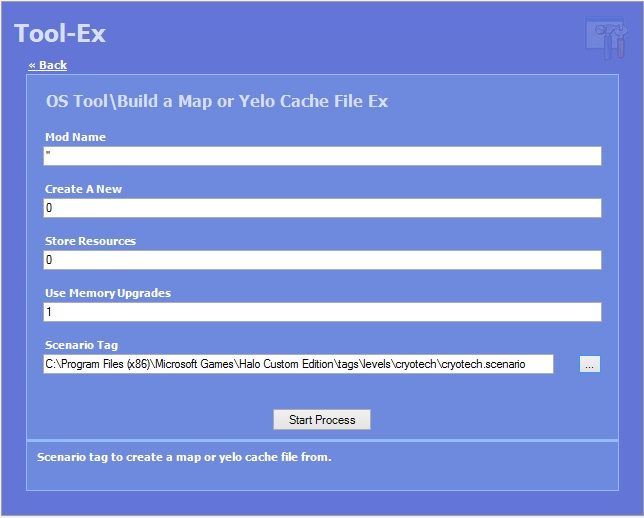 Process completed... Tool.exe > build-cache-file-ex "levels\cryotech\cryotech" usage: C:\Program Files (x86)\Microsoft Games\Halo Custom Edition\tool.exe verb <options..> build-cache-file-ex <mod-name> <create-anew> <store-resources> <use-memory-upgrades> <scenario-name> Process completed... Edited by jackrabbit on Mar 20, 2013 at 03:55 PM Edited by jackrabbit on Mar 20, 2013 at 03:55 PM |
||||
|
|
|||||
|
HaloExtreme117 Joined: May 5, 2012
~Gone~ |
Posted: Mar 20, 2013 03:31 PM
Msg. 7 of 12
Os_tool build-cache-file-ex "" 0 0 1 levels\cryotech\cryotech
|
||||
|
|
|||||
|
XlzQwerty1 Joined: Aug 6, 2009 
|
Posted: Mar 20, 2013 04:04 PM
Msg. 8 of 12
nice! you might also want to create a box/copyable output that takes all the values you've inputted and puts it onto the screen beside the Start Process button, so you know what the actual argument looks like if it were to be typed using cmd.
|
||||
|
|
|||||
|
jackrabbit Joined: Apr 27, 2005
Fight Against the Machine of Deth! |
Posted: Mar 20, 2013 04:52 PM
Msg. 9 of 12
Yeah I realy need that but I don't know how to!
Anyway I got it working I think I need some people to test it! also I got list box to work to =) for mod name you don't have to type anything~ just pase this in your definitions.xml feedback plz n thankx! <MenuItem Text="Open Sause Tool / Build a Map or Yelo Cache File Ex" Description="Builds a cache file with extra Open Sauce arguments from a Scenario tag. Output cache file will be in .yelo format instead of .map if the use-memory-updates is on. "> <TextItem Text="Mod Name" Name="Mod Name" Description="The name of the mod this scenario belongs to. This will also be used when naming the new data-files" /> <ListItem Text="Create A New" Name="Create A New" Description="Should new data-files be created before building the cache?" /> <LIItem Text="No" Value="0" /> <LIItem Text="Yes" Value="1" /> <ListItem Text="Store Resources" Name="Store Resources" Description="Should the scenario's bitmaps/sounds/locale data be stored in the data-files?" /> <LIItem Text="No" Value="0" /> <LIItem Text="Yes" Value="1" /> <ListItem Text="Use Memory Upgrades" Name="Use Memory Upgrades" Description="Does the scenario require Open Sauce's memory upgrades to run? Produces .yelo file instead of .map" /> <LIItem Text="No" Value="0" /> <LIItem Text="Yes" Value="1" /> <FileItem Text="Scenario Tag" Name="Scenario" Filter="Scenario Tags (*.scenario)|*.scenario" Description="Scenario tag to create a map or yelo cache file from." /> <Tool Arguments="build-cache-file-ex [Mod Name] [Create A New] [Store Resources] [Use Memory Upgrades] [Scenario]" /> </MenuItem> Also don't forget you need to rename os_tool.exe to tool.exe I HAVE BEEN USEING THIS DEFFINITION FINE FOR a WILE NOW but i have not tryed to use the mod name option,i woudl like someone to test the mod option out to see if it works. next i try and create gui for real time tag editing!!!! eg:"Open Sauce Tool / Runtime Cache-Viewer Ex" Edited by jackrabbit on Mar 26, 2013 at 08:56 PM |
||||
|
|
|||||
|
Jesse Joined: Jan 18, 2009 Discord: Holy Crust#4500 |
Posted: Mar 26, 2013 10:30 PM
Msg. 10 of 12
bump because bump
|
||||
|
|
|||||
|
jackrabbit Joined: Apr 27, 2005
Fight Against the Machine of Deth! |
Posted: Mar 26, 2013 11:14 PM
Msg. 11 of 12
I am haveing issues in the fact that hek+ types tool for you insted of os_tool
I cant remember where SteelIXB hek+ release thred is or whare he posted info for people to make updates but I remember he did and wanted people to eventuly update it. I thought it was github but cant find anythang. the links he included for updateing and tutorials are dead. on cmt servers. if i could buld new os_tool.exe plugin that would be very helpful! if someone can make simple edit to the current <Module> ToolEx.dll i can wright the deffinitions.xml file. for os. I have tryed editing the toolex.dll with resorce editer and hex editer. but could not find whare to change tool.exe to os_tool.exe im not so good with those programs. or vs_studio. I beleve Tool Arguments= needs to be changed in the toolex.dll when <Tool Arguments="Arguments name" /> is executed. in build-cache-file-ex it works fine but Im haveing trouble reaching the.. os_tool runtime-cache-view command line. this is what i have so far but i cant get it working ATM i will keep trying. untill by brean explods. <MenuItem Text="Open Sauce Tool / Runtime Cache-Viewer Ex" Description="Reads the tag cache and tag instances from a running instance of haloce, displaying the addresses and values of tag fields to easier reverse engineering. Also has basic memory writing for runtime editing of tag values. "> <MenuItem Text="Runtime Cache-Viewer Ex"> </MenuItem> <ListItem Text="Runtime Cache View" Name="os_tool runtime-cache-view" Description="Reads the tag cache and tag instances from a running instance of haloce, displaying the addresses and values of tag fields to easier reverse engineering. Also has basic memory writing for runtime editing of tag values." /> <LIItem Text="No" Value="" /> <LIItem Text="Yes" Value="os_tool runtime-cache-view" /> <ListItem Text="Help" Name="Help" Description="Should new data-files be created before building the cache?" /> <LIItem Text="None" Value="" /> <LIItem Text="Help" Value="help" /> <Tool Arguments="os_tool runtime-cache-view" /> </MenuItem> hear are the current things you can use when wrighting deffinitions for toolex unfortnatly I dont know hwo to use all of them if i did maby it woudl help but the curent file dose'nt even use them all. but dont quote me on that. ProcessCaller ToolWizard GuiItem DirItem TextItem FileItem MenuItem ToolItem ValueType ListItemItem ListItem you can simply look at your cureent deffinitions file for refrence to see how thay are used. EDIT: --------------------------------------------------------------------------------------------------- Anyway as of right now I have been trying to write a new plugin for SteelIXB's HEK+ to use open sauce. at the moment I have only write 1 new definition which does work however its not fully tested. This new definition will add a new menu inside tool-Ex and add a new build-cache-file-ex to that menu, from there you can fill in the rest and hit start. my next was going to be real time tag editing but I can't seem to get tool-ex to work right with. os_tool.exe unfortunately I believe a new tool-ex.dll is needed to accomplish the task of this work. Anyway here is the one new definition I have so far. I Have used it on my owen map over 100 times so far very use full! saves a lot of time. I'm rely hoping some of you will test this out and help me make The OS command's quicker and easy use. easy to use just stick this in your definitions.xml <MenuItem Text="Open Sauce Tool"> <MenuItem Text="Build a Map or Yelo Cache File Ex" Description="Builds a cache file with extra Open Sauce arguments from a Scenario tag. Output cache file will be in .yelo format instead of .map if the use-memory-updates is on."> <TextItem Text="Mod Name" Name="Mod Name" Description="The name of the mod this scenario belongs to. This will also be used when naming the new data-files" /> <ListItem Text="Create A New" Name="Create A New" Description="Should new data-files be created before building the cache?" /> <LIItem Text="No" Value="0" /> <LIItem Text="Yes" Value="1" /> <ListItem Text="Store Resources" Name="Store Resources" Description="Should the scenario's bitmaps/sounds/locale data be stored in the data-files?" /> <LIItem Text="No" Value="0" /> <LIItem Text="Yes" Value="1" /> <ListItem Text="Use Memory Upgrades" Name="Use Memory Upgrades" Description="Does the scenario require Open Sauce's memory upgrades to run? Produces .yelo file instead of .map" /> <LIItem Text="No" Value="0" /> <LIItem Text="Yes" Value="1" /> <FileItem Text="Scenario Tag" Name="Scenario" Filter="Scenario Tags (*.scenario)|*.scenario" Description="Scenario tag to create a map or yelo cache file from." /> <Tool Arguments="build-cache-file-ex [Mod Name] [Create A New] [Store Resources] [Use Memory Upgrades] [Scenario]" /> </MenuItem> Edited by jackrabbit on Apr 6, 2013 at 11:14 AM //////////////////////////////////////////////////////////////////////////////////// EDIT:102-72-013 /////////////////////////////////////////////////////////////// /////////////////////////////////////////////////////////////////////////////////// Might as well update this I have been useing it to get the job done for months now. in order to set this up you need to completly deactivate tool.exe. you will need to make another copy of OS_Tool.exe and rename it to tool.exe I hope that makes sence to you because HEK plus is desined to work with the tool.exe. and this deffinitions update only works with os_tool.exe I cant make hekplus work with os_tool.exe as of yet. I am doing this to make a gui for real like open senario tag editing but so far I dont have it. however I have mannaged to come up with a useful feture. that is quick and easy compileing of .yelo map files! I realy want a gui for realtime tag editing i try and make working deffinition but cant seem to get it working because of the hek+ toolex.dll that StealXB Made hes not around anymore and I have no accsess to the sorce code. we basicly realy need a new one for us to use it with OS. But anyway renaming of the exe file seems to close the gap when it comes to the program serching for the exe now exicuting the commands is a diffrent story. this whole proces of understanding how StealXB wroght the deffeinitions file was complicated for em to figure out I probaby stare at the code for a good couple of days and we wright it 3 times before I got it working and functioning as I had intended. all you need to know is this is a realy easy set up that is totaly worth your tiem to set up and will save you alot of time. when compileing your maps to yelo format in os tool.exe you simply need to rename the file and update with my deffintions file.xml not only have I included a new feture. but I have layed it on top of a new section (frontend)inside hek plus. this way when ever a new function is invented they will all be under the Open Sause Tool section. I am very intrested to know what other functions or OS_tool commands you would like to see implemented? Trouble shooting tips! make sure you install hek plus with the orignal .msi installer from V1 and then updated with the latest updated files you should be running your hek+ from the proper directory! EG: C:\Program Files\SteealXB\Halo Editing Kit Plus Make sure your Hek Plus is totaly up to date and installed in the proper directory! Not some folder on your desktop or root of halo! Make sure you have all your .hekp files! hekplussamples.hekp hekshortcuts.hekp tagdefinitions.hekp tagextractor.hekp tagproperties.hekp toolex.hekp 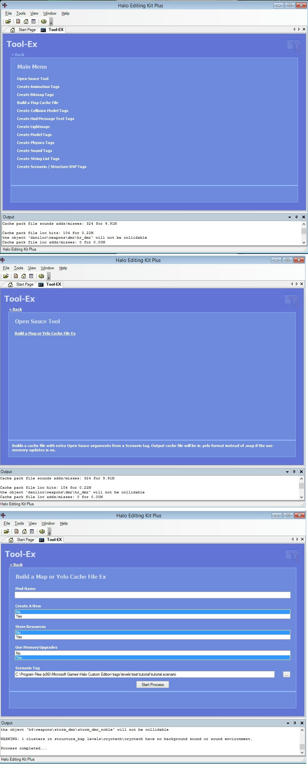 Instalation place this text in side your definitions.xml@ the top. Quote: <?xml version="1.0" encoding="utf-8" ?> <!-- Tool EX GUI Definitions by SteelIXB --> <ToolEx> <MenuItem Text="Open Sauce Tool"> <MenuItem Text="Build a Map or Yelo Cache File Ex" Description="Builds a cache file with extra Open Sauce arguments from a Scenario tag. Output cache file will be in .yelo format instead of .map if the use-memory-updates is on."> <TextItem Text="Mod Name" Name="Mod Name" Description="The name of the mod this scenario belongs to. This will also be used when naming the new data-files" /> <ListItem Text="Create A New" Name="Create A New" Description="Should new data-files be created before building the cache?" /> <LIItem Text="No" Value="0" /> <LIItem Text="Yes" Value="1" /> <ListItem Text="Store Resources" Name="Store Resources" Description="Should the scenario's bitmaps/sounds/locale data be stored in the data-files?" /> <LIItem Text="No" Value="0" /> <LIItem Text="Yes" Value="1" /> <ListItem Text="Use Memory Upgrades" Name="Use Memory Upgrades" Description="Does the scenario require Open Sauce's memory upgrades to run? Produces .yelo file instead of .map" /> <LIItem Text="No" Value="0" /> <LIItem Text="Yes" Value="1" /> <FileItem Text="Scenario Tag" Name="Scenario" Filter="Scenario Tags (*.scenario)|*.scenario" Description="Scenario tag to create a map or yelo cache file from." /> <Tool Arguments="build-cache-file-ex [Mod Name] [Create A New] [Store Resources] [Use Memory Upgrades] [Scenario]" /> </MenuItem> </MenuItem> ASLO SO YOU DONT MAKE A MISTAKE I will just post a version of the ful new definitions.xml Quote: <?xml version="1.0" encoding="utf-8" ?> <!-- Tool EX GUI Definitions by SteelIXB --> <ToolEx> <MenuItem Text="Open Sauce Tool"> <MenuItem Text="Build a Map or Yelo Cache File Ex" Description="Builds a cache file with extra Open Sauce arguments from a Scenario tag. Output cache file will be in .yelo format instead of .map if the use-memory-updates is on."> <TextItem Text="Mod Name" Name="Mod Name" Description="The name of the mod this scenario belongs to. This will also be used when naming the new data-files" /> <ListItem Text="Create A New" Name="Create A New" Description="Should new data-files be created before building the cache?" /> <LIItem Text="No" Value="0" /> <LIItem Text="Yes" Value="1" /> <ListItem Text="Store Resources" Name="Store Resources" Description="Should the scenario's bitmaps/sounds/locale data be stored in the data-files?" /> <LIItem Text="No" Value="0" /> <LIItem Text="Yes" Value="1" /> <ListItem Text="Use Memory Upgrades" Name="Use Memory Upgrades" Description="Does the scenario require Open Sauce's memory upgrades to run? Produces .yelo file instead of .map" /> <LIItem Text="No" Value="0" /> <LIItem Text="Yes" Value="1" /> <FileItem Text="Scenario Tag" Name="Scenario" Filter="Scenario Tags (*.scenario)|*.scenario" Description="Scenario tag to create a map or yelo cache file from." /> <Tool Arguments="build-cache-file-ex [Mod Name] [Create A New] [Store Resources] [Use Memory Upgrades] [Scenario]" /> </MenuItem> </MenuItem> <MenuItem Text="Create Animation Tags" Description="Create animation tags from exported animation data from using blitzkrieg in 3DS Max"> <DirItem Text="Source Directory" Name="SourceDirectory" Description="Source directory containing the animations exported using blitzkrieg from 3DS Max." /> <Tool Arguments="animations [SourceDirectory]" /> </MenuItem> <MenuItem Text="Create Bitmap Tags" Description="Create bitmap tags from Tagged Image File Format (TIFF) bitmaps"> <MenuItem Text="Create a Single Bitmap Tag"> <FileItem Text="TIFF File" Name="Bitmap" Filter="Tagged Image File Format (*.tif;*.tiff)|*.tif;*.tiff" Description="Bitmap source file saved in the Tagged Image File Format (TIFF)." /> <Tool Arguments="bitmap [Bitmap]" /> </MenuItem> <MenuItem Text="Create Bitmap Tags from Folder"> <DirItem Text="Source Directory" Name="Bitmaps" Description="Source directory containing Tagged Image File Format (TIFF) bitmaps." /> <Tool Arguments="bitmaps [Bitmaps]" /> </MenuItem> </MenuItem> <MenuItem Text="Build a Map Cache File" Description="Build a map cache file playable in Halo CE from a Scenario tag"> <FileItem Text="Scenario Tag" Name="Scenario" Filter="Scenario Tags (*.scenario)|*.scenario" Description="Scenario tag to create a map cache file from." /> <Tool Arguments="build-cache-file [Scenario]" /> </MenuItem> <MenuItem Text="Create Collision Model Tags" Description="Create collision model tags from blitzkrieg exported data"> <DirItem Text="Source Directory" Name="Collision" Description="Source directory containing the 'physics' folder that contains the exported blitzkrieg data." /> <Tool Arguments="collision-geometry [Collision]" /> </MenuItem> <MenuItem Text="Create Hud Message Text Tags" Description="Create Hud Message Text tags from 'hud messages.hmt'"> <DirItem Text="Source Directory" Name="Source" Description="Source directory containing the file 'hud messages.hmt' (saved in Unicode Text Format)." /> <TextItem Text="Scenario Tag" Name="Scenario" Description="Name of the Scenario tag to reference the Hud Message Text tag. (in the equivalent 'tags' folder to above source directory)" /> <Tool Arguments="hud-messages [Source] [Scenario]" /> </MenuItem> <MenuItem Text="Create Lightmaps" Description="Create lightmaps for a particular BSP."> <FileItem Text="Scenario Tag" Name="Scenario" Filter="Scenario Tags (*.scenario)|*.scenario" Description="Scenario tag referencing the BSP you wish to generate lightmaps for." /> <TextItem Text="Scenario Structure BSP Name" Name="BSPIndex" Description="The name of the BSP tag referenced in the scenario tag" /> <ListItem Text="Quality" Name="Quality" Description="The quality to generate the lightmaps at."> <LIItem Text="Debug (Fast)" Value="0" /> <LIItem Text="Final" Value="1" /> </ListItem> <TextItem Text="Stop Threshold" Name="Threshold" Default="0.005" Description="A decimal at which to stop the process between 0 and 1. Example: 0.0000001 (would stop at 0.000000). Use a higher value to generate lightmaps faster and lower quality, such as 0.005" /> <Tool Arguments="lightmaps [Scenario] [BSPIndex] [Quality] [Threshold]" /> </MenuItem> <MenuItem Text="Create Model Tags" Description="Create GBXModel tags from data exported from 3DS Max"> <DirItem Text="Source Directory" Name="Source" Description="Source directory containing the 'models' folder that contains the exported blitzkrieg data." /> <Tool Arguments="model [Source]" /> </MenuItem> <MenuItem Text="Create Physics Tags" Description="Create Physics tags from data exported from 3DS Max"> <DirItem Text="Source Directory" Name="Source" Description="Source directory containing the 'physics' folder that contains the exported blitzkrieg data." /> <Tool Arguments="physics [Source]" /> </MenuItem> <MenuItem Text="Create Sound Tags" Description="Create sound tags from either Wav, Xbox, or Ogg sound files."> <DirItem Text="Source Directory" Name="Source" Description="Source directory containing folders that contain certain sound formats. The sound tags created will use the folder names, and use the sound files in the folders as permutations." /> <ListItem Text="Platform" Name="Platform" Description="The platform of the sound files in the folders."> <LIItem Text="Xbox (Requires Xbox codec)" Value="xbox" /> <LIItem Text="Wav" Value="wav" /> <LIItem Text="Ogg" Value="ogg" /> </ListItem> <TextItem Text="Quality or Bitrate (Ogg Only)" Name="Ogg Value" Default="22050" Description="The bitrate or quality to convert the Ogg sound files to when creating the tag." /> <Tool Arguments="sounds [Source] [Platform] [Ogg Value]" /> </MenuItem> <MenuItem Text="Create String List Tags" Description="Create String List / Unicode String List tags from text files in the data folder."> <MenuItem Text="Create String List Tags" Description="Create String List tags from 'ANSI' encoded text files in a folder"> <DirItem Text="Source Directory" Name="Source" Description="Source directory containing 'ANSI' encoded text files with '.txt' extension. Each string in the text file must end with ###END-STRING###" /> <Tool Arguments="strings [Source]" /> </MenuItem> <MenuItem Text="Create Unicode String List Tags" Description="Create String List tags from 'Unicode' encoded text files in a folder"> <DirItem Text="Source Directory" Name="Source" Description="Source directory containing 'Unicode' encoded text files with '.txt' extension. Each string in the text file must end with ###END-STRING###" /> <Tool Arguments="unicode-strings [Source]" /> </MenuItem> </MenuItem> <MenuItem Text="Create Scenario / Structure BSP Tags" Description="Create scenario and structure bsp tags from data exported with blitzkreig from 3DS Max"> <DirItem Text="Source Directory" Name="Source" Description="Source directory containing the 'models' folder, that contains the exported blitzkreig data." /> <TextItem Text="BSP Name" Name="BSPName" Description="The name to give the final bsp and scenario tags." /> <Tool Arguments="structure [Source] [BSPName]" /> </MenuItem> </ToolEx> Edited by jackrabbit on Oct 27, 2013 at 08:25 AM Edited by jackrabbit on Oct 27, 2013 at 08:27 AM |
||||
|
|
|||||
|
thellt Joined: Feb 14, 2009 
chiperdilly the great 1999-2017 |
Posted: Aug 12, 2014 06:51 PM
Msg. 12 of 12
 doesent work. please help i tried several versions of your xml and renamed tool and all sorts of other things..... sorry to bump this again..... i want to know what to do..... Edited by thellt on Aug 12, 2014 at 06:53 PM Edited by thellt on Aug 12, 2014 at 06:53 PM Edited by thellt on Aug 12, 2014 at 06:54 PM |
||||
|
|
|||||

|
