A Community discussion forum for Halo Custom Edition, Halo 2 Vista, Portal and Halo Machinima
|
 Home
Home Search
 Register
 Login
Login Member List
 Recent Posts
| »Forums Index »Halo Custom Edition (Bungie/Gearbox) »Halo CE General Discussion »Kornmann00 v2 needs MS Office to run?! | 
|
| Author | Topic: Kornmann00 v2 needs MS Office to run?! (20 messages, Page 1 of 1) | ||||
| Moderators: Dennis | |||||
 Dumb AI Joined: Sep 18, 2011 
Dead. |
Posted: Mar 15, 2013 02:50 PM
Msg. 1 of 20
It's not working at all and it needs some sort of MS Office .dll (which is pretty ridiculous).
Is there a way around that? |
||||


|
|||||
|
MoooseGuy Joined: Aug 10, 2008 
I Approve This Message. |
Posted: Mar 15, 2013 02:54 PM
Msg. 2 of 20
Just search for the dll on Google and download it. I've had to do stuff like that before.
Edited by MoooseGuy on Mar 15, 2013 at 02:55 PM |
||||
|
|
|||||
|
Dumb AI Joined: Sep 18, 2011
Dead. |
Posted: Mar 15, 2013 02:55 PM
Msg. 3 of 20
Would you care to explain why Kornmann00 v2 even needs it?
EDIT:Now it wants MSVCR80.dll (does not specify any location that it should be in) Edited by Dumb AI on Mar 15, 2013 at 02:58 PM |
||||
|
|
|||||
|
kirby_422 Joined: Jan 22, 2006 
Apparently public enemy number 1? |
Posted: Mar 15, 2013 02:58 PM
Msg. 4 of 20
It's actually the exact opposite; When any part of HEK rages about a dll, remove that dll from your system to fix the problem.
|
||||
|
|
|||||
|
Dumb AI Joined: Sep 18, 2011
Dead. |
Posted: Mar 15, 2013 03:02 PM
Msg. 5 of 20
What if it rages about system .dll's? xD
EDIT:Problem solved. Edited by Dumb AI on Mar 15, 2013 at 03:04 PM |
||||
|
|
|||||
|
kirby_422 Joined: Jan 22, 2006
Apparently public enemy number 1? |
Posted: Mar 15, 2013 03:05 PM
Msg. 6 of 20
It doesn't, the closest to system dlls it will complain about is certain anti-virus programs. Anyways, check the directory in the error message, rename the dll while your using HEK, etc.
|
||||
|
|
|||||
|
Jesse Joined: Jan 18, 2009 Discord: Holy Crust#4500 |
Posted: Mar 15, 2013 03:24 PM
Msg. 7 of 20
What qwerty taught me to do was copy and paste the MSRC71.dll (or something like that) in the CE directory and name a copy after whatever kornman wants and is looking for.
|
||||
|
|
|||||
|
Btcc22 Joined: Dec 17, 2012 |
Posted: Mar 15, 2013 05:42 PM
Msg. 8 of 20
You're missing the C runtime that's usually present on up to date/patched versions of Windows. Renaming old versions isn't guaranteed stable, if it works at all.
You can grab it here. Edited by Btcc22 on Mar 15, 2013 at 05:46 PM |
||||
|
|
|||||
|
XlzQwerty1 Joined: Aug 6, 2009 
|
Posted: Mar 15, 2013 05:56 PM
Msg. 9 of 20
Quote: --- Original message by: Jesse What qwerty taught me to do was copy and paste the MSVCR71.dll (or something like that) in the CE directory and name a copy after whatever kornman wants and is looking for. This. I don't use kornman v2 anymore though, since you know.. OS Guerilla is unlocked as well :) Edited by XlzQwerty1 on Mar 15, 2013 at 05:57 PM |
||||
|
|
|||||
|
Dumb AI Joined: Sep 18, 2011
Dead. |
Posted: Mar 15, 2013 06:10 PM
Msg. 10 of 20
Thank you all for helping but Kormann00 v2 works now.
Edited by Dumb AI on Mar 15, 2013 at 06:10 PM |
||||
|
|
|||||
|
jackrabbit Joined: Apr 27, 2005 
Fight Against the Machine of Deth! |
Posted: Mar 19, 2013 05:09 PM
Msg. 11 of 20
is there a gui for OS_Tool.exe?
Edited by jackrabbit on Mar 19, 2013 at 05:26 PM |
||||
|
|
|||||
|
XlzQwerty1 Joined: Aug 6, 2009
|
Posted: Mar 19, 2013 05:56 PM
Msg. 12 of 20
No. Use CMD and learn how to use each command. It's not hard.
|
||||
|
|
|||||
|
SrgEspectro Joined: Jan 30, 2013 
|
Posted: Mar 19, 2013 07:36 PM
Msg. 13 of 20
I think I have the same problem, what did you do?
|
||||
|
|
|||||
|
jackrabbit Joined: Apr 27, 2005
Fight Against the Machine of Deth! |
Posted: Mar 19, 2013 09:04 PM
Msg. 14 of 20
I alredy know all the cmd's I also know I don't have to type them =)
Anyway I just rename ostool to tool.exe and tool++ works on it =) as added bonus hek+tool ex works with open sause now =) Edited by jackrabbit on Mar 19, 2013 at 09:09 PM |
||||
|
|
|||||
|
XlzQwerty1 Joined: Aug 6, 2009
|
Posted: Mar 19, 2013 10:04 PM
Msg. 15 of 20
That's funny because tool++ won't work on OS_tool with OS Commands
stuff like build-cache-file-ex, etc etc. You'll never be able to use this with tool++. Right now, all you just did was allow tool++ to use OS_tool to perform original halo ce tool functions. And what is the point of that? This is why you use CMD and type them in manually, or create bat files for your convenience. Better yet someone else who knows how to program can make something better than tool++ for tool and os_tool. Edited by XlzQwerty1 on Mar 19, 2013 at 10:05 PM |
||||
|
|
|||||
|
jackrabbit Joined: Apr 27, 2005
Fight Against the Machine of Deth! |
Posted: Mar 19, 2013 10:10 PM
Msg. 16 of 20
where are the OS tool Commands listed at?
bulding levels seems to be the same when I look at the help section? Edited by jackrabbit on Mar 19, 2013 at 10:16 PM |
||||
|
|
|||||
|
XlzQwerty1 Joined: Aug 6, 2009
|
Posted: Mar 19, 2013 10:52 PM
Msg. 17 of 20
sigh.
As I've stated before, using CMD, you can type in os_tool to display all the commands you can use. New commands specific for os, for example, build-cache-file-ex can have extra OS features. If you're just using tool++ for os_tool, there won't be a difference in you using OS tool and the original, normal halo ce tool. |
||||
|
|
|||||
|
jackrabbit Joined: Apr 27, 2005
Fight Against the Machine of Deth! |
Posted: Mar 20, 2013 05:38 AM
Msg. 18 of 20
Yo I make some edits to hek+ tool-ex plugin take your advice and make a new definitions.xml file
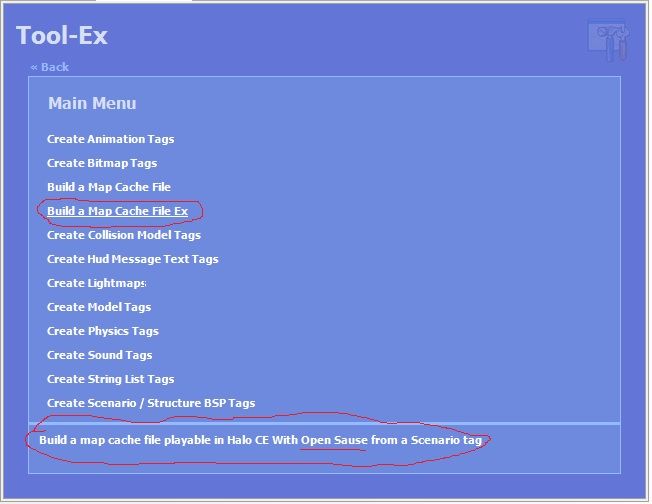 but as for this cmd and the help yelo im not sure what else to add? I want to do it proper but it dose'nt look to me like much has changed am I missing something? I added... <MenuItem Text="Build a Map Cache File Ex" Description="Build a map cache file playable in Halo CE With Open Sause from a Scenario tag"> <FileItem Text="Scenario Tag" Name="Scenario" Filter="Scenario Tags (*.scenario)|*.scenario" Description="Scenario tag to create a map cache file from." /> <Tool Arguments="build-cache-file-ex [Scenario]" /> </MenuItem> but os_tool just spits out.. Tool.exe > build-cache-file-ex "levels\cryotech\cryotech" Please wait... usage: C:\Program Files (x86)\Microsoft Games\Halo Custom Edition\tool.exe verb <options..> build-cache-file-ex <mod-name> <create-anew> <store-resources> <use-memory-upgrades> <scenario-name> Process completed... do I have the cmd wrong or something? Edited by jackrabbit on Mar 20, 2013 at 05:51 AM |
||||
|
|
|||||
|
XlzQwerty1 Joined: Aug 6, 2009
|
Posted: Mar 20, 2013 04:06 PM
Msg. 19 of 20
jackrabbit, don't post information irrelevant to this topic please...
|
||||
|
|
|||||
|
Dumb AI Joined: Sep 18, 2011
Dead. |
Posted: Mar 20, 2013 06:18 PM
Msg. 20 of 20
This thread has served it's purpose.
Please allow this thread to die. |
||||
|
|
|||||

|
