A Community discussion forum for Halo Custom Edition, Halo 2 Vista, Portal and Halo Machinima
|
 Home
Home Search
 Register
 Login
Login Member List
 Recent Posts
| »Forums Index »Halo Custom Edition (Bungie/Gearbox) »Halo CE General Discussion »modeling question | 
|
| Author | Topic: modeling question (4 messages, Page 1 of 1) | ||||
| Moderators: Dennis | |||||
 abkarch Joined: Mar 20, 2010 
This account is old. Sorry for inappropriate posts |
Posted: May 18, 2012 09:41 PM
Msg. 1 of 4
heres a quick diagram of what im trying to do.
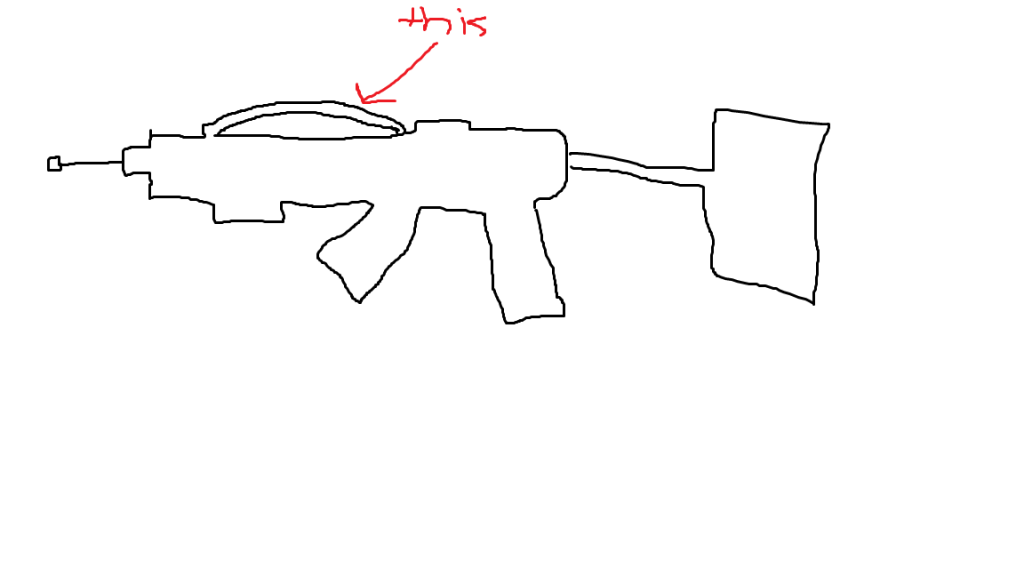 I am well aware that it appears to be drawn by a 5 year old. Anyway, i need to make that sort of curved extrude, how would i do that? |
||||


|
|||||
|
OrangeJuice Joined: Jan 29, 2009 
Documentation and debug.txt |
Posted: May 18, 2012 11:51 PM
Msg. 2 of 4
Either by hand which involves adding segments to that part of the weapon
Or by V-shaping it and using the segments option of the chamfer tool in 3DS max 2008 or newer EDIT> A good way to do it by hand in the older versions is to use the connect function under Edge-selection mode Edited by OrangeJuice on May 18, 2012 at 11:53 PM |
||||
|
|
|||||
|
Maniac1000 -Helpful Poster- Joined: Feb 24, 2007 
|
Posted: May 18, 2012 11:54 PM
Msg. 3 of 4
Extrude, rotate, extrude, rotate, bridge.
or Extrude, bridge (with multiple sections (i forget the real name)lol, thanks orange juice, segments is the word) adjust verts. Chamfer stuff. Edited by Maniac1000 on May 18, 2012 at 11:55 PM |
||||
|
|
|||||
|
abkarch Joined: Mar 20, 2010
This account is old. Sorry for inappropriate posts |
Posted: May 19, 2012 05:57 PM
Msg. 4 of 4
The extruding with multiple segments worked ALOT better than i could have hoped! thanks guys!
|
||||
|
|
|||||

|
