A Community discussion forum for Halo Custom Edition, Halo 2 Vista, Portal and Halo Machinima
|
 Home
Home Search
 Register
 Login
Login Member List
 Recent Posts
| »Forums Index »Halo Custom Edition (Bungie/Gearbox) »Halo CE Technical / Map Design »[APP] Netmerk: In Need of Long-Term Testers | 
|
| Author | Topic: [APP] Netmerk: In Need of Long-Term Testers (9 messages, Page 1 of 1) | ||||
| Moderators: Dennis | |||||
 adolif2 Joined: Apr 27, 2011 
Karma changes people. |
Posted: Feb 24, 2012 08:14 PM
Msg. 1 of 9
Hello. I've made a small app which syncs bipeds (even AI) between two running copies of Halo CE (on separate computers). It now works in multiplayer servers wih up to two players.
What it does: -Syncs biped object memory between two copies of Halo CE. -Allows for a toggle to toggle syncing. What it doesn't do: -Sync AI weapons. -Sync AI in vehicles. Don't even try it. -Work correctly with maps that aren't properly designed for it. Maps should use scripts and/or my included ui widget tags to determine who the host is and spawn ai on his or her computer only. The programs exploit the biped duplicates that are created on the client computer. Bugs: -Toggling the sync off breaks the connection the second time you do it (Fixed?) Problems that need to be addressed, but aren't bugs: -Players must BOTH be in the exact same map when sync is enabled, or else crashes will happen. Remarks: There are still problems, but all is going better than expected. AI bipeds now sync almost flawlessly according to my tests. All tests were done over lan, so a really good internet speed is most likely required. Video of it in action: http://www.youtube.com/watch?v=4_F2sHDlwe8 Current Version: Beta 6 Download for brave beta testers: (Comes with an example map, example ui widget tags, an example scenario tag, and an example ai spawning script.) http://www.mediafire.com/?wai4ikk4ap60i8h Place the apps in the same folder as HaloCE.exe, and make sure to fill out the other person's IP in ip_config.txt. Have the host run Server.exe first, and then have the client run Client.exe. Both the server and client will be prompted (with a gui) for two files. First, choose the player biped configuration file. Next, choose the indent list configuration file. These are map specific! Use the configuration generator that is included with the apps (it's still being tested for bugs, so don't be surprised if it does something really odd). The apps will automatically start Halo once all of these tasks are complete. Numpad0 = Disable Sync Numpad1 = Enable Sync Make sure to have Numlock on. Port Number = 14804 Screenshot of the configuration utility: 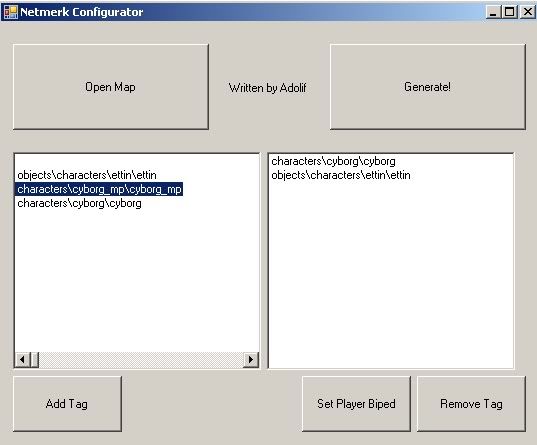 Edited by adolif2 on Mar 8, 2012 at 12:03 AM |
||||


|
|||||
|
Maniac1000 -Helpful Poster- Joined: Feb 24, 2007 
|
Posted: Feb 25, 2012 12:32 PM
Msg. 2 of 9
You should use something other than a warthog in your example, those sync already.
|
||||
|
|
|||||
|
adolif2 Joined: Apr 27, 2011
Karma changes people. |
Posted: Feb 25, 2012 01:10 PM
Msg. 3 of 9
Quote: --- Original message by: Maniac1000 You should use something other than a warthog in your example, those sync already. It was running in single player mode. Anyways, can do! :) I'll make another video really quick. EDIT: http://www.youtube.com/watch?v=sO8E4mN-DHo EDIT AGAIN: http://www.youtube.com/watch?v=AhsvIiZUYIs Edited by adolif2 on Feb 25, 2012 at 10:22 PM |
||||
|
|
|||||
|
LMT Heretic Joined: Feb 18, 2010 
There are mysteries, that should remain hidden... |
Posted: Feb 27, 2012 09:42 PM
Msg. 4 of 9
if you need testers call me i might be client tester aswell i am actually waiting for this to work (to play coop with spark) good luck
|
||||
|
|
|||||
|
adolif2 Joined: Apr 27, 2011
Karma changes people. |
Posted: Feb 28, 2012 02:17 PM
Msg. 5 of 9
Thank you. It might be awhile before this is fully working, though. It can't seem to handle objects that die (AI) very well.
|
||||
|
|
|||||
|
OpsY Joined: Feb 19, 2007 
Frobisher Bay |
Posted: Feb 28, 2012 11:22 PM
Msg. 6 of 9
Are you trying to get Single player maps to work over the internet? Nice thing if it works. You have a long road ahead however... SP is alot more complex than MP. You might need some external scripting help too.
|
||||
|
|
|||||
|
Guilty_spark Joined: Dec 8, 2011 
enjoy my bright, blue, balls! |
Posted: Feb 29, 2012 07:09 PM
Msg. 7 of 9
guys do some ai really sync with this.
|
||||
|
|
|||||
|
adolif2 Joined: Apr 27, 2011
Karma changes people. |
Posted: Mar 1, 2012 11:48 PM
Msg. 8 of 9
Quote: --- Original message by: OpsY Are you trying to get Single player maps to work over the internet? Nice thing if it works. You have a long road ahead however... SP is alot more complex than MP. You might need some external scripting help too. The overall goal is to make all objects sync in multiplayer, including AI. I'm not adding support for scripts, so single player maps would be difficult to work with. Edited by adolif2 on Mar 4, 2012 at 09:15 AM |
||||
|
|
|||||
|
LMT Heretic Joined: Feb 18, 2010
There are mysteries, that should remain hidden... |
Posted: Mar 8, 2012 05:35 PM
Msg. 9 of 9
well it seems to be nice (considering that the network in halo ce multiplayer is crap) but nice work also if you are going to make map add new stuff please maybe br or smg (i know i told you in xfire but i really want to do play coop with br) thanks
|
||||
|
|
|||||

|
