A Community discussion forum for Halo Custom Edition, Halo 2 Vista, Portal and Halo Machinima
|
 Home
Home Search
 Register
 Login
Login Member List
 Recent Posts
| »Forums Index »Halo Custom Edition (Bungie/Gearbox) »Halo CE General Discussion »[LiveCrit(?)]Modelling DMR concept | 
|
| Page 1 of 2 | Go to page: · [1] · 2 · Next |
| Author | Topic: [LiveCrit(?)]Modelling DMR concept (51 messages, Page 1 of 2) | ||||
| Moderators: Dennis | |||||
 bourrin33 Joined: Oct 19, 2009 
HEK not installed tho |
Posted: Nov 20, 2011 05:28 AM
Msg. 1 of 51
I'm a sucky modeler, and I was wondering If I could get help while modeling from advaced modelers.
Basically all I did for now is putting a cylinder, deleting many faces and applying some symmetry. Idk how to start, I hope this could become a step by step tutorial :D  So... yeah... I made the back and it's supposed to be less wide than the rest of the gun. Crit plox ? |
||||


|
|||||
|
anonymous_2009 Joined: Jun 13, 2009 
|
Posted: Nov 20, 2011 07:51 AM
Msg. 2 of 51
http://www.moddb.com/tutorials/beretta-9000-video-tutorial
|
||||
|
|
|||||
|
TM_updates Joined: Aug 31, 2011 
Superior to you, Superior Musclez near Brussels |
Posted: Nov 20, 2011 07:55 AM
Msg. 3 of 51
http://www.randomlinkwithoutdescriptionthatdoesntapplycrittotheworkshown.com/hunterisinthefriendzonelmaooooooooooo/Paul
|
||||
|
|
|||||
|
anonymous_2009 Joined: Jun 13, 2009
|
Posted: Nov 20, 2011 09:53 AM
Msg. 4 of 51
Quote: --- Original message by: TM_updates http://www.randomlinkwithoutdescriptionthatdoesntapplycrittotheworkshown.com/hunterisinthefriendzonelmaooooooooooo/Paul LMAO! Fail much. I provided a link to a tutorial which will teach him how to model. That is crit as words are not needed. It is clearly a tutorial. umad bro? |
||||
|
|
|||||
|
TM_updates Joined: Aug 31, 2011
Superior to you, Superior Musclez near Brussels |
Posted: Nov 20, 2011 10:06 AM
Msg. 5 of 51
 I'm just messing with ya Marty! :-) |
||||
|
|
|||||
|
Jaz Joined: Mar 21, 2010 
[Insert sarcastic comment here] |
Posted: Nov 20, 2011 10:11 AM
Msg. 6 of 51
Lodex, just post TM news and stop trolling please. ;)
|
||||
|
|
|||||
|
Sergeant 1337 Joined: May 1, 2010 
Do you even lift? |
Posted: Nov 20, 2011 10:42 PM
Msg. 7 of 51
Lol.
You should model it with a plane, then mirror it and attach both sides. |
||||
|
|
|||||
|
grunt_eater Joined: Jan 26, 2011 
Everything except biped rigging. |
Posted: Nov 21, 2011 11:07 AM
Msg. 8 of 51
With a plane? you crazy. use spline modeling it's easier to get the right shape because all you have to do is trace around sections. it's a tone easier IMO.
|
||||
|
|
|||||
|
anonymous_2009 Joined: Jun 13, 2009
|
Posted: Nov 21, 2011 11:44 AM
Msg. 9 of 51
Quote: --- Original message by: grunt_eater With a plane? you crazy. use spline modeling it's easier to get the right shape because all you have to do is trace around sections. it's a tone easier IMO. No, plane modelling. Maybe that's why most people's models are so boxy, if they do it the way you just said. |
||||
|
|
|||||
|
UnevenElefant5 Joined: May 3, 2008 
its been fun yall, i'll never forget this site :') |
Posted: Nov 21, 2011 12:01 PM
Msg. 10 of 51
You can model however you want but personally I find plane modelling easier because I can set up my wireframe how I want it, then once I have the outline, I can work with my wireframe to get the side, top, and bottom details. You can also do this with spline modelling I guess, but once you finish the outline it ends up as one big poly, and you have to connect the verts manually.
|
||||
|
|
|||||
|
K_I_D Joined: Nov 27, 2008 
If you are cool, this will be your avatar quote. |
Posted: Nov 21, 2011 12:04 PM
Msg. 11 of 51
I started by Modeling a tea pot, much easier than you think.
|
||||
|
|
|||||
|
Maniac1000 -Helpful Poster- Joined: Feb 24, 2007 
|
Posted: Nov 21, 2011 12:17 PM
Msg. 12 of 51
Quote: --- Original message by: anonymous_2009 Quote: --- Original message by: grunt_eater With a plane? you crazy. use spline modeling it's easier to get the right shape because all you have to do is trace around sections. it's a tone easier IMO. No, plane modelling. Maybe that's why most people's models are so boxy, if they do it the way you just said. Dont be so silly, you can spline model,vertex model or plane model, all produce the same results and it is personal preference only. |
||||
|
|
|||||
|
bourrin33 Joined: Oct 19, 2009
HEK not installed tho |
Posted: Nov 21, 2011 12:46 PM
Msg. 13 of 51
^what hé said. But i think I'll create hundreds of teapots and delete the faces i dont need.
@sarge1337: -10, i dont like how your model looks, I'll check hunters tut. I cant work on the model atm, but I'll post pics when i consider it's needed, ty everyone Edit : I must admit that plane modelling and hunter's tutorial is really good and complete, I recommend it to everyone Edited by bourrin33 on Nov 21, 2011 at 03:43 PM |
||||
|
|
|||||
|
Sergeant 1337 Joined: May 1, 2010
Do you even lift? |
Posted: Nov 21, 2011 09:05 PM
Msg. 14 of 51
Quote: --- Original message by: grunt_eater With a plane? you crazy. use spline modeling it's easier to get the right shape because all you have to do is trace around sections. it's a tone easier IMO. Are you joking? I'm a better modeler than you are. I personally find that plane modeling will give me better results, and if spline modeling really does work, you're a fool to use it as a beginner, due to the amount of work and knowlege needed. |
||||
|
|
|||||
|
Maniac1000 -Helpful Poster- Joined: Feb 24, 2007
|
Posted: Nov 21, 2011 09:26 PM
Msg. 15 of 51
Quote: --- Original message by: Maniac1000 Quote: --- Original message by: anonymous_2009 Quote: --- Original message by: grunt_eater With a plane? you crazy. use spline modeling it's easier to get the right shape because all you have to do is trace around sections. it's a tone easier IMO. No, plane modelling. Maybe that's why most people's models are so boxy, if they do it the way you just said. Dont be so silly, you can spline model,vertex model or plane model, all produce the same results and it is personal preference only. |
||||
|
|
|||||
|
Sergeant 1337 Joined: May 1, 2010
Do you even lift? |
Posted: Nov 21, 2011 09:55 PM
Msg. 16 of 51
It all depends on what I'm modeling. For a majority of things I've modeled, I done it by box modeling. I've just recently started using plane modeling and so far, it's working out pretty well for me.
|
||||
|
|
|||||
|
bourrin33 Joined: Oct 19, 2009
HEK not installed tho |
Posted: Nov 25, 2011 04:07 PM
Msg. 17 of 51
 Here is some new progress using plane modeling. I'm not expecting much from this first model, I'm spending a lot of time to think how could it turn out. Am I doin it rite ? Reference : 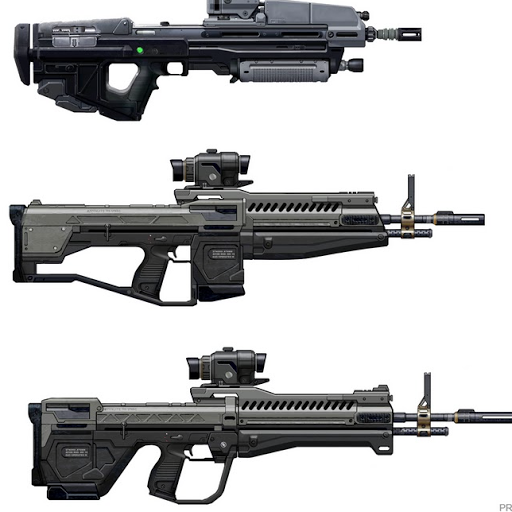 Edited by bourrin33 on Nov 25, 2011 at 04:09 PM Oh there is a face wrong about the curve of the back thing, it's corrected now Edited by bourrin33 on Nov 25, 2011 at 04:12 PM |
||||
|
|
|||||
|
Sergeant 1337 Joined: May 1, 2010
Do you even lift? |
Posted: Nov 25, 2011 08:24 PM
Msg. 18 of 51
One thing I still can't get right to this day is getting those details into the model. I used to boolean them in, but I'm sure there's a better way.
|
||||
|
|
|||||
|
Amazingcuziam Joined: Apr 16, 2010 
Sup. |
Posted: Nov 25, 2011 09:31 PM
Msg. 19 of 51
Quote: --- Original message by: Sergeant 1337 I liek inset/extrude foar mah detalez. I also love shift-edge modeling, but it's all personal preferences (I also box/plane model!). I never could get the hand of spline modeling though, it was always too... spliney.One thing I still can't get right to this day is getting those details into the model. I used to boolean them in, but I'm sure there's a better way. It's all aboot what feeelzzz right though broseph. Also, model looks good! I don't feel like criticizing, because I'm lazy. |
||||
|
|
|||||
|
SlappyThePirate Joined: Aug 24, 2009 
You are irritating, I'll release nothing |
Posted: Nov 25, 2011 09:46 PM
Msg. 20 of 51
I would use shift-edging for the extrusions (as opposed to spline modeling), and proboolean for combining meshes and primitives (like you'll probably do for the scope). Boolean works best for me when the operands are sealed meshes.
e: Forgot to say, this looks goodygood so far. Makes me want to try modeling another one of those concepts, but I haven't the time. Edited by SlappyThePirate on Nov 25, 2011 at 09:47 PM |
||||
|
|
|||||
|
bourrin33 Joined: Oct 19, 2009
HEK not installed tho |
Posted: Nov 26, 2011 04:17 AM
Msg. 21 of 51
 I first made a plane (red) then extruded-placed faces, i finished extruding blue part and finally weld everything. I had to replace points 1by1 Edit :  More progress and wireframe... some things are eww... Edited by bourrin33 on Nov 26, 2011 at 07:41 AM |
||||
|
|
|||||
|
DarkHalo003 Joined: Mar 10, 2008 
All ARs Need Green Little Buttons. |
Posted: Nov 26, 2011 11:12 AM
Msg. 22 of 51
Some areas are inaccurate. The area near the stock, for instance, isn't separated right. Double-check your references, you'll see it. As far as everything else: not bad. I wouldn't worry too heavily on things looking perfect yet, as smoothing is a major component to things looking nice.
|
||||
|
|
|||||
|
SlappyThePirate Joined: Aug 24, 2009
You are irritating, I'll release nothing |
Posted: Nov 26, 2011 11:31 AM
Msg. 23 of 51
Some of your faces are 'bent' into two differently-shaded triangles... move points around until these faces are lined up right. It helps a lot.
|
||||
|
|
|||||
|
bourrin33 Joined: Oct 19, 2009
HEK not installed tho |
Posted: Nov 26, 2011 11:58 AM
Msg. 24 of 51
The unsmoothed vertices looking crap and unaligned doesnt really need change, since it would be a loss of time and really hard to make perfect. I'll check this kind of error lastly.
Also, I'm really used to port things in halo and I know it wont be noticeable at all, and even if I replace those it would still be 2 triangles so theres no urge. |
||||
|
|
|||||
|
SlappyThePirate Joined: Aug 24, 2009
You are irritating, I'll release nothing |
Posted: Nov 26, 2011 12:07 PM
Msg. 25 of 51
It's not just a lack of smoothing, and it does show up weird in halo. They are supposed to be planar, or as close to planar as you can get, so it looks good. Not a very hard fix, just move the verts on the side of the gun on the XY until the shading on the triangles just about match.
You might be right in that it might not be noticeable because it's behind the handle where the hand covers it up.   Edited by SlappyThePirate on Nov 26, 2011 at 12:10 PM |
||||
|
|
|||||
|
bourrin33 Joined: Oct 19, 2009
HEK not installed tho |
Posted: Nov 27, 2011 04:48 PM
Msg. 26 of 51
I cant notice the angles on viewports even when making the shader shine. I can only see it when using mental ray renderer... I'll fix that in the end.
more progress :   I'll finish it soon :D It's made of multiple parts tho., idk if it's fine or not |
||||
|
|
|||||
|
General Okar Joined: Aug 29, 2011 
I hate this place |
Posted: Nov 27, 2011 07:25 PM
Msg. 27 of 51
Looks really good can't wait to see it finished and put in game
|
||||
|
|
|||||
|
Spartan314 Joined: Aug 21, 2010 
Former biped rigger & FP animator |
Posted: Nov 27, 2011 10:16 PM
Msg. 28 of 51
Quote: --- Original message by: bourrin33 I cant notice the angles on viewports even when making the shader shine. I can only see it when using mental ray renderer... I'll fix that in the end. more progress : https://lh3.googleusercontent.com/-L7Gq9ttqf9E/TtKwCfTHbyI/AAAAAAAAAs8/FUlxDD1I0-Y/s640/DMR4.png https://lh6.googleusercontent.com/-pfQGZD8Aljo/TtKwCQS6enI/AAAAAAAAAtA/yLgCpGV8Yoc/s640/DMR5.png I'll finish it soon :D It's made of multiple parts tho., idk if it's fine or not ...have you modeled stuff before? |
||||
|
|
|||||
|
Cheddars Joined: Oct 30, 2010 
Rave to the Grave. |
Posted: Nov 28, 2011 06:18 AM
Msg. 29 of 51
He has but has usually box modeled. IF ONLY MY FUUUUUKING 3DS MAX WOULD WORK AND NOT CRASH ON STARTUP. This thread has inspired me to go and model.
|
||||
|
|
|||||
|
bourrin33 Joined: Oct 19, 2009
HEK not installed tho |
Posted: Nov 28, 2011 12:32 PM
Msg. 30 of 51
Quote: --- Original message by: Cheddars He has but has usually box modeled. IF ONLY MY F. 3DS MAX WOULD WORK AND NOT CRASH ON STARTUP. This thread has inspired me to go and model. Inb4 profanity filter. In fact for the handle I'll just delete the faces and remake them. Edit : remade them, here are new pics   Edited by bourrin33 on Nov 29, 2011 at 08:26 AM Edited by bourrin33 on Nov 29, 2011 at 02:15 PM |
||||
|
|
|||||
|
Maniac1000 -Helpful Poster- Joined: Feb 24, 2007
|
Posted: Nov 29, 2011 02:17 PM
Msg. 31 of 51
looking good, nice and clean.
|
||||
|
|
|||||
|
bourrin33 Joined: Oct 19, 2009
HEK not installed tho |
Posted: Nov 29, 2011 02:21 PM
Msg. 32 of 51
Thank you. I didnt know how many bullets to use for the magazine, so i modeled some and looked how many could fit it.
  The design looks flat on some parts tho, I'd like some suggestions. Edited by bourrin33 on Nov 29, 2011 at 02:22 PM |
||||
|
|
|||||
|
Cheddars Joined: Oct 30, 2010
Rave to the Grave. |
Posted: Nov 29, 2011 04:34 PM
Msg. 33 of 51
 im a nub model but still... |
||||
|
|
|||||
|
bourrin33 Joined: Oct 19, 2009
HEK not installed tho |
Posted: Nov 29, 2011 04:56 PM
Msg. 34 of 51
Quote: --- Original message by: Cheddars http://img43.imageshack.us/img43/7862/highresalmostfinishwire.png im a nub model but still... I still didnt get why are there shadows here. Its not even following the triangulation of those polies, so excuse me but those areas are good and flat, its just mental ray a bit retarded on my settings |
||||
|
|
|||||
|
Amazingcuziam Joined: Apr 16, 2010
Sup. |
Posted: Nov 29, 2011 05:33 PM
Msg. 35 of 51
Quote: --- Original message by: Cheddars I spy ngons. Otherwise I like the model, will give further crit when I'm not walking around Disney, but it looks preety good otherwise. Off topic: it's oddly cold in Orlando this week, great week to come to Disney.http://img43.imageshack.us/img43/7862/highresalmostfinishwire.png im a nub model but still... |
||||
|
|
|||||
| Page 1 of 2 | Go to page: · [1] · 2 · Next |

|
