A Community discussion forum for Halo Custom Edition, Halo 2 Vista, Portal and Halo Machinima
|
 Home
Home Search
 Register
 Login
Login Member List
 Recent Posts
| »Forums Index »Halo Custom Edition (Bungie/Gearbox) »Halo CE Technical / Map Design »Couldn't update edge | 
|
| Author | Topic: Couldn't update edge (6 messages, Page 1 of 1) | ||||
| Moderators: Dennis | |||||
 Halocombatevolved Joined: Nov 20, 2009 
Son, I would've been your daddy, but, nevermind. |
Posted: Jan 1, 2011 07:19 PM
Msg. 1 of 6
Hello, I ripped a cov capital ship from H3 and got it in max, and textured, then I tried to build the collision and i got a lot Couldn't update edge errors, so I fixed all of them until the STL check showed no more errors but when I try to build it again I get
Couldn't read map file './toolbeta.map' ### ccs_ship_small.JMS ### ERROR couldn't update edge #1185 (red). ### ERROR couldn't update edge #235 (red). ### ERROR couldn't update edge #236 (red). ### ERROR couldn't update edge #1188 (red). ### ERROR failed to build collision geometry. ### ERROR failed to import collision bsp. ### ERROR couldn't import permutation 'ccs_ship_small' of node 'frame'. ### ERROR failed to import collision model 'scenery\ccs_ship_small\ccs_ship_smal l'. but 3ds max doesn't show any errors in the STL check, so how can I find where the errors are? Is there a tool where you put in a number lets say 1188 and it selects that edge so you ca find where it is. |
||||


|
|||||
|
Maniac1000 -Helpful Poster- Joined: Feb 24, 2007 
|
Posted: Jan 1, 2011 07:32 PM
Msg. 2 of 6
i told you before, stl check does not work.
You need to import the nameoflevel.wrl and identify and fix the errors. 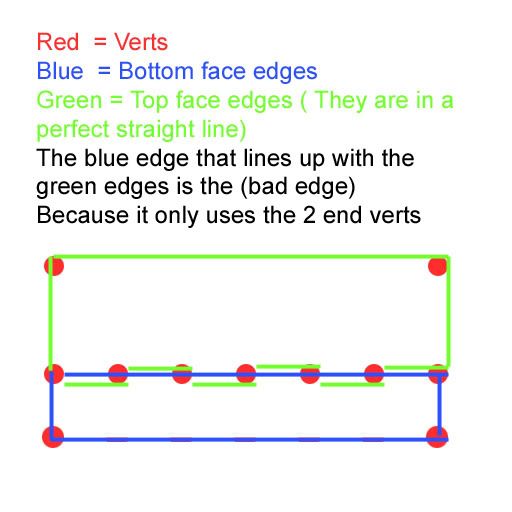 Edited by Maniac1000 on Jan 1, 2011 at 07:34 PM |
||||
|
|
|||||
|
Halocombatevolved Joined: Nov 20, 2009
Son, I would've been your daddy, but, nevermind. |
Posted: Jan 1, 2011 07:52 PM
Msg. 3 of 6
Quote: --- Original message by: Maniac1000 i told you before, stl check does not work. You need to import the nameoflevel.wrl and identify and fix the errors. Edited by Maniac1000 on Jan 1, 2011 at 07:34 PM How do I? This is a scenery tag I'm trying to do not a level. And that STL check helped fix most of the errors! EDIT: Ok I actually found 2 fliped faces and fliped them back and I got Couldn't read map file './toolbeta.map' ### ccs_ship_small.JMS ### ERROR found z buffered triangles (red). ### WARNING found nearly coplanar surfaces (red and green). ### ERROR edge #9465 is too short (red). ### ERROR failed to import collision bsp. ### ERROR couldn't import permutation 'ccs_ship_small' of node 'frame'. ### ERROR failed to import collision model 'scenery\ccs_ship_small\ccs_ship_smal l'. How do I fix and find that edge? Edited by Halocombatevolved on Jan 1, 2011 at 08:02 PM |
||||
|
|
|||||
|
d4rfnader Joined: Jul 16, 2010 
Open mouth, insert sandwhich. |
Posted: Jan 1, 2011 08:55 PM
Msg. 4 of 6
You want to import debug.wrl for anything other than a bsp.
|
||||
|
|
|||||
|
Halocombatevolved Joined: Nov 20, 2009
Son, I would've been your daddy, but, nevermind. |
Posted: Jan 1, 2011 09:01 PM
Msg. 5 of 6
Ok I imported that and it made my model white and some red and green faces, do I fix the red ones?
|
||||
|
|
|||||
|
d4rfnader Joined: Jul 16, 2010
Open mouth, insert sandwhich. |
Posted: Jan 1, 2011 09:19 PM
Msg. 6 of 6
Yeah, i'm pretty sure you fix the red one.
|
||||
|
|
|||||

|
