A Community discussion forum for Halo Custom Edition, Halo 2 Vista, Portal and Halo Machinima
|
 Home
Home Search
 Register
 Login
Login Member List
 Recent Posts
| Viewing User Profile for: Halocombatevolved | |||||||||||||||||||||
| About | Contact | ||||||||||||||||||||
|
Send Private Message |
||||||||||||||||||||
| Post Statistics | |||||||||||||||||||||
|
Halocombatevolved has contributed to 297 posts out of 465278 total posts
(.06%) in 4,809 days (.06 posts per day).
20 Most recent posts:
Halo CE Technical / Map Design »
foggy map Apr 10, 2011 02:14 PM
(Total replies: 1)
Hi I made a map in halo ce, but it is very foggy. the whole map is gray and when I get close to the ground I can see the textures but in a distance, it's foggy, the only thing thats not is the water. How can I fix this? I've fixed it before but don't remember. Edited by Halocombatevolved on Apr 10, 2011 at 02:15 PM
Halo CE General Discussion »
[W.I.P] Flood stasis tanks Feb 6, 2011 07:12 PM
(Total replies: 8)
Ok butI guess I'll mess with it once I get it in my map, because it's going to be part of the map not scenery, I was just seeing how it would look.
Halo CE General Discussion »
[W.I.P] Flood stasis tanks Feb 6, 2011 06:05 PM
(Total replies: 8)
Ok I was accualy trying the cylinder water stuff, so, is there a way to add fog to it like in a map, in guerilla maybe?
Halo CE General Discussion »
[W.I.P] Flood stasis tanks Feb 6, 2011 05:47 PM
(Total replies: 8)
Ok but I'm going to stick with my version. Also how can I put water inside it so it looks better and how can I make the flood float in it?
Halo CE General Discussion »
[W.I.P] Flood stasis tanks Feb 6, 2011 05:07 PM
(Total replies: 8)
Hello I played Precipice and I got inspired to make a Forerunner flood storage thing too, but my own theme. So what I made for it is a stasis tank for some flood. Here's a picture: 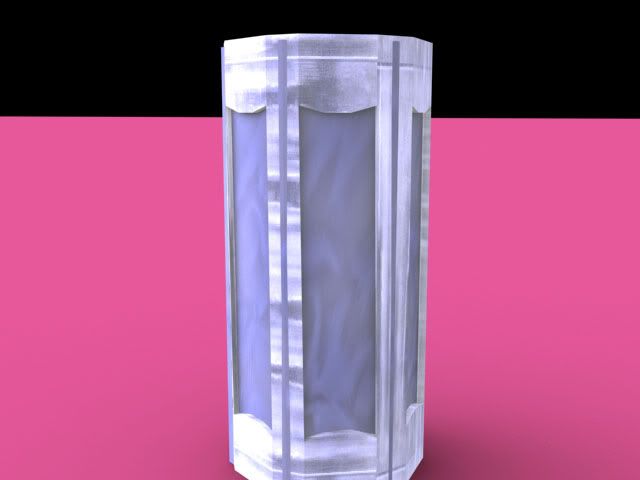 Now I'd like to know what should be fixed and added for this. P.S. I don't know how to render good. Edited by Halocombatevolved on Feb 6, 2011 at 05:08 PM
Halo CE Technical / Map Design »
radiosity error: degenerate triangle [or triangle with bad uvs] Feb 3, 2011 08:45 PM
(Total replies: 8)
Good news and bad news: Good: Got it fixed :). Bad: spent hours to fix when I was doing it all wrong. But anyway THANKS
Halo CE Technical / Map Design »
radiosity error: degenerate triangle [or triangle with bad uvs] Feb 3, 2011 08:34 PM
(Total replies: 8)
I thoght debug.wrl was for non maps, so is it for lightmaps?
Halo CE Technical / Map Design »
radiosity error: degenerate triangle [or triangle with bad uvs] Feb 3, 2011 01:35 PM
(Total replies: 8)
Ok I fixed all of them but I still get the radioisty error? There is no errors in the structure and the .wrl is gone, so... Also I created this using a plain and built it up. (Higuy's terrain tutorial)
Halo CE Technical / Map Design »
radiosity error: degenerate triangle [or triangle with bad uvs] Feb 3, 2011 11:49 AM
(Total replies: 8)
Hello does anyone know how to fix this lightmaps error? Couldn't read map file './toolbeta.map' i'm going to render debug lightmaps for triumph of levels\triumph\triumph, and i 'll stop when red+blue+green = 0.900000. Hit control-c now if this isn't right. WARNING: 1 clusters in structure_bsp levels\triumph\triumph have no background s ound or sound environment. start levels\triumph\triumph radiosity error: degenerate triangle [or triangle with bad uvs] (see blue in err or geometry) failed levels\triumph\triumph done What I'm guessing is that it's degenerate triangles because when I delete and re-create the triangles that are blue in the .wrl the structure changes. What I mean is it goes from ### WARNING found #10 degenerate triangles. to ### WARNING found #8 degenerate triangles. to ### WARNING found #6 degenerate triangles. Is what I'm doing correct and once it reaches 0 the lightmaps will work? I'm just guessing.
Halo CE Technical / Map Design »
Biped exporting help Jan 25, 2011 04:43 PM
(Total replies: 16)
Ok, thats fine.
Halo CE Technical / Map Design »
Biped exporting help Jan 24, 2011 04:35 PM
(Total replies: 16)
Thank you, I have been using blitzkrieg because it's easier, so I guess I'll give it a try. :) EDIT: Ok tried but on export I get the error --Runtime error: exceeded the vertex weight list count skin:skin What do I do? Edited by Halocombatevolved on Jan 24, 2011 at 04:50 PM
Halo CE Technical / Map Design »
Biped exporting help Jan 23, 2011 03:50 PM
(Total replies: 16)
Oh... I gave it hunters bones so it was Bip01 Pelvis... so should I change all the bones to frame BipBONE?
Halo CE Technical / Map Design »
Biped exporting help Jan 23, 2011 03:41 PM
(Total replies: 16)
Ok I just did that but it gives me the error no actors to export. I selected the biped and linked it to the pevis, but I still got that? Edit: I changed the Bip01 Pelvis name to frame and it exported, I also gave it the hunters bones because it's the flood tank form. Edited by Halocombatevolved on Jan 23, 2011 at 03:47 PM
Halo CE Technical / Map Design »
Biped exporting help Jan 23, 2011 02:46 PM
(Total replies: 16)
How do I export a biped, what do I link the biped to? All the bones are linked up and markers, but not the biped, what do I link him to? I make a box called frame and link him to that, but in the gbxmodel, in the node section just shows the frame, but in other bipeds's gbxmodels it shows the bones? How do I export it? And this Questions optional: How do I set up animations for the biped?
Halo CE Technical / Map Design »
Brute problem Jan 23, 2011 12:50 PM
(Total replies: 5)
Sorry for them being small, uh, how do I make em bigger?
Halo CE Technical / Map Design »
Brute problem Jan 22, 2011 10:07 PM
(Total replies: 5)
Hi I got the h3 brute but when I get it in 3ds max not all his armors there, just his helmet and other stuff, what I'm thinking is that in xtraction when I export it, it gives me an error, Index was out of range. Must be non-negative and less than the size of the collection. Parameter name: index, but if I extract it without frame\standard it works. How can I get xtraction to ingnore this or fix it? Also here is picture:    Edited by Halocombatevolved on Jan 22, 2011 at 10:12 PM Edited by Halocombatevolved on Jan 22, 2011 at 10:13 PM
Halo CE Technical / Map Design »
Grated floor? Jan 22, 2011 10:32 AM
(Total replies: 5)
Thanks
Halo CE Technical / Map Design »
Grated floor? Jan 22, 2011 10:06 AM
(Total replies: 5)
How do I make a grated floor? I want to be able to see the lower floor if you look down at it. Is this a texture that you can see through or do I have to make each little bar for the floor?
Halo CE Technical / Map Design »
Vehicles can't go through gas station? Jan 17, 2011 09:13 PM
(Total replies: 0)
I made a gas station but when I try to drive any vehicle theres a invisible barrier, but when I'm out of a vehicle I can go through. Is there something in the collision geometry or something?
Halo CE General Discussion »
Weapons - Works in Process thread [WIP] Jan 15, 2011 06:13 PM
(Total replies: 15008)
that is 3ds max, it's 8, and I have it in game, I took off the rocket launcher, and can't decide what the projectile should be so i'm sticking to pistol bullets with 15 per second and automatic, just a ausult rifle with pistol bullets, so... I'll post pictures soon in game. Edit: got them up:     Edited by Halocombatevolved on Jan 15, 2011 at 09:32 PM |
|||||||||||||||||||||

