A Community discussion forum for Halo Custom Edition, Halo 2 Vista, Portal and Halo Machinima
|
 Home
Home Search
 Register
 Login
Login Member List
 Recent Posts
| »Forums Index »Halo Custom Edition (Bungie/Gearbox) »Halo CE Technical / Map Design »360 Degree Skies | 
|
| Author | Topic: 360 Degree Skies (7 messages, Page 1 of 1) | ||||
| Moderators: Dennis | |||||
 Master Jake Joined: Sep 20, 2009 
Haii |
Posted: Apr 27, 2010 07:13 PM
Msg. 1 of 7
How do you make 360 degree skies? By that, I mean skies that go all around the map like in Area 53. I tried having all the surfaces in my skybox have the +sky material, but that didn't work (the sky only assigned to the top and side faces. I also tried creating a star texture and putting that as the ground with the +sky on the sides and top. That just looked like a floating star plane.
|
||||


|
|||||
|
Maniac1000 -Helpful Poster- Joined: Feb 24, 2007 
|
Posted: Apr 27, 2010 07:35 PM
Msg. 2 of 7
The sky should assign to all +sky faces.
Some or all of the stock skys are made from a half sphere, i would imagine that is why the bottom half looks black. it does show as black right? If you can see an obvious line where the bottom of the sky ends (thats not a material id seam) then i think thats the problem. Use a different sky, or edit the one you are using. |
||||
|
|
|||||
|
Master Jake Joined: Sep 20, 2009
Haii |
Posted: Apr 27, 2010 07:51 PM
Msg. 3 of 7
Oh, thanks. I'll look for some full skies. And yes, half the screen shows up as the sky and the other half is just ugly gray on the default ones.
|
||||
|
|
|||||
|
Maniac1000 -Helpful Poster- Joined: Feb 24, 2007
|
Posted: Apr 27, 2010 09:13 PM
Msg. 4 of 7
maybe check the sky from Prime.
I dunno how the map was made, but it may have a full sphere/box sky. If you cant find one, you could import a sky and change the geometry and bitmaps to suit your needs. If you cant get that done, post back and ill help ya. |
||||
|
|
|||||
|
Maniac1000 -Helpful Poster- Joined: Feb 24, 2007
|
Posted: Apr 28, 2010 11:57 PM
Msg. 5 of 7
|
||||
|
|
|||||
|
Dark Joined: Nov 10, 2008 |
Posted: May 2, 2010 07:59 PM
Msg. 6 of 7
Quote: --- Original message by: Zira Vadum it doesHow did you....But that's.....*sits in a corner and goes insane* That won't sync online, will it? |
||||
|
|
|||||
|
Maniac1000 -Helpful Poster- Joined: Feb 24, 2007
|
Posted: May 2, 2010 09:23 PM
Msg. 7 of 7
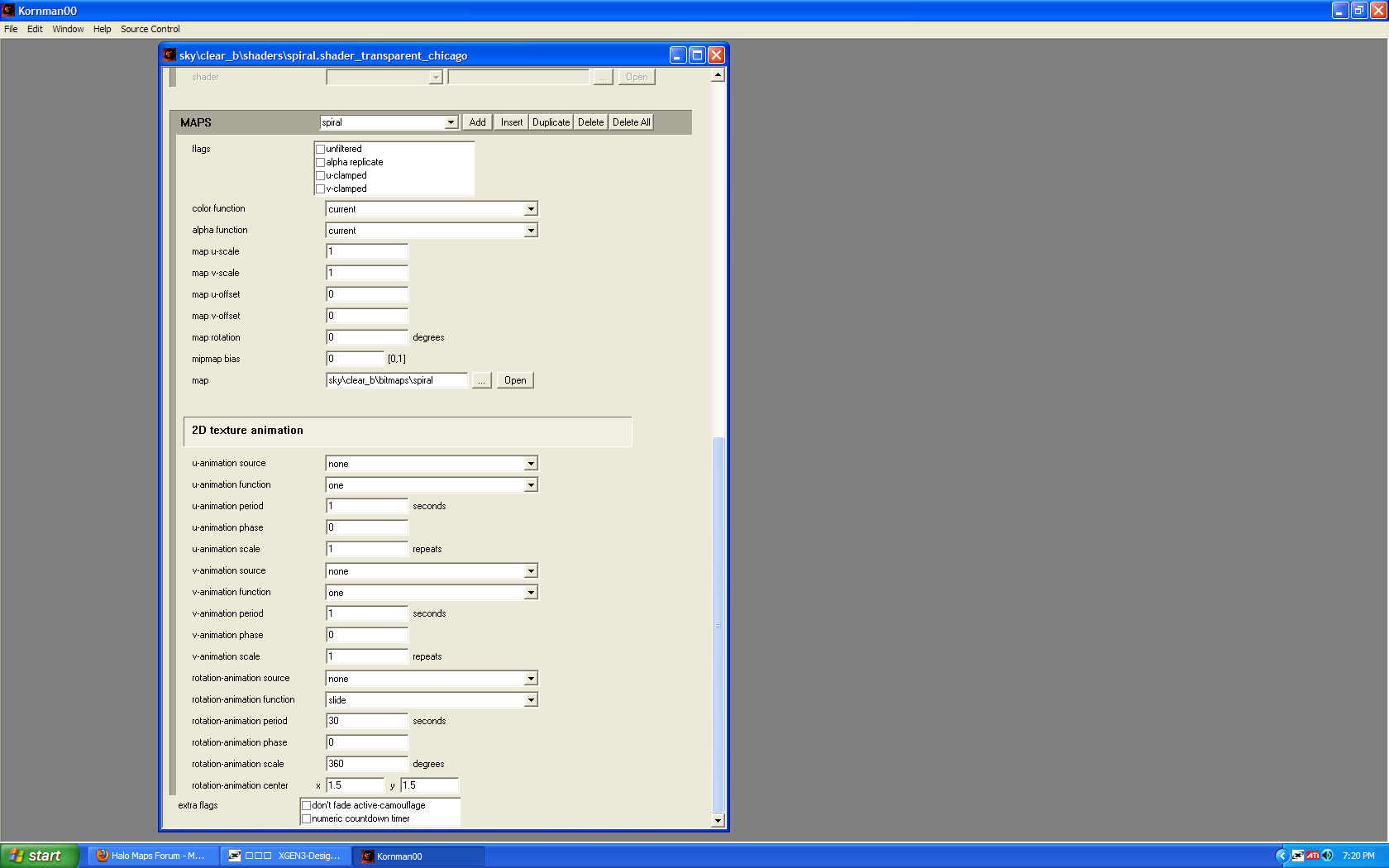 You just make those settings and use a spiral texture with an alpha. |
||||
|
|
|||||

|
