A Community discussion forum for Halo Custom Edition, Halo 2 Vista, Portal and Halo Machinima
|
 Home
Home Search
 Register
 Login
Login Member List
 Recent Posts
| »Forums Index »Halo Custom Edition (Bungie/Gearbox) »Halo CE General Discussion »Texture thread | 
|
| Page 3 of 4 | Go to page: · 1 · 2 · [3] · 4 · Prev · Next |
| Author | Topic: Texture thread (125 messages, Page 3 of 4) | ||||
| Moderators: Dennis | |||||
 Hydrogen Joined: Dec 6, 2009 
Wort Wort Wort... |
Posted: May 15, 2010 07:49 PM
Msg. 71 of 125
followed some tutorial and this is what i got
some kind of hard ground texture. regular texture  bump map if it works right :P i might need to invert it 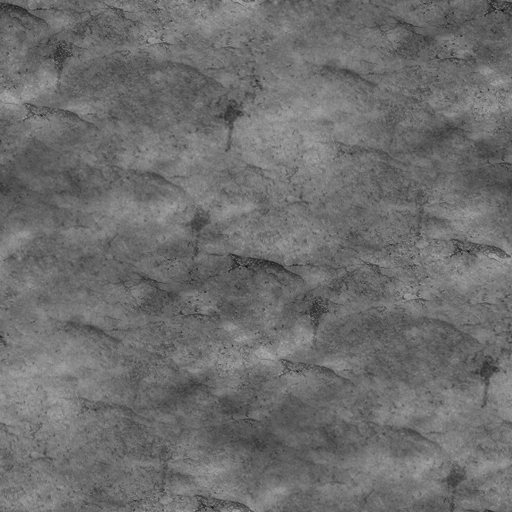 |
||||


|
|||||
|
Invader Veex Joined: Apr 11, 2007 
i make poast |
Posted: May 15, 2010 07:54 PM
Msg. 72 of 125
it's very easy to see the repetition. I can see repetition in the really dark layer, the meduim gray, and the light. Try working with it more by reducing the opacity, and making some more similar layers.
|
||||
|
|
|||||
|
032 Mendicant Bias Joined: Feb 25, 2010 
Magnum periculum est elit. |
Posted: May 15, 2010 11:58 PM
Msg. 73 of 125
Quote: --- Original message by: Alpha Series  My first blood splatter. Grunt blood. mind if I ingame this then release it while giving you credit for it? |
||||
|
|
|||||
|
Alpha Series Joined: Apr 25, 2010 
|
Posted: May 16, 2010 01:23 AM
Msg. 74 of 125
I already ingamed it but sure why not. I made some others that werent as blobby but they looked too round ingame.
I put a border on this to make it 400x400 when I converted to sprite. Oh, also I gave it alpha, and made it more bluish, using curves for more contrast so it looked better ingame. Alpha blended decals are full bright, that works well with grunt blood... Better than component max. But there is one annoying bug. It doesn't seem to spill over onto other triangles. Edited by Alpha Series on May 16, 2010 at 01:26 AM |
||||
|
|
|||||
|
Cocaine Joined: Mar 2, 2009 Can't stop napping. |
Posted: May 16, 2010 02:32 AM
Msg. 75 of 125
That thing reminded me more of a plasma bolt exploding on contact than blood.
|
||||
|
|
|||||
|
Alpha Series Joined: Apr 25, 2010
|
Posted: May 16, 2010 04:40 PM
Msg. 76 of 125
Regular blood...
This one is meant to be blended with subtraction, so it's inverted.  This one is meant to be blended with multiplication, so it has a white background.  It's meant to look sprayed on. I prefer subtract because as it overlaps it gets darker. My attempt at dirt. I still have the layers so I can change most anything that is in need of changing.  Also, to test the decals... I applied them overlapped on the left, alone on the right, to my dirt texture. I used multiply up top, and subtract below.  Edited by Alpha Series on May 16, 2010 at 04:51 PM |
||||
|
|
|||||
|
Alpha Series Joined: Apr 25, 2010
|
Posted: May 16, 2010 05:01 PM
Msg. 77 of 125
What do you think I should change?
Every different color you see should be in it's own layer, excluding shades of the same color.. |
||||
|
|
|||||
|
Alpha Series Joined: Apr 25, 2010
|
Posted: May 16, 2010 09:39 PM
Msg. 78 of 125
Texture, in the realm of game design, refers to a set of data that creates an image to be used in shaders.
|
||||
|
|
|||||
|
Alpha Series Joined: Apr 25, 2010
|
Posted: May 16, 2010 10:22 PM
Msg. 79 of 125
No... In most cases it's called texture.
Halo is an exception. .bmp is an exception. Fallout 3, it's a .DDS texture. Half-life, it's a .VTF texture. (Valve Texture File) If you want to get technical, a texture can be an Albedo or Diffuse. This includes the pixels that are modified by the shader and the other maps. It is the base of the map. Normal maps/bumpmaps are textures which modulate light. Du/Dv maps are an old method (DX8) of making refractions. Normal maps have been adapted for this. There are many other forms of textures. A lot of them are engine specific. For example, multipurpose maps are used in halo for several functions. In the source engine, they are separated into masks such as self illumination masks, specular masks, etc. Some are baked in as alpha maps for the Albedo or the Normal map... Textures are also referred to as maps, but that gets confusing because of playable maps. In my experience, very few engines refer to them as bitmaps. Although, technically they are a map of bits... Edited by Alpha Series on May 16, 2010 at 10:31 PM |
||||
|
|
|||||
|
wesman Joined: Mar 18, 2008 
no your a freezer |
Posted: May 17, 2010 08:19 PM
Msg. 80 of 125
Anyone have a good cliff texture? I'm filling my bloodgulch with hi-res textures
|
||||
|
|
|||||
|
DEEhunter Joined: Dec 16, 2006 
|
Posted: May 17, 2010 08:46 PM
Msg. 81 of 125
Quote: --- Original message by: Alpha Series No... In most cases it's called texture. Halo is an exception. .bmp is an exception. Fallout 3, it's a .DDS texture. Half-life, it's a .VTF texture. (Valve Texture File) If you want to get technical, a texture can be an Albedo or Diffuse. This includes the pixels that are modified by the shader and the other maps. It is the base of the map. Normal maps/bumpmaps are textures which modulate light. Du/Dv maps are an old method (DX8) of making refractions. Normal maps have been adapted for this. There are many other forms of textures. A lot of them are engine specific. For example, multipurpose maps are used in halo for several functions. In the source engine, they are separated into masks such as self illumination masks, specular masks, etc. Some are baked in as alpha maps for the Albedo or the Normal map... Textures are also referred to as maps, but that gets confusing because of playable maps. In my experience, very few engines refer to them as bitmaps. Although, technically they are a map of bits... Edited by Alpha Series on May 16, 2010 at 10:31 PM You, stop. http://cache-www.intel.com/cd/00/00/32/43/324337_324337.pdf http://en.wikipedia.org/wiki/S3_Texture_Compression http://en.wikipedia.org/wiki/Surface_normal http://en.wikipedia.org/wiki/Bitmap (people call them textures because we refer to texture in real life to the surface properties of a specific material.) http://en.wikipedia.org/wiki/Albedo "The albedo of an object is a measure of how strongly it reflects light" We use terms such as glossiness and specular now-a-days. Diffuse is the surface of an object when light is not a factor of its color. A lit model is done by multiplying the diffuse with its lighting. Which is why people multiply ambient occlusion maps over there color maps. etc etc hi Edited by DEEhunter on May 17, 2010 at 08:54 PM |
||||
|
|
|||||
|
Maniac1000 -Helpful Poster- Joined: Feb 24, 2007 
|
Posted: May 17, 2010 09:20 PM
Msg. 82 of 125
Take it to pm's , or drop it.
please |
||||
|
|
|||||
|
eliteslasher Joined: Jun 30, 2008 
Crysis 3!!!!!!! All I have to say. :D |
Posted: May 17, 2010 09:41 PM
Msg. 83 of 125
Quote: --- Original message by: Devon STOP, DO NOT TROLL! You referring to Maniac? |
||||
|
|
|||||
|
Advancebo Joined: Jan 14, 2008 
|
Posted: May 17, 2010 09:43 PM
Msg. 84 of 125
floyd.
|
||||
|
|
|||||
|
eliteslasher Joined: Jun 30, 2008
Crysis 3!!!!!!! All I have to say. :D |
Posted: May 17, 2010 10:12 PM
Msg. 85 of 125
Quote: --- Original message by: Devon Actually, i just wanted to say it to the people in general :P actually someone should put a thread for this because the last couple days it has seemed to escalate on all the threads. |
||||
|
|
|||||
|
Spectrum1012 Joined: Nov 5, 2006 
|
Posted: May 17, 2010 10:27 PM
Msg. 86 of 125
I keep coming to this thread hoping someone has posted another useful texture, only to leave shaking my head. I do like the textures that are here though :)
|
||||
|
|
|||||
|
Maniac1000 -Helpful Poster- Joined: Feb 24, 2007
|
Posted: May 17, 2010 10:33 PM
Msg. 87 of 125
What were you looking for?
What style? |
||||
|
|
|||||
|
abkarch Joined: Mar 20, 2010 
This account is old. Sorry for inappropriate posts |
Posted: May 18, 2010 05:12 PM
Msg. 88 of 125
i too am looking for a good bloodgulch wall texture. i got the ground taken care of though ;)
|
||||
|
|
|||||
|
wesman Joined: Mar 18, 2008
no your a freezer |
Posted: May 18, 2010 05:15 PM
Msg. 89 of 125
Pretty much any detailed/ hi-res ground textures would be appreciated. Nothing special really, just something better looking than default.
|
||||
|
|
|||||
|
lil_bankhead Joined: Dec 12, 2008 
What you look'n at huh? I'll bit ya! |
Posted: May 22, 2010 01:03 AM
Msg. 90 of 125
Quote: --- Original message by: Maniac1000  Edited by Maniac1000 on Apr 28, 2010 at 01:15 AM   Edited by lil_bankhead on May 22, 2010 at 01:03 AM |
||||
|
|
|||||
|
eliteslasher Joined: Jun 30, 2008
Crysis 3!!!!!!! All I have to say. :D |
Posted: May 27, 2010 04:48 PM
Msg. 91 of 125
Scratches should be uneven also no patterns.
|
||||
|
|
|||||
|
Corvette19 Joined: Feb 27, 2007 
|
Posted: May 27, 2010 06:55 PM
Msg. 92 of 125
 who wants to model a paper bag? |
||||
|
|
|||||
|
Corvette19 Joined: Feb 27, 2007
|
Posted: May 27, 2010 10:49 PM
Msg. 93 of 125
Get those in-game.
Do it now. |
||||
|
|
|||||
|
Advancebo Joined: Jan 14, 2008
|
Posted: May 27, 2010 11:58 PM
Msg. 94 of 125
Quote: --- Original message by: Corvette19 who wants to model a paper bag? It doesn't even tile. |
||||
|
|
|||||
|
Maniac1000 -Helpful Poster- Joined: Feb 24, 2007
|
Posted: Jun 9, 2010 03:21 PM
Msg. 95 of 125
         here is a rar of the actual .bitmap cubemaps ready to use. http://www.filefront.com/16699159/maniac_cubes.rar |
||||
|
|
|||||
|
eliteslasher Joined: Jun 30, 2008
Crysis 3!!!!!!! All I have to say. :D |
Posted: Jun 9, 2010 04:06 PM
Msg. 96 of 125
is that top one like for a scope or something if you are in a forest? Looks like trees in that one.
|
||||
|
|
|||||
|
Delicon20 Joined: Oct 3, 2008 
Still here. Still loves bacon |
Posted: Jun 9, 2010 05:05 PM
Msg. 97 of 125
what's the command for building the cubemaps in tool?I tried tool bitmap but it says TIFF file doesn't exist.
sorry I'm stupid but still |
||||
|
|
|||||
|
Alpha Series Joined: Apr 25, 2010
|
Posted: Jun 9, 2010 07:14 PM
Msg. 98 of 125
on XP.....
Go to start --> RUN type in CMD click OK In the DOS window, type: cd C:\program files\microsoft games\halo custom edition\(or where ever you installed halo CE. Make sure you use \back slashes\) then type tool bitmap cubemapdirectory\cubemapfile You save your cubemap somewhere in halo custom edition/data... IE: halo ce/data/cubemaps.... So an example would be.... tool bitmap cubemaps\default_blue At first it won't work properly. You have to load the new file in guerilla and change the type to "cube maps". Then enter the tool line again. Edited by Alpha Series on Jun 9, 2010 at 07:14 PM |
||||
|
|
|||||
|
eliteslasher Joined: Jun 30, 2008
Crysis 3!!!!!!! All I have to say. :D |
Posted: Jun 9, 2010 07:35 PM
Msg. 99 of 125
Hmm maybe this is a better place to ask this than the thread I made.
failed to add bitmap to group tag resize failed does this mean the bitmap size is too big? Or here better question yet, is there a different file type I can save to that compresses better? Edited by eliteslasher on Jun 9, 2010 at 07:43 PM |
||||
|
|
|||||
|
Maniac1000 -Helpful Poster- Joined: Feb 24, 2007
|
Posted: Jun 9, 2010 07:48 PM
Msg. 100 of 125
|
||||
|
|
|||||
|
CAG Gonzo Joined: Apr 2, 2009 
Retreat? Hell! We just got here! |
Posted: Jun 14, 2010 12:15 AM
Msg. 101 of 125
Great textures all. Quick question, as this is a texture-based thread. I have a predesigned map in gmax right now...it's almost done, but I just s--t myself when I realized that I didn't design my map around a bitmap because I was hoping I could model my map, then somehow construct a bitmap that looked nice. I have a few crash sites, so naturally I want to darken those areas up, and I have many, many cliffs, and I'd like to blend the cliff face with the grassy terrain that surrounds them, instead of assigning IDs and having it look sudden (cliff, cliff, cliff, cliff WHOA grass). Not to mention I'd like to add some splashes of browns here and there, to break things up, in addition to making dirt paths.
Is there any way I can make a bitmap that fits my map or do I have to ID all the faces with individual bitmaps (aka improvise)? |
||||
|
|
|||||
|
Advancebo Joined: Jan 14, 2008
|
Posted: Jun 14, 2010 12:22 AM
Msg. 102 of 125
ground maps.
|
||||
|
|
|||||
|
Malevolence Joined: Mar 17, 2007 
Blaaaargh! Gamertag: Sweet Tooth VII |
Posted: Jun 14, 2010 02:43 AM
Msg. 103 of 125
 Pretty crappy, but ehh. Edited by Malevolence on Jun 14, 2010 at 02:47 AM |
||||
|
|
|||||
|
eliteslasher Joined: Jun 30, 2008
Crysis 3!!!!!!! All I have to say. :D |
Posted: Jun 14, 2010 04:08 AM
Msg. 104 of 125
Is that the earth in the process of exploding?
|
||||
|
|
|||||
|
Cocaine Joined: Mar 2, 2009 Can't stop napping. |
Posted: Jun 14, 2010 04:31 AM
Msg. 105 of 125
No , it's obviously the earth growing hair.
|
||||
|
|
|||||
| Page 3 of 4 | Go to page: · 1 · 2 · [3] · 4 · Prev · Next |

|
