A Community discussion forum for Halo Custom Edition, Halo 2 Vista, Portal and Halo Machinima
|
 Home
Home Search
 Register
 Login
Login Member List
 Recent Posts
| »Forums Index »Halo Custom Edition (Bungie/Gearbox) »Halo CE Technical / Map Design »Help with My Custom Turret vehicle model | 
|
| Author | Topic: Help with My Custom Turret vehicle model (23 messages, Page 1 of 1) | ||||
| Moderators: Dennis | |||||
 flyinhawaiianryan Joined: Feb 10, 2009 |
Posted: Sep 23, 2009 12:12 AM
Msg. 1 of 23
I was doing a tutorial from "the Ghost's HaloCE Tutorial site" on 1) Modeling/Skinning a Custom Turret 2) Animating a Custom Turret and 3) Tagging a Custom Turret. I believe i did all the steps in the tutorial correct! my problem is It doesn't show up in GAME! I will show up in sapien and i can place them all over the map but it will not show IN GAME! Anyone have a way of trouble shooting this problem?
|
||||


|
|||||
|
Maniac1000 -Helpful Poster- Joined: Feb 24, 2007 
|
Posted: Sep 23, 2009 12:19 AM
Msg. 2 of 23
Did the tutorial say to SWOP the vehicles in globals/globals ?(in the vehicle section)
Or to check the boxes for gametypes and default gametypes in properties palate in sapien? You need to do both of those. |
||||
|
|
|||||
|
flyinhawaiianryan Joined: Feb 10, 2009 |
Posted: Sep 23, 2009 12:41 AM
Msg. 3 of 23
No it did not! I already knew however, to make sure the gametypes are checked in the properties pallet in sapien. I don't know how to swop the vehicles in globals/globals. Can you please explain how to this?
|
||||
|
|
|||||
|
Maniac1000 -Helpful Poster- Joined: Feb 24, 2007
|
Posted: Sep 23, 2009 01:00 AM
Msg. 4 of 23
in guerilla, open globals/globals.
Scroll to the vehicles section, from the dropdown menu (all stock vehicles), select the vehicle thet you wish not to use, then click the small ... box and select your new vehicle. You need to swop them because you cant have more than 6 vehicle types without scripting them in. |
||||
|
|
|||||
|
flyinhawaiianryan Joined: Feb 10, 2009 |
Posted: Sep 23, 2009 12:35 PM
Msg. 5 of 23
Great! That worked...but, i don't have any cross hairs and no bullets will fire out of it... :(
|
||||
|
|
|||||
|
halo3n00b Joined: Dec 8, 2008 
|
Posted: Sep 23, 2009 05:36 PM
Msg. 6 of 23
thats because you need to tag it now, use the .weapon from the warthog turret.
|
||||
|
|
|||||
|
flyinhawaiianryan Joined: Feb 10, 2009 |
Posted: Sep 23, 2009 10:33 PM
Msg. 7 of 23
I'm not really sure how to do what you are telling me. what i tried was opening up gurilla and opening my models .vehicle and swap the weapons tag with the warthog gun.weapon i also tried to open my .weapon tag for my model and it look exactly like the warthog gun.weapon tag so i just left it the same... i run the game and i can enter the turret and look around but there is no cross hairs and i can not soot any projectiles. Please explain how i can tag this? I thought i already did?
|
||||
|
|
|||||
|
sargejohnson Joined: Apr 20, 2009 
Shall we play a game? |
Posted: Sep 24, 2009 07:33 AM
Msg. 8 of 23
to make a crosshair for the turret, watch this:
http://hce.halomaps.org/index.cfm?fid=3203 as for the .projectile however, i can't help you as i have not done it before.  |
||||
|
|
|||||
|
flyinhawaiianryan Joined: Feb 10, 2009 |
Posted: Sep 24, 2009 09:18 AM
Msg. 9 of 23
I'm sure there has to be an easier way to obtain what i want.
|
||||
|
|
|||||
|
Gamma927 Joined: Jun 12, 2008 
Steam: gamma927 |
Posted: Sep 24, 2009 06:58 PM
Msg. 10 of 23
Open your .vehicle. Open whatever .weapon tag is referenced. Scroll down to HUD, and specify a weapon_hud_interface. Scroll down to projectile, and reference a .projectile.
|
||||
|
|
|||||
|
flyinhawaiianryan Joined: Feb 10, 2009 |
Posted: Sep 24, 2009 11:09 PM
Msg. 11 of 23
Could you be a little more clear Gamma? I tried what i thought you wanted me to do and still nothing! i get the same thing i can enter the turret but no cross hairs and no bullets... Can you be more specific like say "in guirilla open the .weapon file you made for your model" or something like that.
|
||||
|
|
|||||
|
sargejohnson Joined: Apr 20, 2009
Shall we play a game? |
Posted: Sep 25, 2009 10:04 AM
Msg. 12 of 23
Quote: --- Original message by: flyinhawaiianryan I'm sure there has to be an easier way to obtain what i want. watch the video carefully, and you will get the hang of it after a while. as for the projectile, open your .vehicle tag of your turret, scroll down to the weapons section and check if there is a .weapon file that is in the weapon field. If there is none, reference it to a .weapon file that you had created, or another .weapon file that suits your needs, then proceed to the next step. If there is already one .weapon file referenced in that field, open it. Then scroll down to the magazines section, ensure "rounds total initial" and "rounds total maximum" is 9999, "rounds loaded maximum" is a non-zero number, "rounds reloaded" and "chamber time" is non-zero. Next, scroll down to the triggers section, in "firing" ensure "rounds per second" and "rounds per shot" is non-zero, and magazine is not NONE. Now, go to "projectile" in same section (which is triggers), ensure projectiles per shot is equal to/more than 1, and make sure that a .projectile file is referenced in the projectile field (eg weapons\rocket launcher\rocket.projectile). Scroll all the way down to "firing effects", ensure "shot count lower bound" and "shot count upper bound" is non-zero. is this clear enough? |
||||
|
|
|||||
|
flyinhawaiianryan Joined: Feb 10, 2009 |
Posted: Sep 25, 2009 11:45 PM
Msg. 13 of 23
Yes! Thank you! Unfortunately, my turret model is completely useless because it doesn't have any cross hairs or bullet projectiles! I have followed the tutorial like a 10 times! And i am still getting the same results. I just want my turret model to work!
|
||||
|
|
|||||
|
Gamma927 Joined: Jun 12, 2008
Steam: gamma927 |
Posted: Sep 26, 2009 12:40 AM
Msg. 14 of 23
From what I hear, your model works. It's just that your .weapon tag is incorrectly referencing projectiles and a HUD.
|
||||
|
|
|||||
|
flyinhawaiianryan Joined: Feb 10, 2009 |
Posted: Sep 26, 2009 12:53 AM
Msg. 15 of 23
That is correct! But, it seems like the tags i have set up for my .weapon tag is correct... I'm just kinda stuck right now.
|
||||
|
|
|||||
|
Gamma927 Joined: Jun 12, 2008
Steam: gamma927 |
Posted: Sep 26, 2009 01:00 AM
Msg. 16 of 23
Take a screenshot of your .weapon tag for the HUD portion as well as the .projectile.
|
||||
|
|
|||||
|
flyinhawaiianryan Joined: Feb 10, 2009 |
Posted: Sep 26, 2009 01:21 AM
Msg. 17 of 23
If you need to see more just let me know. if you can't see it try right clicking the image icon an go to view image.
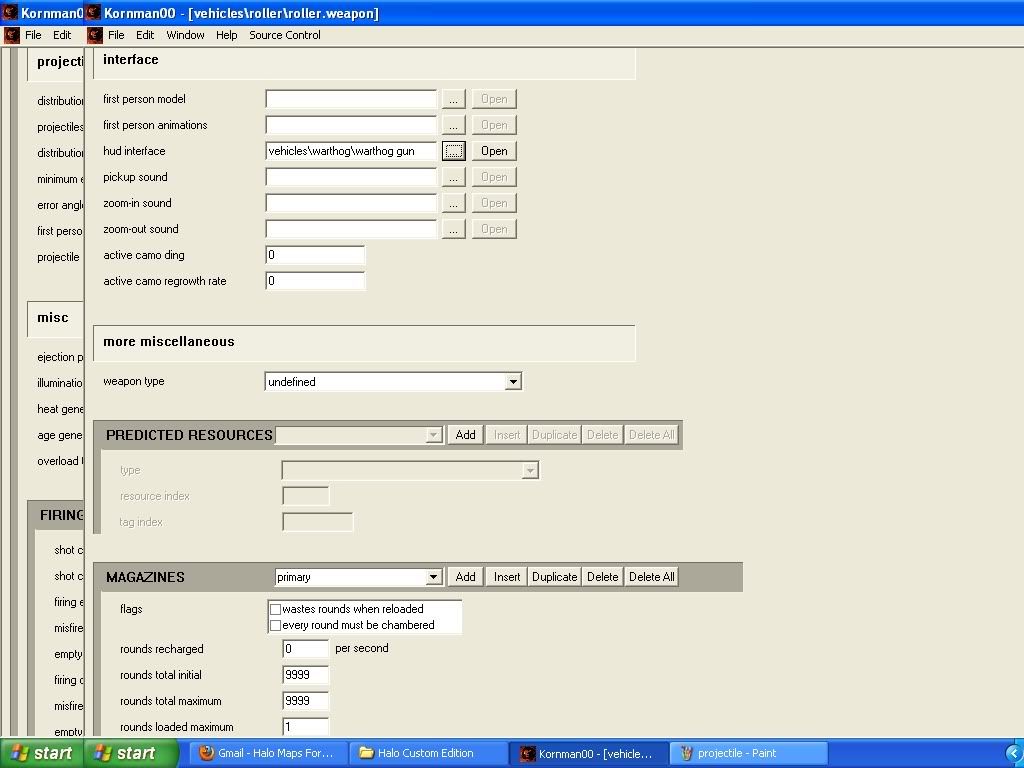 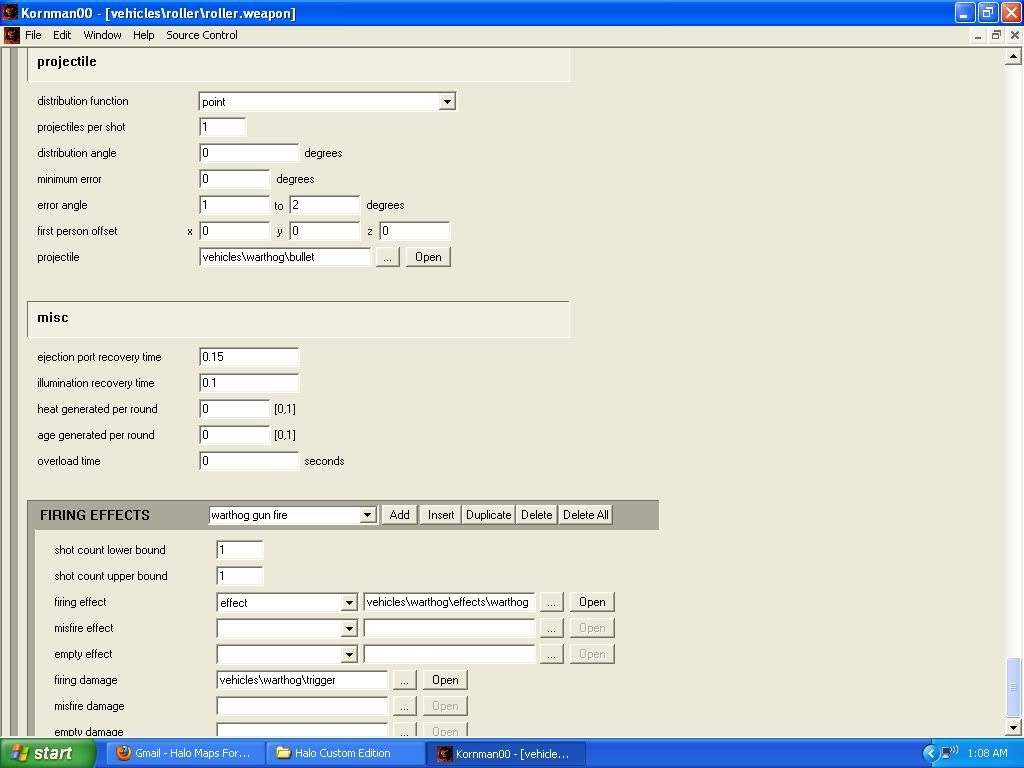 Edited by flyinhawaiianryan on Sep 26, 2009 at 01:26 AM |
||||
|
|
|||||
|
Gamma927 Joined: Jun 12, 2008
Steam: gamma927 |
Posted: Sep 26, 2009 10:31 AM
Msg. 18 of 23
Open up your .vehicle tag, and take a picture of the weapon specified.
|
||||
|
|
|||||
|
flyinhawaiianryan Joined: Feb 10, 2009 |
Posted: Sep 26, 2009 11:30 AM
Msg. 19 of 23
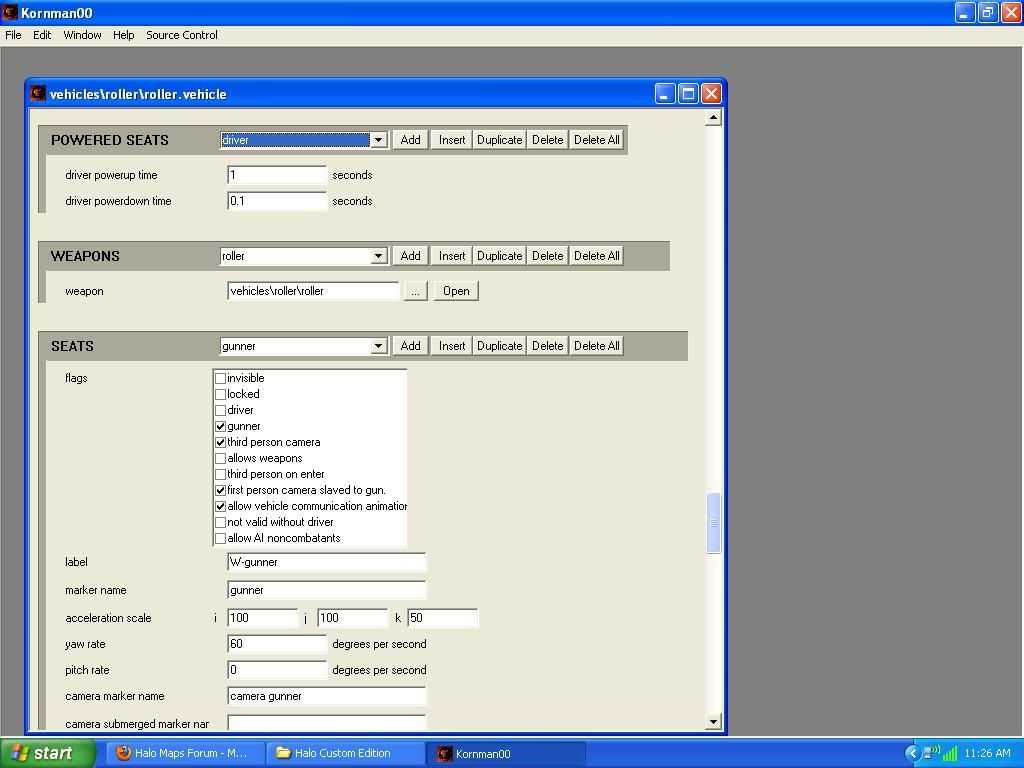 |
||||
|
|
|||||
|
flyinhawaiianryan Joined: Feb 10, 2009 |
Posted: Sep 26, 2009 12:26 PM
Msg. 20 of 23
Awesome that worked! Now the only problem is it's only shooting one bullet every 3 seconds for example it shoots a bullet wait 3 seconds and then out comes another after waiting 3 seconds. How can i change this so it is just like a regular chain gun?
|
||||
|
|
|||||
|
flyinhawaiianryan Joined: Feb 10, 2009 |
Posted: Sep 26, 2009 01:54 PM
Msg. 21 of 23
Okay, i figured out how to fix it! Awesome my turret works! how come my turret wouldn't work with out doing that label thing you were talking about? You know with my animation tag?
Edited by flyinhawaiianryan on Sep 26, 2009 at 02:15 PM |
||||
|
|
|||||
|
Gamma927 Joined: Jun 12, 2008
Steam: gamma927 |
Posted: Sep 26, 2009 03:25 PM
Msg. 22 of 23
When you bump possess certain characters, like a marine, and try to pick up weapons the animations don't support, you can't do it. For example, a grunt cannot hold a rocket launcher without modification. What he told you to do was to add the animation slot into the vehicle, so the vehicle could use the .weapon. It wasn't that the weapon wasn't working. It was that the vehicle couldn't use the weapon due to it not having animations.
|
||||
|
|
|||||
|
flyinhawaiianryan Joined: Feb 10, 2009 |
Posted: Sep 27, 2009 12:50 AM
Msg. 23 of 23
I didn't have to click add animation button cause i already did. The label box was blank and when i added cg it worked for some reason...?...
|
||||
|
|
|||||

|
