A Community discussion forum for Halo Custom Edition, Halo 2 Vista, Portal and Halo Machinima
|
 Home
Home Search
 Register
 Login
Login Member List
 Recent Posts
| »Forums Index »Halo Custom Edition (Bungie/Gearbox) »Halo CE General Discussion »halp meh | 
|
| Page 1 of 2 | Go to page: · [1] · 2 · Next |
| Author | Topic: halp meh (60 messages, Page 1 of 2) | ||||
| Moderators: Dennis | |||||
 Karrde Joined: Jul 30, 2007 
Power beyond containing |
Posted: Jun 16, 2009 12:41 PM
Msg. 1 of 60
I have no idea why it's doing this, but every time I try to run Halo CE, I get this:
 I'm not quite sure what this means, or how to fix it. Help please? And it keeps turning my background gray!! >:( |
||||


|
|||||
|
Klammy Joined: May 25, 2009 
Oh that's right, you're a console gamer... |
Posted: Jun 16, 2009 12:52 PM
Msg. 2 of 60
I'm not really sure what's wrong, but it seems to have to do with your graphics. Go to Start>Run>DXDIAG, then go to the Display tab and see if it tells you that there's a problem.
|
||||
|
|
|||||
|
Karrde Joined: Jul 30, 2007
Power beyond containing |
Posted: Jun 16, 2009 01:26 PM
Msg. 3 of 60
K. I did all the tests, and it said "No problems found." I'm going to try running Halo again.
|
||||
|
|
|||||
|
Greenfuzz Joined: Nov 18, 2008 
PM me if you have CoD MW for Wii |
Posted: Jun 16, 2009 01:54 PM
Msg. 4 of 60
After, try installing DirectX all over again
|
||||
|
|
|||||
|
Dennis  Joined: Jan 27, 2005 
"We are made of starstuff.” ― Carl Sagan |
Posted: Jun 16, 2009 04:18 PM
Msg. 5 of 60
Before you install or uninstall anything first try re-booting.
|
||||
|
|
|||||
|
Karrde Joined: Jul 30, 2007
Power beyond containing |
Posted: Jun 16, 2009 04:38 PM
Msg. 6 of 60
Quote: --- Original message by: Dennis I have done this at least 5 times, but to no avail.Before you install or uninstall anything first try re-booting. |
||||
|
|
|||||
|
Newbkilla Joined: Mar 9, 2008 
- Artist, Environment Artist, Level Designer - |
Posted: Jun 16, 2009 05:25 PM
Msg. 7 of 60
If you've been able to play halo before, and it's not working this time, then a file went corrupt. Re-installing would fix this problem.
Edited by Newbkilla on Jun 16, 2009 at 05:26 PM |
||||
|
|
|||||
|
Karrde Joined: Jul 30, 2007
Power beyond containing |
Posted: Jun 16, 2009 07:37 PM
Msg. 8 of 60
Quote: --- Original message by: Newbkilla Apparently not. I have done it twice.If you've been able to play halo before, and it's not working this time, then a file went corrupt. Re-installing would fix this problem. Edited by Newbkilla on Jun 16, 2009 at 05:26 PM |
||||
|
|
|||||
|
Cocaine Joined: Mar 2, 2009 Can't stop napping. |
Posted: Jun 17, 2009 02:03 AM
Msg. 9 of 60
What exactly does the Error Message say? I cant make it out.
|
||||
|
|
|||||
|
jacknme Joined: Aug 29, 2008 
If you see this, you must be in an old topic |
Posted: Jun 17, 2009 03:11 AM
Msg. 10 of 60
Go run dxdiag, go display, press enable button for direct3d accelartion if its not already done.
|
||||
|
|
|||||
|
sierra117 Joined: Jan 10, 2008 
If sex is good exercise, why are there fat sluts? |
Posted: Jun 17, 2009 04:02 AM
Msg. 11 of 60
ok well did you get your computer rebuilt recently? i had this problem and it was because a driver for my graphics card wasn't installed... if you have a CD that came with your motherboard or gfx card, insert it and reinstall the driver.
|
||||
|
|
|||||
|
SiMuLaCrUm Joined: Oct 25, 2006 
too digital |
Posted: Jun 17, 2009 10:09 AM
Msg. 12 of 60
Get new drivers. See if that works.
|
||||
|
|
|||||
|
stennett Joined: Dec 4, 2008 
|
Posted: Jun 17, 2009 03:10 PM
Msg. 13 of 60
Quote: --- Original message by: jacknme Go run dxdiag, go display, press enable button for direct3d accelartion if its not already done. this Cocaine, the error message says "A problem occurred initializing Direct3D. Hardware acceleration may be disabled, please run DXDIAG." |
||||
|
|
|||||
|
jacknme Joined: Aug 29, 2008
If you see this, you must be in an old topic |
Posted: Jun 18, 2009 01:54 AM
Msg. 14 of 60
Quote: --- Original message by: stennett Quote: --- Original message by: jacknme Go run dxdiag, go display, press enable button for direct3d accelartion if its not already done. this Cocaine, the error message says "A problem occurred initializing Direct3D. Hardware acceleration may be disabled, please run DXDIAG." If you can't enable it, as in the field is grayed out, then its a driver issue or a DX issue. |
||||
|
|
|||||
|
sargejohnson Joined: Apr 20, 2009 
Shall we play a game? |
Posted: Jun 18, 2009 04:07 AM
Msg. 15 of 60
Think this method should help:
Update yr computer at windows update update yr halo with halo update update yr gfx card drivers scan yr comp for viruses and spyware use ccleaner (to clean up yr comp and registry) reboot especially important is step 3 once, my halo kept on minimising when it started up, had to remaximise the window. did step 3, problem solved just an example Edited by sargejohnson on Jun 18, 2009 at 04:10 AM |
||||
|
|
|||||
|
Karrde Joined: Jul 30, 2007
Power beyond containing |
Posted: Jun 28, 2009 09:42 PM
Msg. 16 of 60
Quote: --- Original message by: jacknme Did not work.Go run dxdiag, go display, press enable button for direct3d accelartion if its not already done. Halo still will not run. |
||||
|
|
|||||
|
Greenfuzz Joined: Nov 18, 2008
PM me if you have CoD MW for Wii |
Posted: Jun 28, 2009 09:52 PM
Msg. 17 of 60
Do this
Quote: --- Original message by: sargejohnson Think this method should help: Update yr computer at windows update update yr halo with halo update update yr gfx card drivers scan yr comp for viruses and spyware use ccleaner (to clean up yr comp and registry) reboot especially important is step 3 once, my halo kept on minimising when it started up, had to remaximise the window. did step 3, problem solved just an example Edited by sargejohnson on Jun 18, 2009 at 04:10 AM |
||||
|
|
|||||
|
iTails Joined: Nov 26, 2008 
The lot of idiots on this forum are veterans |
Posted: Jun 29, 2009 02:21 AM
Msg. 18 of 60
Quote: --- Original message by: VAMPIRE Way to bump an old thread dawg.Ah for once I know something. I just had this problem. All you have to do is disable all grapfix hardwear. Re-boot then Enable it all agin. That should work. (please i know i have bad grammer) |
||||
|
|
|||||
|
CorruptedHalo Joined: May 18, 2009 
|
Posted: Jun 29, 2009 02:23 AM
Msg. 19 of 60
Quote: --- Original message by: iTails Quote: --- Original message by: VAMPIRE Way to bump an old thread dawg.Ah for once I know something. I just had this problem. All you have to do is disable all grapfix hardwear. Re-boot then Enable it all agin. That should work. (please i know i have bad grammer) ...its not bumping if it was posted on afew hours ago... Edited by CorruptedHalo on Jun 29, 2009 at 02:23 AM |
||||
|
|
|||||
|
iTails Joined: Nov 26, 2008
The lot of idiots on this forum are veterans |
Posted: Jun 29, 2009 02:24 AM
Msg. 20 of 60
O shi, same avatar as me, so I thought this was already answered, my bad.
|
||||
|
|
|||||
|
iTails Joined: Nov 26, 2008
The lot of idiots on this forum are veterans |
Posted: Jun 29, 2009 02:32 AM
Msg. 21 of 60
On topic: This looks like a driver issue. Go to Control Panel > Performance and Maintenance > System > Hardware > Device Manager
When your in Device manager, go to Display Adapters and make sure there are no Yellow Exclamation Points. If there is, Uninstall, then reinstall the drivers. If that doesn't work, then your Video Card either needs to be updated and/or replaced. |
||||
|
|
|||||
|
Karrde Joined: Jul 30, 2007
Power beyond containing |
Posted: Jun 29, 2009 06:08 PM
Msg. 22 of 60
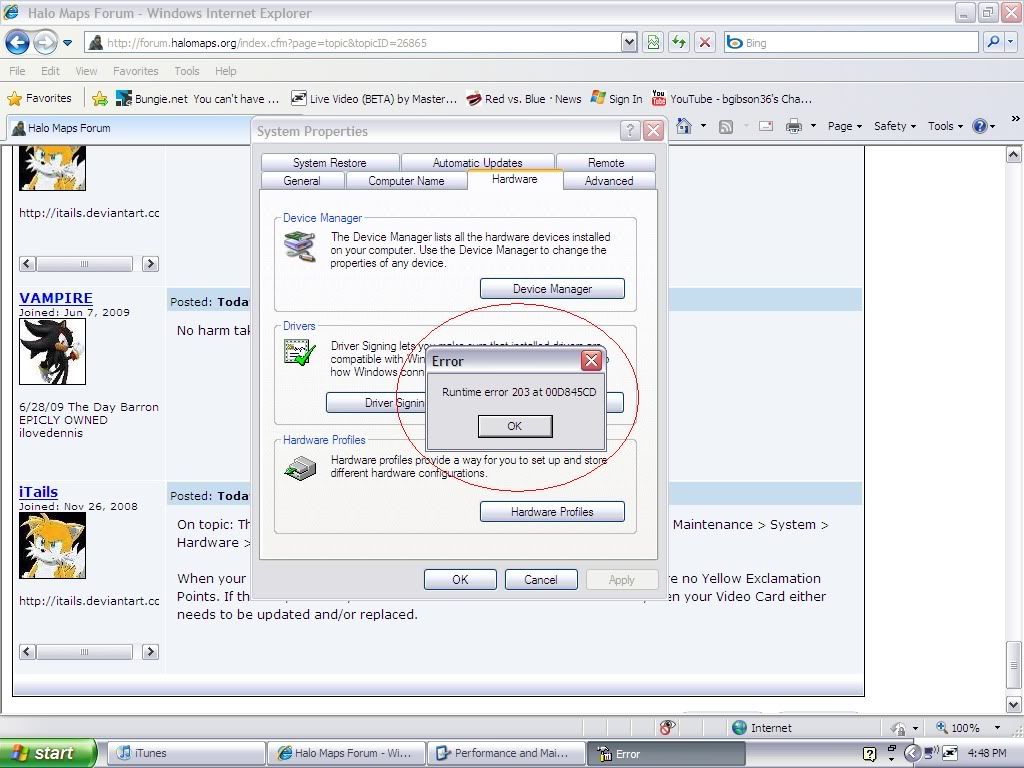
I do not understand this. I keep getting these things no matter what program I'm running. iTunes, IE, even the &$#%ing task manager. WTF are these errors.
 |
||||
|
|
|||||
|
Codebrain Joined: Sep 29, 2007 
/meme |
Posted: Jun 29, 2009 06:21 PM
Msg. 23 of 60
Quote: --- Original message by: Karrde I do not understand this. I keep getting these things no matter what program I'm running. iTunes, IE, even the &$#%ing task manager. WTF are these errors. Specifically, a run time error named 203 has occured at address 00D845CD. What you are seeing is debug information, for a programmer to find and see what is causing the problem. ^_^ |
||||
|
|
|||||
|
iTails Joined: Nov 26, 2008
The lot of idiots on this forum are veterans |
Posted: Jun 29, 2009 07:24 PM
Msg. 24 of 60
Again, its a driver error. Uninstall the Driver and Re-install. If possible if you haven't updated, Roll Back the driver.
|
||||
|
|
|||||
|
pwner5889 Joined: Jun 13, 2008 
|
Posted: Jun 29, 2009 08:16 PM
Msg. 25 of 60
Completely reinstall windows. That fixes EVERYTHING. I'm starting to hate windows. That is why I switched over to linux. Almost no errors. lol
|
||||
|
|
|||||
|
Karrde Joined: Jul 30, 2007
Power beyond containing |
Posted: Jun 30, 2009 11:24 AM
Msg. 26 of 60
When your computer is a piece of crap that wasn't even good when it was made 7 (bungie!!) years ago, errors are to be expected. But I'm getting these errors from just about every program on my computer.
|
||||
|
|
|||||
|
someone not important Joined: Sep 2, 2007 
|
Posted: Jun 30, 2009 02:20 PM
Msg. 27 of 60
http://hce.halomaps.org/index.cfm?nid=308 Nobody said anything about that page...
|
||||
|
|
|||||
|
Karrde Joined: Jul 30, 2007
Power beyond containing |
Posted: Jul 2, 2009 10:16 PM
Msg. 28 of 60
Now I'm getting these.
 |
||||
|
|
|||||
|
DarkZealot Joined: Jan 1, 2008 
Time management: 40% Xbox, 30% PC, 30% Skating |
Posted: Jul 2, 2009 10:18 PM
Msg. 29 of 60
Solution A: Drop IE and get Firefox.
Problem B: AVG is being retarded because avgnsx is related to AVG... I dropped AVG and got avast for free. :/ |
||||
|
|
|||||
|
iTails Joined: Nov 26, 2008
The lot of idiots on this forum are veterans |
Posted: Jul 3, 2009 09:39 AM
Msg. 30 of 60
Reinstall your OS, you have a Virus sir.
|
||||
|
|
|||||
|
Cocaine Joined: Mar 2, 2009 Can't stop napping. |
Posted: Jul 3, 2009 09:44 AM
Msg. 31 of 60
I just say run a virus scan.
Then get a registry key scanner to search for problems. Alt_Control_Delete and check if there are any suspicious applications running , if you're unsure of what it is , google it. Make sure you read through the information before deleting anything , i once nearly deleted a vital component to windows because i just read half the paragraph. Good thing i didnt =D |
||||
|
|
|||||
|
Karrde Joined: Jul 30, 2007
Power beyond containing |
Posted: Jul 3, 2009 09:46 AM
Msg. 32 of 60
Quote: --- Original message by: DarkZealot I do not like firefox. IE 8 is much better.Solution A: Drop IE and get Firefox. Problem B: AVG is being retarded because avgnsx is related to AVG... I dropped AVG and got avast for free. :/ Although I am less impressed with AVG. Is Avast much better? E: Look at that, a new page. Go me :D Edited by Karrde on Jul 3, 2009 at 09:47 AM |
||||
|
|
|||||
|
Karrde Joined: Jul 30, 2007
Power beyond containing |
Posted: Jul 3, 2009 09:51 AM
Msg. 33 of 60
System restore is going to be my next plan. I just need something to back up my maps and my music with, because I don't have a flash drive, and there's far too much stuff to put on discs.
|
||||
|
|
|||||
|
Gamma927 Joined: Jun 12, 2008 
Steam: gamma927 |
Posted: Jul 3, 2009 09:52 AM
Msg. 34 of 60
System Restore won't touch any unimportant files, like your maps, music, or any pr0n. It only rolls back the system files to an older version.
|
||||
|
|
|||||
|
Cocaine Joined: Mar 2, 2009 Can't stop napping. |
Posted: Jul 3, 2009 09:53 AM
Msg. 35 of 60
Yeah , im thinking most people would be worried about the pr0n.
|
||||
|
|
|||||
| Page 1 of 2 | Go to page: · [1] · 2 · Next |

|
