A Community discussion forum for Halo Custom Edition, Halo 2 Vista, Portal and Halo Machinima
|
 Home
Home Search
 Register
 Login
Login Member List
 Recent Posts
| »Forums Index »Halo Custom Edition (Bungie/Gearbox) »Halo CE General Discussion »[Tutorial] Creating a Custom Muzzle Flash Bitmap | 
|
| Author | Topic: [Tutorial] Creating a Custom Muzzle Flash Bitmap (15 messages, Page 1 of 1) | ||||
| Moderators: Dennis | |||||
 Advancebo Joined: Jan 14, 2008 
|
Posted: Jan 28, 2009 05:33 PM
Msg. 1 of 15
This tutorial is how to create a custom muzzle flash, or anything else that can be applied to this.
Step 1: Download this base picture for the tutorial, or make your own that is similar. http://i218.photobucket.com/albums/cc292/Advancebo/MF%20Tutorial/base.png And download this gradient map. http://files.filefront.com/Tutorial+Plasma+Rifle+GRDgrd/;13125150;/fileinfo.html It will be used in this tutorial Step 2: Open up the gradient in a Photoshop 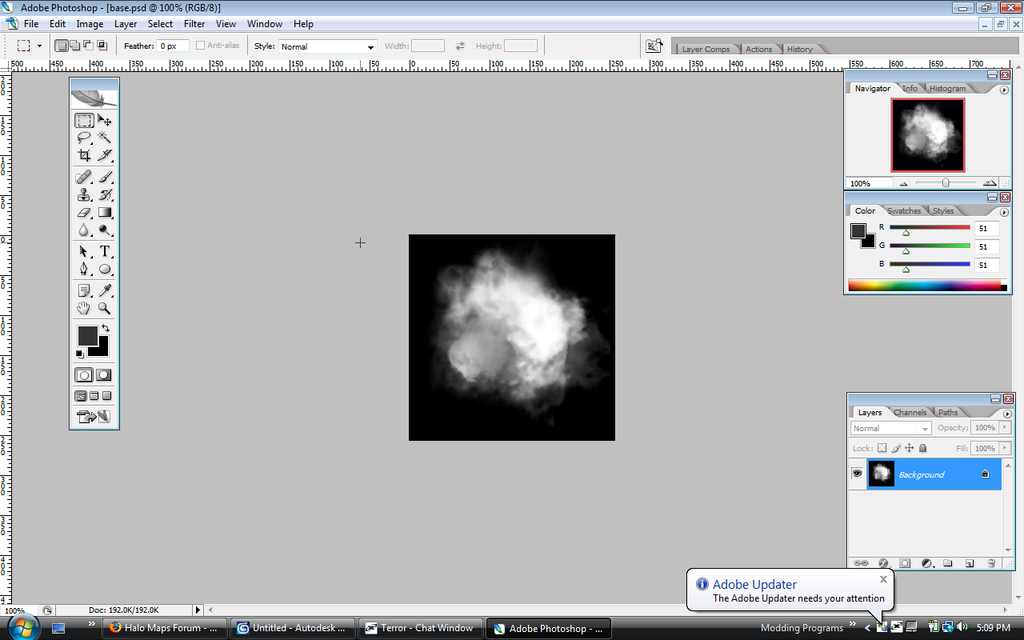 Step 3: Go to Images>Adjustments>Gradient Map... 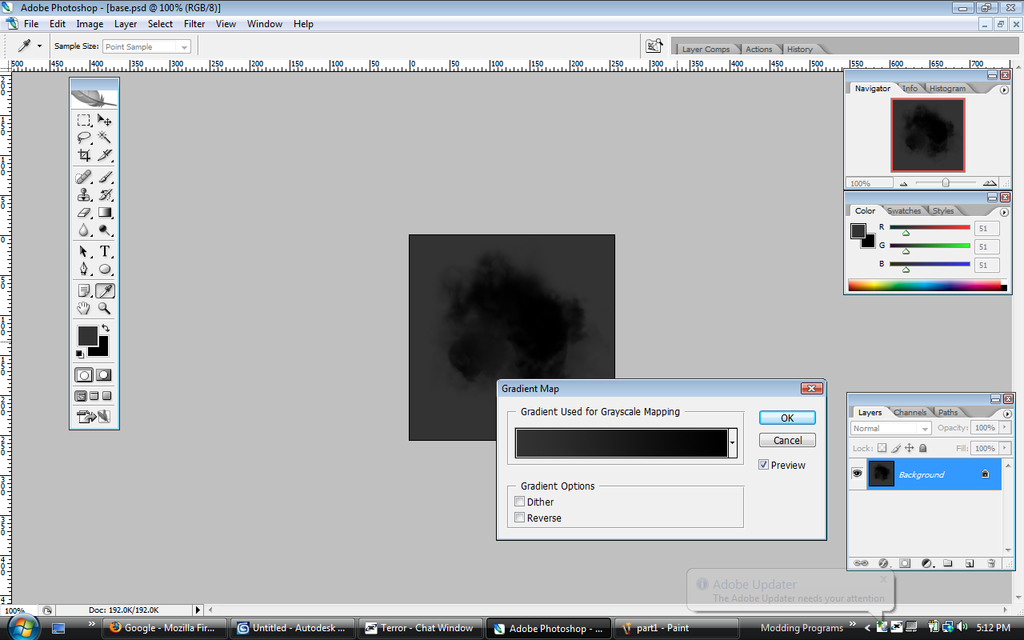 Step 4: Click on the gradient bar 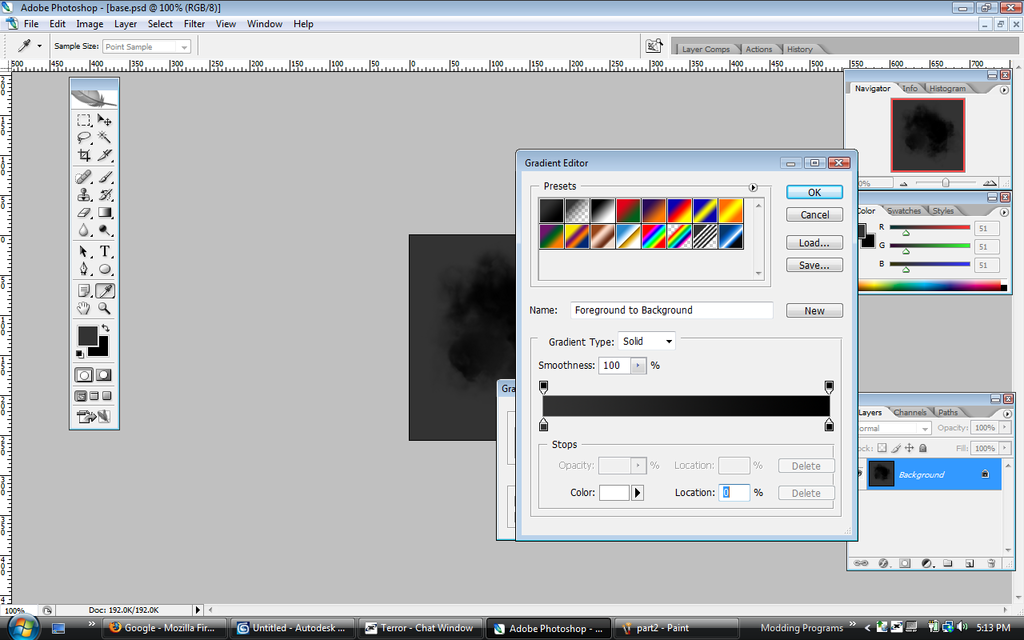 Step 5: You will see this: Click on the [Load...] button. And load in the GRD file you downloaded. 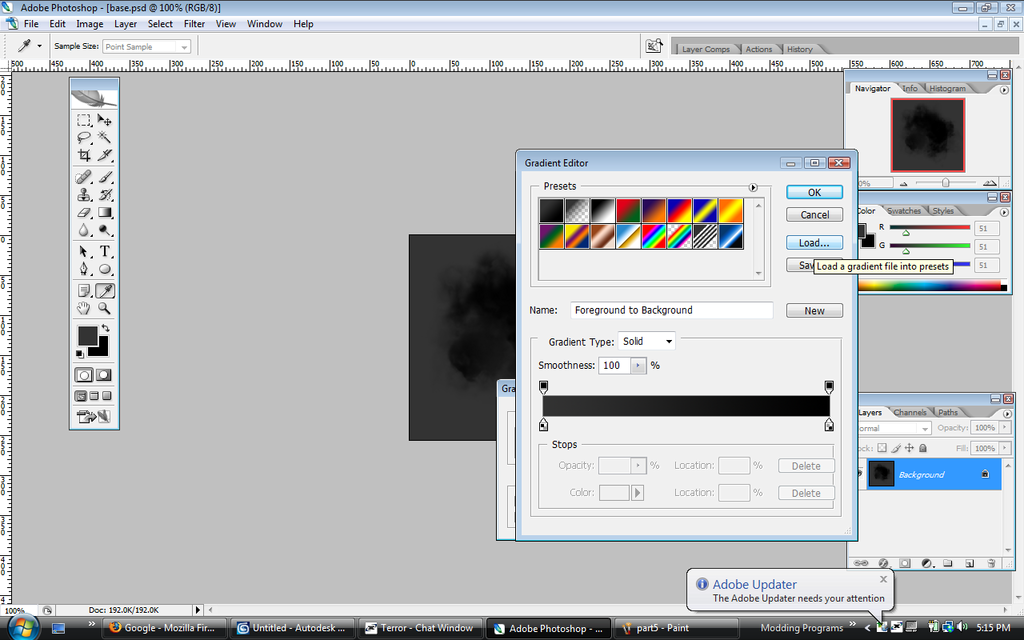 Step 6: It will come up with this: 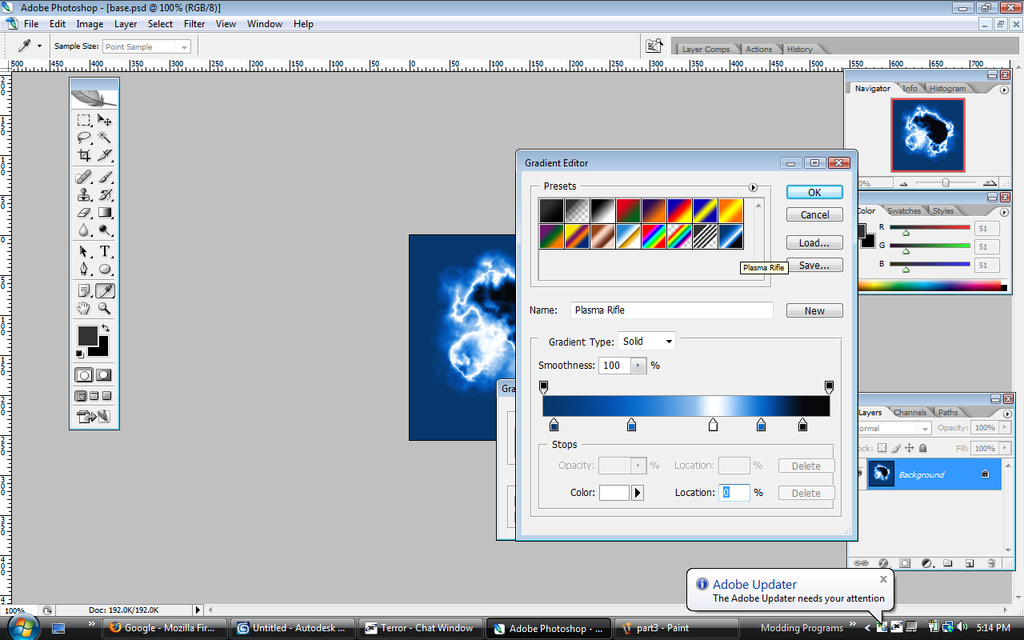 Step 7: Congratulations, you created a muzzle flash bitmap based off of the Halo 3 Plasma Rifle's Muzzle Flash. 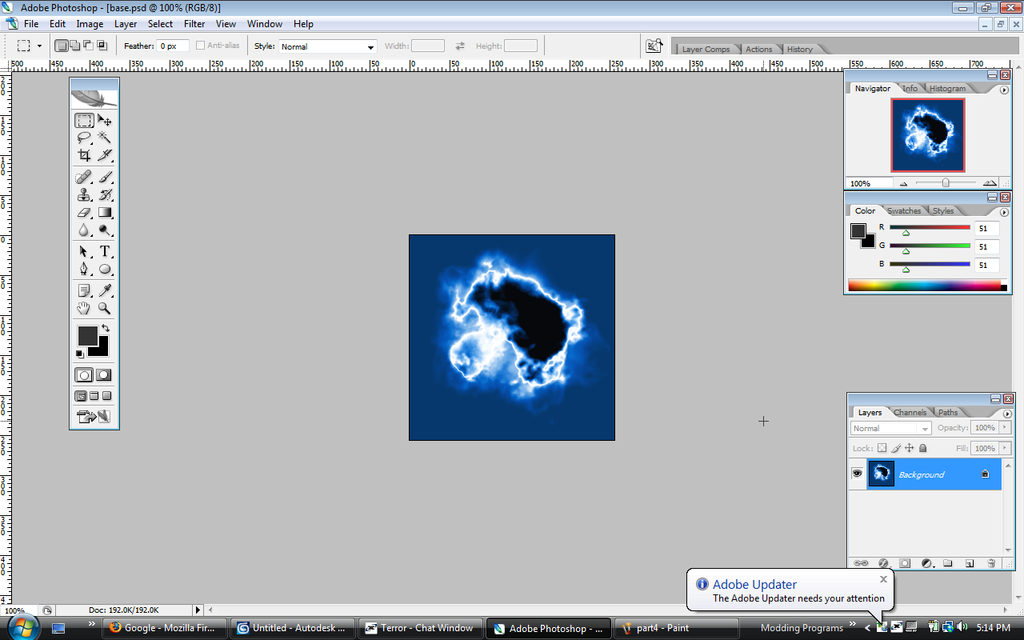 You can make other gradients, to create different styles of muzzle flashes. Also other cloudy/puffy shapes can make it look different in shape. |
||||


|
|||||
|
Dr Pepper And 7up Inc Joined: Dec 23, 2008 
deactivated |
Posted: Jan 28, 2009 05:44 PM
Msg. 2 of 15
Nice tut, I'm gonna DL Photoshop eventually ::evil face::
|
||||
|
|
|||||
|
Advancebo Joined: Jan 14, 2008
|
Posted: Jan 28, 2009 05:53 PM
Msg. 3 of 15
Quote: --- Original message by: Destroyer dose this work for photoshop elements? depends if it can use this method. look for a gradient map tool. |
||||
|
|
|||||
|
Advancebo Joined: Jan 14, 2008
|
Posted: Jan 28, 2009 06:15 PM
Msg. 4 of 15
Quote: --- Original message by: Destroyer it can get to the window where have all those gradients, but it dosen't seem to letme apply it Well, I dont use that Adobe software. So I do not really know, just try what you can. Can you go to Image>Adjustments>Gradient Map? Edited by Advancebo on Jan 28, 2009 at 06:15 PM |
||||
|
|
|||||
|
Advancebo Joined: Jan 14, 2008
|
Posted: Jan 28, 2009 09:43 PM
Msg. 5 of 15
I will try to update constantly with new halo gradients, all in the same GRD file.
http://files.filefront.com/Halogrd/;13127225;/fileinfo.html I will release a tutorial on getting it ingame, soon. |
||||
|
|
|||||
|
iTails Joined: Nov 26, 2008 
The lot of idiots on this forum are veterans |
Posted: Jan 28, 2009 09:56 PM
Msg. 6 of 15
Why do people think Adobe Photoshop costs alot? Its like $50 at Wal-Mart :|
|
||||
|
|
|||||
|
Advancebo Joined: Jan 14, 2008
|
Posted: Jan 28, 2009 09:59 PM
Msg. 7 of 15
Quote: --- Original message by: iTails Why do people think Adobe Photoshop costs alot? Its like $50 at Wal-Mart :| You are talking about Corel PaintShop :V They dont sell Photoshop in Wal Mart |
||||
|
|
|||||
|
iTails Joined: Nov 26, 2008
The lot of idiots on this forum are veterans |
Posted: Jan 28, 2009 10:16 PM
Msg. 8 of 15
Quote: --- Original message by: Advancebo lol, I will go to Wal-Mart tomorrow and take a picture of itQuote: --- Original message by: iTails Why do people think Adobe Photoshop costs alot? Its like $50 at Wal-Mart :| You are talking about Corel PaintShop :V They dont sell Photoshop in Wal Mart |
||||
|
|
|||||
|
DEEhunter Joined: Dec 16, 2006 
|
Posted: Jan 29, 2009 12:12 AM
Msg. 9 of 15
Dont really like the outcome...
Edited by DEEhunter on Jan 29, 2009 at 12:13 AM |
||||
|
|
|||||
|
HDoan Joined: Feb 19, 2007 
"'Tis only happens to them Asians" - ODX 2008 |
Posted: Jan 29, 2009 12:16 AM
Msg. 10 of 15
Click on the "reverse" tab.
|
||||
|
|
|||||
|
Advancebo Joined: Jan 14, 2008
|
Posted: Jan 29, 2009 07:40 AM
Msg. 11 of 15
Quote: --- Original message by: DEEhunter Dont really like the outcome... Edited by DEEhunter on Jan 29, 2009 at 12:13 AM Its the way Bungie does it in Halo 3 :V |
||||
|
|
|||||
|
DEEhunter Joined: Dec 16, 2006
|
Posted: Jan 29, 2009 10:07 AM
Msg. 12 of 15
Quote: --- Original message by: Advancebo Quote: --- Original message by: DEEhunter Dont really like the outcome... Edited by DEEhunter on Jan 29, 2009 at 12:13 AM Its the way Bungie does it in Halo 3 :V Actually no. They didnt. http://www.bungie.net/Inside/publications.aspx#pub15938 The particals faded along the levels of there alpha. And the particle texture "scrolls" across a muck larger one. Also the gradients are animated. |
||||
|
|
|||||
|
Advancebo Joined: Jan 14, 2008
|
Posted: Jan 29, 2009 04:25 PM
Msg. 13 of 15
Quote: --- Original message by: DEEhunter Quote: --- Original message by: Advancebo Quote: --- Original message by: DEEhunter Dont really like the outcome... Edited by DEEhunter on Jan 29, 2009 at 12:13 AM Its the way Bungie does it in Halo 3 :V Actually no. They didnt. http://www.bungie.net/Inside/publications.aspx#pub15938 The particals faded along the levels of there alpha. And the particle texture "scrolls" across a muck larger one. Also the gradients are animated. How they made muzzle flashes is the same as to what I did. Except they did theirs in Guerilla. And your talking about smoke clouds and such. Different particles are made in different ways. |
||||
|
|
|||||
|
DEEhunter Joined: Dec 16, 2006
|
Posted: Jan 30, 2009 08:28 PM
Msg. 14 of 15
Quote: --- Original message by: Advancebo Quote: --- Original message by: DEEhunter Quote: --- Original message by: Advancebo Quote: --- Original message by: DEEhunter Dont really like the outcome... Edited by DEEhunter on Jan 29, 2009 at 12:13 AM Its the way Bungie does it in Halo 3 :V Actually no. They didnt. http://www.bungie.net/Inside/publications.aspx#pub15938 The particals faded along the levels of there alpha. And the particle texture "scrolls" across a muck larger one. Also the gradients are animated. How they made muzzle flashes is the same as to what I did. Except they did theirs in Guerilla. And your talking about smoke clouds and such. Different particles are made in different ways. Actually no. All particals are made the same way. They are originaly greyscale and have gradient maps in guerrilla. This saves a great amount of memory. |
||||
|
|
|||||
|
Advancebo Joined: Jan 14, 2008
|
Posted: Jan 30, 2009 08:31 PM
Msg. 15 of 15
Well, this method is similar then :V
|
||||
|
|
|||||

|
