A Community discussion forum for Halo Custom Edition, Halo 2 Vista, Portal and Halo Machinima
|
 Home
Home Search
 Register
 Login
Login Member List
 Recent Posts
| »Forums Index »Halo Custom Edition (Bungie/Gearbox) »Halo CE Technical / Map Design »I made tool cry. Tool: "why would this happen 1?" A REAL new error. | 
|
| Author | Topic: I made tool cry. Tool: "why would this happen 1?" A REAL new error. (11 messages, Page 1 of 1) | ||||
| Moderators: Dennis | |||||
 Vick Jr Joined: Jun 26, 2008 
Well enough alone... |
Posted: Jan 10, 2009 09:22 PM
Msg. 1 of 11
So I was making a map to test hot halo fog works.
Pics coming soon. I made a box map with a tower in the middle. The tower is hollow, and in the middle has 2 entrances. The entrances have exact portals. Above and below the entrances (covering the lower and upper sections of the tunnel) are also exact portals, overlapping (in the exact same place as), a double sided "alpha grate". in the top an bottom parts of the tower are 2 fog planes, facing down and up respectively. The point of this is to have one type of fog in the top of the tower and another in the bottom, but not in the middle. There's also another large fog plane facing up around the entire map (but with a hole in the tower, so that if you look at it from directly above, 2 the large fog planes and tower fog planes never go above/ below each other) Although this didn't work, it's still not what caused the error. It exported fine. But I could only apply one kind of fog anywhere, and it showed up in the top. But the tower isn't the only feature. I tried adding another room, off of the rest of the map, connected by a hallway capped by 2 outfacing exact portals. In the room, I made a small maybe 7 sided geosphere, with the fog plane material applied. Previously to adding this, tool had no errors. After, it sai this... 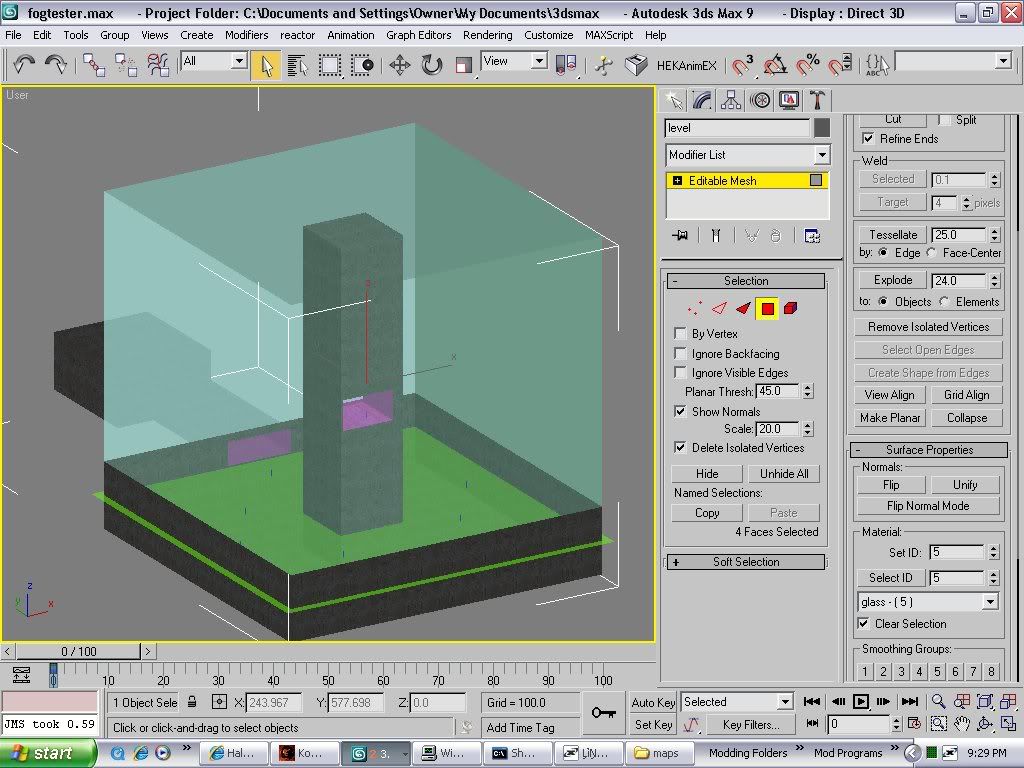 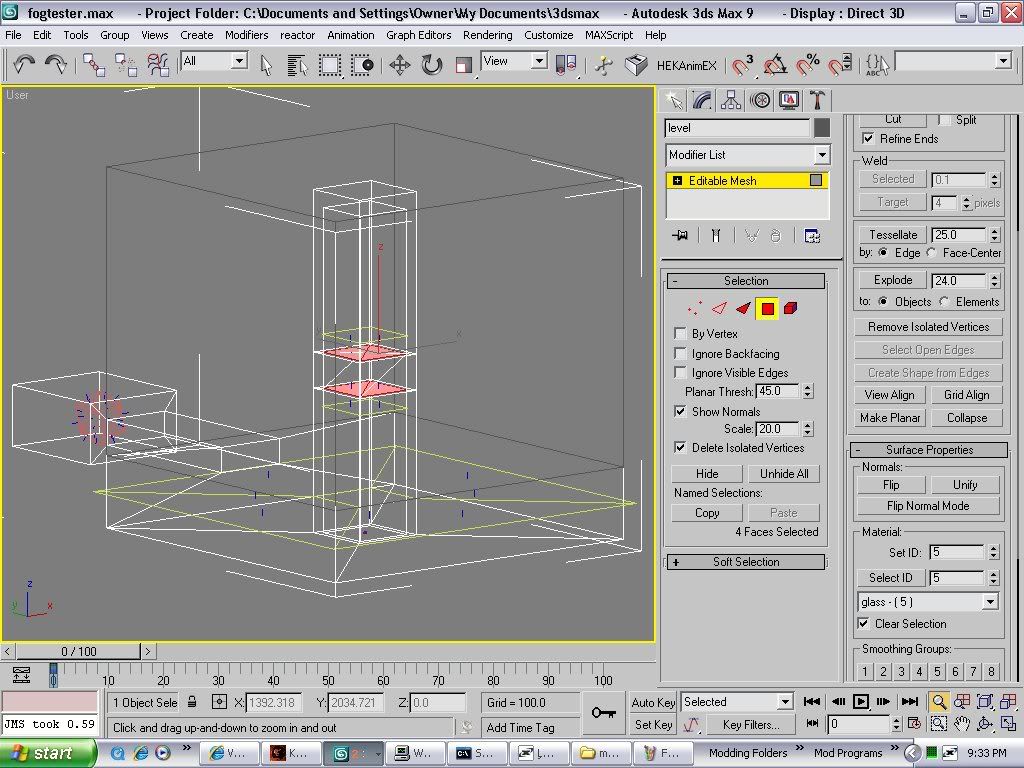 Red faces are where the 2 sided "alpha grate" is and where the exact portals are. The red-orange thing with normals facing out is my 'fog ball". Yello-green stuff is other fog planes. Red faces are where the 2 sided "alpha grate" is and where the exact portals are. The red-orange thing with normals facing out is my 'fog ball". Yello-green stuff is other fog planes.coppied right from command prompt. "C:\Program Files\Microsoft Games\Halo Custom Edition>tool structure levels/test/ fogtester fogtester1 No More Errors For Tools By: {TLS}Udie building intermediate geometry... building collision geometry... reducing collision geometry... building collision bsp... reducing collision bsp... verifying collision geometry... verifying collision bsp... building portals... building render geometry... building subclusters... building pvs... EAX: 0xFFFFFFFE EBX: 0x00200001 ECX: 0x0012F240 EDX: 0x000002CC EDI: 0x0012F240 ESI: 0x00000000 EBP: 0x0012F118 ESP: 0x0012F108 EIP: 0x7C90E4F4, C3 8D A4 24 ????? EXCEPTION halt in .\import_structures\build_structure_bsp.c,#2149: why would thi s happen 1? " hahahahah! Note to self. It may be impossible to have non-planar or closed fog planes. But then, how do you define "volumetric fog regions" that aren't just fog below a plane? I don't expect to be able to fix this one. But it is funny. And I do want to know how to have more then 2 types of fog in a single bsp. in different places. Edited by Vick Jr on Jan 10, 2009 at 09:26 PM Edited by Vick Jr on Jan 10, 2009 at 09:30 PM Edited by Vick Jr on Jan 10, 2009 at 09:36 PM |
||||


|
|||||
|
megahalofan12 Joined: May 21, 2008 
Xbox Live/Xfire is: matthewdratt |
Posted: Jan 11, 2009 12:38 AM
Msg. 2 of 11
If tool doesn't know whats wrong... Well, just good luck fixing it.
|
||||
|
|
|||||
|
randomteddybear Joined: Jul 14, 2008 
|
Posted: Jan 11, 2009 09:07 AM
Msg. 3 of 11
a funny scripting error i got one time "the script tryed to delete the player, the horse he rode in on and his six shooter"
|
||||
|
|
|||||
|
Vick Jr Joined: Jun 26, 2008
Well enough alone... |
Posted: Jan 11, 2009 10:30 AM
Msg. 4 of 11
lol. My favorite is if you type in "help"in command prompt (which gives you a description of the command you type in next), then "predict_sound_looping" (A command to load a sound_looping tag), it returns "your mom".
And sometimes it'l be like "such and such happened. Contact this guy!" Didn't halo 2 vista have a mooning guy as some error? That green thing sticking out is the large fog plane. It's ok if it sticks out and it exported fine. Only after I added the other room with the fog sphere did tool have any problems. But I later found out that fog planes apparently don't have to follow any sealed world rules. Unlike portals, it has no problem if they don't create sealed volumes. You could make a fog pane from a single triangle in the middle of nowhere and it wouldn't care. Making multiple ones is the hard part. |
||||
|
|
|||||
|
UnevenElefant5 Joined: May 3, 2008 
its been fun yall, i'll never forget this site :') |
Posted: Jan 12, 2009 12:21 AM
Msg. 5 of 11
Marty traded his kids for a tag field in particle effects LOL and if animations go wrong it tells you to get Jason to push you around in a wheelchair :P
|
||||
|
|
|||||
|
Donut Joined: Sep 30, 2006 
I swear I'm not actually dead |
Posted: Jan 13, 2009 02:27 AM
Msg. 6 of 11
Quote: --- Original message by: UnevenElefant5 Marty traded his kids for a tag field in particle effects LOL and if animations go wrong it tells you to get Jason to push you around in a wheelchair :P thats for impact sound effects, just an fyi as for your issue vick, i belive it may be because you are using a geosphere. tool does NOT like symmetrical spherical objects as collision mesh. render only is fine, but collision using spheres is bad. try it with a box, if that doesnt work, then you were probably right about the fog plane thing |
||||
|
|
|||||
|
black doom Joined: Oct 4, 2008 
we will never stop, we can win the "impossible" |
Posted: Jan 13, 2009 10:17 AM
Msg. 7 of 11
i found in one tag: "AI cant see though this *s word*"
and donut, if you are using sphere objects it says "maximum bs3d depth" or something like that. |
||||
|
|
|||||
|
UnevenElefant5 Joined: May 3, 2008
its been fun yall, i'll never forget this site :') |
Posted: Jan 13, 2009 02:53 PM
Msg. 8 of 11
Vick i use geospheres with 3 segment when I do collision models that works for me.
Edited by UnevenElefant5 on Jan 13, 2009 at 02:54 PM |
||||
|
|
|||||
|
Donut Joined: Sep 30, 2006
I swear I'm not actually dead |
Posted: Jan 13, 2009 08:10 PM
Msg. 9 of 11
Quote: --- Original message by: black doom i found in one tag: "AI cant see though this *s word*" and donut, if you are using sphere objects it says "maximum bs3d depth" or something like that. yeah thats for collision though. vick is using it as a fog volume aka no collision.... unless your a witch... also, as far as the maximum bsp3d issue with spheres goes, i only tried with the sphere, not the geophere. the geosphere might work properly for collisions Edited by Donut on Jan 13, 2009 at 08:11 PM |
||||
|
|
|||||
|
Vick Jr Joined: Jun 26, 2008
Well enough alone... |
Posted: Jan 13, 2009 09:46 PM
Msg. 10 of 11
No I tried it with a pyramid type thing and a box. Apparently, fog can only be below perfectly flat planes. But I've gotten those planes to be sideways, or horizanta, with fog above or below them. I'll keep the sphere thing in mind though.
(device_set_never_appears_locked ) changes a machine's never_appears_locked flag, but only if paul is a (~blam) (texture_cache_flush) don't make me kick your (~blam) (game_difficulty_get) halo scripting biblereturns the current difficulty setting, but lies to you and will never return easy, instead returning normal lol |
||||
|
|
|||||
|
black doom Joined: Oct 4, 2008
we will never stop, we can win the "impossible" |
Posted: Jan 14, 2009 07:40 AM
Msg. 11 of 11
Quote: --- Original message by: Donut Quote: --- Original message by: black doom i found in one tag: "AI cant see though this *s word*" and donut, if you are using sphere objects it says "maximum bs3d depth" or something like that. yeah thats for collision though. vick is using it as a fog volume aka no collision.... unless your a witch... also, as far as the maximum bsp3d issue with spheres goes, i only tried with the sphere, not the geophere. the geosphere might work properly for collisions Edited by Donut on Jan 13, 2009 at 08:11 PM actually geosphere acts the same as a sphere. but if the sphere has less then 17 segments, it works. 01.14.09 14:36:55 EAX: 0x00000000 01.14.09 14:36:55 EBX: 0x00000001 01.14.09 14:36:55 ECX: 0x000004E4 01.14.09 14:36:55 EDX: 0x00005420 01.14.09 14:36:55 EDI: 0x0012ED68 01.14.09 14:36:55 ESI: 0x00000000 01.14.09 14:36:55 EBP: 0x0012EC40 01.14.09 14:36:55 ESP: 0x0012EC30 01.14.09 14:36:55 EIP: 0x7C90EB94, C3 8D A4 24 ????? 01.14.09 14:36:55 EXCEPTION halt in \halopc\haloce\source\tag_files\tag_groups.c,#3121: brain has been eaten. (annoying braindead AI) |
||||
|
|
|||||

|
