A Community discussion forum for Halo Custom Edition, Halo 2 Vista, Portal and Halo Machinima
|
 Home
Home Search
 Register
 Login
Login Member List
 Recent Posts
| »Forums Index »Halo Custom Edition (Bungie/Gearbox) »Halo CE Technical / Map Design »DO YOU NEED TO KNOW HOW TO DO SOME THING? | 
|
| Author | Topic: DO YOU NEED TO KNOW HOW TO DO SOME THING? (10 messages, Page 1 of 1) | ||||
| Moderators: Dennis | |||||
 arkaman Joined: Nov 22, 2007 
|
Posted: Jun 2, 2008 12:32 AM
Msg. 1 of 10
DO YOU NEED TO KNOW HOW TO DO SOME THING?
then just post a request and I will create a video TUT on You Tube! You better stop by and make sure I have not made it already! http://www.youtube.com/user/vaughnscheunemann |
||||


|
|||||
|
Rhydgaled Publications Joined: May 10, 2007 
I have many questions (can't fit URL in though) |
Posted: Jun 3, 2008 04:18 AM
Msg. 2 of 10
Not sure how many of these you can help with and I'll probablly have more questions soon, but here goes.
How to set different teams to use a different permitation (of the same biped) for example one team could have HALO 1 Mrk 5 armour and the other team HALO 3 Mrk 6 armour. Simalarly with fp arms, and can you make different permitations have different animations for each weapon? How to make the visor look gold and shiny, like in this pic Quote: --- Original message by: arbiter100 Just a little render i made in my spare time   (I've got as far as using a raytrace material so you can see other objects reflected in it but the colouring is rather dull.) Also how do you do colour change in 3ds Max to make the master cheif green instead of white? (I know how to do it in-game.) Also Quote: --- Original message by: vmt 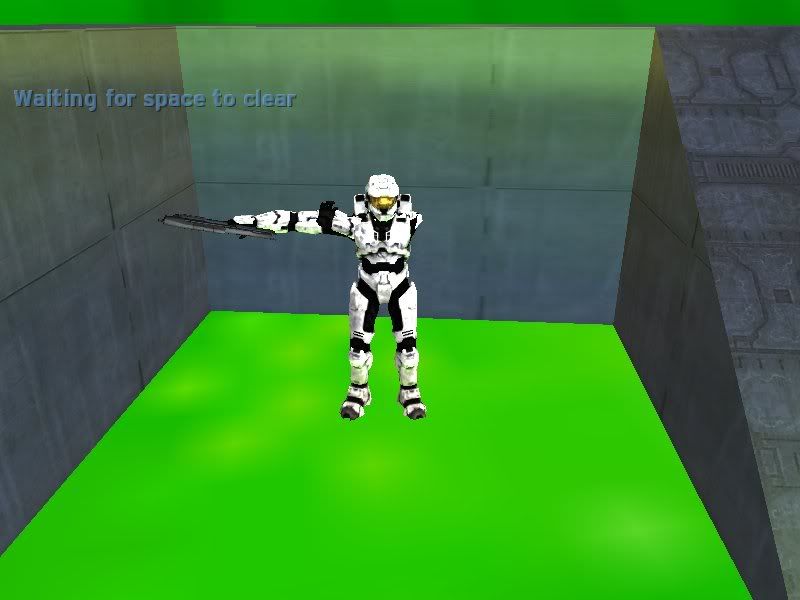 This in-game visor is also nice and shiny and again I would like to know how to do it. How to actually make my own textures, rather than just slapping on a photograph. How to make needler projectile like homing that only homes in on certain nodes or markers (or shaders, whichever is possible.) Also I would like to know how to fix the animation importer script (see my thread) http://forum.halomaps.org/index.cfm%3Fpage=topic&topicID=17324 Edited by Rhydgaled Publications on Jun 3, 2008 at 04:20 AM |
||||
|
|
|||||
|
ChocolateNugget Joined: Sep 29, 2007 
im your #1 fan !! |
Posted: Jun 3, 2008 05:48 AM
Msg. 3 of 10
Quote: --- Original message by: the_ark advance modeling From the looks of what he's showing off on his YouTube account, he won't be able to help you there. :barf: :X |
||||
|
|
|||||
|
arkaman Joined: Nov 22, 2007
|
Posted: Jun 3, 2008 11:25 AM
Msg. 4 of 10
Ok thanks for the requests. I will start work on the tuts that I have good footing in.
|
||||
|
|
|||||
|
Maniac1000 -Helpful Poster- Joined: Feb 24, 2007 
|
Posted: Jun 3, 2008 12:29 PM
Msg. 5 of 10
Rhydgaled Publications, i can answer those for u. if u use xfire then add maniac1000.
|
||||
|
|
|||||
|
arkaman Joined: Nov 22, 2007
|
Posted: Jun 3, 2008 01:40 PM
Msg. 6 of 10
I am loading up the weapon and nade tut right now!
|
||||
|
|
|||||
|
yukonmuffin Joined: May 10, 2007 
Breakn' Stuff to look tough. |
Posted: Jun 8, 2008 06:56 PM
Msg. 7 of 10
A biped tutorial that starts just after you've finished modeling and rigging. About tagging it and about the .jmo and .jmr files and what they meen. and how to fix it if it doesn't show up in sapien.
that whould be awsome |
||||
|
|
|||||
|
Solocord Joined: May 30, 2008 
im what happens when you play with fire. |
Posted: Jun 8, 2008 07:37 PM
Msg. 8 of 10
what about a tut on how to make a model into a tagset??
|
||||
|
|
|||||
|
arkaman Joined: Nov 22, 2007
|
Posted: Jun 9, 2008 10:16 AM
Msg. 9 of 10
Quote: --- Original message by: mastur cheef adding text on wall with 3ds max or gmax just make the texture have words on it. |
||||
|
|
|||||
|
Somone77 Joined: Aug 25, 2007 
|
Posted: Jun 9, 2008 04:17 PM
Msg. 10 of 10
Quote: --- Original message by: arkaman Quote: --- Original message by: mastur cheef adding text on wall with 3ds max or gmax just make the texture have words on it. or make a decal... |
||||
|
|
|||||

|
