A Community discussion forum for Halo Custom Edition, Halo 2 Vista, Portal and Halo Machinima
|
 Home
Home Search
 Register
 Login
Login Member List
 Recent Posts
| Viewing User Profile for: Eliasness | |||||||||||||||||||
| About | Contact | ||||||||||||||||||
|
Send Private Message |
||||||||||||||||||
| Post Statistics | |||||||||||||||||||
|
Eliasness has contributed to 26 posts out of 465278 total posts
(.01%) in 6,016 days (0.00 posts per day).
20 Most recent posts:
Halo CE Technical / Map Design »
Organic modelling Jun 24, 2009 07:41 PM
(Total replies: 7)
Quote: --- Original message by: Advancebo Maya is useful, dont judge it. Bungie uses it for Halo 3. I don't disagree. Just because I don't recommend it for Halo CE's Low-Poly environments doesn't mean I have judged it as a bad program. Personally, I prefer it for NURBS modeling. While I am on the topic its hierarchy system is much better and the UI is much more desirable once you get use to it. Vick Jr is right; I used L3DT not too long ago (for fun) but it didn't really fit into my work flow. Mainly because I didn't have time to deal with their texturing system. If you take the time to fit it in then I have no doubt it will fulfill your needs. Respectfully, Eliasness
Halo CE Technical / Map Design »
Organic modelling Jun 23, 2009 10:24 PM
(Total replies: 7)
Well that is a pretty odd question and it doesn't make sense in Halo's Low-Poly environment. It is the talent of the artist that makes the the geometry accurate or believable. If you are trying to model cliffs in halo just use the face by face strategy. I use 3ds max 8 and go face by face. Over-all I recommend 3ds Max 8 or later for all your modeling needs. I don't mean to beat a dead horse here but, 3ds Max > Gmax. 3ds max (stock) has more useful plug-ins for low-poly modeling then gmax and Maya. Now... if you are moving on from Halo modeling and going to high poly organic modeling or the like then zBrush reins king. Back to Halo's Low-Ploy rules to add a little randomness to your map use the "Noise" or the "Paint Deformation Tool" (only available in Editable Poly mode). Any more questions: Email:Boris308@gmail.com xfire:em1234 Hope this helps Eliasness
Halo CE Technical / Map Design »
3p Animating Jun 2, 2009 12:47 AM
(Total replies: 1)
Umm... Well that is one of the hardest things in 3d (animation and movement). If you are animating in max then the potential goes way up for the final product. All the work that goes into creating even a half-decent 30 second commercial is at its very least extensive. If you really want to do this then here is my advice... First, this is NOT a one man job you NEED a team and an absolutely fearless leader. (These teams work best in person. Next, have your first meeting, talk AND write down the project, ideas, goals, ect. Tell everyone to spend the next few days getting AS MUCH information on their job as possible (this assumes that the people are novices at their jobs). After about a week or so reconvene discuss how your ideas and goals have changed with this new found information. This will get your project off the ground (or stop it in its tracks, depend on your team). Now for learning to animate: start with internet tutorials and when you get better buy books. I recommend the 3ds max bible books published by Wiley Publishing. They are a great reference for any beginner. I know they are a bit pricey but if you stick with it it is a great investment. I hope this helps you. -EJM Any other questions? Skype me: eliasness Xfire: em1234
Halo CE Technical / Map Design »
First gmax model Jun 2, 2009 12:00 AM
(Total replies: 2)
Nice! I like the simplicity. My favorite picture is the first one. As far as my crit goes i think it could do with a thicker first floor ceiling / second floor floor. Other than that pretty good. Since this is your first real model/ project i would like to introduce you to clay renders. They take a little longer but bring out the quality of your work. --You create a skylight anywhere in the scene. change the materials on your renderable objects to the stock gray(or what ever suits your fancy). Next under you render settings(F10) go to the "Advanced Lighting" tab use "Light Tracer". Leave the settings the same. now render again and look upon your professional looking render.-- I look froward to seeing more of your work and maybe you could re-up these in clay style. -EJM Any other questions? Skype me: eliasness Xfire: em1234
Halo CE Technical / Map Design »
3ds Max help Jun 1, 2009 11:39 PM
(Total replies: 3)
Use the "Slice Plane" tool. It is under Edit geometry on the modifier panel. Click on the slice plane button then position the yellow outline just like you would a plane and click "Slice". Note: the faces you wish to add edges to MUST be selected in order to be "cut" by the tool. -EJM Any other questions: skype- eliasness xfire- em1234
Halo CE Technical / Map Design »
Scenery poly/vert buget Aug 5, 2008 10:56 PM
(Total replies: 1)
What is an acceptable face and vertex budget for scenery. I am working on some bushes and road blocks. Right now I have set the object budget to 160 triangles. 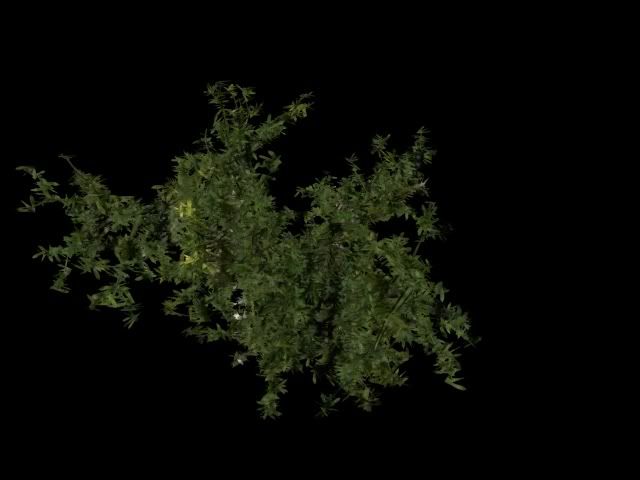 Unfortunately the bushes are around 405. 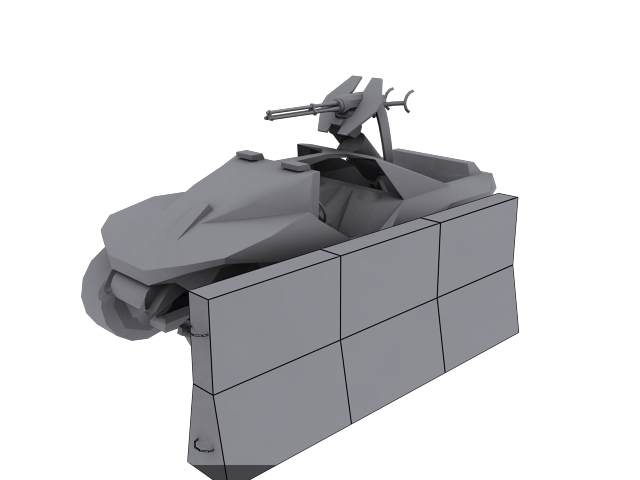
General Machinima Discussions »
Bac0n films Jul 29, 2008 07:06 PM
(Total replies: 12)
I would love to help I specialize in particle systems and scenery. IE Weather, clouds, trees. Xfire: em1234 E-Mail: Boris308@gmail.com
General Machinima Discussions »
Some Machinima Questions (capture card advice and how to do things) Jul 29, 2008 12:08 AM
(Total replies: 4)
First off, i hope your idea gets off the ground. Your head is in the right place on the video capture card ATI is good but personally i use a "Win TV" made by a company called Hauppauge. If it were me AND I had the money I would get the 600 PCIe. Check to make sure that you have a PCIe x1 (most dell computers do not but, will have a regular PCI slot). AND on to the other questions... "How to make the Spartan have multipurpose map color change in 3ds max 5?" That question requires more explaining about fade and change over time. "How to replicate the effect of detail maps on Bloodgultch and Coagulation ground shaders in 3ds max 5?" If the textures look blurred its just a matter of spending a LOT of time alighting the UVWs or scaling/ tiling them correctly. As for the bases, metal, and concrete just use the specular/ gloss to get them looking right. Try to avoid using specular maps from halo in my experience they do not work well in 3ds max (any version). "How to make the text effect like in the Red vs Blue: Reconstruction trailer (it says "we are the meta" 'on the wall' and it flies and falls apart and reconstructs itself into another word.) I have Aodbe After Effects and Premire Pro 1.5 if either of those can do that." I..... do not know. Sorry. I would love to help get your brain child walking or at least crawling (pun intended). Drop me a letter at Boris308@gmail.com
General Machinima Discussions »
Fall of Reach machinima Jun 30, 2008 12:00 AM
(Total replies: 84)
I would like to help. I do 3d models and audio/video editing. Xfire: em1234 Skype: eliasness E-mail: Boris308@gmail.com
Halo CE Technical / Map Design »
modeling help!! Apr 28, 2008 12:35 AM
(Total replies: 6)
Here take this, Your gonna need it! http://www.megaupload.com/?d=Y2Z1IIAK
Halo CE Technical / Map Design »
Clay Renders tut! Apr 28, 2008 12:32 AM
(Total replies: 3)
Here take this clay renders tut and with it do wonders. Hey look a link! http://www.megaupload.com/?d=Y2Z1IIAK Edited by Eliasness on Apr 28, 2008 at 12:33 AM
General Machinima Discussions »
movie cutter & filmer Apr 21, 2007 01:18 AM
(Total replies: 0)
you need a movie editor/ cameraman? My Xfire is: em1234
General Machinima Discussions »
I need a cast for an action adventure series..... all help is thanked Apr 19, 2007 09:17 PM
(Total replies: 53)
yo ill help! movie editor: sony vegas 7 xfire em1234 
General Machinima Discussions »
New "Full" Movie: "Untitled Movie" Aug 16, 2006 02:32 AM
(Total replies: 22)
(1: X-Fire : yes and em1234 (2: A mic : yes (3: Full version of fraps : yep (4: REALLY good gfx : SLI (5: Good internet : yep (6: Must chose a char that has a voise close to yours : Elite/Grunt1 i can do grunt voices and elits witha voice changer.i can edit and have a pro audio editer can film got fly cam Edited by Eliasness on Aug 16, 2006 at 02:33 AM Edited by Eliasness on Aug 16, 2006 at 02:42 AM
General Machinima Discussions »
War of the worlds- halo ce based mini seires Aug 6, 2006 11:59 PM
(Total replies: 62)
I wouldlike to help i can act and Edit my xfire is: em1234 |
|||||||||||||||||||